







Top 3 overview ⤵
1. NordVPN – best for most people
2. Surfshark – best cheap option
3. ExpressVPN – best for beginners
4. Proton VPN – best extra security
5. Norton VPN – best for streaming
Deep dives:
– Best for privacy
– Best for streaming
– Best for top speeds
– Best user experience
– How we test VPNs
Almost everyone can get something out of the right VPN. Whether you want to stream niche shows, protect yourself from surveillance, or just get reliable access to your bank when abroad, one of the best VPNs can help you out.
At their core, VPNs encrypt your data and change your IP address. We've got technical details on how that works below, but the outcome is very simple – VPNs hide the websites you visit from your internet provider, and make sure those websites can't see your real location.
Of course, VPNs aren't a silver bullet. If you use your real details to log into a browser like Chrome or apps like TikTok and Instagram, those platforms can still link you with your activity. However, if you stay savvy and keep online safety in mind, using a VPN is the perfect first step to improving your privacy.
We're a team of four full-time VPN users and cybersecurity journalists, and we spend every day testing, reviewing, and writing about privacy products. We have over 20 years of experience between us, and we've been hands-on with every VPN on this page. You can find links to our VPN reviews in the detailed analysis of each product.
Top 3 overview

What's new in VPN?
Fresh VPN deals
Most VPNs are at full price right now. However, if any good deals launch, we'll update this page straight away. Check out our guide to the best VPN deals for every up to date offer available right now.
Global sports and streaming
The Traitors Ireland S2 (August 30): Conniving characters from the Emerald Isle convene to create chaos and kill each other. The Traitors Ireland returns for it second season, and is available to stream for free on RTE Player (Ireland).
Rugby’s Greatest Rivalry (August 7-September 12): The second test match between New Zealand and South Africa arrives this week. Stream free on RugbyPass TV (US), or watch on Sky Sports (UK).
US Open (August 30-September 13) The US Open begins on Sunday with Carlos Alcaraz and Aryna Sabalenka looking to defend their titles at Flushing Meadows. Streaming on ESPN (US), Sky Sports (UK), 9Now/Stan Sport (AUS).
News and software updates
ExpressVPN recently announced an upgrade to its server network, boosting its range to 113 countries and 214 selectable server locations – great news if you're a real VPN globetrotter.
Elsewhere, it's all small updates. NordVPN. has improved its Linux GUI, Proton is looking to develop its own web browser, and Surfshark is finally killing its long-ignored private search feature.
Meet the creators of this guide

Mo has been covering VPNs at Tom's Guide for over six years, experimenting daily to find out what really works. He focuses on developing better testing methods for putting VPNs through their paces, and also manages The Privacy Lab on YouTube, which – predictably – covers all things digital privacy. Mo has also written for TechRadar, What Hi-Fi? and T3.

Anthony Spadafora is the Senior Security and Networking Editor at Tom’s Guide, where he covers everything from VPNs and data breaches to malware and password managers. Before joining the team, he spent three years in South Korea covering cybersecurity and B2B tech. His responsibilities include managing all of our US-based VPN testing.
Our top recommendation
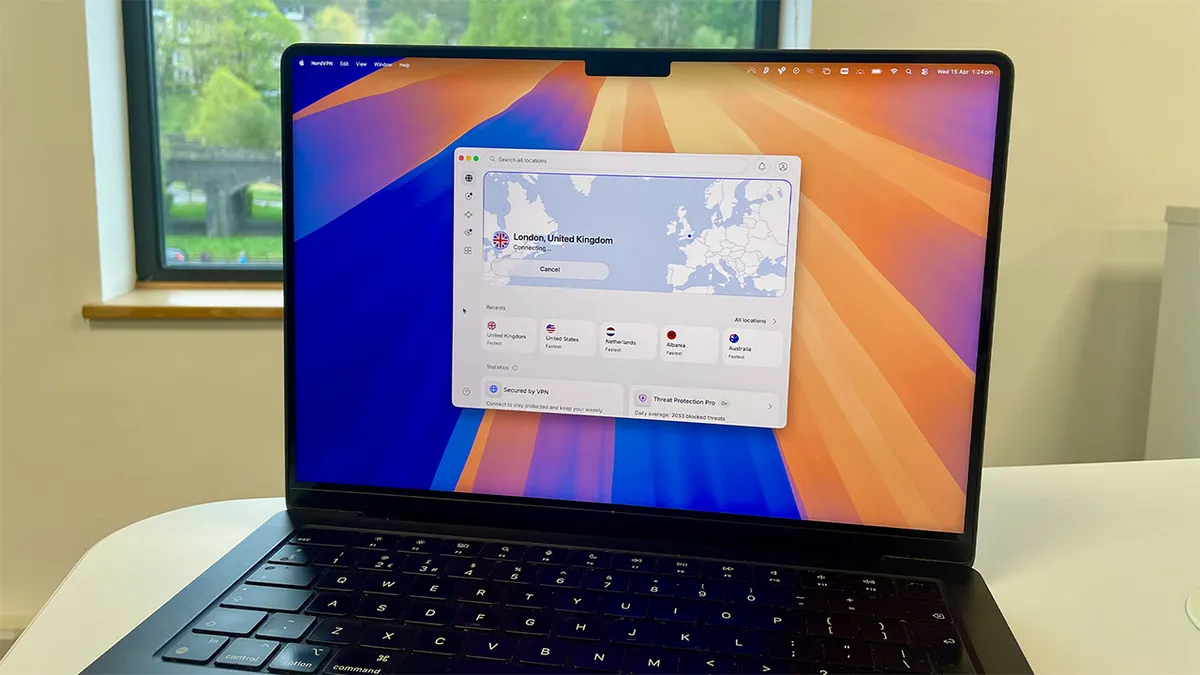
NordVPN is currently our top recommendation as the best all-round VPN service. Our tests show that it combines excellent privacy features with fast speeds in our lab and real-world tests, and has the most server locations of any VPN we'd recommend. It also has an excellent unblocking track record, plus well-thought-out apps and clever customer support.
Close rival Surfshark is cheaper and offers a similar level of performance. However, NordVPN has consistently proven to be one of the best VPNs for streaming – that’s going back at least four years – and is still competitively priced, with what is objectively a good-value, two-year introductory price.
Easy to set up and use, but not as cleanly designed as ExpressVPN
While we don't think NordVPN's app interfaces have the same sheen of visual simplicity as ExpressVPN's, it’s still very suitable for beginners: it took one of our low-tech impromptu testers less than 10 seconds to connect to a server in Australia when I asked him to try using it. Recent mobile app updates have improved this, and only the least confident users will have any problems getting up and running.
Meanwhile, there’s a generous amount of extra features, such as Double VPN (where your traffic can be routed through two encrypted servers rather than one), and custom DNS (often used for custom ad blocking) tucked away for more advanced users if you want them.
Jump to: The best VPNs for usability
Top speeds of over 1,200 Mbps – won't noticeably slow you down
In our latest round of speed testing, we upgraded to a 10 Gbps line. NordVPN performed very well, delivering a average speed of 1,256 Mbps when connected to the closest server, and 626 Mbps when connecting to a US server from the UK. When we tested it on a 10 Gbps connection in the US, we saw maximum speeds of over 1,100 Mbps – that's fast enough for 73 simultaneous 4K Netflix streams.
However, in this round of testing we did see ExpressVPN and Proton VPN make big improvements – peaking at 1,479 Mbps and 1,521 Mbps respectively – which makes NordVPN's results a little less impressive.
While VPNs invariably have some impact on your connection, we can comfortably say that NordVPN won't slow down your connection noticeably during regular use.
When we simulated network drop outs in our lab tests, NordVPN reconnected quickly and without fuss when the network came back – something a remarkable amount of lower-end VPNs really struggle with.
Finally, VPN Editor Mo Harber-Lamond uses NordVPN daily on an iPhone 14 Pro (4G and 5G), as well as at home on a 1 Gbps connection, and on slow public transport Wi-Fi. He finds it almost always connects in a couple of seconds, and manages to stay up even on patchy connections.
Jump to: The fastest VPNs we've tested
Audited, encrypted and future-proof – but not open-source
NordVPN has excellent privacy credentials and is a good choice for most security-conscious people – only Proton VPN scored higher in our testing on that front. Since a hacking incident back in 2018, NordVPN has taken several steps to bolster its security. These include continuing to implement a robust no-logs policy, and committing to regular independent audits to verify that it doesn’t collect any of your activity data. For example, a fifth audit of the no-logs policy was conducted at the end of 2024, and the infrastructure and apps were audited in late 2025. Only ExpressVPN has undergone more audits, with 23 to date.
Show more of our NordVPN deep-dive ▼


NordVPN uses its custom NordLynx protocol to power your connections. Think of it like the engine under the hood, designed to make your connection fast, secure and reliable.
We found that it works well: it connects fast and responds quickly. It's built on top of the industry-standard WireGuard protocol with some custom privacy enhancements, such as its double NAT system which addresses the well-known IP-storing concerns of the base protocol. Many other VPN providers use WireGuard, and most also implement their own privacy measures on top of it.
We tested it across a variety of network conditions in both the US and UK, including Tom's Guide’s office Ethernet, multiple home Wi-Fi networks, and 4G and 5G mobile networks, and found that NordLynx had little to no real-world impact on speed or performance. A recent update has also introduced post-quantum encryption across all apps, which future-proofs the privacy of your data.
This makes NordLynx a strong protocol choice for demanding activities like downloading large games and streaming multiple 4K movies simultaneously on the same network, as well as for everyday internet usage.
However, if you need to bypass heavy censorship or network restrictions like corporate firewalls, NordVPN also supports OpenVPN, which offers better base privacy, as a more robust fallback.
NordVPN’s new censorship-busting NordWhisper protocol is now also available – but we haven't been able to test it properly yet (we're getting set up to do so). In the meantime, if evading super-strict censorship is your priority, we'd suggest using Proton VPN instead at number four in this guide..
One limitation is that NordVPN’s apps aren’t open-source. This means we can’t fully test their security: we rely on independent audit data for this. It's not a major deal, but for many people, open-source should be the norm. If this is important to you, you should again consider Proton VPN, which is a premium VPN with open-source apps.
However, we do test Nord’s kill switch across all major platforms and devices twice a year in the lab, as well as sporadically during personal use, and we've never once been able to make it fail. We’ve also never found iPv6 or DNS leaks when we've probed for them. These security vulnerabilities are common in lower-quality VPN services and can expose your identity.
Jump to: The best VPNs for privacy
Packed with powerful extras, if you know where to look
NordVPN is one of the best-featured VPNs, overall, with a comprehensive set of tools that cater to both general and more advanced users. On the Basic tier you get the same privacy and security features as the other leading VPNs, including a kill switch, custom DNS, Double VPN, and auto-connect.
Extra features include a Dark Web Monitor – something NordVPN says is its "most useful, yet overlooked features." It scans the internet for any credential leaks associated with your email address (within our top five VPNs, ExpressVPN, Proton VPN and Surfshark also offer this feature).
The almost-axed Meshnet feature is great too. Meshnet allows up to 60 devices to be linked, and is made for file sharing and even gaming.
However, split tunneling isn't available on iOS or macOS. If you do much torrenting on these operating systems and want to only route the torrent traffic through the VPN, consider Surfshark instead.
In terms of platform compatibility, NordVPN is at the bleeding edge. As well as all the standard platforms like Windows, macOS, iOS, Android, Apple TV and Linux, NordVPN was the one of two VPNs with apps ready for Amazon's VegaOS launch – with IPVanish being the other.


NordVPN's network has very wide coverage – it recently increased its server locations to at least 224, with servers in 167 countries. This is well ahead of ExpressVPN and Surfshark, which sit at 113 and 100 countries apiece. This is good news if you live in a smaller country, or use your VPN to connect to lots of different locations.
NordVPN's closest competitor here is Proton VPN, and over the past year, the two have been in something of an arms race. Currently, NordVPN is just ahead of Proton's 148 countries. However, it's worth looking at the individual spread of each to see which offers the best locations for your personal usage.
You can upgrade your plan – at a cost, of course – to include some interesting added extras. The most useful of these is "Next-gen Antivirus" – formerly known as Threat Protection Pro. It's an anti-malware and browser protection tool, which runs even when the VPN is off. It was put head-to-head against four competitors by AV-TEST in Germany, which rated NordVPN as the best of its kind, and has recently been upgraded to include hijacked session alerts. In July 2025, NordVPN also introduced scam call protection, and in 2026 the feature was made available in Europe.
It worked really well for us too. We attempted to open 100 brand new malicious URLs from anti-phishing experts OpenPhish, and it blocked 87% (we found dedicated antivirus provider Bitdefender blocked 89% of the same threats – only two more).
However, while it worked well for the leading browsers (Chrome, Edge, Firefox), Threat Protection Pro doesn't protect every browser or app, and also isn't supported on mobile devices. So, if you’re doing anything risky online, we’d still recommend choosing a separate antivirus.
Consistently unblocked every streaming service we tested
Most top VPNs are effective at unblocking streaming sites from around the world. However, NordVPN is one of the very best – and has maintained this performance for a good number of years.
In the early days of our VPN reviews, NordVPN didn't put much effort into streaming and didn't perform well. But, since about 2021, we've found it to be incredibly effective and consistent.
In our latest round of streaming results, NordVPN was very good, and only had a couple of hiccups. The only VPN that outperformed it was Norton VPN, which unblocked everything we threw at it. You can see the results from our latest tests in the Streaming section below.
NordVPN’s extremely fast speeds mean that you don’t get any frustrating buffering – we've enjoyed The Traitors on BBC iPlayer by connecting to a UK server from the US – and the wide spread of server countries adds value too. As a result, NordVPN takes the number one spot in our best Netflix VPN and best VPN for streaming guides.
Jump to: The best VPNs for streaming
Good customer service: real humans and quick responses
To help you when you get stuck, NordVPN offers a 24/7 live chat service. We contacted NordVPN's support team via the chatbot on the site with a variety of questions, and responses were quick. We didn't have to wait long to be handed over to a human agent.
For example, I had trouble accessing the Formula 1 YouTube channel while connected – an issue I've had with all VPNs. The first time I asked this question, the live chat support agent was able to give me a specific server that worked within the space of a couple of minutes. Impressive.
We asked the same question again a month later in mid April 2025 and this time NordVPN couldn’t solve the issue. However, the agent stayed online for almost an hour, providing detailed and varied suggestions to try and solve it.
When it comes to the support articles on the NordVPN website, they're good, but not great. Most are suitable for beginners, but more complex topics are wordy and tricky to decipher. We found ExpressVPN's FAQ section much more accessible, but our recent tests have found that its live chat is now less efficient than NordVPN's.
Jump to: The best VPNs for usability
Great value for money... for the first 24 months
NordVPN offers four different pricing tiers (or three, if you’re outside the US). The entry-level Basic tier offers good value when compared with other services, with more handy extra features than most other VPNs at this mid-range price point – including a "lite" version of its Threat Protection feature.
NordVPN usually costs around $94 for 24 months of service, which is the equivalent of $3.49 per month. Like many other VPNs, though, there's often a special offer – this typically comes in at around $2.99 per month.
By comparison, Proton VPN has more advanced tools but slightly fewer extra features, and costs a little less per month on the two-year plan ($71.76 total for 24 months), while Surfshark is much cheaper at $2.49 per month, but gives you fewer additional features.
NordVPN’s Plus plan also looks good value to me. For less than a dollar more per month, you can get everything in the Basic plan, plus Threat Protection Pro (which works even when the VPN isn’t connected) and a password manager. It’s worth considering if you're looking for wider-ranging online protection and don’t want to buy separate anti-malware software or an antivirus.
I’m less sold on the value of NordVPN’s more expensive higher tiers. If you’re in the US, the Prime option ($7.49 per month / $202.23 overall) includes Coveron (formerly NordProtect), which gives you scam and ID theft insurance up to $1M, and a credit-monitoring service, and personal data removal tool Incogni.
However, ExpressVPN's two-year "Advanced" plan offers almost everything on NordVPN's Prime plan, but costs just $5.49 per month.
However, some of my only major gripes with NordVPN are to do with its pricing model. First of all, the advertised price may not be what you'll actually pay. Depending on where you live, tax is added at checkout – in the UK, for example, a hefty 20% VAT is added. US states vary, but expect a markup of at least 7%. Of the VPNs on this page, only those owned by Nord Security do this.
Another issue is the massive price hike you'll see after your initial subscription runs out – it's far bigger than any other service. If you allow your subscription to auto-renew, the two-year plan that cost $94 for will turn into a one-year rolling plan that costs $139. That works out at around $11.60 per month. My advice? Don't let that happen. Cancel, and resubscribe at a reasonable rate.
NordVPN is best if:
✅ You want a powerful VPN that just works.
NordVPN is the most well-rounded VPN we’ve tested. From enhanced privacy to gaming, streaming, shopping, and more, it’s the best option out there.
✅ You want to access streaming sites anywhere.
NordVPN has consistently been the one of the most reliable VPN for unblocking streaming services in our testing.
✅ You want lots of extra features.
Alongside the core VPN, NordVPN offers good malware protection with Threat Protection Pro, a dark web monitor, and more.
NordVPN isn't best if:
❌ You're on a tight budget.
There are a few cheaper VPNs that give NordVPN a good run for its money – Surfshark and Norton VPN are two standouts. What's more, be aware that NordVPN's prices are quoted pre-tax in its marketing material.
❌ You're a technophobe.
NordVPN isn't too difficult to use, but ExpressVPN is a better choice if you want a simpler alternative.
🔒 Read our in-depth NordVPN review for more.
The best cheap option
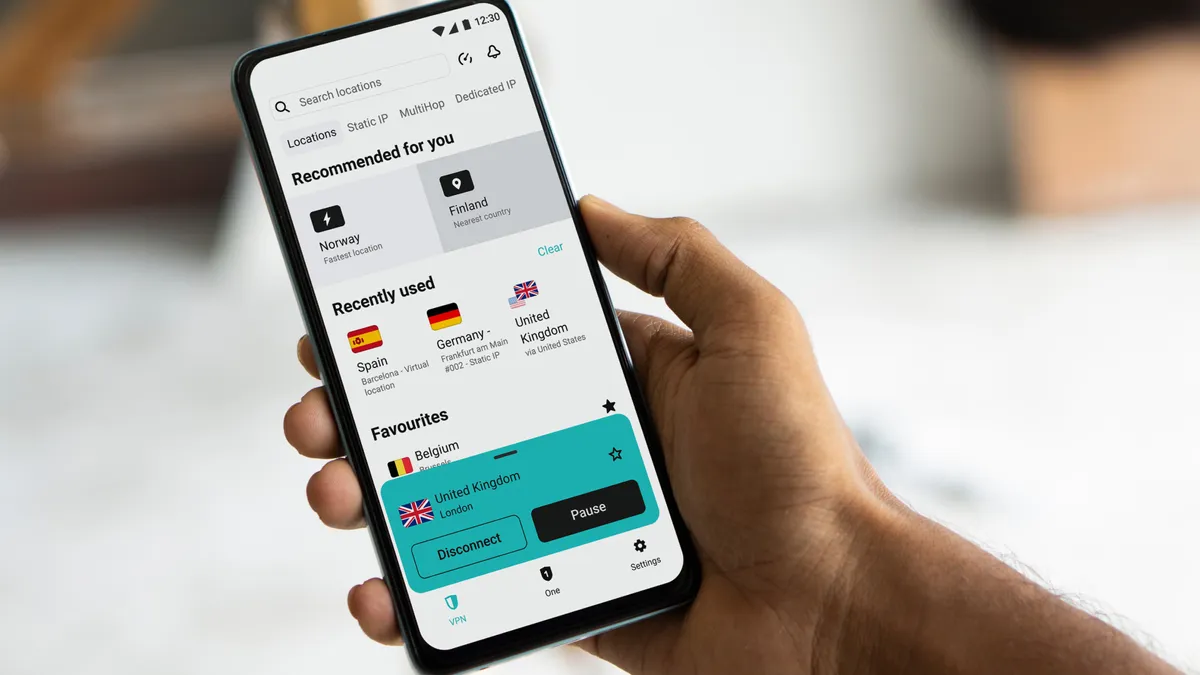
Surfshark's appeal is simple: an unbeatable introductory price, with excellent speeds and good core VPN features that stood up to our testing. While it doesn't have some of the advanced features NordVPN has – Onion over VPN, for example – it offers far more than any other VPN at this price point, and more than most VPNs, period.
The best value VPN we’ve tested by far
The bargain price is clearly the standout reason why many people choose Surfshark. Starting at $2.49 per month (you pay $67 plus tax upfront for 27 months of service), it's the value heavyweight in the VPN division. There are also higher price plans that give you some extras like antivirus (provided by Avira), Alternative Number, and a personal data removal tool with Incogni.
Alternatives in the value category include Norton VPN ($2.49 per month) and PrivadoVPN ($1.11 per month), but I'd recommend Surfshark as a much better fit than these for most people: both Norton VPN and PrivadoVPN are as basic as they come. Surfshark ties together great features with a bargain price like no other provider we've tested.
What's more, In May, 2025, Surfshark launched its 7-day free trial for all platforms. Previously this was only available on mobile devices. However, support for older iOS and macOS versions has been dropped – if you're using an old Apple device, more compatible alternatives include ExpressVPN and Proton VPN.
However, just like NordVPN, Surfshark's headline prices are quoted pre-tax (unlike other VPNs like Proton VPN and ExpressVPN), and also ramp up if you auto-renew. It jumps to $79 for one year, to be exact, which works out at about $6.60 per month. We dislike this practice, but almost every VPN does it. Don't let it happen to you. Mark it in your calendar to cancel, and resubscribe at the end of your package.
Designed with beginners in mind
Compared to the likes of NordVPN and Proton VPN, it's clear that Surfshark has prioritized ease of use over advanced features. Upon first installation for our testing processes, Surfshark asked us how familiar we are with VPNs, and then tailored our setup experience accordingly. It’s a great feature that offers beginners a soft landing into the world of VPNs, and advanced users more immediate access to the fancy features they’re expecting.
The layout is intuitive, with the fastest and nearest location placed front and center in the app. The roominess of the app is also welcome.
Additional features like Alternative ID (where you can generate temporary fake contact details – for example, to sign up for websites online without using your real email address) and antivirus are kept in different tabs, accessible on the left of the app. If you need them, they're available in a click. If you don't, you never have to look at them.
Overall, our team agrees that Surfshark balances simplicity with power, and despite not being quite as elegant as ExpressVPN, it's unlikely to disappoint you.
Surfshark is still very fast – but has dropped off slightly
Surfshark's default protocol is WireGuard – the same VPN engine that NordLynx is based on. In our last round of speed tests, Surfshark impressed, topping out at 1,021 Mbps when connecting to a US server from within the US. Surfshark's long-distance connections have improved too, posting speeds of 935 Mbps when connecting to the UK from the US.
However, if you need even faster connections, Proton VPN is a better choice, and tops our ranking of the fastest VPNs.
It's worth noting that Surfshark recently launched the Dausos protocol, which promises to improve speeds by up to 30%. In our hands-on with Dausos, performance was impressive, and we're excited to see how it performs in our next round of lab testing.
Show more of our Surfshark deep-dive ▼


With speeds of 430 Mbps, Surfshark's OpenVPN speeds are a little slower than its competitors. NordVPN recorded 857 Mbps and ExpressVPN peaked at 808 Mbps.
This is great if you live in a country with restrictive internet laws. OpenVPN is much easier to obfuscate, which means hiding the fact you're using a VPN at all. Camouflage Mode is Surfshark's version of this, and is enabled by default when using OpenVPN.
One caveat to this is that OpenVPN is not actually available by default in any of the Surfshark apps. To use it, you need to set it up manually. We followed Surfshark's onsite guide and it only took us about five minutes, but some people won't like having to do this.
Backed by Nord Security: great security and privacy
Being owned by Nord Security means that you can trust that Surfshark follows the same high standards when it comes to privacy. Everything was in order in our testing, and its privacy policies are fully audited.
In January 2026, Surfshark had its network infrastructure audited by cybersecurity firm SecuRing. The results were very positive, and this is a big improvement – previously, Surfshark hasn't been as diligent as big rivals NordVPN and ExpressVPN when it comes to third-party audits.
The software itself is secure, too. In each of our tests – kill switch, DNS leaks – we found no issues with Surfshark, and the introduction of post-quantum encryption is a big green flag. Clearly, the lower price does not mean less privacy, and we consider Surfshark very safe for general use.
All the essential features, plus some clever extras
Compared to other VPNs of a similar price, we found that Surfshark offers a superb set of extra features. It can't quite match up to NordVPN – there's nothing like Onion over VPN or Threat Protection Pro – so anyone looking for a full privacy suite might be better served by the big brother. But, if you're just looking for a cheap, simple VPN that won’t let you down, that shouldn’t concern you.
When testing the kill switch, we found it 100% effective and reliable: we tried lots of methods to trip it up but we couldn't find a way to break it. That's an improvement from a couple of years ago where we discovered a significant issue.
There's also split tunneling on all platforms, including iOS and now macOS, which NordVPN does not cater for. However, the removal of OpenVPN from the apps and manual setup requirement seems counterintuitive – especially considering how well Surfshark performs when using this protocol.


Elsewhere, there's not a lot that Surfshark has left out. I watched as the rotating IP option successfully cycled my IP address to a new one every 10 minutes. ExpressVPN is the only other VPN on this page that offers this.
The real standout feature, though, is Alternative ID. It’s totally unique, and offers a quick and easy way to create a short-term disposable identity – complete with fake but functional contact details – that can be used to sign up for accounts and services online without revealing your identity or contact information. I created a bogus email address with it, which I used to bag a discount code from an email newsletter sign-up without having to give any real information.
It's not all perfect for Surfshark though. The VPN is aimed at more casual users, which makes it easy to use, but a little simplistic for power users. For example, Proton VPN offers port forwarding – a niche tool that can help when torrenting – so if you have a very particular reason for using a VPN, there's likely a provider that's more tailor-made.
Excellent streaming performance, but a notable hiccup
Surfshark proved to be very reliable for streaming, unblocking almost every website we tried on the first attempt. No matter which server or location we tried with our custom testing tool, we were able to access streaming sites from that country.
However, it's worth noting that Surfshark did have issues when it came to Amazon Prime Video. In fact, it was only able to access the UK library of the streaming site, which is disappointing. That said, almost every VPN tested had issues with Amazon Prime Video this time round, so this isn't unique to Surfshark.
In our previous round of testing, Surfshark rose to the very top of our streaming VPN rankings. However, with a strong performance, NordVPN has overtaken it once again, but both providers are excellent at unblocking.
If you're a VPN newbie who's heading abroad, or just looking to access global streaming services, Surfshark is your very best choice.
Not quite NordVPN-level customer support, but good enough
Surfshark's customer support isn't the most effective we've experienced. We posed the same Formula 1 YouTube channel streaming problem to all our top five VPNs in mid-April 2025, and while Surfshark transferred us to a human very quickly, and the agent was friendly, a resolution couldn't be found. That was disappointing, given that ExpressVPN and Proton VPN were able to resolve the same issue.
The support articles are also quite thin, and don't provide as much detail as other VPNs do. This is one of the few areas in which Surfshark doesn't adequately help the less-experienced user, and needs some improvement.
For example, when querying: "Can't connect to Surfshark," the support article is quite short, and doesn't give much information. Compare this to NordVPN's version and ExpressVPN's version of the same page, and the difference is night and day.
That said, the live chat agents should be able to help you out in most situations if the written articles aren't good enough (our live chat test concerned a very niche issue). Plus, we do have to factor the cheaper price into our expectations here.
Surfshark is best if:
✅ You love a bargain.
At $1.99 per month, Surfshark is excellent value. Just don't forget to turn off auto-renewal to avoid that price hike.
✅ You're a beginner.
Surfshark is designed with beginners in mind, with clear, simple apps that make both basic features and more complex settings easy to understand.
✅ You're a big streamer.
Surfshark performed a clean sweep in our last round of streaming tests, and is our top choice if you just need a VPN for streaming.
Surfshark isn't best if:
❌ You have advanced needs.
A focus on being beginner-friendly means Surfshark has left out some more technical settings.
❌ You need OpenVPN to be readily available.
Although Surfshark is one of the fastest providers when using OpenVPN, it's not available in the apps by default – you'll need to set it up manually to use it.
❌ You want to rely on the built-in malware blocking tech.
Surfshark's CleanWeb tool just isn't as effective as NordVPN's Threat Protection or ExpressVPN's Threat Manager.
🔒 Read our in-depth Surfshark review for more.
The best VPN for beginners

ExpressVPN stood out in my testing as the most user-friendly VPN of the lot. It strips away all the complexities, and just gives you what you need: strong privacy, reliable speeds, and good customer support with an easy one-touch interface.
However, this simplicity inevitably does come with trade-offs. For example, NordVPN offers more customization features, so advanced users may find that ExpressVPN doesn't quite offer enough flex. 4
Prices often vary, but on the most basic plan, they generally sit between $2.49 and $3.49 per month. Find a good deal at the right time, and ExpressVPN rivals Surfshark when it comes to value – but be aware that you need to pay for any extra features beyond the VPN itself.
On that note, with the recent introduction of a huge range of extra apps, ExpressVPN is the perfect choice if you need them. If not, you're paying for tools you won't use.,
As easy as VPN gets across every device
Open ExpressVPN and you get a remarkably clean interface. With just a prominent connect button and a small, curated selection of server locations, there’s almost nothing to distract you from turning the VPN on.
Even for a VPN novice like my housemate, connecting to an Australian server was a swift, sub-10-second process – much as it was for NordVPN. If you just want a simple, one-click interface without having to worry about what’s going on behind the scenes, ExpressVPN is really nice to use.
Dig deeper into the settings, and you’ll find straightforward menus that are logically grouped and easy to get to grips with. That’s a stark contrast to the more feature-dense interfaces of more advanced options like Proton VPN, which can feel a little overwhelming.
The Tom’s Guide team runs ExpressVPN daily on our work-issued Windows laptops, and we’ve never had any issues with the apps freezing or crashing on any platform. ExpressVPN also offers the best level of cross-platform consistency of any VPN we’ve tested: we discovered the interface design is exactly the same whether you’re using a Windows PC, Android tablet, or even an Apple TV 4K. This dramatically reduces any learning curve, and is a significant benefit for beginners – there's more variability across apps from the other providers. ExpressVPN even offers an app for Meta Quest, making it one of the most widely accessible VPNs around.
ExpressVPN is always adding quality-of-life improvements to its apps, too. In September, 2025, it introduced iOS widgets and Siri shortcuts, allowing iPhone and iPad users to switch the VPN on without opening the app. As an iPhone user myself, I've found this very useful – further cementing ExpressVPN's spot at the top of my guide to the best VPNs for iPhone.
New pricing tiers makes ExpressVPN more affordable
Because it focuses on usability as a central pillar, ExpressVPN's core apps are relatively feature-light versus the competition. You get everything you need, and nothing you don't. For example, there's no port forwarding, custom DNS, or multi-hop. However, you do get standard features like split tunnelling and Network Lock (a kill switch). These features tested well for me and I wasn't able to break them.
ExpressVPN used to bundle additional security features as standard. This made it much more expensive than its rivals, but if you needed everything on offer, it was great value. Now, ExpressVPN offers a tiered subscription system.
ExpressVPN Basic subscribers only get the core VPN features, DNS-based ad-blocking, and the brand-new ExpressMailGuard. You'll get protection for 10 devices on this plan, with 12 and 14 offered on premium plans. This is an improvement on the previous limit of eight.
We got hands-on with ExpressMailGuard, and while it's definitely still evolving, it's a very useful email spoofing tool – and much more powerful than Surfshark's Alternative ID.
If you want the Keys password manager, Advanced Protection, the Identity Defender suite, and a free holiday.com eSIM, you'll need to upgrade to ExpressVPN Advanced.
This plan usually costs around $0.50 per month more than the basic subscription. This is a massive upgrade, seeing as previously you had to spend over $6 per month to get the full package.
The only reason to go with the top-tier Pro plan is if you need dedicated IP – but usually priced at $5.49 per month, it's still good value. I'd recommend most people settle for the Advanced plan. If you don't want Dedicated IP and/or don't use Identity Defender, then the Pro plan is fairly expensive and not worth subscribing to – although still better value than NordVPN Prime.
Finally, it's worth mentioning the ExpressVPN-backed EventVPN, an ad-supported free VPN which launched on September 18, 2025. From our first hands-on tests, it's very powerful and has the potential to challenge the best free VPNs, but the ads are intrusive.
Show more of our ExpressVPN deep dive ▼


Privacy pedigree and a reputation for innovation
ExpressVPN has put a lot of time, effort, and money into establishing strong credentials in the security and privacy space over the last decade, often tapping into cutting edge technologies like quantum encryption earlier than its rivals. It also has the basics locked down, like a solid kill switch on every platform including iOS, a choice of protocols, and TrustedServer.
TrustedServer refers to how ExpressVPN manages its servers to offer an extra dimension of safety for its subscribers. In short, nothing is ever stored on these servers, and to make things even more secure, they're wiped and reinstalled every time they switch on. To confirm this, ExpressVPN submitted its servers to an external independent audit, along with almost every other part of its business (there’s a handy section on the ExpressVPN website that details all the audits).
The way that ExpressVPN handles dedicated IP addresses is also very innovative. In short, ExpressVPN doesn't know which dedicated IP it allocates to any user, which eliminates one of the biggest privacy concerns with using a dedicated IP.
ExpressVPN's server count now includes one in every US state, with 62 locations now present across the country. This will mean servers are less crowded and they'll likely be one closer to where you are.
However, on that note, ExpressVPN's acquisition by Kape Technologies in 2021 was highly controversial. The software giant has historic links to dubious software like CrossRider – and malware-like toolbar extension – but our opinion is that ExpressVPN operates independently, and there is no evidence otherwise.
It's also worth noting that in the wake of age-verification laws and the scrutiny VPNs have come under, ExpressVPN has introduced DNS blocks for URLs known to share CSAM. While this is a clear positive for child safety, some have questioned whether a VPN should impose content blocks at all.
ExpressVPN's speeds are a tale of two halves
A VPN protocol determines the methodology for how your VPN encrypts and transmits your data, and it makes a big impact on connection speed. ExpressVPN primarily uses its own totally custom Lightway protocol, and we found it to be the quickest at establishing a connection of all the VPNs – although this is only a matter of seconds.
In March, 2025, ExpressVPN launched Lightway Turbo – a super-fast version of Lightway that uses multiple tunnels to improve bandwidth and speeds.
When testing Lightway Turbo, the results were impressive. Speeds averaged at 1,177 Mbps on our 10 Gbps UK-UK connection, while UK-US speeds were similarly speedy at 1,117 Mbps. This is good, but not quite up there with the very fastest VPNs like Windscribe and Mullvad, both of which topped out at over 2,000 Mbps.
There are also a few catches. Firstly, Lightway Turbo is only available on Windows – meaning Mac, Linux, and mobile VPN users can't use the protocol. What's more, Lightway Turbo doesn't support split tunneling, and some applications and websites may not be compatible.
So, original Lightway and OpenVPN are still important to consider.
Lightway averaged 1,156 Mbps on a UK-UK connection, and 970 Mbps UK-US. Interestingly, in this round of testing Lightway Turbo delivered slightly slower speeds than before, while regular Lightway doubled its results. The conclusion here is that while neither protocol is the absolute fastest, neither is slow by any means.
We'll finish with more good news, because ExpressVPN's OpenVPN speeds topped the charts at 1,038 Mbps UK-UK, and 708 Mbps UK-US.
This is likely down to ExpressVPN's implementation of OpenVPN DCO, a technique that allows OpenVPN process data in the kernel space rather than copying over to the user space. In short, it's much faster than regular old OpenVPN, and ExpressVPN posted the fastest OpenVPN speeds of any VPN this time around.
Not flawless at unblocking, but unlikely to let you down often
ExpressVPN has long been a reliable VPN for streaming, and in our latest round of testing it was able to unblock almost every streaming service and app we tested. However, unlike with the options higher in our guide, we did experience some issues along the way.
For example, we couldn't access Amazon Prime Video when connected to a US server. We changed servers three times but still encountered a VPN detection message.
When it was successful, ExpressVPN unblocked streaming platforms first time. This was the case for every Netflix library we tested, Disney+, and regional sites. There's no dedicated streaming servers, so connecting to any server in any country should serve you well.


ExpressVPN has downsized its human live chat service
The written setup and troubleshooting articles on ExpressVPN's support centre are the best we’ve seen from any provider. Having been through hundreds of them, they strike a balance between being user-friendly and offering useful technical advice. Whatever problem you have or whatever you want to know, you’ll probably find a detailed page ready to help you.
However, recently we've found that the live chat service has significantly deteriorated. ExpressVPN formerly offered an industry-leading 24/7 live chat service, with near instant replies from real people. We now get a mix of AI chatbot and longer waits if we need access to a human agent. For example, when we asked a simple question about whether custom DNS is available in any version of ExpressVPN, the AI chatbot couldn’t understand our question, and we had to wait over 10 minutes to get a response from a person.
Compared to the likes of NordVPN, where you can talk to a human within a minute, this is poor. Reports online suggest that a considerable number of support agents were sacked in the March 2025 ExpressVPN layoffs, so this is likely to be the result of this.
ExpressVPN is best if:
✅ You'll use all the bonus features.
Premium ExpressVPN plans come bundled with a password manager, an ad tracker and malware blocker, personal data leak monitoring, ID theft insurance, data broker removal, and Dedicated IP. This is a huge privacy bundle, and worth the money if you're going to use everything.
✅ You're looking for the simplest VPN.
ExpressVPN makes staying protected online incredibly easy, and its stripped-back apps are perfect if you're new to VPNs.
✅ You want cutting-edge privacy.
ExpressVPN is consistently one of the first VPNs to address the "next big thing" in privacy.
ExpressVPN isn't best if:
❌ You don't trust Kape Technologies
ExpressVPN's ownership is controversial, and privacy purists may prefer to go with an independent VPN like Proton VPN or Mullvad.
❌ You love to tinker.
Just like Surfshark, ExpressVPN doesn't afford many customization options, such as port forwarding or setting up your own custom DNS. Proton VPN is a better choice for this.
🔒 Read our in-depth ExpressVPN review for more.
Top-rated for privacy and open source
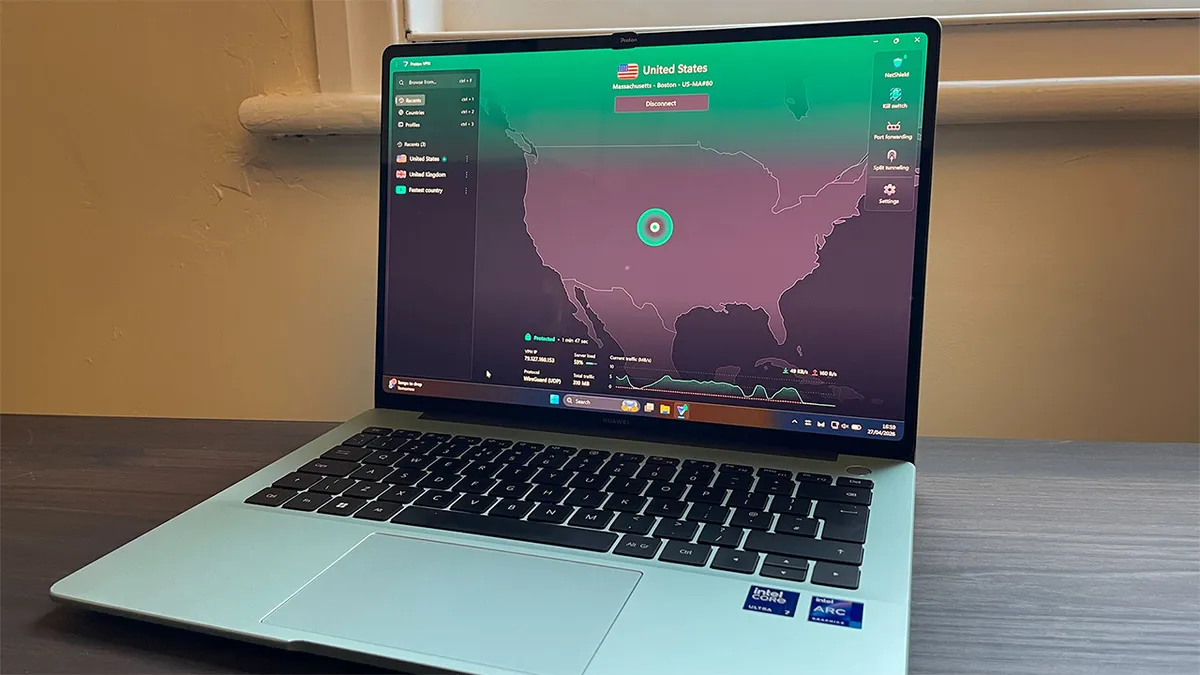
Proton VPN has two big privacy USPs. Firstly, its apps are fully open source, which means software experts and independent developers can inspect the source code and examine it for any security and privacy flaws. This transparency – along with regular independent audits (the most recent was in September 2025) – helps build confidence that the provider is doing what it claims to. It’s something we'd love to see more VPN companies embrace.
The second USP is Secure Core, which is Proton's version of multi-hop, a feature that sends your traffic through two VPN servers instead of one.
However, rather than using two regular servers, like NordVPN and Surfshark, Secure Core first sends your traffic to an ultra-secure server in either Sweden, Iceland, or Switzerland. These have extra protections in place, and will keep your data safe even if the end server is compromised.
The kill switch was rock solid for us in our tests – it didn't leak anything when we tried force-ending the connection in different ways. And since our last review, Proton has also implemented a number of anti-censorship features. These include Stealth Protocol (which hides the fact you're using a VPN), and Smart Routing, which allows Proton to offer servers in countries it otherwise could not. If you're using a VPN to keep your activity hidden from the government under strict regimes, there's no better choice.
Unlike other VPN providers, Proton VPN is very open and often collaborates with other privacy tech companies. For example, it has recently partnered with secure browser Vivaldi.
Most apps now high quality and easy to use
Proton VPN refreshed its apps on Android, iOS, and Windows in April 2025, meaning it's now much more intuitive to use. Gone is the map-based interface, making way for a simpler, less complex design that’s more welcoming to those new to VPNs. Do note, though, that the Mac app hasn't been updated yet.
Installation is very simple, the app is well-designed, and plenty of features are included without being intrusive. For example, we found the quick toggles for the kill switch, NetShield, and split tunneling very useful, because these are the features most likely to be used frequently. Less frequently used features like moderate NAT (useful for online gaming) and connection rules don't need to be permanently on show, and are easily accessible in the Settings menu instead.
Usability is an area we've previously criticized, so it's great to see Proton VPN being proactive and responding to feedback. However, simply due to its wider range of technical features, there's no escaping the fact that Proton VPN feels more complex and functional than NordVPN, ExpressVPN, and Surfshark – all of which offer a slightly more polished and user-friendly experience.
Show more of our Proton VPN deep dive ▼


Top speeds unlikely to ever slow you down
When using the WireGuard protocol to connect to a local US server on our 10 Gbps test line in the UK, we saw speeds of around 1,475 Mbps. Somehow, we saw even better top speeds when connected to UK servers from the US, with speeds peaking at 1,548 Mbps. In short, these results make it the fastest we've tested recently.
When using OpenVPN, speeds were good at 449 Mbps. That's faster than our previous round of testing but seriously lagging behind NordVPN, Surfshark, and ExpressVPN. There are clearly some faster alternatives out there if OpenVPN is a priority for you – but most people won't need to bother about this.
We can confirm from our day-to-day use of Proton VPN on various networks, including the Tom's Guide office Ethernet, 4G, 5G, and spotty public Wi-Fi, that it’s very reliable, with no unexpected drop-outs or blocks – all of which have earned it top spot in our guide to the fastest VPNs.
A few rough edges don't spoil Proton VPN's privacy power tools
Proton VPN is well featured, covering the basics with a kill switch and split tunneling, as well as more advanced features like moderate NAT. If you're a beginner, these technical features won't be a big selling point. Thanks to their inclusion, though, Proton VPN is a very strong choice for more technical users.
You'll also get NetShield, an ad and tracker blocker that offers basic protection. However, in our tests it proved much less effective than NordVPN's Threat Protection Pro. If wider-ranging ad blocking and browser protection are a priority, NordVPN is a better choice.


Profiles might seem gimmicky, but if you use your VPN for multiple reasons – perhaps streaming UK Netflix from the US, downloading torrents, and general browsing protection – they'll be very useful.
They take a little time to set up, but after configuring a particular set of rules for each purpose – watching BBC iPlayer through a Secure Core server in the UK, for example – they prove to be a genuinely time-saving addition to the apps.
A recent update has introduced split tunneling to the Linux app, which frequent torrenters will be pleased to see.
One area in which Proton falls behind is its Mac application. It hasn't yet had the visual update all other platforms have, and it misses our split tunneling – surprising for such a privacy- and feature-focused VPN. However, Proton's 2025 roadmap claims that this, as well as plenty of other features, are on the horizon – and the update to the Linux app may indicate the Mac upgrades are close.
Now a top performer when unblocking Netflix and others
In our streaming testing, Proton VPN matched NordVPN and Surfshark – meaning it unblocked everything we tried to access, every time. That includes UK, US, Canadian, Japanese and Australian Netflix libraries, Disney Plus, Amazon Prime Video, BBC iPlayer, 10 Play, and many more.
We'd still recommend NordVPN as the streaming VPN of choice, thanks to its consistency in recent years. However, Proton VPN is becoming a very reliable alternative.
Great customer support but no 24/7 support
Proton VPN's customer support isn't quite as comprehensive as the other VPNs on this page. The main reason for this is the fact that live chat isn't available 24/7. Agents are online between 9am and 12am CET (between 3am and 6pm EST). This could prove awkward if you're in the US, but Proton has told us that there are plans to expand this.
However, when we've contacted the agents, responses have been prompt, and they've typically seemed knowledgeable and friendly.
The written setup and troubleshooting guides are very comprehensive, but they do lean towards the more technical side. If you're a beginner, some may need some deciphering.
Pricey. But if you know, you know
If you head through from Google, Proton VPN's two-year plans coming in at the equivalent of $4.49 per month (upfront fee of $107, which lasts for 24 months). That makes it the most expensive VPN on this page, now that ExpressVPN has introduced its tiered subscriptions.
However, if you choose to head through from one of the links on this page, Proton VPN is currently available for $2.99 per month. This is exclusive to Tom's Guide and our friends at TechRadar Pro.
Just like every other VPN here, once this introductory deal ends you'll see your plan shoot up to $6.67 per month ($79.95 for 12 months). Don't let that happen. Cancel, and resubscribe to get a better price.
Proton does also offer a free VPN option that currently ranks at #2 in our review of the best free VPNs. The best feature of the free version is that it offers an unlimited data allowance, so you know you won't run out at any point in the month. But there are big drawbacks compared to the paid version including slower speeds, just five server locations in Netherlands, Japan, Poland, Romania and the US, and no support for unblocking streaming services or downloading via BitTorrent.
Proton VPN is best if:
✅ You live in a country with strict censorship.
Proton VPN has made a name for itself as an advocate for a free internet for all, and is very effective at evading censorship measures.
✅ You use other Proton products.
Unsurprisingly, Proton VPN integrates very well with all the other Proton apps.
✅ You value privacy over everything.
Proton VPN's unique privacy features like Secure Core are great if you're looking to stay as private as possible.
Proton VPN isn't best if:
❌ You don't need that extra veneer of privacy and security.
For most people it's probably not necessary to spend this much on a VPN service.
❌ You're looking for simplicity.
Proton VPN isn't as complicated as some alternatives, but its more expert features may seem complex to those new to VPNs.
🔒 Read our in-depth Proton VPN review for more.
Our top pick for streaming

Just a couple of years ago, Norton VPN was a largely forgotten add-on to Norton's antivirus suite. But since then, the 40-year-old security brand has pumped a lot of investment into Norton VPN, and it has more than earned itself a spot in the top five best VPNs overall.
It carries a lot of the classic Norton hallmarks – both good and bad – but what really stands out is how effective it is for unblocking streaming sites from around the world. So much so, it recently took top spot in our guide to the best VPNs for streaming.
The best streaming VPN we've tested
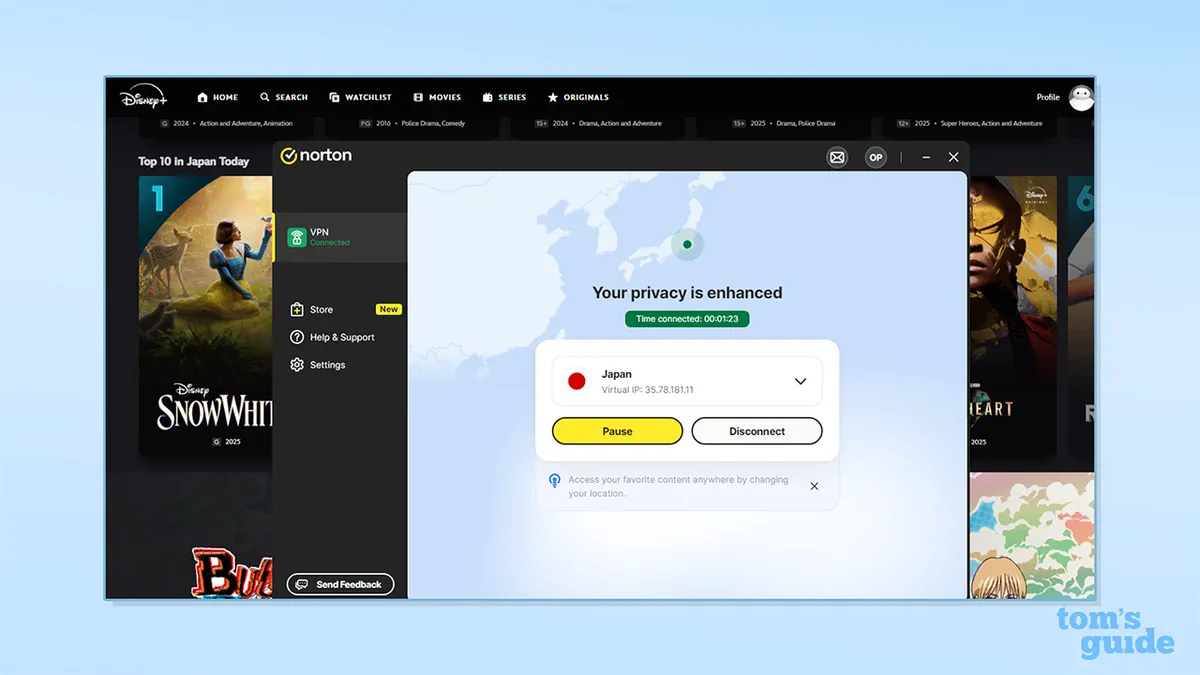
Streaming performance and the accompanying connection speeds are the main reasons why you'd choose Norton over the other VPNs on this page. In our latest round of testing, it was the only VPN to unblock every single streaming site we tried it with. That's better than NordVPN, Surfshark, ExpressVPN, and Proton VPN – four of the most popular and historically reliable VPNs available today.
Netflix and some regional streaming sites like BBC iPlayer aren't too difficult to crack, but in our experience, Amazon Prime Video and US YouTube (when not logged in) can pose a real issue to even established VPNs. Norton tapped into both with ease.
In terms of speeds, Norton VPN averaged 1,010 Mbps when connected to a 10 Gbps network. That's not the fastest we've seen – Mullvad, PrivadoVPN and Windscribe all maxed out at over 2,000 Mbps. However, it's still fast, and comparable with NordVPN and Surfshark. Plus, with 4K video only needing around 50 Mbps to stream seamlessly, Norton VPN won't be holding you back.
Excellent privacy and security credentials
As you'd expect from one of the few household names in cybersecurity, Norton VPN's privacy credentials are solid. Most importantly, there's an iron-clad no-logs policy present, which has been independently audited to prove its veracity. We also found the kill switch very reliable. It ensures your identity will not be leaked, even if the VPN disconnects.
When we inspected the apps, we found Norton VPN was indeed using the industry-standard encryption it promises. It has also introduced post-quantum encryption (PQE) in all its apps. However, we found a small caveat with Norton's PQE – it's only available with its proprietary Mimic protocol, not the standard OpenVPN or WireGuard. This puts it slightly behind ExpressVPN here, but Mimic is speedy, and there's little reason not to use it.
The only wrinkles to be aware of are that Norton has not transitioned to 100% RAM-only servers, and the apps are not open-source. RAM-only servers are a failsafe that ensure none of your data is stored. Once powered down, all the data on a RAM-only server is deleted, which means even if a server is captured by the authorities, once unplugged, no data will remain. Open-source apps, on the other hand, mean that anyone can check the code to make sure there are no hidden nasties.
However, neither of these issues will be dealbreakers for most people. As long as a VPN adheres to a good no-logs policy – which Norton does – RAM-only servers are not a necessity, and the only VPN on this page that is open-source is Proton VPN.
Show more of our Norton VPN deep dive ▼

Great apps for beginners, but Norton shows its heritage
Norton VPN's "newness" is most apparent when you take a close look at the apps. On mainstream devices, they're very usable. The interface is pretty simple and similar across the board, and there's plenty of assistance for new users getting to grips with VPNs. However, the details betray it somewhat.
For example, there's no Linux application, and the lack of any OpenVPN or WireGuard configuration files means that Linux users are entirely left out. This also means that more advanced users are stuck with Norton's basic apps, and manual connections are off the table. What's more, the apps that are available feel remarkably bare, and we wonder if Norton has prioritised the most tech-phobic customer base at the expense of anyone with an ounce of experience.


We've seen some improvements when it comes to feature parity between each platform, but Apple devices in particular still miss out. iOS and MacOS don't support OpenVPN, and iOS doesn't get split tunneling, either. Moreover, the Mac app in particular is quite intrusive: there's simply no way of entirely closing the application short of uninstalling it. Our testers didn't like the permanent Norton icon in the menu bar, even after closing every Norton window.
Those of a certain vintage will be reminded of the antiviruses of old – both Norton and other rivals – with their pop-ups and inescapable processes. Norton VPN is nowhere near as bad these days, but it definitely retains some of these annoyances that users of "dedicated" VPNs like NordVPN and Surfshark won't be used to.
However, all of this must be caveated. Norton VPN is at a different stage to most VPNs. It's still developing. Judging by its current trajectory, there's a reasonable expectation that a lot of these issues will be ironed out in time. And the fact of the matter is that Norton VPN's apps are simplistic for a reason: their target audience wants a VPN that's as easy to use as possible. For experienced, techy VPN users, there are certainly better choices like Private Internet Access out there – but beginners will find it most agreeable.
Excellent value – but some limitations
So, Norton VPN is a pretty balanced option: great for streaming and privacy, but the apps might be too restrictive for more advanced users. Thankfully, Norton VPN is great value too – so any shortcomings won't feel quite so bad.
If you head through to the Norton VPN site from Google (or your alternative search engine of choice), you'll only see 1-year plans, starting at $3.33 per month. However, use one of our links, and you'll see 2-year plans available, which start at $2.49 per month (paid upfront as $59.76 on the Standard plan). Considering Surfshark's recent price increase, this sees Norton VPN tie with it as the cheapest VPN on this page. This Standard plan covers 10 devices, and gives you all the core VPN features.
Of course, if you pay more, you get more. Go for the 2-year Plus plan at $3.49 per month ($83.76 upfront), you'll get the VPN, plus AI-powered scam protection, a password manager, dark web monitoring, and 10 GB of secure cloud backups. Again, this covers 10 devices. If you go the whole hog and pay $4.49 per month ($107.76 upfront), you'll get 50 GB of cloud storage, coverage for 20 devices, and parental control tools.
Compared to its biggest rivals, this range of extras is good, but not class-leading. NordVPN and ExpressVPN both include cyber insurance and credit monitoring, while Surfshark has the very nifty Alternative ID email masking tool.
Finally, one thing to note is that while most VPNs operate a "simultaneous connections" rule – you can install the app on as many devices as you like, but only connect, say, 12 at once – Norton VPN limits you by the number of devices you can install the app on. This means that once you've used up your 10 (or 20) installs, you'll have to deactivate one of these to install the app on another. Again, this is clearly a hangover from Norton's antivirus-first days, and we hope this changes to be more in line with its competitors as the VPN matures.
Whatever you choose, it’s worth taking advantage of the Norton VPN 7-day free trial to make sure that this VPN is going to work for you.
A tempting up-and-comer
All things considered, Norton VPN does everything most people want from a VPN at a very reasonable price. It's especially suited to those new to VPNs who have little interest in digging into any advanced settings or configurations, and don't mind the occasional pop-up reminding them to turn their VPN on. It's certainly not the right choice if you have years – or decades – of using VPNs behind you, and expect a certain amount of customization.
As with any new product, there are positives and negatives with choosing it over a more established rival. On the one hand, expect plenty of app updates and new features, with an eye on cutting-edge tech like post-quantum encryption. On the other, be aware that certain "basic" features will be missing, and if you use anything other than a standard laptop or smartphone, you may be left out in the cold.
All told, it's clear that Norton VPN is on the up, while a number of established VPNs like Private Internet Access and CyberGhost are falling off. Its stellar streaming performance is testament to the amount of recent investment into the product, and even if it's not quite the right choice for you today, keep your eyes peeled – it may well be in the future.
Norton VPN is best if:
✅ You want the most reliable streaming VPN.
Our latest testing puts Norton VPN ahead of every other VPN that we've tested when it comes to unblocking streaming sites.
✅ You're new to VPNs.
Incredibly simple apps on mainstream devices mean it's very easy to get up and running.
✅ You're looking for an affordable VPN.
Norton VPN ties with Surfshark as the cheapest VPN on this page.
Norton VPN isn't best if:
❌ You're an experienced VPN user.
Pushy pop-ups and super-simplified apps won't suit you if you like to work things out for yourself.
❌ You're an Apple fan.
Although Norton VPN's Mac and iOS apps are very capable, they lack some features that are present in their Windows and Android counterparts.
🔒 Read our in-depth Norton VPN review for more.
Our rankings are based on rigorous testing
Why you can trust Tom's Guide Our writers and editors spend hours analyzing and reviewing products, services, and apps to help find what's best for you. Find out more about how we test, analyze, and rate.
Our recommendations are built from a decade of in-depth VPN testing. We don't just review these apps – we use them every day and run over 30 top services through structured lab tests twice a year. Those tests include speed benchmarking, streaming tests, and deep dives into security features like kill switches and DNS leak protection.

We've developed custom tools to map server networks, track app satisfaction among users, and evaluate how well VPNs block malware and bypass VPN restrictions. Wherever possible, we factor in independent audits and transparency reports.
This guide is built from that ongoing experience to help you make a confident, informed choice. You can find out more about our testing process below.
Learn more about VPN basics ▼
What is a VPN and why do people use them?
A Virtual Private Network is a system that creates a private and secure connection between you and the internet. It routes your traffic through an encrypted tunnel to a remote VPN server and then on to the internet and back, making your personal data unreadable to anyone without the correct encryption key.
The VPN also assigns you a generic IP address. Your IP address is one of the key factors that identifies you online and it can be linked to your physical location. Changing it to a random one removes that point of vulnerability.
A neat analogy is a secret tunnel between you and a grocery store. Instead of leaving your house and driving to the store in plain view, you can travel through the tunnel without anyone seeing what you're doing, where you came from, or what you’re buying.
There are caveats though – especially on mobile, where there are data points that the VPN doesn’t touch. Your location can still be revealed through browser fingerprinting (where websites use details about your device and browser to track you) or GPS data, so you need to remain savvy. And of course, if you’re logged into any services you’re accessing – Netflix, Facebook, Google, and so on – with your real credentials, they can still track what you’re doing on their platform.

So, the two core parts of how a VPN protects you online are encryption (making your information unreadable to anyone looking in) and anonymising your IP address. These help break the link between your true identity and your online activity: your data is secured, and your browsing history and location are hidden.
VPNs can be used across a wide range of devices and platforms, including desktop, mobile, routers, and even smart TVs. However, certain platforms – such as games consoles like PlayStation or Nintendo Switch – may require manual setup or additional steps, like setting up the VPN on your router to cover all devices on a home network.
Read more: What is a VPN?
Why you might use a VPN
- Stream geo-restricted content
- Keep sensitive data protected when working remotely
- Prevent ISPs, advertisers and hackers tracking your activity
- Stay safer on unprotected public Wi-Fi
- Safer torrenting
- Find cheaper prices online by switching locations
- Avoid censorship and access restricted websites and services
- Access websites and services from your home country when abroad
VPNs aren't a silver bullet for staying completely safe and secure online, but they are a powerful starting point.
Encryption makes it significantly harder for third parties to track you online – when you're connected to a VPN, not even your internet service provider (ISP) or mobile network provider can see what you're getting up to. They can see how much bandwidth you're using, but they have no way of finding out what it contains.
For some people, that can be a life or death feature. In countries with harsh censorship laws, VPNs can be a lifeline because they can allow you to connect with the outside world without being blocked – or worse – watched.
VPNs can protect you while you’re using public Wi-Fi in places like airports. These networks are often unsecure and so can be vulnerable to snooping attacks. They're also a fantastic tool to prevent an internet provider from throttling your connection. For example, some hotels offer free, basic Wi-Fi to guests but slow down or restrict video streams. That’s not possible if you’re using a VPN because the hotel has no way of detecting the type of data you’re accessing.
For torrenters, using a VPN is essential. Not only does one grant you access to the torrent sites that might otherwise be blocked by your ISP, but it also lets you connect to the P2P networks to download the content privately by hiding your identity from the rest of the network.
Beyond privacy, another core function of VPN services is location spoofing. By sending your connection to the web through a server in another country, a VPN can make it appear to the rest of the internet as though you’re browsing from that location.
This means depending on which service you use, you can bypass firewalls and blocks on geographically restricted content. For some people, that means the international libraries of streaming services like Netflix; for others, it means being able to use Google and access western news sites.
VPNs can even help you bypass price discrimination. Some sites and services offer cheaper prices depending on your region, and so by switching to a virtual location you can sometimes unlock cheaper deals.
Specific VPN guides
This buying guide is to tell you about the best VPNs overall and some of their uses but if you're after a VPN for a very specific use case, then you should take a look at our VPN buying guides on the following:
- Best VPN for Mac
- Best VPN for torrenting
- Best VPN for streaming
- Best VPN for Fire Stick
- Best VPN for iPhone
- Best VPN for Android
- Best VPN for Apple TV
- Best VPN for gaming
- Best free VPN
- Most private VPN
- Fastest VPN
- Best VPNs with free trials
- Best VPN for Linux
A note on affiliate links
Tom's Guide's parent company Future could earn a commission if you click through and sign up for a VPN through one of our links. Our promise to you is that this will never affect our testing or scoring, and our recommendations are locked in before any links are added. There's often a benefit to you too: clicking through using an affiliate link from a review site will usually unlock a few extra months for free on multi-year plans.
Our top five VPNs compared
VPN |
Value |
Privacy |
Speed |
Streaming |
Features |
Usability |
|---|---|---|---|---|---|---|
★★★★☆ |
★★★★★ |
★★★★★ |
★★★★★ |
★★★★★ Comprehensive; plenty of extras |
★★★★☆ |
|
★★★★★ |
★★★★☆ |
★★★★☆ |
★★★★☆ |
★★★★☆ |
★★★★☆ |
|
★★★★☆ |
★★★★★ |
★★★★☆ |
★★★★☆ |
★★★★☆ |
★★★★★ Intuitive; most beginner friendly |
|
★★★★☆ |
★★★★★ |
★★★★★ |
★★★★★ |
★★★★★ |
★★★☆☆ |
|
★★★★★ |
★★★★☆ |
★★★★☆ |
★★★★★ |
★★★★☆ |
★★★★★ |
Key to star ratings:
★★★★★ = Excellent
★★★★☆ = Very Good
★★★☆☆ = Good
★★☆☆☆ = Fair
★☆☆☆☆ = Poor
3 best VPNs for privacy
- Proton VPN. This open-source provider offers the best combination of relative ease of use, dedicated privacy tools like Secure Core servers, and anti-censorship tech like Alternative Routing.
- NordVPN. Solid privacy basics, with robust, audited apps, and welcome extras like post-quantum encryption. It's the cheapest of the top three.
- ExpressVPN. Has undergone the most independent audits of any VPN, and typically leads the way when adopting new privacy technology.
What makes great VPN privacy?
Using a VPN you can't trust is worse than not using a VPN at all. Although you might be hiding your activity from your internet provider, the VPN can see everything and do what it likes with that information. That's why signing up to a VPN with a strong focus on privacy is important. Here's how we evaluate a VPN’s privacy credentials.

1. Logging policy
One of the most important ways we evaluate a VPN’s privacy credentials is to study its logging policy. This is a public statement that outlines what data a VPN does and doesn't collect. A "no-logs policy" is a statement that claims the VPN does not collect any "identifiable data" – that is, any data that can be linked to you and your internet activity, such as your browsing history, home IP address, or the files you download.
A "zero-logs" policy goes further, and claims that a VPN does not collect any information about its users at all. That includes anonymized and aggregated user data, which server you've used, and for how long you've used the VPN. This is the Holy Grail for VPNs, but we aren't aware of any VPN providers that can truly claim to be zero-logs.
All of the VPNs we recommend on this page have audited no-logs policies.
2. Independent audits
When we test VPNs for privacy, we read through every word of the no-logs policy. We also look for an independent audit to verify its claims. This process involves a reputable third party studying the no-logs policy and ensuring the VPN actually follows it in practice. Examples of auditing firms include Deloitte, KPMG, and Cure53.
These audits can extend to other areas of the VPN too, including server infrastructure, and applications on various devices. We study these audits to see the scope of the process, whether any vulnerabilities were found, and whether these vulnerabilities have been addressed.
Proton VPN and NordVPN regularly take on and pass third-party audits. ExpressVPN subjects itself to more successful audits than any other. PIA has twice been able to stand up in court and show that it doesn't log any information when data on its customers has been subpoenaed. Arguably, Surfshark is a little less impressive on this front, with its last VPN-specific product audit in 2023.
3. Privacy features
Once we've made sure all the paperwork is in order, we then go over the apps with a fine-tooth comb to see how much emphasis has been put on privacy features, and whether they work as intended.
How we test VPN privacy and what we recommend
We're satisfied that all of the VPNs we recommend here meet high standards for privacy. These are the privacy features we've looked at in detail and which products we rate most highly for each.
Test the kill switch
First up, it's the kill switch. We try every possible way to unexpectedly end the VPN connection and trick it into failing. "One of my tests is simulating some kind of major issue with Windows; perhaps the networking layer just stops working,” explains our lead VPN tester – who, unsurprisingly, wishes to stay anonymous. “If the app uses a standard network connection – Win+R and run ncpa.cpl – then I try to disconnect it manually. At the most extreme, I have uninstalled an app’s driver while it’s connected."
All our top-recommended VPNs have very strong kill switch functionality that withstood these tests.
Check the code
Some VPNs are open-source, which means we can study the code to make sure it's in order. This is one of the main reasons we recommend Proton VPN if your absolute top priority is privacy – none of the VPNs ranked higher on this page have made their app code open-source.
However, even if an app isn't open-source, there are still tests we can do. For example, to ensure there are no trackers within an app, we check its traffic. If we see it sending requests to a tracking service, we can immediately tell it's up to no good. Naturally, none of the VPNs on this page do this.
Dedicated privacy features
A standout here, again, is Proton VPN. The provider has clearly invested in dedicated privacy features like Secure Core to offer a unique level of privacy for its users.
NordVPN's Onion over VPN feature, allowing VPN access to the Tor browser, is another good privacy feature to consider.
Jurisdiction
Each VPN provider has to choose where to base itself, legally speaking. As such, they are subject to the data protection, and other, laws of that land.
ExpressVPN (British Virgin Islands), NordVPN (Panama) and Proton (Switzerland) are all well positioned in jurisdictions which offer their users excellent protection from governmental data requests. All three territories have strict laws which means they won't have to give up information, no matter who comes knocking.
Surfshark is the other exception. It moved its headquarters from the British Virgin Islands to the Netherlands in 2021. While the country does not require any logging of user data, there is some concern that it is part of the Fourteen Eyes intelligence sharing group of countries which did upset users at the time of migration.
Track record
We also take a VPN's track record very seriously. A clean sheet is perfect, and many VPNs here, like Proton VPN, have a long history of good practice.
Not every VPN is as untarnished. NordVPN, for example, suffered a server hack in 2018, and worsened the impact by not disclosing this until a year later. However, in the years since, NordVPN has hugely improved its privacy practices and, likely spurred on by the fallout after this event, is now one of the most privacy-conscious VPNs around.
Read more in our guide to the most private VPNs.
VPN |
No-Logs Policy |
Independent Audit |
Kill Switch |
Open-Source |
Jurisdiction |
|---|---|---|---|---|---|
Proton VPN |
✅ |
✅ |
✅ |
✅ |
Switzerland |
NordVPN |
✅ |
✅ |
✅ |
❌ |
Panama |
ExpressVPN |
✅ |
✅ |
✅ |
❌ |
BVI |
Norton VPN |
✅ |
✅ |
✅ |
❌ |
United States / Czechia |
Surfshark |
✅ |
✅ |
✅ |
❌ |
Netherlands |
3 best VPNs for streaming
- Norton VPN: The only VPN that unblocked every streaming site we tested it with, Norton VPN tops our guide to the best streaming VPNs.
- NordVPN: A reliable pick for streaming, thanks to its generally effective unblocking performance across all major platforms, combined with its overall feature set and fair price.
- Proton VPN: We really rate Proton VPN, and our testing shows it’s currently performing just as well as NordVPN and Surfshark when it comes to streaming. But it also has less of a consistent track record with these features, which means it stays at number three for now.

Using a VPN to unblock streaming services has historically been somewhat hit and miss. One day a specific server will work to unlock Netflix Japan; the next day it doesn’t, and you’re left looking for one that does.
That’s because using a VPN to unblock streaming content isn’t illegal – but it is against the streaming services’ terms of service. Those same services are contractually required to uphold the licensing agreements they have with their content partners.
So, when the streaming services start to suspect that certain IP addresses belong to VPN servers, they ban those IPs, which is why certain VPN servers stop working for streaming. The VPN companies then buy fresh IP addresses to use for their servers – which the streamers haven’t banned – and so on goes the cat and mouse game between the streaming services and VPN providers.
For the time being, our VPN streaming tests show that the VPNs have the upper hand. Over the last year, our testing has indicated a shift in that dynamic and the good news is that all of the top five VPNs we recommend on this page can consistently unblock the most popular streaming services exceptionally well.
How we tested streaming
For every VPN that Tom’s Guide reviews, we go through a process of accessing region-exclusive content across a range of platforms, including Netflix libraries in the US, UK, Canada, Japan, and Australia, plus Amazon Prime Video, Disney Plus, and local services like Hulu, BBC iPlayer, 10 Play, and 9Now.
To do this, we use a semi-automated tool that connects to multiple servers in each location and tracks which ones work, which don’t, and how consistently we can stream without error messages or detection. The tool allows us to check many more services and locations than we would be able to manually, and we follow up any errors manually. We also manually spot-check each provider to correlate our test findings with real-world experience, and investigate any issues our readers report to us.
And it’s not just about whether a VPN works – we also consider how the provider handles things when it doesn’t. If a service claims to support Netflix but fails in our tests, we reach out to customer support to see how they respond. Can they suggest a working server? Are they actively addressing the issue? Services that engage and troubleshoot earn credit, while those that shrug and point to vague disclaimers don’t. Streaming is a moving target, and the best VPNs aren’t just capable – they’re proactive.
What we recommend
On that basis, we’ve chosen Norton VPN as our top pick for the best streaming VPN. It scored full marks in all streaming tests without a single hiccup, and because it’s also our top-rated service across the other tested categories, it’s also a no brainer to recommend.
That being said, if you're looking for more of an all-round VPN that's reliable for streaming, NordVPN may be a better pick. It only struggled in a couple of situations, and in general it offers a better VPN experience than Norton.
We also really rate Proton VPN: it matched NordVPN in our most recent testing, and the only reason it isn’t higher currently is because it has less of a track record in comparison.
It’s worth highlighting that ExpressVPN and Surfshark performed well for streaming too, but we don’t recommend them more highly for a couple of minor reasons. ExpressVPN had a few wobbles when we were trying to unblock international Netflix libraries – we still got it working with every streaming site, but not first time, every time. Occasionally we had to jump through some extra hoops to find a server that would give us the result we wanted.
Unfortunately, Surfshark had more issues than we're used to. It failed to access Netflix in a few key regions, and was poor for Amazon everywhere except the UK. Hopefully this improve in our next round of tests.
VPN |
Netflix (All regions) |
Disney+ |
Prime Video |
BBC iPlayer |
Hulu |
10 Play |
|---|---|---|---|---|---|---|
Norton VPN |
✅ Reliable |
✅ Reliable |
✅ Reliable |
✅ Reliable |
✅ Reliable |
✅ Reliable |
NordVPN |
✅ Reliable |
✅ Reliable |
⚠️ Patchy |
✅ Reliable |
✅ Reliable |
✅ Reliable |
Proton VPN |
✅ Reliable |
✅ Reliable |
⚠️ Patchy |
✅ Reliable |
✅ Reliable |
✅ Reliable |
ExpressVPN |
⚠️ Patchy |
✅ Reliable |
⚠️ Patchy |
✅ Reliable |
✅ Reliable |
✅ Reliable |
Surfshark |
⚠️ Patchy |
⚠️ Patchy |
⚠️ Patchy |
✅ Reliable |
✅ Reliable |
✅ Reliable |
Read more in our guide to the best VPNs for streaming.
3 fastest VPNs we've tested
- Proton VPN: Big improvements in speed have seen Proton VPN take the number one spot here, with speeds peaking at 1,548 Mbps. Its OpenVPN speeds are average but WireGuard is blisteringly fast.
- NordVPN: Impressively speedy, with WireGuard speeds exceeding 1,249 Mbps. OpenVPN speeds are good too, peaking at 689 Mbps.
- ExpressVPN: It recorded the good speeds on a 10 Gbps line and has excellent OpenVPN performance. But regular WireGuard didn't perform as well as the in-house Lightway protocol.

Connection speeds are important for almost everyone using a VPN. Whether you're streaming global content or avoiding censorship under a repressive government, getting the most out of the internet connection you have access to is a must.
That’s why speed testing is one of the biggest parts of our VPN review process, and we do it in a number of ways. First, we test multiple times on an uncontested 1 Gbps line from our UK base to the recommended fastest server, and then from the UK to the fastest US server.
While our base connection is much faster than the average domestic connection, it gives us a good idea of what a VPN is capable of under perfect conditions. We initially test using the VPN's recommended protocol – usually WireGuard nowadays – and repeat when using OpenVPN.
Proton VPN, ExpressVPN, and NordVPN all well exceeded 1,000 Mbps when using their recommended protocols. When given more bandwidth, Proton VPN 1,500 Mbps. Our results table below, detail the speeds we recorded in our testing.
Real-world testing
These results may not be representative of what you'll see in the real world, though. To get a better idea of this, we test VPNs on a variety of networks, including very fast domestic fibre connections, slower public Wi-Fi, and 4G and 5G. Generally, the providers that were fastest in the peak tests perform best in our real-world tests. However, there can be some surprises – especially when using less powerful devices which will likely not be so adept at coping with the encryption and decryption demands of the VPN software
For example, using a bottom-of-the-range 2022 Dell Inspiron on a connection that topped out at around 100 Mbps, we found that ExpressVPN had the least impact on speed, only reducing it by around 16%. Contrast this with NordVPN, which surprisingly impacted speeds by almost 47%, and you get quite a different picture from a single case study to the one painted by peak performance. So, it’s important to bear in mind your particular set of circumstances.
Of course, these tests only provide a snapshot in time. Speeds fluctuate continually on VPN servers, even on our base connections. The important thing is consistently delivering good speeds on a variety of connections – which all the providers on this page do.
Bear in mind that you only need fairly low speeds for most daily activities:
- Streaming music: 1-5 Mbps
- General browsing: 5-10 Mbps
- HD video: 5-10 Mbps
- 4K video: 25-30 Mbps
- Gaming: 25-50 Mbps
Remember, though, that all of these activities take up part of your total bandwidth. So, two people streaming 4K Netflix with someone else playing an online Apex Legends match will use up almost all of a 100 Mbps connection.
If you do find yourself suffering from low internet speeds when using a VPN, make sure that heavy usage isn't impacting your base connection before investigating your VPN or contacting the support team.
Latest speed test results: October 2025
Provider |
Peak Ireland-UK, (Ping), Mbps |
Peak Ireland-US, Mbps |
OpenVPN, Mbps |
|---|---|---|---|
Surfshark |
1,021 |
935 |
851 |
Proton VPN |
1,475 |
1,548 |
449 |
ExpressVPN |
1,177 |
1,117 |
1,038 |
NordVPN |
1,249 |
688 |
689 |
Norton VPN |
1,010 |
782 |
514 |
3 easiest VPNs to use
- Norton VPN: Objectively, Norton VPN is the easiest VPN to use, with tons of assistance and help when setting it up, as well as super simple apps. However, more experienced users may find this limiting.
- ExpressVPN: A super-simple interface and clear one-click connection make it easy to use for absolutely anyone. Lots more features than Norton VPN too, but slightly more expensive.
- Surfshark: A cheaper alternative to ExpressVPN. It's not quite as slick, but it's still really easy to use and we can't imagine anyone having any issues with it.
Anyone should be able to use a VPN to improve their online privacy without fuss or confusion – even if you're not that comfortable with tech. No one wants a steep learning curve.
When reviewing a VPN, we first test the installation process. Gone are the days where you need to dig around in your computer's guts to get software to run properly. All the VPNs on this page install simply and quickly, with direct downloads available for PC and Mac. On mobile, they all offer easily accessible apps from both the App Store and Play Store.
Be aware that you will need to give the VPN permission to access certain parts of your device before it can run. This isn't anything to worry about, but some VPNs – like ExpressVPN, Norton VPN and Surfshark – make it very clear exactly how to do this, and when to do so.
Then comes the fun bit: running the app. After giving those permissions, the most reliable VPN apps are totally ready out of the box, and that’s the case for all our top-recommended providers. You can connect to the suggested server and forget all about the VPN – or, if you're feeling adventurous, you can test out some extras.
We love having extra features, but having them laid out in a simple, effective way is essential if anyone but the most experienced user is going to try them out.
Finally, good customer support is crucial if a VPN is going to cater for less experienced users. All the providers on this page offer live chat (although Proton VPN isn't available 24/7), but written articles are where the real knowledge lies.
All of this is what separates the really well-made VPNs from the less user-focused ones.
What we recommend


Norton VPN takes the crown here, because it's incredibly simple: just a single button to connect, and another to select your server. The trade-off is that there's very little customization available in the settings, but it's clearly designed to make the process of using a VPN as simple as possible.
ExpressVPN is a close second here, and while the apps are marginally more complex, the written help articles are second to none.
Surfshark adds a little more depth to its apps, but manages to keep the essentials simple and to the point. The left-hand tabs are a smart way of offering easy access to advanced features while not cluttering the main interface.
NordVPN is similarly laid-out, with tabs down the left-hand side of the desktop app that contain more advanced features. However, it feels a little more "grown up," with smaller buttons and a more sober color scheme – the result of which is a potentially more intimidating experience.
Finally, Proton VPN serves up more advanced features to users’ fingertips, and with that comes a delicate balance with usability. Since a recent app design overhaul, Proton VPN has come up with a UI that we’d still recommend for anyone – even if it’s not quite as simplified as the likes of Norton VPN and ExpressVPN.
VPN |
Interface simplicity |
Setup process |
Usability of extra features |
Live chat support |
Help articles |
|---|---|---|---|---|---|
Norton VPN |
Excellent |
Very easy |
Very few extra features |
Fast + phone support |
Helpful, but sparse |
ExpressVPN |
Excellent |
Very easy |
Simple, clear |
Slight delays |
Best-in-class |
Surfshark |
Very good |
Very easy |
Clean, accessible |
Fast |
Very helpful |
NordVPN |
Good |
Easy |
Feature-rich, less intuitive |
Fast |
Very helpful |
Proton VPN |
Improved |
Easy |
Better, still complex |
Not 24/7 |
Helpful |
How we test VPNs at Tom's Guide
The Tom’s Guide team takes testing VPNs seriously. If a VPN gets a security feature wrong even one time, for one person, on one day, there can be serious consequences.
So, we're as rigorous as possible, including designing custom in-house testing tools, to ensure our recommendations are as reliable as possible. Of course there are some things we can’t test. For example, if an app isn’t open source we can’t look at the source code. And because we’re talking about encrypted systems that are designed to be impenetrable, it’s hard to verify certain security and privacy claims – which is why we also consider independent audits in our analysis.

Assessing countries, cities and servers
We wrote a custom tool that can scrape the latest location lists of 260+ VPNs. This can export any provider’s location list into a Google-compatible format, enabling us to visually compare its network on Google Maps.
The tool also enables us to see how every provider’s live locations are distributed across the globe. In a click or two, we’re able to see where in the world a provider is strong or weak, and to highlight any important locations it’s missing. And if we’re curious which providers have the most countries in Asia, or anywhere else, we can find out with a click.
The end result is that we don’t just tell you that "VPN X has an average number of servers." We know where it excels, where it falls down, the key countries it’s missing and more. All of this contributes to a much richer and more helpful review.
Tool |
What It Does |
Used For |
|---|---|---|
Location mapper |
Scrapes VPN server lists and plots on Google Maps |
Network reach, global coverage analysis |
Speed test engine |
Automates multi-platform, multi-location testing |
Reliable speed benchmarking and averaging |
Streaming unblocker |
Tests access to Netflix, Prime, BBC iPlayer, and more |
Unblocking and content access testing |
App store crawler |
Finds and ranks 850+ apps across platforms |
Comparing VPN app availability and quality |
Threat block tester |
Uses real-time threat feeds + browsing tests |
Checks accuracy of malicious site blocking |
Testing VPN apps: the big picture
Reviewing VPN apps starts by being able to compare them with the competition, but that’s surprisingly difficult. Do you even know how many Android apps there are, how many on the App Store, how many Chrome or Firefox extensions? That’s really important information, and so we decided to find out.
We wrote a custom app that uses multiple search techniques to crawl the web and identify VPN apps. On its last run, the app found 850 Android apps, 929 for iOS, and uncovered more for Chrome, Firefox, Edge, and the Windows Store.
This data brings all kinds of benefits to a review. We can sort all our apps by rating, downloads, or the number of reviews for instance, allowing us to see exactly how each provider compares with the competition. And by analyzing each app store, we can come up with useful information that isn’t available any other way.
For example: we’ve discovered that the average VPN app rating on Google Play is 4.2, but on the App Store it’s 4.5. Sounds like a small detail, but it means when we tell you whether a VPN app rates above or below average, we can be far more accurate than anyone else.
Speed matters

We begin by building our main speed test environment on a Microsoft cloud PC, effectively creating a Windows 11 computer with a huge amount of ultra-reliable bandwidth and a connection that’s not going to be affected by having to share resources with anyone else on the same cable. This means we get improved consistency of our speed test results, and also allows us to automate testing.
On testing day, we start in the morning, when our custom tool runs five speed tests using each of four speed test platforms: SpeedTest.net’s website, SpeedTest.net's command line tool, Measurement Lab and Cloudflare, giving us 20 tests in total.
Then we switch locations to the US, reconnect and run the tests again. Then we change protocol to OpenVPN, and repeat the entire sequence. And finally, in the evening, we repeat all those steps again, giving us a total of 160 speed test results for each VPN service.
Finally, we analyze the data, calculate the best median scores in the morning and evening sessions, and average those to get a download speed you could reasonably expect from that VPN. This all takes a while, but it’s worth it. We’ve found our results are generally consistent over time, and properly reflect improvements (or issues) with providers as they happen.

Unblocking Netflix and more
To find out how these apps really perform at unblocking tasks, we connect to countries including the UK, USA, Australia, Canada and Japan, using whatever streaming server the VPN recommends (if any). An automated testing tool that we built identifies Netflix and other content available in that country that we can’t view in the UK, and we use both automatic and manual testing across multiple streaming platforms – Netflix, Amazon Prime, Disney+, YouTube, BBC iPlayer and more regional channels – to see if it’s accessible.
If a VPN appears to be blocked with one location in a country, we try up to two others, if possible. When we’re done, we put the results through a custom algorithm to score each provider and accurately rank them against the best.
Unblocking isn’t just about streaming, though: many websites try to detect and block VPN users. To find out how each provider handles these, we use an automated tool to see how many of these VPN-hating sites it can fool. You won’t often see stats like that elsewhere, but they’re important: the better a VPN is at bypassing protection, the less likely you are to experience website blocks, CAPTCHAs, and other security hassles.

VPN features: test, don’t trust
A provider might claim it has servers in specific locations but is that really true? We verify (or disprove) those claims by running various timing tests to see if a location is really hosted in the country the provider claims.
The kill switch is another great example. We don’t just take the provider’s word that it works. We put it through some serious stress testing, killing processes, stopping services, tweaking drivers – doing everything we possibly can to make the VPN drop, while monitoring where our traffic is going and making sure it’s still protected.
Even that’s not enough. Just because a kill switch worked on one protocol, doesn’t necessarily mean it will work with another, so we check them all.
Blocking malicious websites is a common VPN extra. Sounds good; but only if it works. To find out, we wrote a custom tool to scour the web looking for newly reported malicious links, both phishing sites and malware. We use Google’s Safe Browsing API to help verify that these really are dangerous sites, and remove anything that looks harmless. Then we connect to the VPN, open our links in Chrome and a custom browser, and find out how well the VPN performs.
Testing area |
What we check |
How we test |
|---|---|---|
Speed |
Download consistency across servers |
160 tests using four platforms and multiple locations |
Privacy and logging |
No-logs policies, jurisdiction, audits |
Manual review and audit analysis |
Streaming and unblocking |
Access to Netflix, iPlayer, Prime Video + more |
Custom tool + manual re-testing per region |
Security features |
Kill switch, DNS leaks, malicious site blocking |
Stress tests, packet analysis, threat detection |
Apps and usability |
Ease of use, interface clarity, performance |
Cross-device testing + real-world use |
Customer support |
Live chat quality, help article depth |
Real user queries + content review |
Testing everything else
So, we’ve looked at some of the more involved tests and checks we make in a review, but there are many, many more.
User experience: We take a long, hard look at usability. Are the apps easy to understand? Can we spot key features right away, or are they sometimes hard to find? Does each app interface work as we expected, or does it break conventional design rules? Performance and features matter here, too. Does the app connect in a flash, or take ages? Does it have dark/light modes, or other tweaks to suit you and your device?
Platforms: We test many of the most technical aspects of a VPN on Windows, because that’s most difficult to get right and easiest to get wrong, but we’re keen to explore other devices, too. Which platforms does a provider support? Does it update these regularly? Is it always adding new features, and always improving, or has it not seen any real changes for years? Does each platform have all the necessary features, or are they poor imitations missing essential elements of a modern VPN?
Audits: VPN audits are also good to see, but we don’t just quote the "we passed" post on the provider’s blogs: we find the full report, and read it, to discover just what the auditors uncovered.
Support: Even if you’re a VPN expert, support matters: everyone needs help sometimes. We scour every support site, checking the quantity and quality of articles, confirming that they’re up-to-date and contain useful advice. We put real questions to the support team, too, and rate the provider on the speed of response, the quality of the answer, and whether the agent feels like an expert listening carefully to what we’re asking, or an amateur simply reading from a script.
Going the extra mile
Sometimes we run into tough issues – for example, if something about a VPN app just doesn’t work as expected. When it feels important, we don’t just give up. We dig deeper to understand what’s happening. In the past, that’s meant firing up tools like Fiddler or Wireshark to inspect network traffic, or using Process Explorer and other Sysinternals utilities to monitor app behavior. We’ve even decompiled Windows and Android apps to inspect the code.
At times our testing has felt closer to an audit than a review, but the precise methods don’t matter – it’s what we uncover that counts, and those discoveries often add real depth to our reviews. For more information, take a detailed look at how we test VPNs.
How to choose the right VPN
All the best VPNs have slightly different advantages and drawbacks. The right VPN for you depends on a range of factors, from what you want to use it for to your skill level, budget, and more. Here are some key considerations to help you choose the right one for your needs.
1. Privacy
Protecting your privacy is the most fundamental role of a VPN. Look for independently verified no-log and security audits, detailed privacy policies, and a kill switch – all our top five recommendations offer these.
If you're a beginner, streamer, or gamer, this should be enough. But if you're heavily privacy conscious, look for multi-hop features and obfuscated servers, and choose a provider that’s based in a country with strong privacy laws for extra security (Proton is based in Switzerland, for example).
2. Speed
Fast speeds are essential for smooth streaming and gaming. The speed of your VPN depends on your own internet connection, but the fastest are capable of over 950 Mbps – well above the 25 Mbps generally required for 4KUHD streaming and gaming. For a detailed provider comparison, see our VPN speed tests.
Bear in mind that using a VPN does make your internet speed slower. You shouldn't notice a difference during daily browsing, streaming, or gaming, as long as your internet is fast enough.
Some advanced privacy and security features such as multi-hop or Onion over VPN can add more latency and may slow you down a little because your traffic has to travel further. Your VPN protocol also has an impact: WireGuard is faster than OpenVPN.
However, in practice, modern VPNs are capable of much faster speeds than the average domestic Wi-Fi connection. If you pay for an ultra-fast 1 or 10 Gbps connection and push it to the max, you will want the very fastest VPN you can find. If not, all the providers on this page will deliver a speedy and lag-free experience,.
3. Ease of use
The best way to test ease of use is to take advantage of a VPN free trial or money-back guarantee, and use the VPN yourself. Look for apps with a clean, intuitive interface, with obvious on/off buttons, and easy server selection across all devices (app design can differ across desktop and mobile so check both).
Ideally, the provider’s website will have plenty of well-organized FAQs and tutorials – ExpressVPN excels in this area. Beginners should consider a VPN that is also scored highly for customer support by users.
4. Device connections
If you want VPN protection for the whole family, or have a large number of devices, then look for an unlimited device connections policy. Providers commonly offer protection for 8-10 devices, which may be enough, but unlimited connections are offered by some – including Surfshark.

5. Customizable features
Unless you're a real tech wizard, you won't require much more than the basics. For beginners, look for a wide range of servers, integrated threat protection, and the odd speciality server will be enough. Streamers may want to look for streaming optimized servers, but this isn't essential and specialized servers don't always perform as well as regular servers.
For more control, look for split tunneling to manage which apps use the VPN, and the ability to choose different protocols (like WireGuard or OpenVPN). You can turn your VPN off for things like online banking or websites that block VPNs.
Experts should seek torrenting and P2P support, and features like port forwarding. However, these tools are often more complicated to use and have very detailed settings, so they're not for everyone.
6. Price
We always recommend taking out a two-year deal. You pay more upfront but they work out cheaper per month.
Check what features are included in your plan. Most providers include everything, but some (NordVPN and Surfshark for example) offer tiered plans, where the number of features offered is price dependent. Read what's included in each tier so you only pay for what you need.
Almost all providers include a money-back guarantee of at least 30 days, so take advantage of this and trial your VPN risk free.
We test and review VPN services in the context of legal recreational uses. For example: 1. Accessing a service from another country (subject to the terms and conditions of that service). 2. Protecting your online security and strengthening your online privacy when abroad. We do not support or condone the illegal or malicious use of VPN services. Consuming pirated content that is paid-for is neither endorsed nor approved by Future Publishing.

