





Tom's Guide Verdict
PIA is cheaper than most, and offers unlimited simultaneous connections alongside a wide range of technical features for advanced users. It also has a good selection of apps and great Linux support, and it ticks the boxes with a kill switch, split tunneling for desktop, multi-hop servers, and obfuscation. However, it’s held back by its relatively slow connections, middling performance for unblocking streaming platforms, and some minor usability issues.
Reasons to buy
- +
Cheap price
- +
Unlimited simultaneous connections
- +
Highly configurable
- +
Reliable kill switch
- +
All servers support P2P
- +
A server location in every US state
- +
Experts will appreciate advanced features
Reasons to avoid
- -
Not super fast
- -
Some issues with streaming
- -
Apps are fairly complex
- -
No split tunneling on Android
Why you can trust Tom's Guide Our writers and editors spend hours analyzing and reviewing products, services, and apps to help find what's best for you. Find out more about how we test, analyze, and rate.
Private Internet Access (PIA) is one of the oldest VPNs still running, and provides a strong offering for more technically minded users.
Based in Denver, Colorado, PIA was founded in 2010 by Andrew Lee. In 2019, it was acquired by Kape Technologies, which also owns a range of top security products, including ExpressVPN, CyberGhost VPN, and Intego antivirus.
PIA has solid security credentials, with an audited no-logs policy, regular transparency reports, open source apps, and a history of successfully resisting official attempts to track user activity.
However, it has some limitations. Connection speeds are relatively slow, it has a smaller server spread than some leading providers, and there's clear potential for usability improvements.
To provide a comprehensive view of PIA’s performance, in this review I’ve thoroughly tested its apps and its capabilities when it comes to privacy, browsing, streaming, torrenting, and gaming across devices.
PIA Summary
- Who is PIA for? It’s not too hard to get started with PIA, but it’s best suited to more technical users.
- What does PIA cost? PIA starts at $2.19 per month ($56 all-in) with the option to add a dedicated IP and antivirus ($2.50 per month and $1 per month, respectively, with a three-year plan).
- What do I like? PIA is affordable, offers unlimited simultaneous connections, and comes with a wide range of configuration options.
- What don't I like? Connections are relatively slow, and the pace of development seems to have dipped in recent years, with fewer updates and increasingly outdated support material.
PIA on paper
Number of servers |
Unspecified, but reportedly 10,000+. |
Server countries |
152 locations in 91 countries (with a server in every US state). |
Supported platforms |
Windows, Mac, Linux, Android, iOS, Chrome, Firefox, Android TV, Amazon Fire TV, and routers (including DD-WRT, ASUS-WRT, OpenWRT). |
Simultaneous connections |
Unlimited. |
Split tunneling |
On Windows and Mac. |
Kill switch |
On Windows, Mac, Linux, and iOS (Android uses native "Always-on VPN"). |
Protocols supported |
WireGuard, OpenVPN, IKEv2 (iOS only). |
Country of registration |
United States. |
Support |
Online knowledgebase, live chat (24/7), email (24/7). |
For a quick explanation of any VPN-related terminology, check out our VPN glossary.
Private Internet Access price
- Affordable pricing, starting at $2.19 per month with a 26-month plan.
- Reasonable renewal rates that are more affordable than many competitors.
- Antivirus and dedicated IP available as add-ons (at $1.45 and $2.50 per month with a three-year plan).
Plan length |
Overall cost |
Monthly cost |
1 month |
$11.99 |
$11.99 |
6 months |
$7.50 |
$45 |
2 years |
$2.19 |
$59.94 |
Private Internet Access has single-tier pricing, which is available at $2.19 per month with a 26-month plan ($56.94 total), $7.50 per month with a 6-month plan ($45 all-in), and $11.99 per month with a monthly subscription. This puts PIA on par with Surfshark, arguably the best cheap VPN on the market, and makes it a fair bit cheaper than competitors like NordVPN, ExpressVPN, and Proton VPN.
These prices were correct at the time of writing, although be aware that PIA – like almost all VPNs – frequently runs promotions, and the price you see may vary. However, PIA typically costs around the $2-per-month mark on the longest plan.

Many VPNs substantially hike up their pricing on renewal, but PIA is fairly reasonable, with only an 8% price increase for longer-term subscriptions.
While there’s only one pricing tier, the company does offer an antivirus and a dedicated IP as add-ons. These cost $1.45 and $2.50 per month with a three-year plan, $2 and $4.25 per month with a one-year plan, and $4.50 and $5 per month with a one-month subscription.
PIA doesn’t offer a free plan, but you can get a 7-day trial on Android and iOS, and there’s a 30-day money-back guarantee on all plans. You can pay with credit card, PayPal, Amazon Pay, and Bitcoin and other cryptocurrencies via BitPay.
Rating: 9/10
Does PIA have a free trial?
PIA offers a 7-day free trial on Android and iOS. The service doesn’t offer a free plan, but there is a 30-day money-back guarantee on all plans.
Note that if you claim the free trial on either mobile store, you may have to go through Google or Apple to claim a refund or cancel your plan. For most people, signing up and claiming a refund directly is the easier option.
Private Internet Access features
- Offers all key VPN features, with an effective kill switch, split tunneling on Windows and Mac, multi-hop servers, auto-connects, and obfuscation.
- Leading VPN protocols are included, with granular control over protocol setup and DNS settings.
- Various security tools are offered, but PIA gets poor results for online malware and phishing detection.

Private Internet Access has a strong set of core VPN features, as well as advanced controls for more technical users. To kick things off, the provider offers a robust kill switch for Windows, Mac, Linux, and iOS, which cuts your internet connection if the VPN drops.
There’s no in-app kill switch on Android but PIA directs users to activate the Android system-level option for “Always-on VPN.” This is a little inconvenient, but it’s a very secure solution and achieves the same effect.
PIA’s Windows, Mac, and Linux apps also offer an “Advanced Kill Switch” option that blocks your internet access at all times, unless you’re connected to the VPN. This is a very secure solution, but you may need to make use of split tunneling if there are any apps or sites you use that don’t work when the kill switch is enabled. For most, this will be overkill.

I tested the kill switch on Windows with WireGuard and OpenVPN, using various approaches to cut the VPN connection. In every case, the app worked just as it is intended to and blocked my internet the moment the VPN dropped. It then promptly attempted to reconnect the VPN and establish a new connection as soon as possible to restore internet access.
PIA also offers one of the most comprehensive split tunneling features on Windows and Mac I've tested. In the first case, you can build a list of applications or IP addresses that won’t use the VPN (which can be useful if you want to access local news or streaming services or want your full connection speed for gaming). You can also build an "include" list, so that only specified apps route through the VPN.
Compared to the likes of NordVPN and ExpressVPN, PIA's split tunneling is far more comprehensive. If this is an important feature for you, PIA will be your best choice of mainstream VPN.
However, while it’s not something I’ve observed myself, I’ve seen user reports stating that split tunneling doesn’t work well on Macs, and stops some key apps from working. If you find this to be the case, there's always the 30-day refund period so you can get your money back.

When it comes to securing your connection, PIA supports WireGuard and OpenVPN on all platforms, offering a balance of secure and high-speed modern VPN protocols. Unusually, the iOS app offers the most options and also supports IKEv2.
Notably, I found that PIA’s desktop apps give you far more control over your protocol setup than most of the competition. For example, if you select OpenVPN you can pick the encryption to be used (AES-128-GCM or AES-256-GCM), as well as the port, network driver (WinTUN, TAP static, TAP DHCP), and MTU (large or small packets).
This is great news if you’re a network pro, but it will be less useful for beginners, and PIA doesn’t provide the information that less-experienced users will need to make use of these tools. I searched the support site for “TAP DHCP,” for example, and came back empty-handed.
Unusually, the platform has a combined multi-hop and obfuscation feature. This runs your connection through PIA’s SOCKS5 proxy server or a Shadowsocks server, as well as your previously chosen server location. Like other multi-hop implementations, this adds another layer of security, but also serves to make it harder for third parties to detect that you’re using a VPN.

I found selecting a multi-hop connection with Shadowsocks fairly simple, but PIA only offers compatible servers in six countries. Using the SOCKS5 proxy is more complicated and requires a server IP address, with options for port settings and user credentials. There is support information covering this, but it could be quite a bit simpler and clearer. It’s also worth noting that the feature only works with OpenVPN, which is much slower than PIA’s WireGuard connections.
In comparison, ExpressVPN has built obfuscation into its Lightway protocol, while NordVPN offers NordWhisper, a custom obfuscated protocol, making it extremely fast and easy to access an equivalent level of extra protection.
In addition, there are several auto-connect options. For example, I configured PIA to launch and connect when my system loads on Windows, and equivalent settings are also available on Mac and Android. There are also more advanced automation rules (for Windows, Mac, Android, and iOS), allowing you to decide what happens when you connect to specific network types (such as activating the VPN when accessing unencrypted public networks). It’s a useful feature and offers more flexibility than the equivalents offered by most competitors.
PIA’s desktop apps also stand out for offering a wide range of low-level network settings, and they give users a lot of control over DNS settings (helping you secure your connection). The mobile apps have fewer options, but this is still more than most VPN apps do. As is the case with many features, though, there’s very little support material explaining this functionality.
PIA's apps stand out for their deep customization, and out of all the "mainstream" VPNs, it's the best choice if you know you'll want to adjust multiple network settings to suit your overall setup.
Mo Harber-Lamond – VPN Editor
You can also get a dedicated IP address as an add-on purchase, giving you access to a specific, unique IP from a location in one of ten countries for the duration of your subscription. PIA has a very solid offering in terms of features, though it doesn’t currently offer Tor over VPN connections.
Going beyond the VPN, the MACE feature blocks ads, trackers, and malware. I put it against 50 brand-new phishing links and 50 malware-hosting URLs. MACE failed to detect any malware, and only blocked a single link. I suspect this is because MACE’s blocklists are said to be updated once a month, which likely puts it far behind the curve. In contrast, many dedicated antivirus and security solutions keep their threat lists updated in real time.
However, MACE performed much better when it came to ad blocking. Using testing tools, MACE blocked 87% of ads. That’s significantly more than I’ve seen even with the excellent uBlock Origin Lite Chrome extension (67%) with the same setup.
From the web settings page, you can also access a data breach monitoring tool (Identity Guard), which checks the dark web for instances of your personal details, and the Antivirus by PIA feature. However, this is only available for Windows and doesn’t compare well with Surfshark’s antivirus, which runs on Windows, Mac, and Android and has gotten good results under independent testing.
Score out of 10: 9
Private Internet Access server network
- Substantial network of 152 locations in 91 countries, with servers for every US state.
- Lots of locations for the US and Europe, but less coverage for Asia and Africa.
- Provider is transparent about the use of virtual servers, though they account for a large part of the network.

PIA has servers in 91 countries and 152 locations. This puts it behind leading providers like NordVPN (167 locations in 127 countries), Proton VPN (at least 127 locations in 127 countries), ExpressVPN (157 locations in 108 countries), and Surfshark (140 locations in 100 countries) but ahead of others like Hotspot Shield, Turbo VPN, Windscribe, and TunnelBear.
The company offers servers for every US state and is only beaten in this respect by ExpressVPN and NordVPN (with 55 US servers apiece). There are a healthy 46 European locations and 9 locations for South America. However, Asia is relatively poorly served, with 25 locations, putting it behind ExpressVPN, NordVPN, and Proton VPN for the continent.
The company no longer reports how many individual servers it has, but it previously counted at least 10,000 servers in its network. At the time, this was far ahead of its rivals, but now a number of other VPNs – like Proton VPN – are also well into five figures.
Private Internet Access' server network is generous, but a few more premium rivals outdo it. In particular, NordVPN and Proton VPN offer servers in more than 30 additional countries compared to PIA.
Mo Harber-Lamond – VPN Editor
Unlike most VPNs, PIA allows you to connect an unlimited number of devices to your account at once. This puts it on par with Surfshark and ahead of ExpressVPN, which limits you to 14 devices at most.
PIA is unusually transparent about its use of virtual servers, highlighting them in its apps and listing their real locations online. Slightly confusingly, they’re labeled as geo-located servers (though they’re specifically not the servers that are geographically located). In addition, more than 80 of PIA’s locations are served by virtual servers, accounting for more than half of its network.
I tested a sample of 20 locations and found that they generally matched PIA’s virtual server location lists. There were a few exceptions, however, with Malta being hosted in Milan, for example, and the US Arkansas location seeming to be hosted in Dallas, some 400 miles away.
There are streaming-optimized servers in 11 countries, covering the US, the UK, Australia, and Japan, but missing Africa and South America. You don’t have to use them, though, as I found you can generally unblock platforms with locations from the regular server network.eh
Rating: 8/10
Is Private Internet Access good for streaming and unblocking?
- Unlocks Disney, Netflix, and regional sites, but struggles with YouTube.
- Streaming-optimized servers are usually more reliable.
- Great results for P2P connections and one of the few VPN providers to still support port forwarding.
When I pitted PIA against a range of streaming providers, it had reasonable success, putting it in the middle of the pack.
PIA has streaming-optimized locations in the US (East and West), the UK, Australia, Canada, Japan, and six other European countries. While you can still use other locations to access streaming sites, and I found the streaming-optimized servers more reliable than the others.
In terms of major streaming sites, I was able to access Netflix in all locations I tried – the UK, Us, Canada, Japan, and Australia. I was also able to access Disney Plus everywhere except Canada.
Regional streaming sites like BBC iPlayer, ITVX, and 10Play were all accessible, which is a great showing.
However, like a number of VPNs in my latest round of testing, PIA was unable to access US YouTube. This has recently become a big stumbling block, with YouTube restricting VPN access to certain content like Formula 1 highlights. In fact, of the big-name VPNs, only ExpressVPN and Norton VPN were able to get around this.

It's worth noting that some streaming sites won’t work if you use an adblocker. I found that I had to turn off the PIA MACE ad blocker before I could stream on ITV, for example, though this doesn’t speak to the provider’s actual unblocking capabilities. – the same issue often occurs with dedicated ad-blocking extensions.
PIA supports P2P connections on all the servers in its network. I tried downloading a test torrent with servers in the US, the UK, and Australia, and performance was good in every instance.
I rank Private Internet Access at the top of my guide to VPNs for torrenting. It's one of the few mainstream VPNs to offer port forwarding, and combines this "niche" feature with fairly usable apps.
Mo Harber-Lamond – VPN Editor
PIA also supports port forwarding on its desktop apps, which will help you on the uploading side of P2P connections. Port forwarding is an increasingly rare VPN feature, so this is definitely a positive for technically minded users, and it marks PIA out as one of the best torrenting VPNs available today.
A complication is that not every location supports port forwarding. For the most part, the US servers don’t support port forwarding, while most of the servers in the rest of the world do. The interface labels whether servers support the feature, though you’ll need to interpret what the “no port forwarding” icon means before this is clear.
It’s also worth noting that, over an extended period, PIA generally assigns you the same port every time you connect. This is convenient, as you won’t have to reconfigure apps or devices with every connection, but it is less secure, given that the feature allows external processes to connect to your device.
Rating: 8/10
How fast is Private Internet Access?
- PIA’s connection speeds are becoming noticeably slower than its rivals.
- Connections were generally stable.
- Good results for latency and relatively fast connection times.
In my tests, Private Internet Access delivered middling connection speeds. PIA achieved a local connection speed of 419 Mbps with WireGuard for me, and 256 Mbps for a UK-US connection.
It’s worth keeping in mind that you only need around 25 Mbps for 4K streaming and 100 Mbps for multiplayer internet gaming, but this is considerably slower than leading providers. For example, ExpressVPN with its Lightway Turbo protocol with dual tunneling clocked in at 1,177 Mbps, Proton VPN posted 1,475 Mbps, and Mullvad maxed out at a searing 2,308 Mbps. all significantly faster than Private Internet Access.
PIA's peak speeds are clearly well behind much of the competition. However, in use, I've always found it to be very reliable – it has never dropped out, and it maintains good speeds over extended periods.
Mo Harber-Lamond – VPN Editor
As a positive, PIA scored good results for latency, which were comparable to or better than those from many rivals. The app is also able to connect fairly quickly and smoothly, and you’ll generally be online within five to seven seconds at most.
Using the slower but more secure OpenVPN protocol, PIA clocked in at 129 Mbps with a local connection and 113 Mbps for UK-US traffic. This was almost a tenth of the speed posted by ExpressVPN (at 1,038 Mbps) and Surfshark’s (825 Mbps). It's not snail-like, but there are much faster options out there.
To ensure we can access the fastest internet speeds for VPN testing, we use a cloud PC with a 10 Gbps connection. We test both for local and US-UK connections and run tests at multiple times of day to gauge the consistency of performance and the impact of network traffic. You can read our full guide to how we test VPNs for additional details about our testing process.
Rating: 7/10
Privacy and security
- RAM-only network ensures data can never be retained, but no claims are made about post-quantum security.
- Perfect results in testing for the kill switch and no evidence of DNS or WebRTC leaks.
- Audited no-logs policy and quarterly transparency report instill confidence.
All PIA’s servers are RAM-only, which means they are wiped every time they reboot. This ensures that no data is retained and that server settings are regularly reset to defaults, so misconfigured settings and system breaches could never stay in place for long (if they did ever occur). At present, PIA doesn’t offer any steps towards post-quantum encryption, unlike market leaders like ExpressVPN.
PIA uses WireGuard’s highly secure CHACHA20 encryption and AES-256-GCM (or AES-128-GCM), if you’re using OpenVPN. My inspection of the app’s functionality confirmed that it worked just as described.
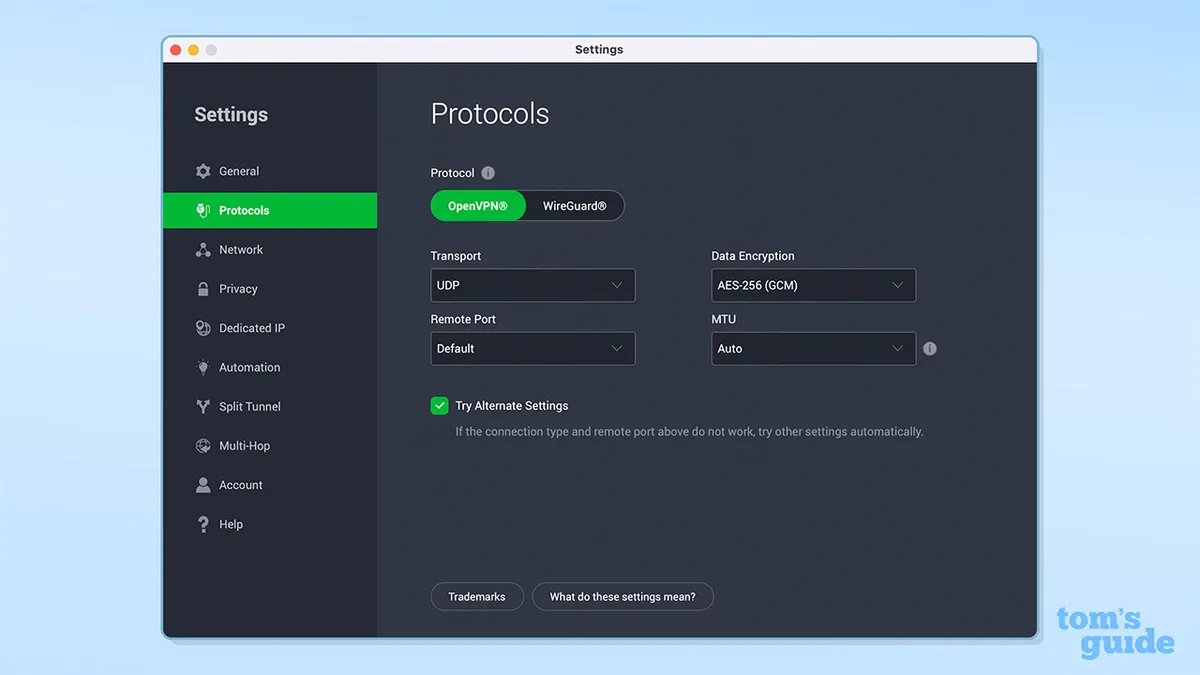
PIA has built-in protection to prevent data leaks. I checked WireGuard and OpenVPN for WebRTC and DNS leaks and didn’t find any issues. PIA’s kill switch also worked perfectly in my testing, and while the feature isn’t available for Android, the app points users to an acceptable workaround.
The Private Internet Access Privacy Policy has a very clear no-logging commitment, stating that the company doesn’t “collect or store browsing history, connected content, user IPs, connection time stamps, bandwidth logs, DNS queries, or anything like that.” The only pieces of information the company says it retains are your email address, partial payment details, and your state/territory and zip code for tax purposes.
Underlining its privacy statement, the company has regular independent audits of its no-log policy. It was inspected by Deloitte Audit Romania in 2024, which investigated PIA’s network and management processes and gave it a passing grade, and also underwent its third infrastructure audit in February 2026.
In addition to its audits, PIA publishes a quarterly transparency report. This lists the subpoenas, warrants, and requests from governments and law enforcement agencies that PIA has received, and states that it hasn’t been able to comply with any of them for lack of data. PIA has also repeatedly proven its no-logging credentials in legal cases, and has withdrawn from Russia and Hong Kong to prevent government access to its servers.
Rating: 9.5/10
Apps and compatibility
- Great support, with apps for Windows, Mac, Android, iOS, Apple TV, and Amazon Fire TV, and particularly strong Linux support.
- Browser extensions have limitations but include a great set of privacy features.
- Service is available for routers, though the company advises against it.


PIA has strong cross-platform support, with apps for Windows, Mac, Linux, Android, iOS, Apple TV, and Amazon Fire TV.
I found that PIA's apps are generally consistent and are easy to get started with. In terms of limitations, there’s no split tunneling on Android or iOS, and there’s no kill switch on Android (though PIA offers instructions for a workaround).
Notably, PIA’s apps are open source, meaning the community can inspect the codebase and potentially identify and report vulnerabilities. Other VPNs with open source apps include Windscribe, Proton VPN, and IVPN.

The Mac app is very similar to the Windows version, and macOS users aren’t short-changed by any means. However, I have seen user complaints that some features, such as split tunneling, haven’t worked properly in some time. It’s also notable that the Mac app has only seen one relatively minor update in over a year. In comparison, ExpressVPN has issued 11 Mac updates in the same period. The iOS app similarly hasn’t had a significant update in more than a year.
PIA does get points for offering a Linux app with a graphical user interface, which is much like the Windows and Mac versions. If you do want to run the app in a headless mode, you can also access it via the command line (which is also available for Windows and Mac, for those who want it). Not all VPN providers offer Linux apps, but PIA puts the platform on an equal footing to Windows and Mac, reflecting its support for more technical users.
While PIA doesn’t sell a router of its own, you can buy routers pre-configured with the VPN. The VPN can also be manually set up on some routers, and there are tutorials available to help you get started. PIA is less positive about routers than most other providers, though, and warns against the implementation due to the potential impact on your connection speeds. Given the sternness of the warning, it may make you think twice.
There are also browser extensions for Firefox and Chrome. PIA’s Chrome extension has a poor 3.2/5 rating, and several recent reviews complain about issues like frequent disconnections and fewer locations than the provider’s desktop and mobile apps.

The UI of the extensions reflects the desktop apps, but it has some usability issues. For example, the extension window shows you the city name that is currently selected, but it generally doesn’t give you the full country name (unlike almost every other VPN interface). The address bar extension icon also gets a flag that indicates the destination, but I didn’t feel that this was very helpful or intuitive. There is a “Quick Connect” list, but this also has flags rather than country names.
The extension also has far fewer locations than the regular apps. The full service has 91 countries, but you’re limited to 27 on Chrome, and the 50 US locations available elsewhere are cut to 14 here.
I found that the PIA extension does come with some great privacy and security features, however. It allows you to disable third-party cookies, strip out tracking parameters from URLs, disable autofills, and prevent websites from accessing your location, camera, or microphone. And that’s just the start of it. It’s an impressive list and beats most specialist privacy extensions I’ve seen. Just keep in mind that you need PIA to be enabled for the features to work.
PIA also has a Smart DNS system, which can help you unblock region-locked content. PIA’s web control panel offers support for setting up Smart DNS on Chromebook, Chromecast, PlayStation, Xbox, Roku, and other smart TVs.
The fact that PIA’s web control has access to OpenVPN configuration files and an OpenVPN configuration generator means that you can potentially also use PIA’s services with third-party OpenVPN apps. However, although PIA’s manual setup options are better than those offered by many providers, they’re not market-leading. Surfshark, for example, can help you set up manual OpenVPN connections and can also help with WireGuard and IKEv2 connections.
Rating: 7.5/10
Is Private Internet Access easy to use?
- Apps are clear and intuitive and contain tons of functionality if you dig down.
- Small tweaks could make the apps easier to use for general users, and they could feel more polished.
- Accessibility standards could be improved, despite stated commitments.
During my testing, I installed PIA’s Windows, Mac, Android, and iOS apps and found them to be simple to download, install, and set up across devices. An unusual point is that you can download previous versions of the software (going back years), meaning you’re not stuck with an update if it causes issues, and you can still access versions that will work with older hardware.
To use the VPN, you’ll need to log in. If you forget your password, you can request an email link that will allow you to access the service.
The Windows app has a simple and clear layout. A large “Connect” button allows you to connect and disconnect with a single click, and information is displayed on your currently selected country and your standard and encrypted IP addresses. You can also click to extend the panel and access more settings and status information.
This includes convenient features like a quick connect list of recent locations and an on/off switch for the MACE ad blocker. Leaning again towards technical users, it surfaces information such as the length of the current session and your protocol, encryption, and current download speed.

It's worth noting that if you're new to the app, it'll take some time to understand what everything does. The "quick settings" icons, for example, are unlabeled – you'll need to hover over them to find out what they do. Compared to the likes of ExpressVPN, it's clear PIA doesn't prioritise absolute ease of use.
I found the interface to be highly configurable, and the different elements can be rearranged or pinned to the top. It’s not necessarily obvious that this is the case, though (the website doesn’t even mention it), and many users may miss it (as I would have done if I hadn’t been experimenting with the app). Notably, the PIA iOS app also includes support for Siri shortcuts, so you can connect and disconnect with voice commands.
PIA’s location list includes the country’s name, a latency figure, and an indicator labeling virtual servers. You can find locations by scrolling the list or by typing in the search box, where you can search by country or city or look for streaming optimized servers, for example.
Unlike other VPN apps, I discovered that PIA’s main interface isn’t accessed via the task bar on Windows. Instead, you have to open it from the notifications section (where it has a gray logo on a gray background), and when you click away, annoyingly, it auto-hides. If you open additional settings, these will appear as a program on the taskbar, but the core VPN functionality isn’t included with this.
PIA does suffer from some usability quirks. For example, as a Mac user, it's quite frustrating having the app minimize to the menu bar. However, the apps are perfectly serviceable, and generally in line with the competition.
Mo Harber-Lamond – VPN Editor
The same is true on Mac – rather than an icon in the dock, PIA minimizes to the menu bar located in the top-right of the screen. I found myself repeatedly reaching to the dock, only to remember that PIA doesn't live there. It's a strange decision on PIA's part, if only for the reason that almost every other VPN I've used makes itself visible in both locations.
While using PIA, websites like Google did occasionally post “are you human?” verifications. In addition, I experienced some odd, possibly DNS-related issues. In several instances, I found I couldn’t access websites, and Chrome flagged constant DNS errors. Disconnecting the service and reconnecting seemed to fix the problem.
In terms of accessibility, PIA has the best keyboard support of any VPN I’ve seen, and it’s easy to navigate the app and access almost every feature using a keyboard. The program also supports a decent 18 languages, and you can easily switch between them from the “Settings” panel.
PIA has publicly committed to high standards of accessibility and has made specific commitments for web content. However, the support site doesn’t have a single piece of content that’s relevant to accessibility, and there are some big issues with the website.
Accessibility Checker is a service that scans web pages for accessibility issues. PIA’s homepage gets a very poor Accessibility Checker Audit Score of 10%, due to elements that lack clear text or have low contrast, putting PIA significantly behind providers like Mullvad and NordVPN, which score 89% and 83%, respectively.
Rating: 7/10
Why is PIA based in the US?
PIA is based in Denver, Colorado, in the United States. The US doesn’t have the strongest data protection laws, and it is part of the Five Eyes alliance, made up of countries that share intelligence with one another.
However, the company argues that this doesn’t matter as it doesn’t log anything, as proven by its independently audited no-logs policy and history of not divulging user data when requested to in court. PIA also has a quarterly transparency report, which counts the number of requests, warrants, and subpoenas it receives from government and law enforcement, and states that PIA is unable to comply as it does not log any data.
Customer support
- The support hub has lots of articles, but many are old and highly technical.
- Live chat support is prompt and helpful but isn’t available via the support site.
- Community suggestions and news articles on the support site are very out of date.
If you need help with using PIA, you can look for support via the company’s online knowledgebase, live chat, or email support. There’s also a community suggestion form on the company site and a PIA-managed subreddit.
The knowledgebase has a lot of material, and it seems that since my last review, PIA has gone on a spree of updating these pages. Instead of most displaying publish dates several years ago, almost all have a 2026 timestamp.
The support site appears to mix English and non-English guides. If you do click on an article title in Chinese, however, you get redirected to the Chinese-language homepage.

Some of the support articles I reviewed weren’t terribly helpful. For example, searching for the keyword “slow” sent me to an article titled “I’m experiencing slow speeds, what can I do?” This is likely a fairly common issue, but the page doesn’t suggest common tips like trying a different server, restarting your router or device, or accessing the VPN from a different network.
Instead, its first suggestion is to try to change the ports the app is connecting to. This is quite a technical task, and if you seek help with this, you’ll be sent to other pages that feature complex language and out-of-date material.
In contrast, the PIA subreddit is quite active. It gets around 14,000 visits and 135 contributions per week, and these do seem to generate feedback and discussions. The community suggestion form on the support site seems rather moribund, however, with the latest closed ticket being dated to October 2022. The main support page also has a slot for news articles near the top of the page, but the most recent upload was in August 2023.
Customer support is PIA's weakest area. With complex articles and occasionally slow human support, you're not on your own, but you don't have nearly as much help as you would with competitors like NordVPN or ExpressVPN.
Mo Harber-Lamond – VPN Editor
PIA says its email support is available 24/7. Testing proved this to be the case, and I received a response in 21 minutes to my query. The live chat interface proved to be quicker still. It comes with a twist, though, which is that the interface is accessible from PIA’s main site, but (I eventually discovered) it doesn’t load on any of the support pages.
If you do track it down, you’ll initially be directed to a chatbot, which recommends support articles that may help you. When I logged in as a guest, I found the suggestions were rather hit and miss and often had little to do with the question.
When I clicked the “transfer to agent” option, I was warned that there was high demand and I might receive a slow reply, but I was connected within a couple of minutes. I was then able to get detailed replies to all my queries within a fairly short time period. That said, I asked whether the Android app had a kill switch, and the agent responded that it did, which isn’t entirely true (the “kill switch” labeled feature just directs you to enable “always-on VPN”).
However, in my last review of PIA, I was left waiting around for hours before I got an answer to my question – so your results may vary.
Rating: 7/10
Can you trust Private Internet Access?
- An audited no-logs policy, regular transparency reports, and open source apps provide confidence.
- When put to the test, the company has refused to cooperate with the authorities.
- PIA has generally solid customer ratings that compare well with the competition.
Dating back to 2010, PIA is one of the oldest on the market. It was acquired by Kape Technologies in 2019, putting it under the same ownership as ExpressVPN, CyberGhost VPN, and ZenMate VPN.
Kape Technologies is often criticized online for creating malware in its previous incarnation as Crossrider. Based on my research, though, Crossrider wasn’t responsible for this activity, and I’d stress that Kape Technologies is a fundamentally different company today, with an entirely different business model.
PIA has a very clear no-logs policy and has run recent independent audits to prove its claims. It also provides a quarterly transparency report, which counts official requests for information and states that the company is unable to comply with them as it doesn’t log any user information.
The company’s apps are also open source, enabling the developer community to independently monitor and audit their functionality and report potential vulnerabilities.
PIA gets kudos for refusing to cooperate with attempts to spy on its users. When Russia imposed a national security law in 2016, demanding that VPNs log online user activity, PIA refused and its servers were seized. PIA removed its servers from the country, and it no longer maintains any Russian presence, even with virtual servers.
Similarly, when Hong Kong passed a national security law in 2020, allowing police to intercept communications and seize servers without warrants, PIA removed its hardware from the territory. Today, it offers virtual servers for the region, located in Singapore.
In terms of customer reviews, PIA has a decent 4.3/5 rating on Trustpilot, based on 10,700 reviews. In comparison, Surfshark gets 4.4/5, NordVPN gets 4.2/5, and ExpressVPN gets 4/5. PIA has a sub-par 3.2/5 rating for its Chrome extension, but its mobile app ratings are very similar to other top providers, with 4.5/5 for the Google Play Store and 4.7/5 for the Apple App Store..
Rating: 9.5/10
PIA review: final verdict
Subscribe if:
✅ You would like in-depth technical configuration options.
✅ You want port forwarding.
✅ You’re looking for a strong security record.
Don't subscribe if:
❌ You need first-class connection speeds.
❌ You’re an inexperienced user and need accessible support guides.
Alternatives to PIA


PIA FAQ
How to cancel PIA
Canceling PIA is fairly simple. You need to log into your account on the web, and go to “Subscription Overview.” Then, under “Next billing,” select “Turn off auto-renewal.” You may be asked to confirm, but you just need to click “Continue” or “Turn off auto-renewal” to complete the cancelation process.
Does PIA work in China?
According to users, PIA does work in China, with virtual servers in China and Hong Kong, and obfuscation available via PIA’s multi-hop feature. However, it’s reportedly somewhat unreliable and its connections can be slow, so we don’t rate it as being one of the best China VPNs, like NordVPN and ExpressVPN.
Who owns PIA?
PIA is owned by Kape Technologies, which also owns ExpressVPN, CyberGhost VPN, and ZenMate VPN. The company was founded by Andrew Lee in 2010 and was acquired by Kape Technologies in 2019.
Feature |
Comments |
Rating |
|---|---|---|
Design |
Row 0 - Cell 1 | ⭐⭐⭐ |
Ease of use |
Row 1 - Cell 1 | ⭐⭐⭐⭐ |
Performance |
Row 2 - Cell 1 | ⭐⭐⭐⭐ |
Unblocking |
Row 3 - Cell 1 | ⭐⭐⭐⭐⭐ |
Security and privacy |
Row 4 - Cell 1 | ⭐⭐⭐⭐⭐ |
Customer support |
Row 5 - Cell 1 | ⭐⭐⭐⭐ |
Price |
Row 6 - Cell 1 | ⭐⭐⭐⭐⭐ |
How we test VPNs
We have a full explainer on how we test VPNs, but, in short, it goes something like this.
Firstly, we test the sign-up process. How easy is it to pay, and what options are there? From there, we install the VPN on a number of devices, make notes on the simplicity of the process, and whether there are any extra steps that introduce complexity.
Then comes the fun part. We use all the features, running tests to detect any problems like DNS leaks or faulty kill switches. We'll dive into the code if it's available, and see if there are any anomalies we think you might be interested in reading about.
We test the speed – 120 individual tests, daytime and evening – and connect to various servers to get a good idea of how robust the server network is, and what speeds you can expect to get in normal usage.
Streaming comes next. We test a wide range of global and regional streaming services to see how well each VPN can unblock content.
Customer support is also very important. So, if we have any queries along the way, we'll follow the avenues provided to see how well-prepared the support team is. This includes live chat, email, and ticketed systems.
Once we've done all of this, we'll have a good feel for the apps and will have found out if there are any usability quirks, or unique features that we really like.
We test and review VPN services in the context of legal recreational uses. For example: 1. Accessing a service from another country (subject to the terms and conditions of that service). 2. Protecting your online security and strengthening your online privacy when abroad. We do not support or condone the illegal or malicious use of VPN services. Consuming pirated content that is paid-for is neither endorsed nor approved by Future Publishing.

