




When you’re jumping from one video call to another all day every day, the last thing you want is to be showing the side of your head instead of looking straight on at your webcam. Depending on your desk setup, this is easier said than done.
Attending meetings is only half of the battle though, as putting your best face forward likely isn’t what your job actually entails. Instead, you also need to manage multiple windows and have enough screen real estate to horizontally scroll through spreadsheets at ease or glance over at your notes or calendar while writing up an email.
It's time to free your webcam
For this reason, I often use either a side-by-side dual-monitor setup or an ultrawide monitor with a portable monitor underneath it. With the latter, it’s easy to mount one of the best webcams on top of your display and call it a day. With the former though, things can be a lot trickier.
When you have two of the best monitors next to one another, you’re forced to pick one of them to put your webcam on. Then when you’re actually on a call, you either have to turn your body at an angle or, worse, settle for showing the side of your head while everyone else is looking directly into their own cameras.
After struggling with this age-old dual-monitor conundrum for years now, I finally decided it was time to do something about it without having to say goodbye to one of my all-time favorite desk setups. Here’s how I finally freed my webcam from being relegated to one screen or the other and found a best of both worlds solution that works for me.
From bezel to mount

After putting together a new, dual-monitor desk setup for my upcoming Secretlab Mangus Evo review, I realized that besides gaming, I also wanted to attend meetings from the comfort of my living room. To that end, I needed a way to add a webcam so that the rest of my team could see me but I didn’t want to be stuck having to stare at one screen or the other.
I can move my monitors freely without having to worry about tugging on my webcam’s cable or the whole device falling off its perch.
Whether it’s a monitor stand or one of the best monitor arms, I have no qualms about mounting things on the back of my desk. In fact, I actually prefer it since it frees up desk space, makes cable management easier and gives your desk setup a cleaner overall look. The Magnus Evo makes this a little tricky (more on that later) but I eventually decided that a camera desk mount would be the best solution for this particular problem.
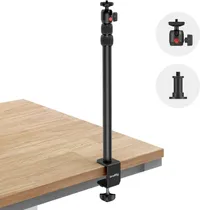
While I’ve thought about picking up some of SmallRig’s well-regarded camera accessories over the years, I hadn’t actually had a chance to test out any of the company’s gear. I figured the SmallRig Camera Desk Mount would be the perfect way to dip my toes into the world of professional camera gear, especially since my needs were much more modest. In addition to the mount itself, you also get a carrying case (just in case) a ¼” ball head adapter and a ring light adapter.

I had initially considered using a selfie stick and a small desk tripod I had on hand for this project. Although that would work in a pinch, the SmallRig Camera Desk Mount has a much sturdier build. Likewise, it can be raised from 19 inches all the way up to 35 inches which makes it a lot more versatile than just clipping a webcam onto the top of your monitor.
Even though I planned on using the SmallRig Camera Desk Mount with Razer’s new Kiyo V2 webcam, I wanted to put its stability and weight bearing abilities to the test. To do so, I grabbed my Canon Rebel T6i DSLR camera. I figured if it could hold a ‘proper’ camera, it would have no trouble at all with a webcam on the back of my desk.

Much to my surprise — even though it can technically hold up to six and a half pounds at an incline and just over 22 pounds vertically — the SmallRig Camera Desk Mount held up my old DSLR without any issues. At just $30, not only could this new mount solve my dual-monitor webcam dilemma but it also doubles as an entry-level studio rig. If I ever decide to get back into content creation, I’d have an easy and reliable way to shoot top-down unboxing videos or even time-lapsed PC builds.
With the initial testing out of the way, next came the hard part, actually integrating this new accessory into my desk setup.
Closer to centered
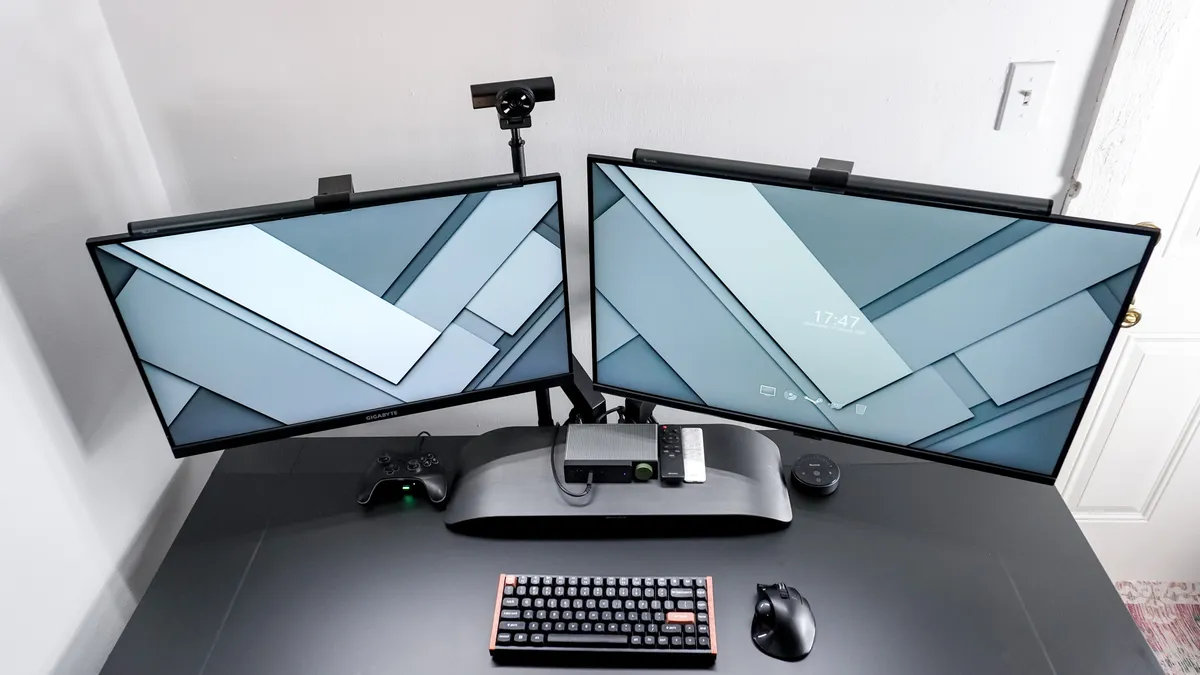
Not everyone of my DIY projects comes out exactly as I had imagined it in my head but this one came close enough. As you can see here, the Kiyo V2 webcam above my desk isn’t exactly centered but still, it isn’t perched on the edge of one of my monitors either. Plus, I still get to have a monitor light bar on top of both displays without having to use yet another adapter to place a webcam on top of one of them.
Just like the Secretlab Magnus Pro I reviewed, the Magnus Evo comes with built-in cable management. However, instead of a full-length integrated shelf that runs along its entire backside, this newer and slightly cheaper, gamer-focused standing desk does come with a cable management tray. Since there’s only a sliver of space between it and the desk, you need to use one of Secretlab’s low-profile monitor arms.
I had hoped that I’d be able to squeeze the SmallRig Camera Desk Mount in between them but unfortunately, that couldn’t have been further from the truth. At first, I tried jerry-rigging a way to use Secretlab’s magnetic headphone hook to mount it to no avail until I came to terms with the fact that it would have to be slightly off center, and not right between my two displays as I had initially planned. After tucking its desk clamp into the back of Magnus Evo’s cable management tray, I managed to squeeze my hand in there to tighten it up and securely clamp the mount to the back of the desk.
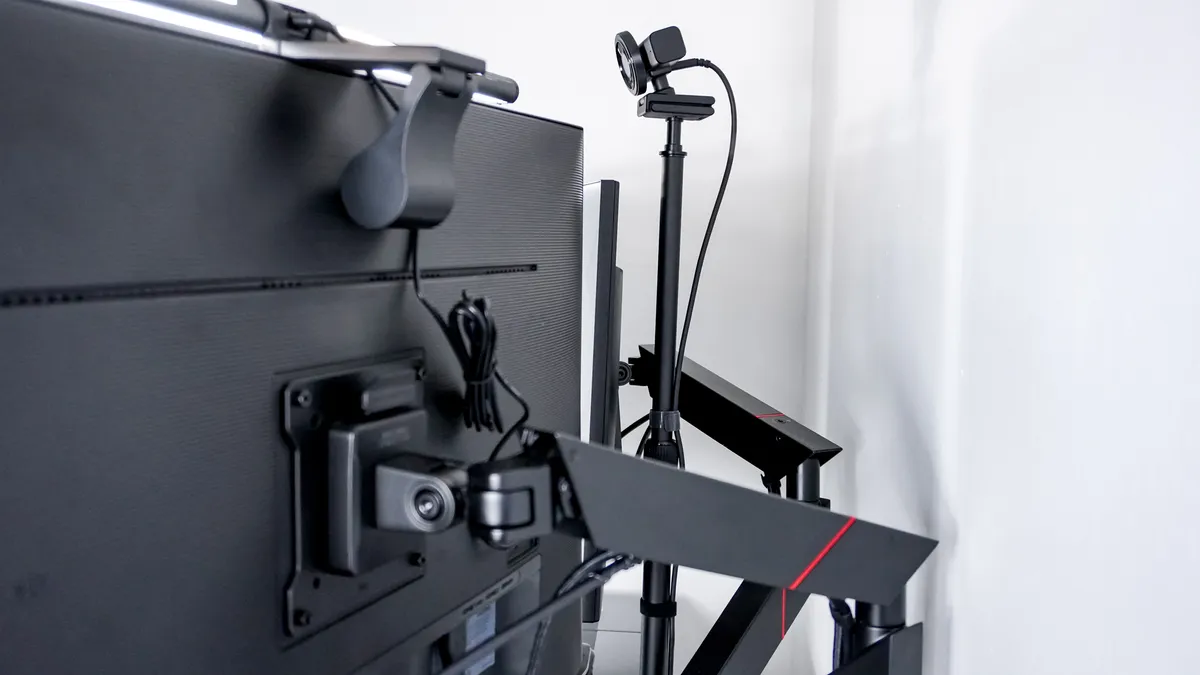
Even though things didn’t turn out perfectly as planned, I did solve the problem I set out to finally tackle once and for all. One thing that I really like about having my webcam on its own separate mount is that it — and more importantly its cable — aren’t tied to one of my monitors. As such, I can move my monitors freely without having to worry about tugging on my webcam’s cable or the whole device falling off its perch on one of their respective bezels.
Although the SmallRig Camera Desk Mount doesn’t come with built-in cable management like a monitor arm, its round aluminum pole made securing my webcam’s cable in place quite easy. I just put it right up against the pole and wrapped a few Velcro cable ties around it. After all, this accessory is made for real cameras, not webcams.
Always in frame

Getting the right webcam for your needs is the first step to putting your best face forward in video calls. However, like with ergonomics, positioning your webcam is just as important. Too low or too high and you might as well turn your camera off, but you can only get away with telling everyone else you’re experiencing camera issues for so long.
Sooner or later, you’re going to have to step back and think about the best way to incorporate a webcam into your desk setup. If you’re only using a single monitor, then perched on top of your display may just be the best choice for you. However, if you’re partial to multi-monitor setups like I am, then things are a bit more complicated. Fortunately, after all these years, I’ve finally found a solution that works for me.
Since I review the best standing desks for a living, I’ll inevitably have to move onto the next one once my review of the Secretlab Magnus Evo is finished. With my new SmallRig Camera Desk Mount though, I won’t have to give up my dual-monitor setup and all that extra screen space just to look my best in video calls. It may take a while but I’ve found that if you look hard enough, there’s always an accessory for whatever problem you come across, regardless of how niche it may be.

Follow Tom's Guide on Google News and add us as a preferred source to get our up-to-date news, analysis, and reviews in your feeds.
More from Tom's Guide

