







Instead of a full-on keynote presentation, Apple has a “big week ahead” of it starting today with three days of back-to-back product announcements.
From various leaks and rumors, we already have a good idea of what you can expect to see. From a low-cost MacBook that could launch in colorful new designs to more powerful, M5-powered MacBook Air and Pro models, there will be quite a few new Apple computers unveiled.
Likewise, on the mobile front, we’re likely getting a brand new standard iPad as well as an upgraded iPad Air with a new chipset. Not to be outdone by the long-awaited, more affordable iPad, Apple will likely also be showing off the new iPhone 17e.
All of these announcements are enough to get any Apple fan excited, but as a desktop user, I’m most looking forward to an updated Studio Display. First launched back in 2022, Apple’s 27-inch 5K monitor has long been one of the best monitors you can buy for the Mac mini M4. However, in 2026, it’s beginning to look a bit long in the tooth, especially as displays from LG, Samsung, and others keep adding new features.
While I don’t know whether or not we will see a Studio Display 2 at next week’s Apple event, here are the upgrades I want to see most as someone who’s been using the original Studio Display for over a year now.
A detachable power cable

When I first unboxed the Apple Studio Display, I almost gasped. Sure, it was a gorgeous, premium monitor that was packaged incredibly well, but I wasn’t expecting to see a hardwired power cable jutting out from the back. Instead, this is the kind of design decision I’d expect to find on one of the best budget TVs.
So why does the Studio Display have a non-detachable power cable? At just 1.2 inches at its thickest point, the standard port used by monitors with built-in power supplies is just too big. While it could have made the Studio Display slightly thicker to accommodate this port, Apple decided to just make the power cord a permanent fixture instead.
A detachable power cable on the Studio Display 2 would be an instant upgrade in my opinion. You’d have a bit more flexibility when setting up the display, and if you needed a longer cable, you could purchase one separately. How would Apple pull this off without making the Studio Display 2 thicker? Easily, by using a USB-C port and a GaN (Gallium Nitride) charger. This would solve both issues, and with a max power draw of around 170 to 180W, USB-C PD 3.1 (which supports up to 240W) would do the trick nicely.
Multiple sizes

Don’t get me wrong, 27 inches is almost the perfect size for a monitor. Neither too big nor too small, it’s really the sweet spot for most desk setups, and with a 5K resolution, you can easily have two windows open side by side while working. However, if we have a standard, Pro, and Pro Max iPhone, why can’t it be the same for Apple’s monitors?
The current Studio Display features a 27-inch panel, but with Studio Display 2, I’d love to see some more size options. Now I wouldn’t get rid of the 27-inch version as it really is the best for most people. But for those that want a slightly bigger screen — say for scrubbing through the timeline in Final Cut Pro — a 32-inch Studio Display 2 would be perfect. That way, those looking for a larger display wouldn’t have to leave the Apple ecosystem for a monitor from LG, Samsung, BenQ, or MSI.
A modular stand

Even if the optional monitor stands were still priced at a premium, at least that would save me an awkward trip to the mall with a very expensive monitor under my arm
With the current Studio Display, you can get either a Tilt-only stand, a Tilt-and-Height stand, or a VESA mount at the back if you’d rather use one of the best monitor arms. However, once you make this decision, you’re locked in. None of Apple’s monitor stands are user-replaceable. Instead, if you’re tired of craning your neck down to look at your monitor, you’ll need to drive to your nearest Apple Store and have one of the company’s certified technicians do the swap for you.
Given how much Apple likes to talk about health with the Apple Watch and its Apple Fitness app, you’d figure ergonomics would be at the top of its list when it comes to adding new features to its products. With the Studio Display 2, I’d love to be able to swap out its stand or be able to put it on a monitor arm all on my own. Even if the optional monitor stands were still priced at a premium, at least that would save me an awkward trip to the mall with a very expensive monitor under my arm.
More than one video input
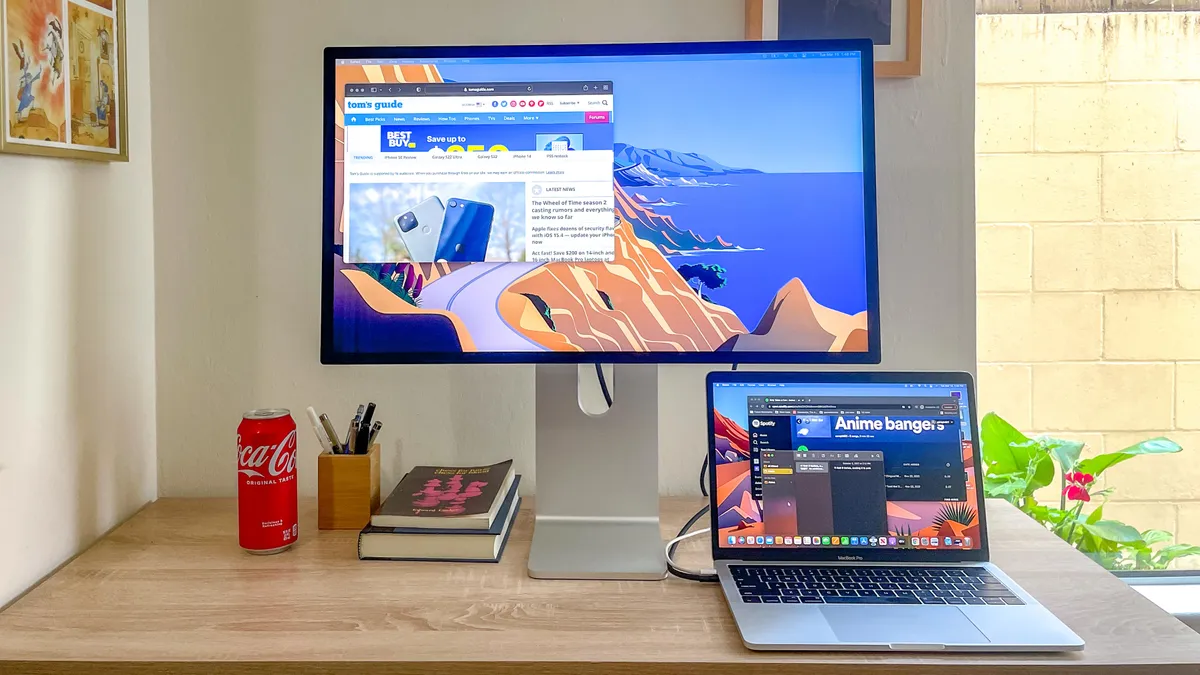
With a premium monitor like the Studio Display, I thought I’d be able to have two computers connected at the same time, but unfortunately, that’s not the case. Though I usually have it connected to my Mac mini M4, when I reviewed the Khadas Mind 2S, which has a Thunderbolt 4 port on the back, I tried plugging it into Apple’s monitor, and it worked. The problem, though, I couldn’t have both mini PCs connected at the same time, as the Studio Display only has one upstream Thunderbolt 3 port.
Since you might have a Mac mini or a Mac Studio at home and use one of the best MacBooks for work, wouldn’t it be great to be able to connect them both to your monitor at the same time? I get why Apple didn’t put any HDMI or DisplayPort connections on the back of the Studio Display, as Thunderbolt gives you that magical one cable experience to charge and for video output. However, I’d love to see a second upstream port on the Studio Display 2. That way, you could use a desktop and a laptop with the same monitor without having to unplug either.
A built-in KVM switch

Speaking of using two computers at the same time, another great feature I’d like to see on the Studio Display 2 is a KVM switch. You can find these on a lot of productivity-focused monitors today, and with one, you can use the same mouse and keyboard across multiple computers.
I know Apple is partial to Bluetooth peripherals, but even Logitech still includes 2.4 GHz USB dongles with its MX Master Series devices. The Magic Mouse and its awkward charging port aren’t for anyone, so why not give Studio Display 2 users options?
In addition to a KVM switch, I’d also like to see Windows support on the Studio Display 2. It might not be the first choice for Windows users when picking up a new monitor, but at least everything — like the built-in webcam and microphones — would work properly when connected to one of the best Windows laptops.
HDR support

In recent years, HDR has become a standard feature on the best TVs. With monitors, though, it’s still a bit of a gamble as some will have DisplayHDR 400 on the box, but this just means the display can reach 400 nits of brightness. If you want a monitor with TV-like High Dynamic Range, you’re going to want to get one with HDR 400 True Black.
The current Studio Display doesn’t have HDR, but if Apple is going to add this feature to really make the colors pop on the Studio Display 2, it should do what it does best and take things to the next level. In 2026, DisplayHDR 1000 is considered the gold standard for this tech, and by getting its next monitor up to this level, that would be a 400-nit increase over the current Studio Display’s 600 nits of brightness.
One way Apple could do this is by ditching the IPS LCD panel in the original Studio Display and going with a Mini-LED one instead. In a similar way to OLED, Mini-LED uses localized dimming for improved contrast to make blacks really pop.
Faster refresh rates

The current Studio Display has a refresh rate of just 60Hz, which pales in comparison to the 120Hz on the base iPhone 17. The best gaming monitors can go even faster, with some getting all the way up to 540Hz, though 240Hz is a lot more common. With a monitor equipped with a faster refresh rate, everything just looks clearer, especially when you’re doing things like scrolling or playing games.
With the Studio Display 2, I think 120Hz would be a big enough upgrade. Not only does this put Apple’s next monitor in line with the best iPhones, but it will also make a big difference for creative professionals editing video on a Mac. As most films are still shot at 24 fps, which you can’t divide by 60, there’s a noticeable judder when editing on a 60Hz display. With a 120 Hz one, though, the Studio Display 2 would offer perfectly smooth playback for almost every type of video content.
Likewise, as Mac gaming just keeps getting better and better, wouldn’t it be great to play a game like Cyberpunk 2077 or the newly released Resident Evil Requiem at a higher frame rate?
Studio Display 2 outlook
Whether or not we’ll see a Studio Display 2 next week is still up in the air. However, according to Bloomberg’s Mark Gurman, Apple has been working on two new Studio Display monitors for quite some time. Four years is a long time to go between major releases, and since the original Studio Display first debuted back in 2022, now is the perfect time for a major refresh, hopefully with some compelling upgrades.
We’ll just have to wait and see, but if a new Studio Display does get announced next week, we’re definitely going to be calling one in for review to put it through the paces. Stay tuned to Tom’s Guide for all the latest Apple news, especially with all of those new product announcements set to start on March 2nd.

Follow Tom's Guide on Google News and add us as a preferred source to get our up-to-date news, analysis, and reviews in your feeds.
More from Tom's Guide

