




One of the biggest reasons why I continue to keep the Galaxy Z Flip 7 as one of my daily drivers is because of how Samsung's foldable flip phone is much better suited for capturing selfies and vlogs than conventional handsets. Because of its design, I’m able to pair the Flip's outer screen with its rear cameras to see myself as I’m capturing images and footage, which is a common characteristic I find with the best foldable phones.
There’s no way I could do this with devices like my iPhone 16 Pro Max or iPhone 17 Pro, so I’m left to simply use their front facing cameras — but everyone knows the quality’s a downgrade with those front camera sensors. That’s why I’ve been using the SYNCO XView M4, a handheld monitor with a MagSafe connection that fastens to the back of my iPhone.
Thanks to the XView M4, I’m able to record selfies and vlogs with the superior rear cameras of my iPhone. It’s really the iPhone accessory I didn’t know I needed until now. Here’s why.
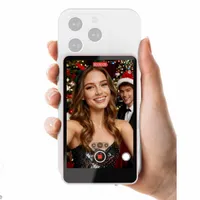
This pocket-sized monitor works by allowing me to cast my phone’s display to it, much like a Chromecast. I’m essentially performing a screen mirroring function with AirPlay, so whatever’s on my iPhone shows up on the display. That makes the XView M4 the easiest way to add a rear screen to my iPhone — at least until an iPhone Fold shows up.

I didn’t have high expectations with the 3.9-inch screen initially, but the XView M4 turned out better than I had anticipated with decent contrast and detail that makes it usable for a wide variety of applications. Since it relies on a direct Wi-Fi connection, I was initially skeptical about the latency — but that doesn’t appear to suffer, resulting in smooth mirroring. However, I’ve found a few situations where the latency lags a bit when recording video.
As much as I appreciate the added utility the XView M4 offers with selfies and vlogs, I’ve used it on some of my professional shoots to monitor the framing of a video using a second camera. I did this by mounting my iPhone to the top of my b-camera, while I held onto the SYNCO XView M4 in my hand using my main a-roll camera roughly 10 feet away.

Since it’s pocketable, it doesn’t add a lot of extra bulk into my backpack — and it’s way better than carrying one of my portable monitors. There’s also a built-in speaker inside of the SYNCO XView M4 that lets me listen to the videos I’ve just recorded.
So far, I’ve been able to wirelessly stream to the XView M4 for an hour with the battery lasting me that long. The company claims it’ll last 3 hours, but I’ve found the battery indicator at less than one bar after an hour’s use.

Best of all, the XView M4 works on any phone — including many of the best Android phones using their respective screen mirroring functions. You’ll get way more utility from Android phones that have embedded magnets, like the Pixel 10, so the accessory can easily stay attached to them with its magnetic connection.
Finally, it’s worth mentioning that this handheld monitor doesn’t cost a fortune. Normally the XView M4 sells for $59, which is pretty good for an accessory such as this, but it’s currently discounted by 24% off to bring its price down to $45.

Follow Tom's Guide on Google News and add us as a preferred source to get our up-to-date news, analysis, and reviews in your feeds.
More from Tom's Guide
- Looking to make your holiday photos more festive? Try these 3 camera phone tips
- I put the OnePlus 15R in a dishwasher to test its IP69K rating — here's how it went
- I use the hidden ‘Back Tap’ iPhone feature to create my own instant shortcuts — here's how to do it

