







The iPhone 17e has brought MagSafe to Apple's cheapest phone, which is a good thing (or not, depending on your point of view). Not only does it improve the wireless charging experience for budget iPhones, it also opens up a whole new world of accessories and gadgets to go with the phone.
Magsafe has been around for over five years. That means there are a lot of MagSafe-friendly purchases you could buy right now. Where do you start, and more importantly, which one do you pick? Well, I know that if I were only able to buy a single MagSafe accessory for my phone, it would be this one — the humble PopSocket.
I know, PopSockets can get a bad rap from certain kinds of people. But, I've been using a PopSocket of some sort for around eight years — and I wouldn't go without one ever again. Especially now that I've experienced the convenience of the MagSafe-compatible options.
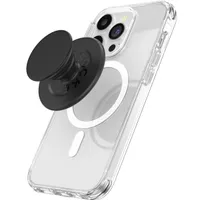
PopSockets are great

I never understood the people who dislike PopSockets, or any other kind of phone grip, for that matter. They've become such an essential part of my phone life that I feel strange every time I have to go without one.
The main benefit of having a PopSocket on the back of your phone is that it improves your grip. Instead of having to grip your phone from the side, you simply slide the PopSocket between your fingers and you have a nice, secure hold on your phone. I find it a lot more comfortable to use the phone, as I only need two fingers to actually hold on to it, which leaves the rest of my hand free to do whatever needs to be done.

That extra hand mobility makes it a lot easier to reach the farthest corners of my phone screen. Granted, I don't have a particularly big phone; it's a Pixel 10 Pro with a 6.3-inch screen, and I have rather large hands, so it's usually not an issue. But holding onto my phone and trying to use it with the same hand is a challenge in itself. It's a lot more comfortable to slip the grip through my fingers and free up the rest of my hand to get stuff done.
Considering I now spend a lot of time holding a baby with one arm, I can't utilize my second hand when using my phone. So I must have a way to do things one-handed.
Finally, there's the fact that PopSocket grips also double as stands. That way, you can prop up your phone on any flat surface to watch movies, or angle it better at your desk so you have a better view of the screen. Best of all, when you're done, it all folds into place. It's not quite flush with the phone, but a MagSafe PopSocket is barely thicker than your phone's camera bump, so it's not like you're making it uncomfortably thick.
MagSafe makes things so much more convenient

Nothing is stopping you from using a PopSocket on any phone, including MagSafe-less models like iPhone 16e or iPhone SE. The only issue is that you have to rely on an adhesive sticker to actually attach the thing. Since you can't remove and replace the grip easily, it means your PopSocket can get in the way of things like stands and wireless chargers.
Likewise, if you want to change cases or phones, you have to find a way to reattach the grip or purchase a brand new one. PopSocket has released grips with a more robust glue that lets you remove and reuse the grip, but even those wouldn't last forever, nor could you take them on and off at a whim. Magnets, by their very nature, don't have that problem.

Essentially, what you get with a MagSafe PopSocket is a grip you can remove anytime you like, and reattach as if it were brand new. It doesn't matter how often you change your phone, case, or whether your car phone mount has space for rear-mounted grips or not. You just pop it off, and reattach the grip where necessary — a process that takes about three seconds.
Most importantly, you're not limited to the MagSafe designs PopSocket offers. The majority of the grips can be removed from their base, so you have a single magnetic base you can pop on just about any design you like the look of, whenever you like.
Really, the magnets offer a way to enjoy all the benefits of a PopSocket, or any accessory you like, while also giving yourself the freedom to change things up at a moment's notice. And thanks to the addition of MagSafe on the iPhone 17e, you don't need to buy an expensive flagship to take advantage.
Bottom line
Phone grips are not for everyone, but I find that the benefits of having one on the back of my phone far outweigh the negatives. Yes, they make your phone a little thicker and slightly heavier, but they also make it a lot easier to get stuff done — particularly with one hand. Having a MagSafe-equipped phone means you end up with none of the sticky glue-laden downsides.
I will be the first to admit that PopSockets can be very expensive, though, especially if you want one of the licensed designs. Throw in the cost of an extra magnetic base to connect to MagSafe and you could end up spending too much money on a single grip.
But if you keep it simple, are not picky, and shop the sales, then you can fetch yourself a tidy discount. Especially when you consider the fact that magnets should keep future costs low as well.

Follow Tom's Guide on Google News and add us as a preferred source to get our up-to-date news, analysis, and reviews in your feeds.
More from Tom's Guide

