




Whether you’re working from home or gaming, a lot goes into putting together the right desk setup for your needs. While the big items like your computer and desk often tend to be the ones you put the most thought and research into, sometimes, it’s the little ones that end up having the most impact in the long run.
Personally, I like to ensure I have the right desk — or better yet, one of the best standing desks — before I start thinking about my monitor and other accessories like my keyboard and mouse. Once that’s done, it’s time to pick out the right chair for your needs. Whether you want an all-mesh chair for better airflow or an ergonomic chair with excellent lumbar support, when it comes to the best office chairs, you have plenty of options to choose from.
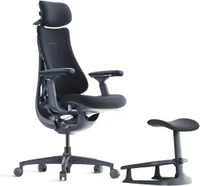
Although I’ve used a footrest in the past, I never really thought too much about the benefits of using one. That was until I reviewed the LibreNovo Omni office chair. Although it doesn’t come with a footrest, you can get LibreNovo’s StepSync Footrest in a bundle with the chair. Once again, I initially thought this footrest was just another home office accessory. However, after using the LibreNovo Omni for the past few months, I can’t imagine sitting in this chair without it.
If you’ve ever considered getting a footrest for your own chair, or even if you’re a skeptic like I once was, here’s how I realized that this small accessory is actually a game-changer that can really make your workday much more comfortable.
Not your typical bundled accessory

The LibreNovo Omni is an impressive office chair in its own right, thanks to its sleek, space-age design and extremely comfy cushioning. What really sets it apart, though, is its adjustable lumbar depth.
Sure, other chairs have adjustable lumbar depth mechanisms that you can move closer or further away from the small of your back to lock in the perfect fit. However, the Omni’s is motorized, and with a press of a button on the inside of the left armrest, you can change its position on the fly.
Just like other office chairs, this one reclines, but the Omni takes things to the next level by allowing you to lean back a full 160 degrees. You’re not just reclining; you’re practically lying down.
With those same button controls, you can enable the OmniStretch feature. It uses the motorized actuator to slowly lift and lower your spine repeatedly for five minutes. It helps relieve tension and straightens things out in a way that's surprisingly similar to a trip to the chiropractor.

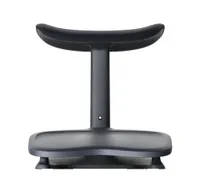
The bundled StepSync Footrest features similar padding to the chair itself, making it very comfortable for your legs while reclining or taking a break. You do have to line the footrest up with the chair before you lean back for the best results, but I really enjoyed using it.
If you’re considering the Omni, I’d recommend getting the bundle for the complete experience — though you can also purchase the StepSync on its own to use with any chair.
After the novelty of reclining that far back with my feet up, it was time to get to work. To ensure it was out of the way, I pushed the StepSync Footrest under my desk. What I wasn’t planning on, though, was that I would end up using it just as much while sitting upright as I did when sprawled back in the chair.
For so much more than reclining

As someone who’s on the shorter side (5’4”), I’ve found that with many office chairs, my feet can end up dangling rather than resting firmly on the floor. When this happens, the front edge of the seat presses into the underside of your thighs, which restricts blood flow and leads to that “pins and needles” sensation.
Likewise, without your feet anchored, your pelvis tends to roll backward, flattening the natural S-curve of your spine and forcing your lower back muscles to work overtime just to keep you upright.
For the best results, your feet should rest firmly on the floor with your knees slightly higher than your hips. If your chair won’t go low enough to achieve this, a footrest is the only way to bridge the gap. That’s exactly how I used the StepSync while sitting in the Omni.

While the top of the StepSync Footrest is padded for lounging, the bottom platform is flat and sturdy, designed for sitting upright. I’ve used it both with and without shoes, and the 10-degree tilt provides a surprisingly stable "anchor" for your feet.
Although other ergonomic chairs have helped my posture, pairing the Omni with the StepSync made it much harder to hunch over or perch at the edge of my seat. Instead, the small of my back stayed locked into the backrest. Also, because I wasn't dealing with restless legs, I was able to actually focus on my work.

It’s ironic: you’d think a premium, motorized chair like the LiberNovo Omni would provide the biggest shift in comfort on its own. And while it is an incredible chair, if your feet don't reach the floor, you won't realize half of those benefits.
By pairing it — or any office chair — with a footrest, you’re finally distributing your weight correctly and taking the unnecessary strain off your legs and back.
A great addition for any office chair

It’s kind of ironic. You’d think that I’d notice the biggest improvements in my posture and comfort from using a premium office chair like the LiberNovo Omni.
It’s easy to think that replacing your current office chair with a brand-new one will fix all of your posture problems, but that isn’t always the case. If you recently upgraded your chair within the last year or two, buying a new one might just be an expensive workaround. Instead, you’re often better off investing in accessories that make the furniture you already own work better for you.
I’m constantly brainstorming ways to improve my desk setups, but it wasn’t until I tested the LiberNovo Omni that the idea of using a footrest truly clicked. I had tried one before when I reviewed the X-Chair X2, but because I didn't view it as an "essential" accessory, I didn’t realize how beneficial it could be for my daily comfort.
If something doesn’t feel quite right at your desk, or if your feet often dangle as mine do, I highly recommend trying a footrest. You don’t even have to rush out and buy a fancy one; you can just use a sturdy box or a stack of old books first to see if you notice the benefits.
I’m still a bit surprised that a chair as high-tech and futuristic as the LiberNovo Omni is what finally made me a footrest convert. But I’m glad I had this realization now, rather than years down the road when the damage from sitting incorrectly would have been much harder to fix.

Follow Tom's Guide on Google News and add us as a preferred source to get our up-to-date news, analysis, and reviews in your feeds.
More from Tom's Guide
- I just tried an office chair with a built-in massager and working from home will never be the same
- 12 ergonomic home office upgrades: Here's my top picks for the best desk, chair, laptop and more for a strain-free workstation
- I added this $30 accessory to my desk setup and it finally let me use dual monitors comfortably for video calls

