There's a lot that goes into a golf simulator. I've broken down the parts of my golf simulator before, but I don't think I talked sufficiently about how important a good projector is to the overall enjoyment of playing golf at home.
So I turned to the BenQ AK700ST, a golf-sim projector with a bunch of useful features that make using it easy and fun — both for actually playing golf and for watching movies, playing games, and other entertainment. Here's why I use this projector with my golf simulator and why you might want to use it in your home setup.
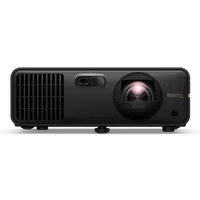
Why I like the BenQ AK700ST

There's no single projector that's perfect for every setup, as we all have different needs. But for most golf enthusiasts, the BenQ AK700ST has key features that let you practice more efficiently at home and actually improve your game.
My favorite feature is probably Auto Screen Fit. As someone without a lot of projector experience, the idea of manually setting the focus and fit of the screen sounded daunting, but this lets me push one button and get everything about as close to perfect as possible (after I got more comfortable, I started making small manual tweaks, but these aren't necessary).
This feature isn't just beneficial to golf, though, because having your screen fit correctly and focused properly applies to watching shows and movies and playing video games. You don't want to play Call of Duty with a slightly out-of-focus projector, and the Auto Screen Fit feature ensures this won't be a problem.

Purely for golf fans, the BenQ AK700ST has a Golf picture mode. With it, you get colors tailored for different golf course environments. This creates a more immersive golf experience by heightening the greens and other common golf-related colors. It's not going to actually help you improve your game, but it will make your practice time more enjoyable.
Probably the most important factor in helping you improve at golf, though, is the projector's versatility in placement. The short-throw lens is designed specifically for golf sim environments, allowing you to place it closer to the screen so it won't be in your backswing, even if your ceilings aren't the perfect height. And it can go as large as 200 inches, so you can get that immersive feel you want.
Not without drawbacks
Of course, nothing is without drawbacks, and the BenQ AK700ST isn't an exception. One minor issue is that it only has two HDMI ports (fairly standard for projectors, but still annoying), which greatly limits the number of devices you can hook up (your computer will require one port for your golf simulator, leaving you with only one port for a game console, smart TV, or anything else).
It doesn't sound like a big deal since you can do most things with a PC, but then you might want to hook up a soundbar via HDMI ARC — now you've used both HDMI ports, leaving no room for a game console or anything else.

To combat this, I ordered this 4-port 8K HDMI 2.1 switch on Amazon for $39. This gives me enough ports for my Switch 2, Xbox Series X, PC, and one flex spot for other devices, while allowing me to use the HDMI ARC port for my Bose Smart Soundbar (another must-have if you plan to use your golf sim for other forms of entertainment).
I also wish it had an optical port for hooking up the soundbar, as this would alleviate the need for HDMI ARC, but this is a fairly minor gripe since there's a perfectly reasonable solution outlined above.
BenQ AK700ST final thoughts
Perhaps the ultimate drawback for anyone looking to build a golf simulator on a budget is the price. At $2,899, this device will break the bank. But it has a 3-year limited warranty, and the light source is rated for 20,000 hours, which means you won't need a new one for several years.
Are there cheaper models that will do the job? Absolutely, but with 4,000 lumens of brightness, this projector will work in lighter spaces, which is harder to find on less expensive models.
I think it's worth the money, but if you are in the market for a budget-friendly projector designed explicitly for golf, consider the BenQ TH671ST Golf Projector, which comes in at $949. It's 1080p and 3,000 lumens, but with around $2,000 in savings, it might be worth considering.
Regardless, if you want to improve your golf game at home with as little setup and work as possible, a golf-specific projector is one of the must-have devices for your sim.

Follow Tom's Guide on Google News and add us as a preferred source to get our up-to-date news, analysis, and reviews in your feeds.
More from Tom's Guide
- I built the ultimate golf simulator in my home for under $10K — here's the products I used
- You haven't used a golf launch monitor until you've tried Foresight GC3 — here's my thoughts after 6 months of testing
- I ditched my boring golf bag for a customizable one — here’s why I’ll never go back