




There’s nothing like having another set of eyes in the cabin with you when you’re out on the road but that’s not always possible — which is why the first and most important accessory I got for my new truck was a dash cam.
Even while driving my old car around, I often felt like an idiot for not spending $100-$200 on a dash cam. I remember one specific time at Costco when another shopper hit my car twice in a row — with my newborn son in the back, no less — after I had already gotten out to tell her she’d hit me the first time. I called the cops, but besides filing a report, what could they really do?
It was at that moment that I vowed to get a dash cam. Unfortunately, it’s one thing to say you’re going to do something and another to actually do it. As I was driving home from the dealership in my new truck, I knew it was too expensive of an investment not to protect it with one of the best dash cams.
Although nothing anywhere close to that incident has happened yet (knock on wood), knowing that every time I turn on my engine I have both front and rear video recording in real time gives me tremendous peace of mind. This is especially true as I’m still a relatively new driver that only started driving a few years ago.
Here’s why I highly recommend getting a dash cam for your vehicle, why I picked the one I did, and the tricks I used for a completely clean install that rivals my desk setups back home.
Two cameras are better than one

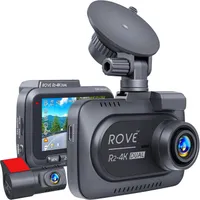
There are a lot of different dash cams available from a wide variety of manufacturers. Plus, it’s easy to get lost in all the various features and specs when picking one out for yourself. I did my own deep dive after checking out the recommendations from our own Tom Pritchard but in the end, I settled on the Rove R2-4K Dual dash cam.
It’s highly rated on Amazon, often goes on sale and for my particular needs, it’s not overly complicated. Remember, I wanted a dash cam for peace of mind while on the road, not for shooting first person racing or offroading videos. With all the fancy and high-tech dash cams out there, what I like about this particular model from Rove is that it reminds me of my Roku Ultra as it does what it needs to do with a simplicity that’s almost elegant.

Another thing I really liked about the Rove R2-4K Dual is that you get a ton of accessories in the box. Besides a front and rear camera, you get multiple mounting options, two super long USB-C cables, a microSD card (more on that in a bit) and for my purposes, a trim pry tool for the super clean install I was going for.
The main camera and the brains of the Rove R2-4K can be attached to your front windshield using the included adhesive tape or a suction mount. If you happened to come across my Govee Prism lights review, then you know — at least for me — adhesive is a no-go here in muggy Houston. The suction mount worked like a charm and it has yet to budge since I finished my install.
Now for the storage elephant in the room. From my research, Rove often gets a bad rap for using proprietary microSD cards. However, as I didn’t plan on using my dash cam to shoot impromptu video, I wasn’t too concerned about adding extra storage to the R2-4K. Since the dash cam automatically overwrites recorded clips when its storage space gets low, I knew I’d always have the clips I needed if I ever got into an accident, or more likely here in Houston, someone else hit me.

In the box, you also get a rear mounted camera that needs to be connected to the main one via a 21-foot USB-C cable. Despite my ongoing doubts about adhesive tape here in Houston, this rear camera hasn’t budged either since my install.
What I like about having a dash cam with both a main and rear camera is that when combined, you’re almost getting a 360 degree view of your vehicle. There are dash cams out there that give you a full 360 degree view but they’re more expensive and the simple nature of this one from Rove spoke to me. I have too many high-tech gadgets in my home and I wanted one that was reliable with physical buttons in my car.
With everything unboxed and laid out on a table in my garage, it was time to roll up my sleeves and get to the actual install.
Taking my cable management out to the car

As part of my work at Tom’s Guide, I test and review the best standing desks. Besides being one of the main reasons I opted for a truck to transport them, building desk setups like this triple monitor one has pushed me to continually improve my cable management skills. While I can put together a desk setup without any visible wires, accomplishing the same feat in a car is a bit more difficult.
Still, after purchasing my dash cam, I wanted to try to recreate this experience in my truck and see if my skills were transferable. After planning out the installation and watching a few YouTube videos showing how others had done the exact same thing with my particular truck, it was time to get to work.

Given the fact that I bought the Rove R2-4K Dual with my own money and hadn’t planned on writing about it, I didn’t take any pictures during my install. However, I did take one of my dog, Mario, trying out the new truck.
If you look closely at the sail panel — the plastic trim that houses a car’s side-curtain air bags — you can see how I have a wire running along the edge. Just like when putting together a desk setup, you want to carefully plan out your install before you get started and that’s exactly what I did.
To have the USB-C cable from my center console not be visible, I tucked it under the glovebox and ran it up the gap between the door and my dashboard. With that sail panel, I actually removed it and ran the cable behind the side air bag. This was a crucial step, as you want to ensure the wire is tucked behind the airbag housing so it doesn't interfere with deployment in an accident.
From there, I tucked the cable under where my truck’s headliner meets the top of its windshield. I was a bit worried at first as I had never taken apart a car like this, but once I got going, I felt like I was running cables from the underside of my desk up through one of the best monitor arms.

In the picture above you can see what the finished installation looks like. Only a few inches of that USB-C cable are exposed as I did have to drop it down to plug it into my dash cam. Since the Rove R2-4K Dual has a rearview camera, I had to repeat the process on the driver side of my truck too. I then ran the cable for the rearview camera all the way across my truck’s cabin and down from the headliner to where I attached it on my rear window.
It goes without saying that if you’re worried about damaging your car or breaking your warranty, then you should probably have a professional installer get your dash cam set up. However, as I love a bit of DIY, I decided to do the whole thing myself and I’m glad I did as I learned a lot about my new truck along the way.
A wider rearview mirror (that remembers everything)

Although a dash cam with a single camera will definitely capture any head-on collisions, I opted for one with a separate, rear-facing camera and I’d recommend paying a bit more to do so too. The reason why is simple: you’re more likely to get rear-ended than you are to crash into the car in front of you.
If someone does hit your car from behind, what’s stopping them from trying to flee the scene? With a high-quality rear camera, you’ll have the whole incident on video — along with their license plate info — which will satisfy both the police and your insurance provider.
One thing that I wasn’t expecting to like as much as I do is the wider field of view I get from the screen built into the Rove R2-4K Dual. My rearview mirror is more than enough for most situations, but when I want to see how close the car behind me actually is, I turn my head ever so slightly and look at the dash cam screen instead.
With the Rove R2-4K Dual and most dual-camera systems, you can choose which video feed to display. I tried several configurations after the install, but once I saw the expansive view from the rear camera, I kept the screen set to that perspective full-time. Even though the screen shows the back, the device is still silently recording everything happening in front of the truck in 4K.

As a new truck owner, I’m still gaining experience hauling cargo. The second accessory I bought was a set of ratchet straps to ensure my loads are secured correctly. Even with the right gear though, you still want to check in on your cargo from time to time. The last thing I want is to be that person on the highway whose cargo falls out of their truck bed because a strap came loose.
From my rearview mirror, I can only make out the very top of what I’m hauling — like the leg of a standing desk. By checking the dash cam feed instead, I get a complete picture of the truck bed. It gives me the certainty that everything is staying exactly where I put it, making each drive with cargo a lot less stressful.
Don’t leave home without one
Besides desk setups and home office furniture, I also cover hackers and cyberattacks at Tom’s Guide. One topic I write about fairly often is identity theft. Once your identity is stolen, it can take years of work and a lot of money to get it back. However, if you invested in one of the best identity theft protection services beforehand, the recovery process is a whole lot easier.
I feel the exact same way about my new dash cam. While there are cameras on the road and you may be lucky enough to find a witness to vouch for you after an accident, nothing beats having video showing exactly what happened. I’m sure a lot of people who have been in accidents wish they had invested in a dash cam after the fact. Since I didn't want to be one of those people — and because I wanted to protect my new investment — I decided to put my money where my mouth was and install a dash cam before it was too late.
Now, I know not everyone wants every merge and turn they make recorded 24/7. However, the alternative of being in an accident without any evidence to prove I wasn’t at fault sounds a whole lot worse to me. If there’s one accessory I recommend that every driver buys for their vehicle, it’s a dash cam. After installing my own, I’m already planning to convince my wife and anyone else who will listen to follow suit.

Follow Tom's Guide on Google News and add us as a preferred source to get our up-to-date news, analysis, and reviews in your feeds.
More from Tom's Guide
- I tested more than 40 EVs this year — here's the top 5 most efficient models (and 3 worst)
- I'm not anxious that it's getting darker earlier with this thermal camera for my car — here's why
- I tested Alexa+ and liked it so much I put my Echo Auto back in my car — now I can’t imagine driving without it

