




Happy holidays, everyone! I hope you've all been having a restful break from work, and are enjoying lots of chocolate and sweet treats. I'm sure many of you have either bought or have been gifted some fantastic presents and tech that you can't wait to try out. If you just got a drone for Christmas, congratulations and welcome to the club.
Aerial photography is extremely exciting and it has been a great year for drones, but it can be a little overwhelming if this is your first time owning a quadcopter. If that is the case, you've come to the right place. I oversee the drones coverage here at Tom's Guide, and I personally test and review the best drones nearly every month.
I'm a licensed drone pilot, based in the U.K., and I'm here to tell you about the things you should do before taking to the skies for the first time — from registering your quadcopter and charging it up, to conducting pre-flight checks, amongst other things. Once you've taken your first flight, let me know in the comments what you thought of it!

I review the best cameras and best drones here at Tom's Guide. I've adored photography for as long as I can remember, and when I'm not working, I love taking my Fujifilm X-T50 or my DJI Air 3S on a walk and capturing the sights. My favorite subjects to photograph are animals, birds, and my partner. You can follow my work on Instagram.
1. Register your drone

One of the first things you need to do when you unbox your shiny new drone is register it with your local governing body. In the U.K., where I'm based, you need to register your quadcopter with the C.A.A., and if you're in the U.S., head over to the F.A.A. website for registration.
Bear in mind, registering your drone depends on the type you have. Some drones, such as the DJI Flip and the DJI Neo 2, weigh less than 8.81oz / 250g. Because of their light weight, you don't necessarily need to register them, as the rules are more relaxed. However, if your drone weighs more than that, such as the DJI Mavic 4 Pro or the DJI Mini 5 Pro (when using Intelligent Flight batteries), you definitely need to register it.
2. Check the weather

Once you've registered your drone, it's time to go flying! Exciting, but hold your horses. What's the weather looking like outside? It's vital that you check the weather before heading out. You can use the weather app on your smartphone or use a website, like the Met Office in the U.K. or the National Weather Service in the U.S. to check not just the weather, but also how windy it is.
Different drones have different wind resistance levels, so it's crucial that you not fly if it's stormy or extremely windy outside. Most consumer drones aren't weather-sealed either, so be mindful not to fly your quadcopter when it's raining. Sunny and cloudless conditions are ideal, of course.
3. Charge your batteries

Once the weather is looking ideal, check and charge your drone batteries. Most consumer drones can fly for under 40 minutes on a single charge — some even less. It is, then, very important that you carry spare batteries, especially if you're heading far from home. Trust me, there are few things worse than when you drive somewhere to fly, take your drone out, and realize you have only 10% battery remaining.
4. Update your drone's firmware

When you unbox your drone, bear in mind that it may not have the latest firmware installed. More often than not, it'll be an out-of-date firmware, as the drones are boxed up weeks or months in advance of you receiving them. Use your drone's companion app to update the firmware of the drone as well as the controller.
Updating the firmware ensures that the drone and controller function as intended, and that their safety features are up to mark and functioning as well as they can be.
5. Conduct a pre-flight check

Now that you've done the first steps and are out in the field, it's time to conduct a pre-flight check. Even though I've been flying drones for years, this is something I always do, and it helps ensure that your drone doesn't malfunction mid-flight, preventing crashes.
What does this involve exactly? It's simple, so don't worry. You must check all of the drone's parts. This means you should check that the gimbal can move freely, and ensure the propellers aren't damaged. Propellers can be delicate and can get damaged if you drone bumps into something. Most drones come with spare replacement propellers, and it's fairly easy to replace them as they utilize a lock and twist mechanism. There will be detailed directions in the drone's manual.
Sometimes, you'll get a notification on the drone's companion app to recalibrate the compass and gimbal, so don't ignore it. This ensures you drone is able to fly back home accurately. Last but not least, check the drone has enough storage, and carry a spare microSD card if your quadcopter supports it.
6. Keep an eye on your drone

Have you taken off yet? Nice, congratulations on your first takeoff! Now, it's important to keep your drone in visual line of sight (VLOS). Regardless of where you're flying — whether it's an open field or a cityscape — you should be able to see your drone at all times.
This is a legal requirement in most countries, and it also helps you gauge obstacles, people, vehicles, etc. The last bit is especially important if your drone doesn't feature obstacle avoidance, as a few don't.
7. Utilize your drone's safety features

Your drone is packed with safety features, especially if you got a drone that's more on the expensive side of things. Some quadcopters, like the DJI Mini 5 Pro and the DJI Neo 2, feature omnidirectional obstacle avoidance which means they can either bypass or brake in front of obstacles.
You should always utilize these safety features, especially if you're in a sticky situation or are unsure of what to do. For instance, 99% of drones feature something called "return-to-home." This means that your drone can automatically return to its last-known takeoff position when you hit the button, or battery is running low. My motto? When in doubt, RTH — and so should you.
8. Keep an eye on your controller

Your drone's controller, or your smartphone, shows lots of vital information and you should keep an eye on it. This information includes but is not limited to wind speed, number of connected satellites, signal strength, height and distance, drone battery level, and more. Depending on the manufacturer, the controller will also display flight warnings.
9. Grab some accessories
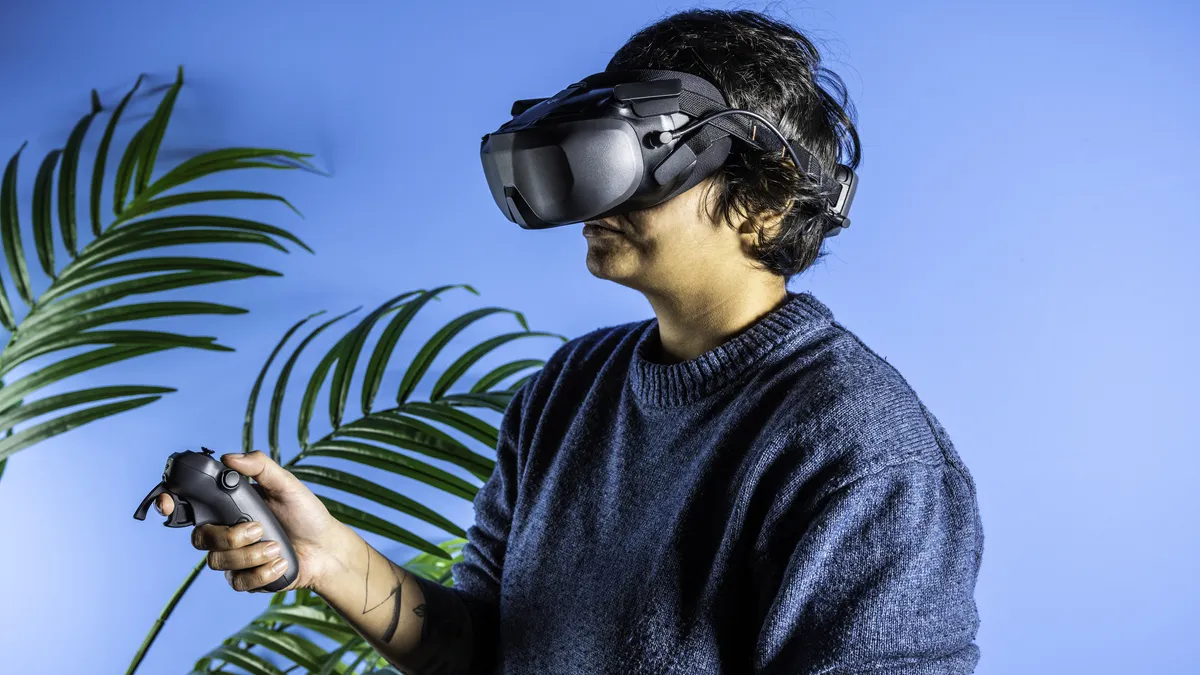
Trust me when I say that once you've got a taste for drone flying, you want to do everything you can to enhance that experience. Luckily, there are plenty of accessories available out there, and it's definitely worth investing in them. Whether that's a landing/launch pad or a first-person view (FPV) headset for immersive flying, get some accessories for yourself.
My top recommendation, if you own the DJI Avata 2, DJI Neo 2 or the DJI Neo, is to buy the DJI Goggles N3 and the DJI RC Motion 3 controller. These FPV gadgets make flying more intuitive and immersive, and I enjoyed it so much that it made me not want to use traditional controllers again!
10. Stay away from wildlife

Another important thing to remember while flying a drone: do not disturb wildlife. Animals are sensitive to loud sounds, and we shouldn't be disturbing them in their habitat. You can fly your drone at a distance, of course, where you're sure the loud noise isn't rattling them.
This applies to birds too. Birds may want to protect their nests and might get territorial, so they may see your drone as a threat. It is crucial that you withdraw your drone and promptly return to home in case you're in a pickle. Again, remember: when in doubt, RTH.
11. Have fun!

Last but not least, remember to have fun! Aerial photography is extremely exciting and it can help you get creative. Few things compare to the joy you feel when you see the world from a bird's eye view. Experiment with different photography and videography styles, have fun in a group of people with QuickShot Intelligent Flight modes, just go for it — as long as you're being safe and following the law, of course.

Follow Tom's Guide on Google News and add us as a preferred source to get our up-to-date news, analysis, and reviews in your feeds.
More from Tom's Guide
- Best drones in 2025
- I tested the DJI Neo 2 and it’s so good that I don’t want to go anywhere without it
- I test drones for a living — here’s what I think of Reddit’s top recommendations for beginners

