




With prices increasing on just about everything, it’s refreshing that Google kept its most affordable brand-new Pixel at the same price as before. Now that I’ve spent over a week with the Pixel 10a, I have a much better sense of what this best cheap phone contender actually offers.
In my Pixel 10a review, I noted that this device has the fewest hardware upgrades of any successive model I’ve tested in recent memory — like how it recycles the same Tensor G4 chip found in the previous Pixel 9a. But despite the lazy upgrade, the Pixel 10a continues to offer the best value of any phone on the market right now.
Over the weekend, I captured even more photos with its cameras (the same 48MP main and 13MP ultrawide pairing as before) and dove deeper into the software. Here’s what I like and don’t like about the Pixel 10a so far.
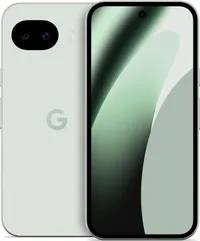
Google Pixel 10a: Pros
New Pixel desktop mode

I cannot emphasize enough how valuable the new desktop mode is on the Pixel 10a. While the previous version I tested was still locked away for developers, it’s now a native feature with the Pixel 10a.
This new desktop mode essentially gives me a Windows-like interface when I connect the phone to a monitor via USB-C. I’ve tested this new mode in great detail, and I’d go as far as to say that it rivals Samsung DeX. It’s the perfect tool to fall back on if I happen to leave my laptop at home but still need a desktop-like experience at work.
120Hz refresh rate

In 2026, I still can’t believe phones like the iPhone 17e are stuck with 60Hz displays. Looking at the Pixel 10a, I’m constantly reminded that 120Hz should be the minimum. It doesn’t just make game graphics look better; it also gives the phone a generally snappier feel across all the different interface animations.
Longer battery life
Average Battery life (Hrs:Mins) |
Charging % in 15 minutes |
Charging % in 30 minutes |
|
Pixel 10a |
15:16 |
31% |
64% |
Pixel 9a |
13:08 |
25% |
47% |
Despite having the same 6.3-inch Actua display, 5,100 mAh battery, and Tensor G4 chip as its predecessor, I’m shocked to find that the Pixel 10a lasts significantly longer. In Tom’s Guide’s battery drain test, it reached an average of 15 hours and 16 minutes — a solid improvement over the 13 hours and 8 minutes averaged by the Pixel 9a.
Call Screening works like a charm

If you haven’t experienced Pixel’s Call Screening, you’re missing out because it’s one of the best examples of how helpful AI can be in a daily routine. Instead of letting a call go to voicemail, the Pixel 10a screens it on my behalf and presents me with different responses I can choose from based on the conversation. Honestly, Call Screening feels like having an actual human managing my line to handle every incoming call.
Google Pixel 10a: Cons
No meaningful camera performance improvements
When I review phones, the first thing I test is how the cameras perform. In the case of the Pixel 10a, I’m disappointed that not only does it feature the same hardware as before — a 48MP main camera paired with a 13MP ultrawide — but there also don't seem to be any changes to its image processing algorithms. As a result, the photos I captured with the Pixel 10a and Pixel 9a look practically identical. Just look at the side-by-side photos above to see what I mean.
Still missing magnets for Qi2 magnetic charging

Unfortunately, we’ll have to wait another year for the Pixel A-series to potentially offer Qi2 magnetic wireless charging. That’s because the Pixel 10a lacks the embedded magnets required for PixelSnap support — a feature the rest of the Pixel 10 lineup uses to enable magnetic charging. This means that if I want to use the Pixel 10a with my MagSafe wallet or any of my 3-in-1 MagSafe chargers, I still need to buy a specialized magnetic case.
Reuses the same processor

One piece of hardware that often gets upgraded in a new device is the processor. However, that’s not the case here with the Pixel 10a, as Google chose to repurpose its Tensor G4 chip. As a result, there’s no performance boost whatsoever.
In the past, the Pixel A-series was typically powered by the latest chip, which would’ve been the Tensor G5 this time around. While this isn’t the first time Google has opted for an older chip, it certainly doesn’t help that other parts of the hardware are also identical to its predecessor.
Despite the lackluster hardware upgrades, the Pixel 10a continues to have a robust software experience made better by new AI tools like Auto Best Take and Camera Coach. In fact, it's going to come down to new Pixel Drop updates to make this phone better as time passes.

Follow Tom's Guide on Google News and add us as a preferred source to get our up-to-date news, analysis, and reviews in your feeds.
More from Tom's Guide

