Since I get to work with such a talented bunch of nerds who have the opportunity to test dozens of devices every year, I thought it might be fun to check in with the Tom's Guide computing team and ask: what's your favorite gadget of 2025?
The responses I got were intriguing and I think they're all great devices, so I figured I'd share these suggestions from the team. If you have your own suggestions for the best gadget of 2025, why not shout it out in the comment section below?
Asus ROG Flow Z13


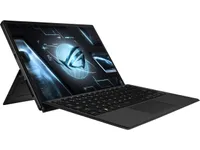
Something changed in PC gaming in 2025. Up until this year, the only real way to play was with a power-hungry dedicated GPU strapped to your system. But integrated graphics took a huge step forward this year (something I predicted right at the beginning of this year), and the perfect embodiment of this is the Asus ROG Flow Z13.
Packed with AMD’s Strix Halo, you’re getting up to RTX 4070 levels of performance without the power drain of dedicated graphics — all in a slim, sleek 2-in-1. It’s basically a Surface Pro if you gave it steroids, and it brings serious versatility to AAA gaming wherever you are.
The Flow Z13 is the starting pistol being shot on integrated graphics beginning to creep more and more into the gaming laptop space. I’ve seen this first hand in AMD’s chips, Intel’s upcoming Panther Lake, and even the Snapdragon X2 Elite is seeing some solid gaming performance. We’re now at a time where you can get an ultra thin-and-light notebook that can just so happen to play games really well too.
Even Realities G2


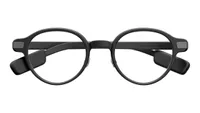
I know. Despite Mark Zuckerberg making a grand reveal of the Meta Ray-Ban Display this year (with an on-stage hiccup), pushing the future of smart glasses to new heights, those weren’t the specs that really blew me away. Actually, it was the ones that don’t look like smart glasses at all: the Even Realities G2.
No cameras, no speakers and no high-detail Micro-OLED displays offering 150-inch virtual screens here. So what makes them the only pair of smart glasses I’d wear on a daily basis? Well, just that. Stripping down all the latest features this category of devices has to offer has not only jump-started a new era of wearable smart tech, but also one that’s a necessity for those who wear glasses in their everyday lives. To me, that's what makes the G2 one of the best smart glasses around today.
That, and they boast advanced Even AI and features that are actually useful, including the cheat sheet-like Conversate that offers context to conversations in real time, along with a wickedly sharp dot matrix green display (for both lenses) with a layered effect that makes navigating menus and reading text a breeze.
All that wrapped up in a subtle, stylish-looking pair of specs? The Even Realities G2 are the day-to-day smart specs done right, and that’s not even mentioning the Even R1 smart ring that takes these glasses even further.
Amazon's new Kindle Scribe


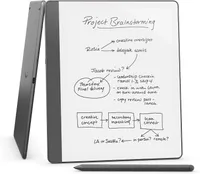
This could be recency bias since it’s one of the last products I reviewed this year, but my favorite product of 2025 is the new Kindle Scribe. I’ve been an avid Kindle user for years, and credit Amazon’s e-reader for helping me read more books in the past seven years than I have in the decade prior. I’m very familiar with the Kindle experience, but the Kindle Scribe just provided me with a new way to enjoy my favorite line of e-readers.
While the main draw (no pun intended) of the Kindle Scribe is that you can take notes or write on its display, this feature is all but superfluous to me since I don’t like writing by hand. The real magic of the Kindle Scribe is its 11-inch e-paper display that makes me feel like I’m reading a real paperback book. Unlike with the basic Kindle or Kindle Paperwhite, I don’t have to adjust the font or margins to get a comfortable reading experience. It’s practically perfect out of the box! The tablet’s lightweight design and auto-brightness are also highlights.
It will be hard going back to the Kindle Paperwhite after experiencing the Kindle Scribe. I predict I’ll be doing a lot more reading thanks to this device. And not just novels, as the new Scribe is also excellent for black and white comics and manga. If you’re a bookworm with an extensive collection of digital books from Amazon like I am, then you should consider checking out the new Kindle Scribe. It’s my favorite product of the year, and I think it could become your fave as well.
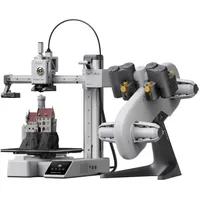
Bambu Lab A1 Combo


I’ve been on the outside looking in at the exciting world of 3D printers since the first models hit the market. Sure, I wanted to try one, but it just didn’t seem like a necessary purchase. Now, I’ve finally got my hands on the Bambu Labs A1 Combo, and I can’t stop making stuff and things. Functional, useless, pretty, ugly — I’m printing it all.
Not only am I having fun printing Minecraft characters and other fun doohickeys for my step-son, but I’ve printed a couple of useful items for my favorite hobby: golf. I have a full golf simulator setup in my living room from Carl’s Place, and I printed a ball dispenser that tees up the balls for you and a tee holder that keeps the simulator’s tees right where you need them (with the help of some cheap elastics). It felt great to print these instead of ordering a more expensive version from someone else who probably would just use their own 3D printer to make them.
The main reason I like the Bambu Labs A1 Combo is the value proposition. It’s a competent printer once you add the Multi-Color Printing that comes with the Combo. Its 256x256x256 build volume is enough to print all kinds of projects, and the $559 price tag is highly competitive in the 3D printer space (it’s usually on sale for less, and it’s $399 right now).
At the end of the day, choosing a 3D printer is no easy task, and our best 3D printer guide will help, but if you’re just getting started like I was, the Bambu Labs A1 Combo is my go-to recommendation as it’ll grow with you even as you turn into a 3D printing expert.
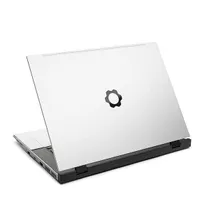
Framework Laptop 16


We reviewed over 100 laptops in 2025, but for my money there's one that stands head and shoulders above the others. It wasn't the lightest, the fastest or the longest-lasting, but if I had to buy one laptop this year it would be the new Framework Laptop 16.
If you missed my original Framework Laptop 16 (2025) review, just know that the 2025 edition updates the ultra-configurable Framework Laptop 16 with optional Nvidia GeForce RTX 50-series laptop graphics cards. It's the first time this Framework has been available with an Nvidia GPU, and the upgrade to RTX 50-series power (not to mention access to Nvidia's DLSS upscaling tech) unlocks new heights of power for the Framework Laptop 16.
I love that because the Framework Laptop 16 was already the most customizable gaming laptop you can buy, and now it has the muscle to compete with the best gaming laptops toe-for-toe. And while I wish the screen got a little brighter, the fact that you can open up the laptop to upgrade the RAM or swap in a new CPU when you need to is an unbeatable value. Factor in the fact that the six-slot Expansion Card system gives you plenty of room to mix and match your favorite ports as you need to, and you start to appreciate why the Framework Laptop 16 is my favorite laptop of 2025.

Follow Tom's Guide on Google News and add us as a preferred source to get our up-to-date news, analysis, and reviews in your feeds.
More from Tom's Guide
- Logitech just unveiled a solar keyboard that could last for a literal decade
- I review laptops for a living, and these are my 3 favorite laptop travel accessories
- Windows turns 40 — here's the 20 best (and worst) moments in Windows history