




I test the best keyboards here at Tom's Guide. Since I started in April 2024, I have tested over 80 of them — mechanical, membrane and magnetic. Many of them have been great, some of them have been downright awful to the point that I've boxed them up as soon as I've finished testing them.
Recently, I've noticed a trend. Whenever I'm contacted by a brand or a keyboard arrives at our testing lab, it's often a Hall Effect keyboard. And honestly? I'm tired of it.
Magnetic keyboards are fantastic, don't get me wrong, but it feels like every manufacturer is jumping on board the Hall Effect hype train. It makes sense, but can we please start showing mechanical keyboards some love again? At least Keychron has decided to refresh some of its mech keyboards and introduce 8K polling to them, such as the V1 Ultra, which is nice.
I've spent the last week testing a Hall Effect keyboard and a mechanical deck, and I much preferred the latter at the end of the testing period. In my opinion, the GravaStar Mercury V75 Pro HE can't hold a candle to the Epomaker P65.
The Mercury V75 Pro HE is a good keyboard, but the P65 is a great keyboard. Though they're different in terms of the switches they use (Hall Effect vs MX), if I had to buy just one, I'd get the P65. It's sleek. It's portable. It's fast. It sounds incredible, and it types even better, and it's convinced me that magnetic decks aren't the end-all be-all. Here's why I'd still buy a mechanical keyboard in 2026.
Nothing comes close to the sound profile

One of the most important things I've learned, having reviewed keyboards for nearly two years, is that people love how they sound, and a keyboard's sound profile is a big pre-purchase consideration for some.
You've got so many different sound profiles. Clacky, thocky, creamy, silent, and so on. Mechanical keyboards, by the nature of their switches, sound much better than magnetic decks, in my opinion. The Epomaker P65 sounds so much better than the GravaStar Mercury V75 Pro HE, and it isn't even close.
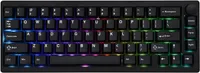
The P65's Wisteria linear switches (which I tested) sound thocky and clean and oh-so-sweet. I could listen to its sound profile all day long if I could. The Mercury V75 Pro HE sounds... okay. But this is a limitation of Hall Effect switches. Mechanical switches utilize physical moving parts that create distinct sounds upon impact, while Hall Effect switches are designed to be frictionless, contactless and usually muted, as they use magnets instead of actual physical parts.
Technicalities aside, to me, mechanical switches sound like they have more soul and feel to them. This is entirely a personal preference, but I simply prefer the auditory feedback of MX switches. Thanks to the auditory feedback, it also makes me a faster typist, which brings me to my next point.
A typist's dream

The Epomaker P65 is a typist's dream, and I will die on the hill that mechanical keyboards are much better for typing than magnetic decks. This might not even be an unpopular opinion because mechanical switches offer superior tactile feedback and a "physical bump" which helps you type faster, as you can tell exactly when the switch has been pressed and activated.
Magnetic keyboards are far better for gaming than they are for typing. The GravaStar Mercury V75 Pro HE's Gateron switches have adjustable actuation points down to 0.005mm, so you can tailor the switches to suit your game style. They're also more durable, so they're better suited to gaming. While they're decent for typing, my typing speed and accuracy have always been better on mechanical keyboards.
Of course, one of the downsides of using a mechanical keyboard over prolonged periods of time is that the switches' physical components can get damaged and need to be replaced. A keyboard like the P65 is hot-swappable, so you can change switches without de- and re-soldering them to the PCB, thankfully. Magnetic switches are longer-lasting and more durable, in comparison. Even so, as someone whose bread and butter is typing 10,000 words a week, I'd stick with a mech deck.
Money well spent

This won't be true for every magnetic and mechanical keyboard, but it is true with the GravaStar Mercury V75 Pro HE and the Epomaker P65. I, personally, wouldn't want to spend over $200 on a keyboard that looks like a spray can exploded next to it.
The Mercury V75 Pro HE, as I pointed out in my full review, looks like someone ate a bag of Skittles and then threw up on the board. The Neon Graffiti design is just not to my taste. I prefer my keyboard a bit more lowkey — and less cringe.
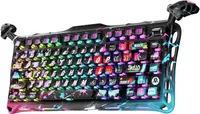
GravaStar has never shied away from giving its keyboards funky designs unlike anything we've seen from the likes of Epomaker, Keychron, Lemokey, or NuPhy. After all, this brand made the fully transparent Mercury K1 Lite, which could help guide planes that are landing. But I think this time, GravaStar may have gone a step too far. There's nothing wrong with innovation — in fact, it should be encouraged! But I feel like there are more tasteful ways of doing so.
This is one of the primary reasons I much prefer the Epomaker P65. Its low-key Khaki design has won me over, and if it wasn't for the RGB backlighting, the keyboard would look like one I used to type away on in my school's computer lab. I will say, though, that this comes down to individual taste and preference. If you like the (ridiculously) colorful Mercury V75 Pro HE, good for you. But if you prefer the P65's inconspicuous design, I'll give you a virtual high-five.

Follow Tom's Guide on Google News and add us as a preferred source to get our up-to-date news, analysis, and reviews in your feeds.
More from Tom's Guide
- The GravaStar Mercury V75 Pro HE stands out for its polarizing design — but its rivals outperform it at much lower prices
- I just tested the Epomaker P65 — and it's reminded me how much I love mechanical keyboards in the era of Hall Effect
- Best keyboards in 2026: tested and rated

