





Tom's Guide Verdict
The Oakywood Standing Desk Pro is a masterclass in home office furniture, blending a handcrafted solid wood top with robust, industrial-grade construction. It is remarkably stable and feature-rich, offering silent Bluetooth-controlled height adjustments and smart standing reminders. While its premium price — impacted by 2026 tariffs — and the need for semi-regular wood maintenance may give some pause, its timeless design and heirloom build quality make it a true “forever desk” that only gets better with age.
Pros
- +
Clean, minimal design
- +
Incredibly easy to assemble
- +
Handcrafted, all-wood desktop
- +
Industrial-grade hardware with smart app
Cons
- -
Quite hefty
- -
Priced at a premium
- -
Regular maintenance required
Why you can trust Tom's Guide Our writers and editors spend hours analyzing and reviewing products, services, and apps to help find what's best for you. Find out more about how we test, analyze, and rate.
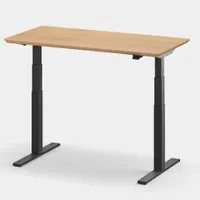
The Oakywood Standing Desk Pro isn’t your typical standing desk, thanks to its premium materials and excellent build quality. Instead of a cheap laminate desktop, you’re getting a handcrafted, all-wood desk paired with a sleek steel frame. After living with this desk for over a year, it might just be the best one I’ve tried yet.
Available in five finishes and six sizes, the Oakywood Standing Desk Pro is a masterclass in desk aesthetics. Since I first received it, Oakywood has released several optional add-ons — like an under-desk cable management tray and a desktop grommet — that further refine the experience.
Unfortunately, over the past year, this desk has jumped from an attainable splurge to a luxury investment. Still, if you’re looking for a workspace that’s built to last a lifetime and looks more like an heirloom than a piece of office equipment, the cost may be justified.
My Oakywood Standing Desk Pro review will help you decide if this is the best standing desk for you or if you’d be better off investing in something less expensive. That way, you can pick up one of the best office chairs to go along with your new desk instead.
Oakywood Standing Desk Pro: Cheat sheet

- What is it? A premium, hand-crafted electric standing desk available in several desktop sizes and finishes.
- Who is it for? Those who want to upgrade from an existing standing desk to something more long-term, or people who want a premium desk that don’t want to worry about upgrading later.
- What does it cost? The Oakywood Standing Desk Pro starts at $1,429 in the smallest configuration with an Oak veneer top, but can go as high as $3,000 with a Walnut top and all of the optional add-ons.
- What do we like? Its stable and robust build, how easy it is to put together, the LINAK frame and motors, and how you can control the desk via your phone.
- What don’t we like? The high price, which has risen significantly over the past year and that the cable management tray is sold as an optional add-on.
Oakywood Standing Desk Pro: Specs
Desktop size |
472. x 23.6 inches, 51.2 x 25.6 inches, 55.1 x 27.6 inches, 59.1 x 29.5 inches, 63.0 x 31.5 inches, 66.9 x 33.5 inches |
Desktop styles |
Oak, walnut, black, oak veneer, walnut veneer |
Leg colors |
Black, white |
Min/max height |
24.8 to 50.4 inches |
Max supported weight |
154 pounds (70kg) |
Electric |
Yes |
Noise level |
50 dB |
Memory presets |
2 |
Grommets |
No |
Cable management |
Optional under-desk cable management tray |
Warranty |
5 year |
Oakywood Standing Desk Pro: The ups
The Oakywood Standing Desk Pro immediately stands out from other desks I’ve reviewed thanks to its handcrafted, all-wood top and incredibly simple assembly. Complementing the wood are high-end touches like the premium LINAK frame and seamless Bluetooth height control, which solidify its status as a premium workspace.
Snapping into place

The Oakywood Standing Desk Pro arrived in two boxes, with the frame and legs in one and the desktop in the other. What surprised me most about the packaging is how Oakywood took the extra step to secure the oak desktop I picked out in a custom-built wooden crate instead of a standard cardboard box.

After removing a few screws to open the crate, I was left with the desktop itself, a pair of black legs and feet, the rest of the parts that make up its stainless steel frame, and a paddle-style controller like the one on the Branch Duo.

From there, I used a power drill and screws to attach the frame to the desktop. The process was remarkably quick, as Oakywood provides pre-drilled holes that align perfectly with the hardware.

Just like the Hexcal Elevate, Oakywood sources its frames and legs from LINAK, a company renowned for its industrial linear actuator systems. Instead of the typical 'bag of bolts' approach, LINAK uses a more intuitive method to secure the legs. Once the leg is inserted into the frame, you simply use your foot to press down on a plastic locking mechanism until it snaps into place. It felt sturdy immediately, and the legs on my desk haven’t budged an inch in over a year.

Although Oakywood’s cable management tray add-on wasn’t available back when I received this desk, the company does include a metal cover to protect the control box and to hide some of the wires coming from each leg. Since it’s an all-wood desk, I was easily able to add my own cable management tray, which is certainly a more cost-effective option since the official one isn’t included and costs over $100.
Hand-crafted elegance

With the Oakywood Standing Desk Pro fully assembled and flipped over, I had to stop and admire the desktop. Normally, I configure review units with the least expensive laminate options to keep things relatable. While laminate is easy to clean, it doesn't draw the eye like solid wood.
From the moment I touched the surface, I knew this was something else entirely. Instead of particle board wrapped in a thin veneer, it’s a substantial slab of real timber with the grain and heft to prove it. While my walnut desktop was sourced from the U.S., Oakywood's oak options are sourced from state-owned forests in Poland near the company's headquarters in the Polish Highlands.

The desktop features uniquely milled edges that curve inward, and even after a year of use, it still feels incredible to the touch. This is because Oakywood coats the wood in an eco oil-wax that preserves its natural pores rather than sealing them under a thick, plastic-like finish. If you want a workspace that inspires rather than feels like a sterile office cubicle, the premium for this wood is well worth it.
Just smart enough

At a time when standing desk companies are adding integrated touchscreens or trying to incorporate AI into their home office furniture, Oakywood takes a “less is more” approach to smartening up its desks. On the backside of the Oakywood Standing Desk Pro’s paddle-style controller, there’s a small button. When pressed, it starts the Bluetooth pairing process to connect with your phone.

To adjust your desk’s height and to set standing reminders throughout the day, you have to download the Desk Connect app for your iPhone or Android device. This isn’t an Oakywood app, though. Instead, it’s actually from LINAK — the same company that makes the frame. This allows you to control this desk as well as other desks with the same hardware.

To adjust your desk’s height and to set standing reminders throughout the day, you have to download the Desk Connect app for your iPhone or Android device. This isn’t an Oakywood app, though. Instead, it’s actually from LINAK — the same company that makes the frame. This allows you to control this desk as well as other desks with the same hardware.
A versatile year-long companion

Back when I first built the Oakywood Standing Desk Pro, I thought I’d review it and move on. However, other projects kept getting in the way, which is why I held off on sharing my thoughts for so long.

Over the past year, though, I’ve consistently returned to this desk whenever I needed a reliable foundation for a new story. I’ve used it to build everything from a distraction-free workspace to my first triple-monitor setup, and most recently, a dual-monitor rig to test out the MSI Cubi NUC AI+ 2MG.
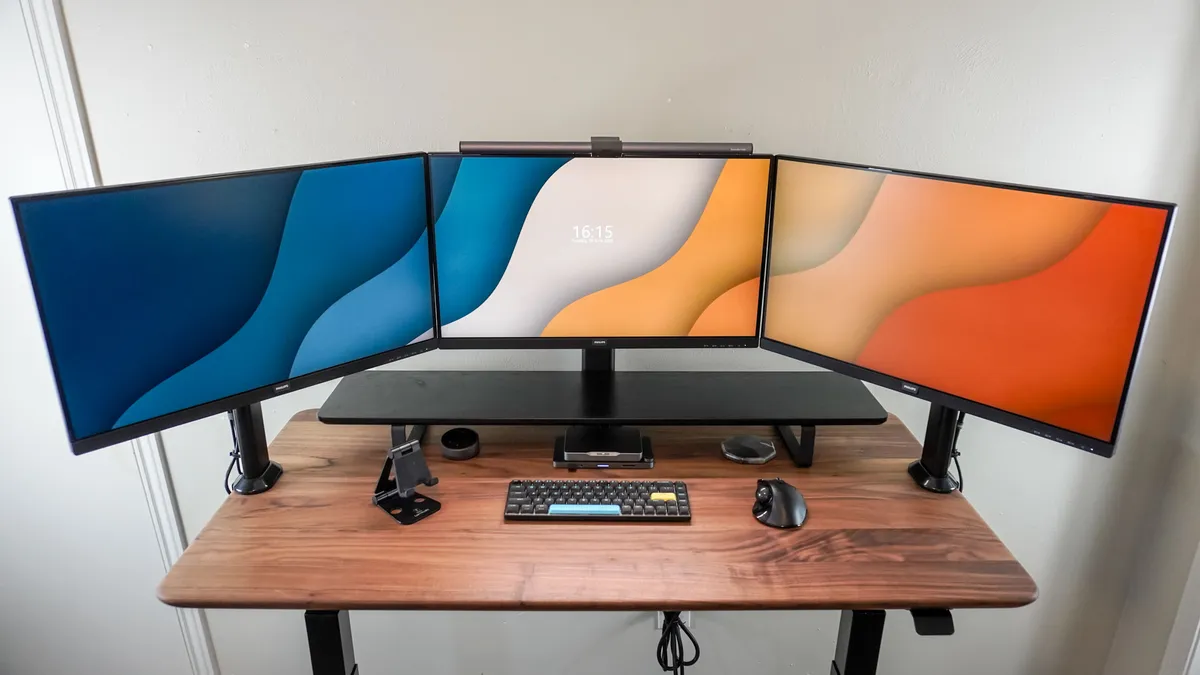
The solid wood top makes modifications like adding custom cable hooks or under-desk mounts — as I did for my triple-monitor setup — an absolute breeze. While I normally use a desk mat in my setups, this was the first time I chose to forgo one entirely. I simply couldn’t get over the premium feel of the eco oil-waxed oak on my forearms while typing.
Oakywood Standing Desk Pro: The downs
The Oakywood Standing Desk Pro is an exceptional piece of furniture, but it isn’t without its trade-offs. Most of these stem from the inherent nature of living with real wood — which requires more care than a cheap laminate — and a significant price hike that has pushed this desk deep into the luxury category.
Real wood, real wear

With a cheap laminate desktop, all it takes is a quick wipe down with a wet cloth to have it looking and feeling like new. However, since the Oakywood Standing Desk Pro is made of real wood, things aren’t that simple.
Although its desktop is treated with eco oil-wax before it ships, you still have to maintain it like you would with other real wood furniture. Oakywood does sell an optional maintenance kit for $43, and the company recommends using it every 6-12 months to refresh the desk’s surface and to keep it from drying out. The kit doesn’t just come with more oil, though; it actually includes 150 and 240-grit sandpaper for smoothing out minor surface damage, and you also get a specialized cloth for applying the oil.
While I’m very careful with home office furniture and always use a coaster with my coffee, I have noticed a few small scratches across the desktop. Oakywood didn’t send over one of its maintenance kits with my review unit, but if they had, I’m sure I’d be able to buff out those scratches in no time.
From splurge to premium

When I first got the Oakywood Standing Desk Pro in March 2025, it had a starting price of $1,199 for the 120 x 60 cm (47.2 x 23.6 inch) configuration with an oak veneer top. In the year since, that base price has increased to $1,429. Meanwhile, the solid walnut configuration — the one I’ve lived with for the past year — now starts at $1,735 for the smallest size and can easily climb past $2,100 for a larger desktop.
As you might have guessed, a major driver behind this hike is the current tariff landscape. While a planned jump to 30% and 50% duties on certain wood products was recently delayed until January 1, 2027, a substantial 25% duty remains in effect throughout 2026 for many furniture imports. Additionally, there is a 10% duty specifically on the softwood timber and lumber often used in structural components. When you combine these higher import costs with the fact that this is a handmade desk from Poland, it’s clear why it has moved from a "splurge" to a true luxury investment.
If you love the aesthetic but want to save a bit of cash, the Standing Desk Pro Mini is a viable alternative, currently starting at $1,319. It’s still a hefty investment, but given the build quality, this is the kind of desk your grandchildren could still be using one day — provided you keep up with the maintenance.
Oakywood Standing Desk Pro: Verdict
The Oakywood Standing Desk Pro is everything you could want in a premium standing desk. It’s remarkably easy to assemble, incredibly sturdy, and features just enough smart technology through the LINAK app to be useful without being intrusive. While the lack of included accessories like a cable management tray remains a sting, the fact that Oakywood now offers pre-configured bundles (starting around $1,476) makes the initial purchase process much smoother. What was once a splurge has undeniably become a luxury investment, largely driven by global economic factors beyond the company’s control.
Now, would I recommend the Oakywood Standing Desk Pro to everyone? Absolutely not. This isn’t a starter desk. It’s an investment for those who have mastered their workflow and want a foundation that ages as well as they do. If you’re after a quality standing desk that feels more like a piece of heirloom furniture than a home office in a box, this could be your forever desk.

