




Most people put in minimal effort to capture photos. I’m one of those offenders based on the countless burst shot photos I see of my cats in my phone’s gallery, but if there’s something you really want to share that showcases your artistic side, then you’ll want to take my advice on simple ways to level up your phonetography.
I’ve taken countless comparison shots with the best camera phones out there, like the iPhone 17 Pro Max, Galaxy S25 Ultra, and Pixel 10 Pro XL. Before I edit my photos, it’s paramount to have a shot that has a worthy foundation to tweak later on. This is where these camera tips and tricks I live by come into play, and they’ll help you stop settling for mediocre snaps. Whether you’re using the best iPhones or best Android phones, you'll look more like a pro.
Don’t be afraid to add more zoom to your macro shots
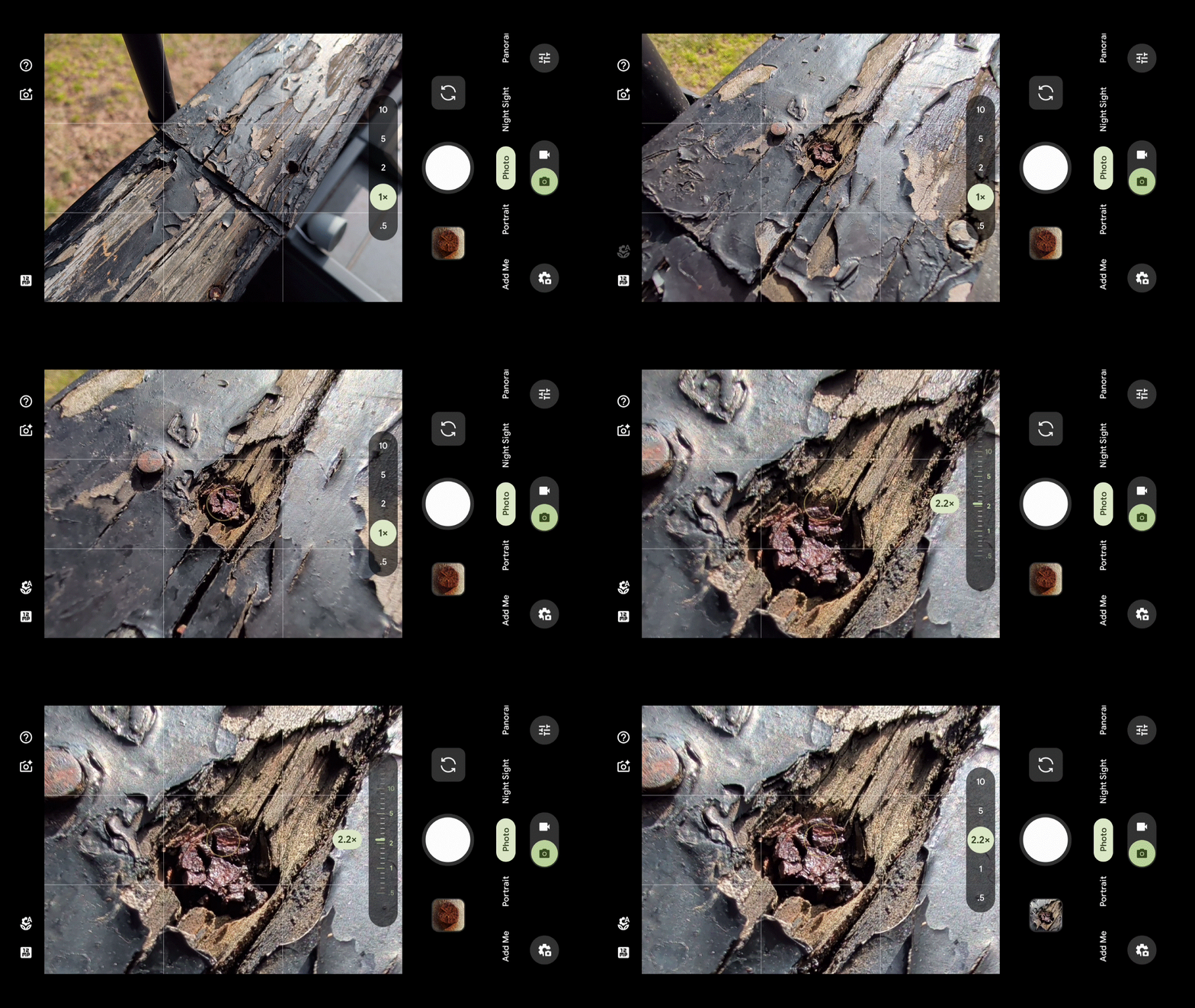
Getting closer to your subject is easier than ever before because most phones have a dedicated macro mode that automatically kicks in when you’re shooting something very close. However, it doesn’t hurt to apply a little bit of zoom to get even closer.
You’re effectively performing a digital zoom when you do this, but I still recommend it because of how it enhances the framing of the shot. Likewise, this technique allows me to still get very close without having my camera’s lens breathing on the subject — which can also cast shadow over it.
Get a parallax effect with the telephoto camera


By default, we’re inclined to shoot with the main camera — but I would challenge you to think about the scene and perhaps switch to the telephoto lens. That’s because it can do a number of things, like giving sprawling cityscapes a parallax effect or filling more of the frame with a subject.
I really love the parallax effect look achieved by doing this, which becomes even more pronounced at longer zoom ranges. For example, I like shooting with my Pixel 10 Pro XL’s 48MP telephoto camera with 5x optical zoom — but this effect is best amplified at 10x zoom.
When you shoot people, this technique will exaggerate the amount of background blur. And with general landscapes, you'll fill in more of the scene
Ultra long night modes


When it's nighttime, camera phones often will automatically switch to a night mode to perform a long exposure capture. If you dig into your phone’s camera settings, you might find a way to access an even longer exposure night mode.
For example, I’ve explained how the iPhone 17 Pro has a night mode max option that increases the exposure time to up to 30 seconds. Take a look at the before and after shots I captured above to see the difference.


Samsung Galaxy phones also have a hidden camera night mode that’s lumped into its Expert RAW mode, which I’ve used to take the stunning astrophotography shots above. By leaning on these ultra long night modes, while also keeping your phone incredibly still, you’ll draw out way more detail.
Explore vertical panoramas
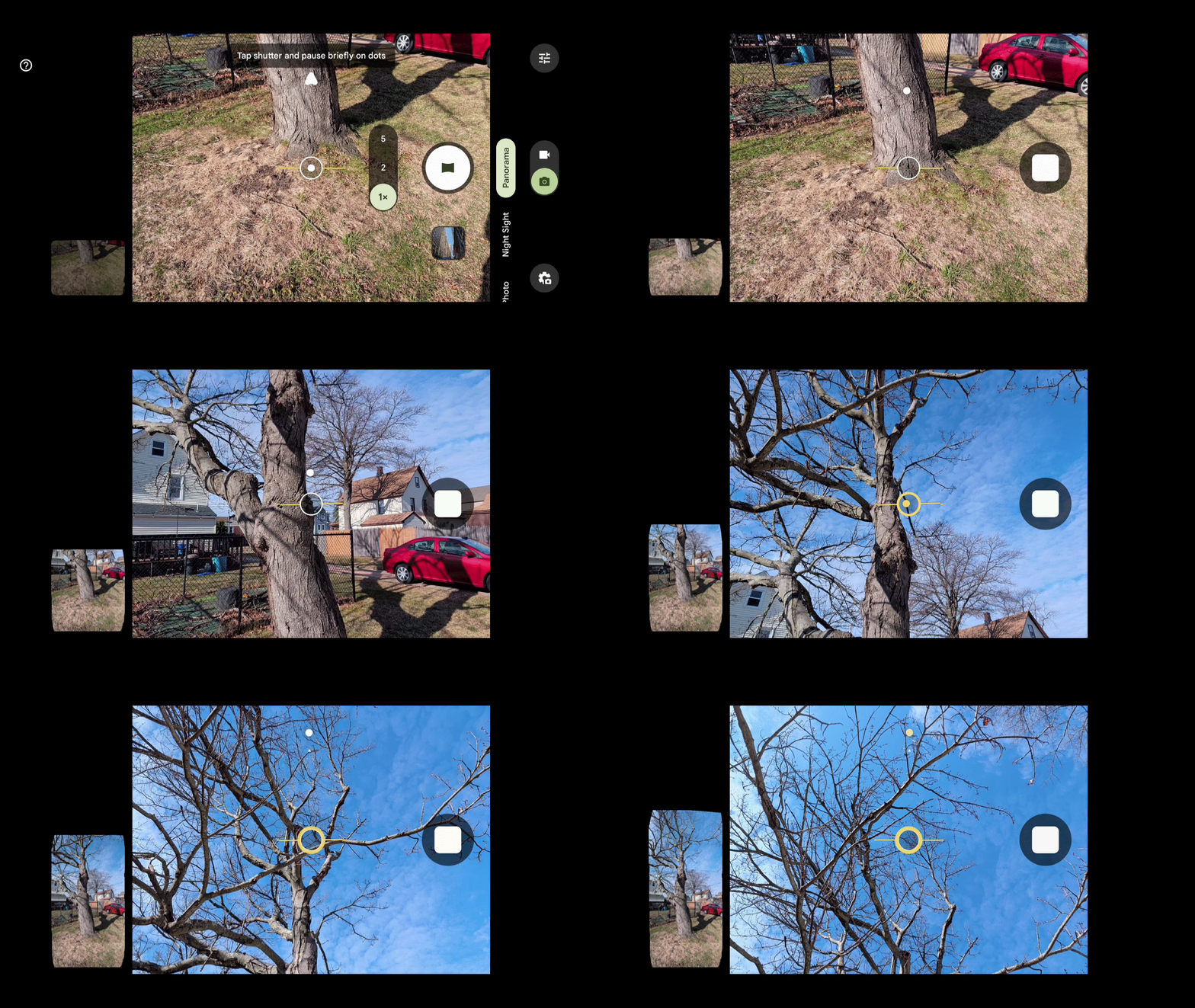
Panoramas are typically reserved for capturing sprawling landscapes, but you can achieve another creative look by shooting them vertically. Rather than going from side to side, these vertical panoramas require you to shoot them up and down.
Trust me, the results can be astounding — just as long as you frame the scene correctly. I wouldn’t go through the entire span because it can distort stuff, so it’s good to practice this technique. I really love the Inception-esque look of some of the buildings I’ve captured in the gallery below.


Flip your camera upside down for a different perspective


This last technique can change up the perspective in such a way that it can better fit what you’re trying to shoot. Instead of shooting in the traditional sense of having the lens positioned on top, I suggest flipping your phone around so that it’s at the bottom.
I want you to look at the two shots above: the first is shot holding the phone horizontally, the second is with the phone flipped upside down. Since the lens is closer to the ground with the second shot, the composition of the wooden rail gives it a more abstract, symmetrical feel. This is the same technique I often use when photographing cars, as shooting with the camera lower to the ground makes for a more dramatic look.
What are some of your favorite tips when taking photos with your phone? Let me know in the comments below.

Follow Tom's Guide on Google News and add us as a preferred source to get our up-to-date news, analysis, and reviews in your feeds.
More from Tom's Guide
- My iPhone’s camera app was holding me back, so I ditched it for this alternative that lets me take mobile photography to the next level
- Your iPhone's Notes app can do way more than you realize — here are 13 hidden features
- Samsung Galaxy S26 Ultra's 'Privacy Display' tested by leaker: here's what they revealed

