




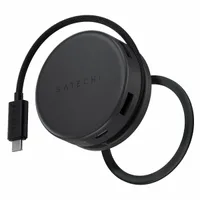
Whether it’s a MagSafe wallet that holds all of my cards and cash, or more niche accessories like a MagSafe power bank that doubles as a retro gaming handheld, I’m always on the lookout for cool MagSafe accessories that make my iPhone even more versatile. That’s why I can’t stop carrying the Satechi OntheGo 7-in-1 Multiport Adapter, a MagSafe accessory that gives me the same ports as my laptop.
This puck-sized gadget snaps onto the back of my iPhone, giving me access to a full-sized USB port, HDMI port, 1GB Ethernet port, and more. Even though it feels more like a productivity tool than anything else, it’s also an incredibly helpful camera accessory that lets me shoot more photos and videos.
Seriously, it transforms my iPhone into the ultimate media and productivity machine — and yeah, it also works with many of the best Android phones out there.
One of the biggest reasons I now carry the Satechi OntheGo 7-in-1 Multiport Adapter everywhere with me is because of how I can record high-quality ProRes video and not take up precious space on my iPhone. I can transfer them with ease to a microSD or SD card with the Satechi OnetheGo adapter.

Alternatively, I love being able to capture photos with my mirrorless camera and quickly share them on my social media. This process is streamlined because the OnetheGo adapter acts as a memory card reader for my iPhone, instead of having to do it on my laptop.

When I’m at work, I can also use the Satechi OntheGo 7-in-1 Multiport Adapter in a number of ways to boost my productivity. First and foremost, I can attach USB peripherals like a keyboard to it — allowing me to work more productively. I can also connect it to a monitor through the HDMI port, resulting in a mirrored view that makes most apps way easier to work with.

Finally, I don’t have to endure the slower data speeds that can sometimes be offered on cellular or Wi-Fi because there’s a 1GB Ethernet port I can access for way faster wired speeds. I’ve barely ever come close to getting 50 Mbps upload speeds on 5G with my iPhone, but I’ve seen it get upwards of 900 Mbps with the wired connection at work. Believe me, it now takes seconds to upload 4K videos I’ve shot to the cloud — whereas with cellular or Wi-Fi, it would’ve taken minutes.

Satechi ingeniously designs this accessory because it stays put on the back of my iPhone while I’m using it. There’s an integrated USB-C port that connects to my phone, which neatly wraps around when it’s not being used. It also works on Android phones, including my Galaxy Z Flip 7, which goes the extra step in being more PC-like when I connect a monitor to it with Samsung DeX.
For the $60 cost Satechi’s asking for this gadget, I think it offers ample value considering how you get all of these ports in a compact design you can take anywhere.

Follow Tom's Guide on Google News and add us as a preferred source to get our up-to-date news, analysis, and reviews in your feeds.
More from Tom's Guide
- My iPhone’s camera app was holding me back, so I ditched it for this alternative that lets me take mobile photography to the next level
- Your iPhone's Notes app can do way more than you realize — here are 13 hidden features
- Samsung Galaxy S26 Ultra's 'Privacy Display' tested by leaker: here's what they revealed

