







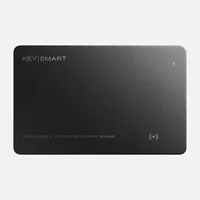
I said in my AirTag 2 review that it’s the most findable tracker ever, but it’s still missing a few features I'd want. That’s why I’ve been using KeySmart’s SmartCard (Gen 3) — a credit card-sized tracker I can slip into my backpack or wallet instead.
What makes it unique is its cross-platform compatibility with both iPhone and Android, whereas other trackers force you to choose one. This makes it perfect for gifting, especially when it's under $40. And now, it has become my new favorite keycard tracker. Here’s why.
No-fuss MagSafe charging support

One of my biggest issues with the AirTag 2 is that it still uses a user-replaceable coin battery. It becomes a problem when I miss a low-battery notification and eventually realize it hasn't worked for months.
The KeySmart SmartCard (Gen 3) addresses this in two big ways: it’s rechargeable and supports MagSafe wireless charging. Being rechargeable means it’s one less thing to worry about, and I’m not forced to go out and buy a replacement battery when the time comes.
Furthermore, I can’t tell you how convenient it is to just place the card on any of the best MagSafe chargers I’m testing. It’s genius, and it makes me wonder why Apple hasn't added wireless charging to the AirTag yet.
Supports Android and iPhone

Another issue I have with GPS trackers is that they often only work with one service. For example, the Nomad Tracking Card I previously tested only supports Apple’s Find My network. Other trackers, like those from Tile, require a separate app to track them down.
KeySmart solves this by supporting both Apple Find My and Android’s Find My Device network out of the box. This is incredibly handy for someone like me who is constantly testing the best phones because I can simply reset my SmartCard when I switch from Apple to Android, and vice versa.
It’s also the perfect gift for this reason — I don't have to worry about which phone the recipient is using.
Sleek design

While its credit card-like design makes it a natural fit for a wallet, I’ve actually used it to track many other things — especially since most of the MagSafe wallets I test lack any built-in tracking. Speaking of my wallet, I actually misplaced it in my home recently, but I was able to use the SmartCard’s internal speaker to quickly track it down.
At just 1.8 mm thick, it's roughly the size of two credit cards. I’ve slipped it into my backpack and set a left behind notification in the Find My app. This is easily one of the most underrated features of Find My-compatible devices. Not only does it notify me if I walk away, but it also pinpoints the exact location where the item was left.
In another instance, I slipped the KeySmart SmartCard (Gen 3) into the glove compartment of a Polestar 4 I was testing to help me remember where I parked in an unfamiliar lot. While it lacks the Apple AirTag 2’s Precision Finding feature, I can still see its general location on a map.
For its $39 price tag, it’s well worth the investment given the convenience it offers. Best of all, I don’t have to shell out extra money for replacement batteries like I do with the AirTag.

Follow Tom's Guide on Google News and add us as a preferred source to get our up-to-date news, analysis, and reviews in your feeds.
More from Tom's Guide

