




By now, you’re probably aware of my never-ending quest to find the perfect MagSafe wallet. Some of my recent tests include one with integrated Find My support, and another with a neat slider mechanism that ejects my cards. But for this latest one, I’m going back to PopSockets — one of my all-time favorite phone accessory makers.
I’ve been using a PopSocket for years because nothing else matches its simplicity and ease. While the company has long offered a MagSafe wallet in its lineup, its latest offering combines everything I look for in a wallet.
The Kick-Out PopWallet takes the previous static design and adds an adjustable MagSafe ring that lets me use my iPhone in portrait and landscape modes — adding a new layer of utility that previously wasn’t available.
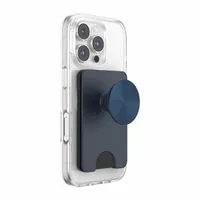

The Kick-Out PopWallet takes the previous static design and adds an adjustable MagSafe ring that lets me use my iPhone in portrait and landscape — adding a new layer of utility that previously wasn’t available.
Since I can angle the PopWallet to support my phone, I find it perfect for watching movies hands-free while eating or even taking conference calls. David Barnett, the founder of PopSockets, told me that this shift toward utility is intentional. He describes the Kick-Out as a "perfect example" of the brand's evolution, calling it "a wallet, grip, and adjustable stand combined into one smart MagSafe accessory that works at any angle."
In 2026, I still come across MagSafe wallets that don’t offer this simple feature — so it’s refreshing that PopSockets has done it.

Secondly, it makes accessing my cards a breeze thanks to the notch at one end of the wallet. Pushing that area slides out all my cards at once, so I’m not fussing around trying to reach them.
I’m a bit bummed that it can’t hold more than three cards, but the design is purposeful in keeping it slim. I posed the question to Mike Kory, director of product engineering at PopSockets, as to the thinking behind how many it can store. "Three cards emerged as the sweet spot, giving consumers the capacity they want while keeping the product as portable and pocketable as possible," he responded. Having used it for a week, I can confirm it is easily the sleekest MagSafe wallet I’ve used in a couple of years.

Finally, the Kick-Out PopWallet offers something I don’t find in other wallets: style. Because I can swap out the PopSocket, I can personalize the wallet to my liking. I swapped out the bland one that came pre-attached with another I’ve been using for the past six months — one that has a neat, lava-lamp-like effect. As Barnett puts it, the company's roadmap is now focused on products that "blend real function with personal style."
Not only does the PopSocket make it more convenient to hold my phone with one hand (especially handy while I'm on the train holding a rail), but it also adds a look that complements my style. The PopSockets Kick-Out PopWallet sells for $50, which is a premium over other MagSafe wallets, but I think it’s well worth the cost if you’ve already invested in a PopSocket you love. Few MagSafe wallets offer this level of style and utility, making it well worth checking out.

Follow Tom's Guide on Google News and add us as a preferred source to get our up-to-date news, analysis, and reviews in your feeds.
More from Tom's Guide

