




You know that one friend growing up who had every — and I mean every — console? Well, I was lucky enough to have one and unlike me, he had almost too many options when it came to what game to play or what console to play it on.
From the Sega CD attachment for the Genesis to a TurboGrafx and everything in between, my childhood friend had it all. While I got a turn here and there, I was more spectator than player but growing up, but that didn’t phase me at all. Of the consoles in his family’s collection though, there was one in particular that continued to elude me even now: the Nintendo Virtual Boy.
As the odd console out between the Super Nintendo and the Nintendo 64, the Virtual Boy was unlike anything I had ever seen before. Not only was it the only home console you could play without a TV but you got to play in full 3D for the first time, even if it was only in red.
Although I eventually convinced my friend to let me try out his Virtual Boy to play a few rounds of Mario’s Tennis, that was all I got. To this day, I still think about that short play session but now, thanks to Nintendo’s new Virtual Boy accessory for the Nintendo Switch 2 and the original Switch, I finally got a chance to play it again.
Here’s everything you need to know about this modern recreation of 1995’s Virtual Boy and why it just might scratch that same retro gaming itch for you.
Nostalgic looks with a modern Switch

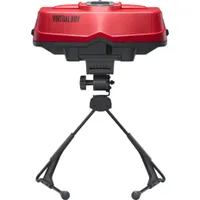
Just like it did with the Labo VR Kit, Nintendo decided to use the Switch’s modularity to its advantage again with its new Virtual Boy accessory. Also available as a foldable cardboard cut out, I got to try the more expensive replica version that’s as close to the original as I remember, minus the “M” shaped Virtual Boy Game Pad of course.
In the box, you get a red and black plastic headset and a stand that fixes everyone’s gripes with the “Medusa” stand that came with the original. Instead of a brittle sliding C-clamp, this new stand holds the replica console much better than the one that shipped with the Virtual Boy. You also get a plastic adapter in the box to use with the Nintendo Switch as Nintendo designed its latest accessory around the Switch 2.

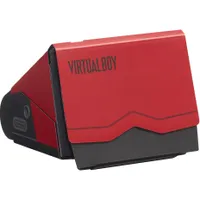
In a similar way to the NES Classic and the SNES Classic, Nintendo stayed true to the details of the original Virtual Boy throughout the design of this new headset. For instance, on the underside, you have all of the original ports and controls etched into the plastic. In the center, there’s a place to connect the stand and a spring-loaded quick release mechanism, which almost made me feel like I was ejecting cartridges from my SNES when removing my Switch 2.
Getting this new accessory working with your Switch 2 or Switch starts with downloading the new Virtual Boy Nintendo Classics app from the eShop. However, to do so, you will need a Nintendo Switch Online subscription along with the Expansion Pack add-on. While I miss Nintendo’s Virtual Console as much as anyone else, Nintendo Switch Online is the closest thing you can get to a Blockbuster for retro games and well worth the annual price in my opinion.

Once you have the app installed on your console, it’s just a matter of flipping up the red top part of the Virtual Boy accessory and dropping your Switch 2 in.
If you’ve ever docked your Switch or Switch 2, you’ll have no trouble at all turning either console into a modern Virtual Boy. Just note that if you’re still playing on the original Switch, you will have to attach the plastic adapter first to make up for the size difference between it and the Switch 2.
Seeing red again

With my Switch 2 loaded in Nintendo’s Virtual Boy accessory, it was time to finally step back into the world of red-tinted, stereoscopic 3D gaming. While nowhere near close to one of the best VR headsets, donning a Virtual Boy again for the first time in 30 years took me back to when virtual reality was still science fiction.
After loading the app, I was met with that same Nintendo Classics UI but this time, with a black and red Virtual Boy-style twist. At the time of writing, there are currently a total of seven Virtual Boy games you can play right now in the app with an additional seven coming later this year including two unreleased games. This might not seem like a lot compared to the now massive NES and Super Nintendo catalogs on Nintendo Switch Online but with this console in particular, you’re getting access to every game ever released for it with half of them available from the get go.
Unfortunately, I wasn’t able to pick up where I left off in Mario’s Tennis all those years ago, as that particular title isn’t among Virtual Boy’s launch lineup on the Nintendo Switch. So I did the next best thing and booted up 3D Tetris as I have fond memories of playing the original on the Game Boy. It didn’t quite click for me though, so I moved onto Galactic Pinball.

Pinball is much more straightforward on the Virtual Boy and I really enjoyed how I had the option to use either the triggers or the joysticks on my Joy-Cons to control the paddles. It felt like there was a slight input delay between hitting a button and seeing the paddles move but I quickly got used to it. After a few rounds though, it was time to try what many (myself included) consider the Virtual Boy’s flagship game: Virtual Boy Wario Land.

Since I didn’t get a chance to play it as a kid, I was instantly impressed with Wario Land and how it took full advantage of the console’s stereoscopic 3D. In fact, it reminded me of playing the original AstroBot on PSVR. I loved Wario’s more familiar moveset, the mini games at the end of each level and how you could jump between the foreground and background at certain points. Likewise, the way that Wario walked right towards my face when leaving the room after finishing a mini game was a very nice touch.

From there, I played through the rest of the current Virtual Boy games available. Teleroboxer felt like a cross between a more high-tech version of Mike Tyson’s Punchout and Arms on the Switch. Red Alarm reminded me immediately of Star Fox but with a lot less handholding as I flew a ship through an enemy base in the opening sequence. The Mansion of Innsmouth is a classic first-person dungeon crawler but after turning only a few corners, a game over screen flashed before my eyes after I didn’t quite know what to do when I encountered a monster in one of the corridors.

Finally, Golf played just like a classic golf game but with the added depth and realism you get from playing in stereoscopic 3D.
As you may have guessed, Wario Land was my favorite of the bunch and I made sure to create a suspend point so I can pick up where I left off. In fact, I had such a good time playing it that I might just have to finish it.
One thing that remains true with this new Virtual Boy accessory is that it’s hard to find the perfect position to play in. At my coffee table, I was leaning forward with my back bent, which felt less than ideal. That’s why after my initial test to make sure everything was working, I took the Virtual Boy and my Switch 2 out to the living room where I spent a big chunk of time playing at my standing desk.

With one of the best standing desks, I was able to raise the console up fairly close to eye level but even then, I still found myself leaning forward to get my head close enough to the screen.
My turn at last

Among Nintendo’s other highly successful game consoles, the Virtual Boy is and will always be an outlier. Sure, it was quite advanced back in the 90s when it was definitely ahead of its time but with the Nintendo 64 and true 3D gaming just a year away from its launch, the Virtual Boy never really got a chance to shine. Fortunately, thanks to the modular nature of the Switch and Switch 2, it’s back in all its red and black glory.
If you’re curious about checking out this piece of Nintendo and gaming history, then the cardboard version of the Virtual Boy accessory will be more than enough to help you scratch that itch. However, if like me, you actually had a chance to play the original, then the more expensive replica version could certainly be worth it, even for nostalgia alone.
Maybe if my childhood friend had given me a bit more time to play the original, I wouldn’t have spent the last three decades thinking about the Virtual Boy. Even then though, he only had a few games besides Mario’s Tennis which came included with the console. Thanks to this new accessory and Nintendo Switch Online, not only can I play every Virtual Boy game I want to but I can do so without being tethered to a power outlet.
I can’t wait to check out the rest of this console’s game collection though but in the meantime, I plan on making my way through Wario Land as it’s the must-play Virtual Boy game. Even with what I’ve played through so far, it seems like the kind of game you don’t want to miss. Now though, I get to play it with modern conveniences like suspension points and being able to rewind when I accidentally jump into lava. If Nintendo just made a new version of its original controller, I’d be able to finally fulfill my childhood wish almost as if I was back in the 90s.

Follow Tom's Guide on Google News and add us as a preferred source to get our up-to-date news, analysis, and reviews in your feeds.
More from Tom's Guide
- I tried playing Mario Kart World with a racing wheel on Switch 2 and it's perfect for cruising in Free Roam mode
- Donkey Kong Bananza is the 3D Donkey Kong game I’ve always wanted and one of the best reasons to get a Switch 2
- I played the Switch 2 with AR glasses to see what it's like to race Mario Kart World on a 135-inch screen in front of your face

