




I can’t deny that my iPhone 17 Pro is one of the best camera phones around, but since it’s your standard slate phone, it’s not really conducive to vlogging. That’s because when I’m recording, I prefer to see myself in the frame — something I can only do with the front-facing camera.
While the iPhone 17 Pro’s new 18MP Center Stage camera boasts notable upgrades like a wider field of view, it still doesn’t provide the highest possible quality. To get that, I’d have to switch to the rear cameras. This new iPhone case tackles that exact hurdle by slapping a small display on the back.
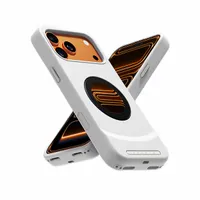
The Dockcase Selfix is just like any other protective case for my iPhone 17 Pro, but it specifically makes capturing vlogs and selfies much easier with the rear camera. It’s transforming the way I shoot on iPhone. Here’s why.
Stable video feed

In the past, I’ve used accessories like my SYNCO XView M4 to do exactly what the Dockcase Selfix does. However, the problem with MagSafe accessories like that is their reliance on AirPlay to mirror the camera feed, which makes them susceptible to interference.
The Dockcase Selfix relies on a direct connection because my iPhone 17 Pro sits inside the case and connects via USB-C. This implementation is much more practical for most people. Not only is the video feed more stable, but it also draws power directly from my iPhone, so the case doesn’t require its own battery.
On the back sits a 1.6-inch AMOLED screen with a resolution of 480 x 480 pixels, delivering a sharp enough picture to see exactly what the camera is framing. It’s bright and vivid, with wide viewing angles that make vlogging easy. Most importantly, there’s no lag or interference — a key benefit over the traditional AirPlay monitors I’ve tested.
It even has touch support

While the circular 1.6-inch AMOLED screen makes it easier to snap selfies and record vlogs with the rear cameras, it’s also touch-sensitive, providing extra camera controls. To do this, though, I have to activate AssistiveTouch in the Accessibility settings.
Once activated, I can tap the screen on the case to adjust focus, exposure, and zoom levels. This is helpful because I’m not forced to constantly flip the phone around to use the iPhone’s main screen for these parameters.
I do recommend, however, enabling the camera’s grid settings, because the preview on the 1.6-inch screen is a smidge off-center. With the grid activated, you’ll have a better idea of whether you’re actually centered in the frame.
For recording videos, you’ll also want to lock the orientation of the phone so the preview stays in a horizontal position. After all of these settings are adjusted, you’ll find just how versatile the Dockcase Selfix is for capturing content.
Protective case that adds storage

Other benefits of the Dockcase Selfix include a fitted design that provides extra protection against everyday wear and tear and accidental drops. While it doesn't quite match the ruggedness of some Otterbox cases I’ve tested, it still effectively cushions the impact of low-height drops.
Additionally, the Dockcase Selfix comes equipped with a microSD slot tucked away on the inside for file transfers and backups. If you’re low on local storage, this is an excellent way to offload files from your iPhone by copying media to a microSD card. However, keep in mind that you cannot record photos or videos directly to the card; you have to transfer them manually.
And yes, it has magnets — but no MagSafe charging support

Finally, another big incentive for me to use the Dockcase Selfix is the magnetic connection on the back, which allows me to use many of my favorite MagSafe accessories — like my MagSafe wallet and expandable USB-C hub. However, the biggest downside to this case is forfeiting MagSafe wireless charging.
To charge my iPhone, I have to fall back on wired charging via the USB-C port on the bottom of the case. It’s definitely a convenience I’d hate to give up, but it's a sacrifice you’ll have to make to gain a rear screen on your iPhone.
Right now, the Dockcase Selfix is on Kickstarter with an early bird price of $79 — a generous discount from its $129 retail price. Most ruggedized iPhone cases can easily fetch $50, but here you’re getting expandable storage and a versatile screen for just a little more. If you’re tired of leaning on the front camera for all your vlogs, you won’t want to go back after using the Selfix.

Follow Tom's Guide on Google News and add us as a preferred source to get our up-to-date news, analysis, and reviews in your feeds.
More from Tom's Guide

