




Some of the best gadgets I've paired with my phones are thermal cameras. I've tested every one you can imagine from standalone ones that run off Wi-Fi, to phones that integrate them, and even those that I can attach to my phone’s USB-C port. They all display heat signatures to better see potential dangers in my home and critters roaming around my backyard at night, but they all share a common thing: they’re notoriously expensive.
That’s why I’ve been trying out the Thermal Master P1 for the last month, which is the cheapest thermal camera I’ve ever tested. Similar to the Thermal Master P2, the P1 connects to my phone’s USB-C port and instantly gives me night vision to see in the dark — but it’s much more affordable.
FLIR’s comparable thermal camera, the FLIR One Gen 3, costs way more at $214. In comparison, the Thermal Master P1 only sets you back $129, which is down from its normal $159 sticker price.
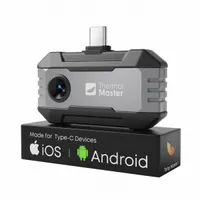
What I like about the Thermal Master P1 is that it doesn’t cost a fortune like other similar cameras that attach to a phone. In fact, it’s the most affordable thermal camera that attaches to my phone that I’ve tested in the last couple of years. For reference, the InfiRay P2 Pro I tested a couple of years back costs $299 — which, despite having a more compact design, is a stretch for some people.

For about the last month, I’ve used the Thermal Master P1 for a number of things around my home. Since it detects heat signatures, it helped me to uncover the water line valve for my outdoor water hose.
I didn’t want the plummeting temperatures to freeze the pipe, so I pointed the Thermal Master P1 towards the second floor where my water heater is located. Through the app on my phone, I was able to trace the water line coming down to the side of my house and eventually realized that it went into the laundry room — where I eventually found the valve to close it off.

Another way it helped me out was when one of the foot warmers on my Sleep Number smart bed didn’t feel like it was warming up. I pointed the Thermal Master P1 at that part of the bed and it revealed it was still working. What’s unbelievable is that the picture I captured above visibly shows the outline of the coils, which is impossible to see in real life because the pad’s underneath the mattress.


The only downside to the Thermal Master P1 is that it doesn’t have as much detail with faraway shots as other thermal cameras I’ve tested, but it doesn’t affect its thermal imaging capabilities. What I’m referring to is the amount of definition it captures. If you look through some of the shots I captured from my backyard above, you’ll see how it still captures the heat signature, but the images lack detail — often appearing smudgy. For example, the first shot has a car parked in the middle of the frame, but it’s hard to make out. Other thermal cameras would add detail, like the edges of the window and even the tire rims.

Despite that, it’s an inexpensive thermal camera that gets the job done. Add in the fact that it’s portable enough to stash in my backpack, and it can absolutely prove helpful for certain situations.

Follow Tom's Guide on Google News and add us as a preferred source to get our up-to-date news, analysis, and reviews in your feeds.
More from Tom's Guide
- Best phone battery life
- I've adjusted these 5 settings to get my Android phone to last longer
- Samsung's upcoming camera tech could benefit the entire smartphone industry — here's how

