






Tom's Guide Verdict
The MacBook Air M5 delivers the goods thanks to its strong M5-driven performance, better connectivity options, all while retaining the same slim design, bright and colorful display, and long-lasting battery life. While it isn’t a revolutionary update and costs $100 more, it’s a stellar notebook for most people.
Reasons to buy
- +
Lightweight, durable design
- +
Fast M5 performance
- +
Epic battery life
- +
Gorgeously vivid display
Reasons to avoid
- -
Costs $100 more
- -
Nominal upgrades over the M4 model
Why you can trust Tom's Guide Our writers and editors spend hours analyzing and reviewing products, services, and apps to help find what's best for you. Find out more about how we test, analyze, and rate.
The MacBook Air M5 (starting at $1,099 for 13-inch and $1,299 for 15-inch) isn’t radically different from the MacBook Air M4, but its under-the-hood upgrades make it a compelling option for folks who own older models. This is especially true if you want something larger than the 13-inch MacBook Air but not the extra power of a MacBook Pro.
Naturally, the biggest upgrade is the Apple M5 chip, which we first saw in last year’s iPad Pro M5 and 14-inch MacBook Pro M5. Thanks to this processor, the Air M5 offers excellent performance for web surfing, video editing, and even some AAA gaming. While the new M5 Pro/Max MacBook Pros can handle heavier loads, the Air M5’s performance is more than enough for everyday use.
Other upgrades include 512GB of base storage, which doubles the previous model’s 256GB. You’ll now have more room to store your favorite photos and videos. And thanks to the newly added Apple N1 wireless chip, you also get faster Wi-Fi 7 and Bluetooth 6 connectivity, which makes a noticeable difference when you’re downloading large files or when peripherals are connected (respectively).
As before, the new MacBook Air is a thin and light laptop that’s easy to travel with. It retains the same sturdy design as previous models, making it a natural fit whether you’re at home or at the office. The Liquid Retina display is as vivid as always, and the large keyboard deck delivers a comfortable writing experience. Additionally, you get MagSafe support, a 12MP webcam, and your choice of four colors.
While the MacBook Air M5 isn’t a monumental upgrade and costs $100 more, it’s still one of the best MacBooks and best laptops currently available. If you want the latest and greatest MacBook Air, this is it. Find out more in my full review.
We have lab tested both the 13-inch and 15-inch M5 MacBook Airs, and while I did get some hands-on time with the 13-inch, I have been daily driving the 15-inch model. Given the build quality, ergonomics and display are near-identical between both models (just that one is bigger), what I'm saying about the 15-inch model applies to its smaller sibling! I have added the testing data for the 13-inch Air to give you context on both systems.
MacBook Air M5: Cheat sheet
- What is it? This MacBook Air is a larger version of the 13-inch model and has also been updated with an Apple M5 chip, faster Wi-Fi 7 and Bluetooth 6, and 512GB base storage.
- Who is it for? For those who want a larger MacBook Air or a more affordable alternative to the MacBook Pro.
- What does it cost? The MacBook Air 13-inch M5 starts at $1,099, and the MacBook Air 15-inch M5 starts at $1,299. This is $100 more than last year’s models.
- What do we like? We like the powerful M5 performance, epic battery life, lightweight design, large, vibrant display, and roomy keyboard.
- What don’t we like? We don’t like the $100 price bump, and that it’s not a significant upgrade over the Air M4.
MacBook Air M5: Specs
| Row 0 - Cell 0 | MacBook Air 15-inch M5 |
MacBook Air 13-inch M5 |
Price |
$1,299 starting |
$1,099 starting |
Display |
15.3 inches (2880 x 1864) |
13.6 inches (2560 x 1664) |
Chipset |
Apple M5 (10-core CPU / 10-core GPU (starts at 8-core GPU) / 16-core Neural Engine) |
Apple M5 (10-core CPU / 10-core GPU (starts at 8-core GPU) / 16-core Neural Engine) |
Memory |
16GB |
16GB |
Storage |
512GB (1TB as tested) |
512GB (1TB as tested) |
Battery life |
15 hours 30 minutes (tested) |
15 hours 28 minutes (tested) |
Ports |
2x Thunderbolt / USB-4, 1x MagSafe, 1x headphone jack |
2x Thunderbolt / USB-4, 1x MagSafe, 1x headphone jack |
Connectivity |
Wi-Fi 7, Bluetooth 6 |
Wi-Fi 7, Bluetooth 6 |
Colors |
Sky Blue, Silver, Starlight, Midnight |
Sky Blue, Silver, Starlight, Midnight |
Dimensions |
13.4 x 9.5 x 0.4 inches |
12 x 8.5 x 0.4 inches |
Weight |
3.7 pounds |
2.7 pounds |
MacBook Air M5: The ups
The new 15-inch MacBook Air has been upgraded with an M5 chip, faster wireless connectivity, and more base storage. It retains the same great lightweight design, large 15.3-inch Liquid Retina display, and phenomenal battery life as its predecessor.
Strong M5 performance
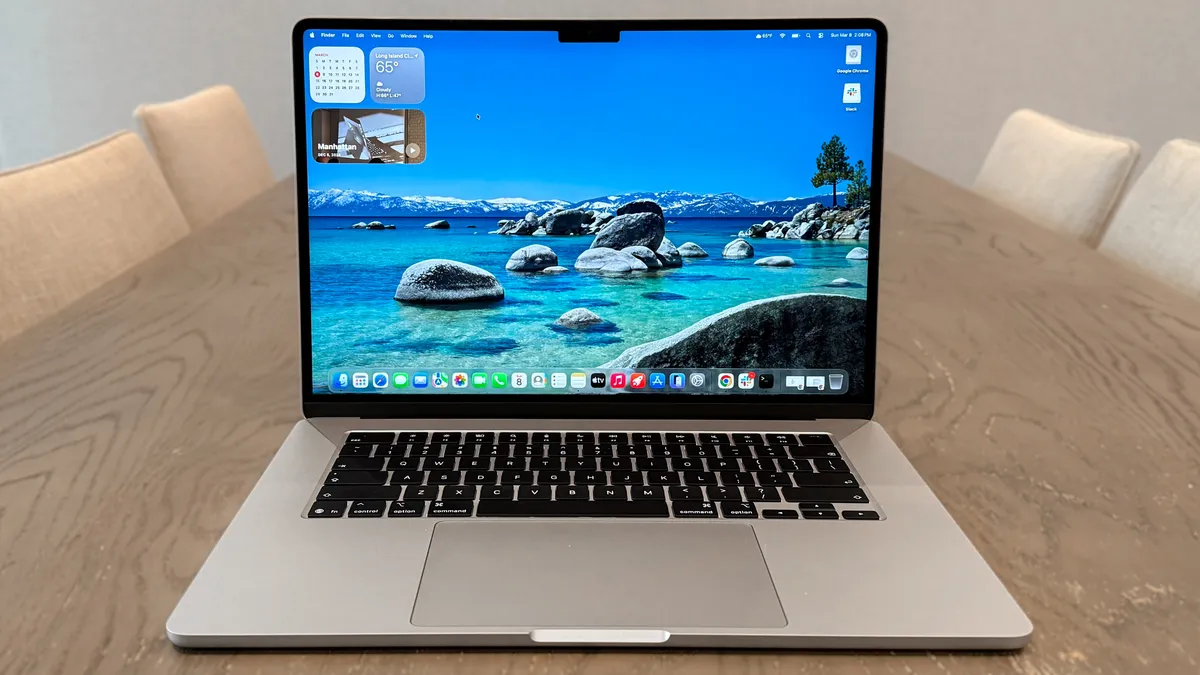
The biggest upgrade here is the Apple M5 chip, which delivers strong performance for everyday tasks and heavier workloads.
When testing this laptop, I had dozens of open Chrome tabs, along with Slack and YouTube running in the background. During all of that, I never experienced any slowdown or stuttering.
How did the 15-inch MacBook Air M5 perform in our testing lab? On Geekbench 6, which measures overall CPU performance, it pulled in a solid multi-core result of 17,276. That’s a noticeable jump over last year’s model (14,921). It also slightly edged out the Intel Panther Lake-powered Samsung Galaxy Book 6 Pro in multi-core, but outclassed it in single-core tasks.
In our Handbrake test, which tasks the laptop with transcoding a 4K video to 1080p, the MacBook Air M5 finished in 4 minutes and 34 seconds. That’s over 20 seconds faster than the previous model but 30 seconds slower than the Galaxy Book 6 Pro.
| Row 0 - Cell 0 | Photoshop (Score/Time) |
Premiere Pro |
Handbrake (Video editing) |
MacBook Air (15-inch, M5) |
11,865 / 9.14 mins |
58,993 / 10.63 mins |
4:34 (mins: secs) |
MacBook Air (15-inch, M4) |
10,185 / 12.05 mins |
4,226 / 6.05 mins |
4:57 |
Samsung Galaxy Book 6 Pro |
8,523 / 15.41 mins |
39,111 / 14.75 mins |
4:04 |
The 15-inch MacBook also did great in our suite of Adobe tests. In Photoshop, it scored 11,865, showing an improvement over its predecessor (10,185). The same is true for the demanding Premiere Pro test in terms of score, though the M4 model did better on time. Overall, the new MacBook Air M5 is well-suited for heavy video and photo editing.
| Row 0 - Cell 0 | SSD BlackMagic Disk Speed (Write/Read in MBps) |
MacBook Air (15-inch, M5) |
6499 / 6728 |
MacBook Air (15-inch, M5) |
6495 / 6783 |
MacBook Air (15-inch, M4) |
3335 / 3012 |
Samsung Galaxy Book Pro (Intel Core Ultra X7 358H) |
3368 / 4772 |
On the BlackMagic Disk Speed Test, the MacBook Air M5 proved that its SSD is plenty fast. It clocked 6499 write and 6728 read, which is generally twice as fast as the M4 model and Galaxy Book 6 Pro. This ensures file transfers and app launches are virtually instantaneous.

| Row 0 - Cell 0 | MacBook Air 15-inch M5 |
MacBook Air 15-inch M4 |
Samsung Galaxy Book 6 Pro |
Assassin’s Creed Shadows |
19 fps |
N/A |
30 fps |
Cyberpunk 2077 |
27 fps |
34 fps |
19 fps |
We tested a couple of Apple silicon-optimized games to see how they fare on the M5-powered MacBook Air. At 1200p resolution and medium graphics setting, both Assassin’s Creed Shadows and Cyberpunk 2077 ran below 30 frames per second. The Panther Lake-driven Galaxy Book 6 Pro didn’t fare much better.
That said, the games we tested in the lab are large open-world adventures, which are naturally more demanding on a system. When I played Resident Evil 4 Remake, which is a much smaller title in comparison, it ran at a rock-solid 60 frames per second with the performance-enhancing MetalFX enabled. In short, the MacBook Air is capable of playing some high-end games, just don’t expect the same results as on the best gaming laptops.
Same svelte design

The MacBook Air 15-inch M5 keeps the same design as its predecessors. That might be a bummer for those wanting something new, but I still like this practical, utilitarian design, so I’m not complaining.

At 13.4 x 9.5 x 0.4 inches and 3.3 pounds, this 15-inch laptop is thin and light enough to slip and carry around in your backpack easily. The 13-inch sibling comes in even more svelte at 12 x 8.5 x 0.4 inches and 2.7 pounds.
But since it’s larger than its 13-inch sibling, your hands will have plenty of space to type on that roomy keyboard deck. As before, the keys are nice and snappy, and the big touchpad is a joy to use on both models.
Despite its thin, light design, the laptop’s sturdy aluminum frame prevents it from bending or flexing easily. The same is true for the lid, which doesn’t wobble even if you’re walking with the laptop open. Thanks to the lip on the lid, opening and closing the MacBook Air with one hand is seamless.

We get the same port selection as before, including a pair of Thunderbolt 4/USB-C ports, a headphone jack, and a MagSafe charging port. It also supports dual external monitors simultaneously, even with the lid open.
I quite liked the Starlight color of the review unit I tested. It hits the sweet spot of having some personality without being too colorful. That said, Sky Blue is my favorite of the four available options.
Vivid display

The new 15-inch MacBook Air M5 might not have an OLED panel, but it still delivers vivid images at a sharp 2,880 x 1,864 resolution. Unlike the new M5 MacBook Pros, it doesn’t support 120Hz ProMotion, but does support higher refresh rates (up to 240Hz at 4K) for external displays.
I fired up a 16K OLED video on YouTube, and everything appeared sharp and vibrant. The color houses stretching across a port town's harbor looked fantastic. The Liquid Retina panel delivers nice contrasts between dark and light elements to make everything look its best.
| Row 0 - Cell 0 | MacBook Air 15-inch M5 |
MacBook Air 13-inch M5 |
MacBook Air 15-inch M4 |
Samsung Galaxy Book 6 Pro |
Nits (brightness) |
454 (SDR) / 470 (HDR) |
458 (SDR) / 468 (HDR) |
475 (SDR) / 487 (HDR) |
457 (SDR) / 570 (HDR) |
sRGB |
117.2% |
117.3% |
117.9% |
119.4% |
DCI-P3 |
83% |
83.1% |
83.5% |
84.6% |
Delta-E |
0.27 |
0.21 |
0.27 |
0.20 |
Our lab tests confirm my anecdotal experience. While the MacBook Air M5s don’t hit the promised 500 nits with either SDR or HDR content, it comes pretty close. It also delivers overall good color reproduction (sRGB and DCI-P3) and color accuracy (Delta-E). As you can see, these values are nearly the same as those of the other laptops in this comparison.
Beyond all-day battery life

Though it doesn’t deliver the 18 hours of battery life that Apple claims, I’m not complaining about this laptop’s incredible endurance.
In our battery test, which involves continuous web surfing over Wi-Fi with the display set to 150 nits of brightness, the MacBook Air lasted 15 hours and 37 minutes. That kind of battery life means you won’t have to worry if you forget the power charger at home.
Battery life is slightly longer than that of the previous model and the Galaxy Book 6 Pro. While the difference isn’t huge on paper, those extra minutes could be crucial if you’re doing anything important.
MacBook Air M5: The downs
There’s no denying that the MacBook Air M5 is a fantastic laptop for just about all your needs. However, it’s not a major update from last year, and it costs extra.
$100 price bump

Whereas the Air M4 cost $100 less than its predecessor, the M5 model costs $100 more — going from $999 to $1,099 for the 13-inch, and $1,199 to $1,299 for the 15-inch. If you’re on a tight budget, this could be a deal-breaker.
Despite the additional cost, the base 512GB storage, faster wireless connectivity, and, of course, the powerful M5 chip are nice upgrades. Paying an extra $100 for these features isn’t too egregious, overall. Still, paying extra does sting.
Incremental upgrades over the M4 model

The M5 chip gives the MacBook Air some serious Pro-like performance. If you’re upgrading from the M3 model or an older MacBook, you’re going to notice a major difference.
For M4 owners, however, the changes are relatively modest. You likely won’t notice performance gains when you’re surfing the web or doing work. If you own the M4 version, this laptop isn't essential unless you need faster wireless connectivity or just want the latest and greatest.
MacBook Air M5: Verdict
The MacBook Air 15-inch M5 offers nice upgrades over the M4 version while keeping the same sleek design, vibrant display, and long battery life. M5 performance impresses, and the doubled 512GB storage and better wireless connectivity are nice bonuses. But as I said, it costs an extra $100 for most of the same features.
Overall, the 15-inch MacBook Air M5 is a fantastic laptop for most folks, especially anyone looking for a premium notebook that’s under $1,500. If money is tight, you might want to wait for the inevitable holiday sale. But if you want a 15-inch laptop for the basics and more, you won’t go wrong with this super-sized MacBook Air.

