I tried 3 free sleep trackers for iPhones and compared them to my gold standard sleep tracker — one seriously impressed me

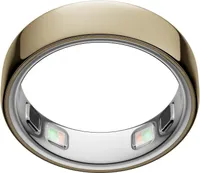
The Oura Ring 5 sets the standard for sleep tracking — I’ve been wearing it for 6 weeks and its accuracy has blown me away. However, the Oura Ring 5, from $399 at Amazon, is a luxury spend and while it collects a lot of data, I mostly use it for sleep tracking. So it got me thinking: is there a way to get accurate sleep tracking data for free?
The Oura Ring is the best sleep tracker on the market (I credit the Oura Ring 5 with helping me go from 6 to 7 hours of sleep), so I appreciate that a free app is unlikely to match its accuracy. But with so many iPhone apps promising precise sleep tracking through sound and movement sensors, I wanted to see if you really have to pay 100s of dollars for sleep tracking.
I picked three free sleep tracking apps with the best reviews in the App Store — Sleep Cycle, SleepScore and Sleepwave — and used them overnight. With my trusty Oura Ring 5 on my finger, to compare data. Here's how they measured, plus the one that impressed me so much I’m almost considering giving up my Oura Ring.
Key takeaways: Free sleep trackers at a glance
- While I'm using a $499 Oura Ring 5 as a sleep tracker, there are plenty of free iPhone apps that promise accurate sleep tracking.
- The Oura Ring uses integrated sensors to measure heart rate, blood oxygen levels, respiration rate, movement and temperature.
- Most free sleep trackers rely on movement and sound to determine sleep stages
- To accurately compare data, I wore the Oura Ring while using each of three popular sleep tracking apps: Sleep Cycle, SleepScore, and Sleepwave.
- While SleepScore and Sleep Cycle provide intuitive apps and accessible data, both had glaring accuracy flaws when tracking sleep stages.
- Sleepwave, however, provided accurate results. Sleepwave's sleep stage data was in the 5-minute accuracy threshold of the Oura Ring, making the Sleepwave app the winner.
The gold standard sleep tracker I’m using

I could talk all day about the fitness tracking data provided by the Oura Ring 5,. But let's just stick to its digestible, precise sleep data for now.
The screenless Oura Ring 5 relies on light-based, thermal, and kinesthetics technology to track sleep duration, sleep stages, sleep debt, nighttime breathing, and heart rate variation (to name a few metrics). It then presents the sleep data in easy-to-read tables, charts, and infographics on the accompanying app.
How I selected (and tested) each free sleep tracker

There are plenty of free sleep tracking apps for iPhones, but they aren't made equal. For example, a lot of apps track sleep by detecting snoring, which I knew wouldn't work for me as I'm not a snorer.
In the end, I selected Sleep Cycle, SleepScore, and Sleepwave, because all use motion-sensing technology to track sleep. Sleepwave and SleepScore are both free to download and deliver free sleep tracking (although advanced features are paywalled), while Sleep Cycle is free all summer (with the deal ending August 31st).
I then used one app every night (without paying a penny for any premium features) alongside my Oura Ring 5.
Putting each free sleep tracker to the test — see my results and how I scored them
Sleep Cycle | Test score: 3.5 out of 5
The Sleep Cycle app, free to donwload at the App Store was the first smart alarm clock app in the world. It currently boasts 4.7 stars out of 5 from over 7,000 ratings (but ratings aren't always the best review of quality). It tracks sleep through microphone sound detection (to capture noises such as tossing and turning and coughing) and an accelerometer (to detect movements).
As with most sleep tracking apps, I first had to make sure that my phone was placed in the correct position. I followed SleepCycle's recommended procedure, placing my phone near the edge of my nightstand with the built-in microphone facing towards me. Alternatively, you can put your phone on your mattress, under your sheets.
I also made sure that my phone was a connected to a charger, so it didn't run out of juice mid-tracking. I also positioned it a few inches above the mattress surface. (Sleep Cycle didn't specify to do this, but its instructional picture depicted that.)
Before you press the Start button, you can choose between two smart alarms (or you can select No Alarm — which I did). The first offers a 30-minute wake-up window that should go off during the lightest sleep stage, while the second is one alarm that'll go off at your chosen time.

When I checked the app in the morning, I was greeted with data for sleep duration (how long I slept for), REM sleep, light (or core) sleep, deep sleep, and latency (how long it takes me to fall asleep).
Here's a summary of the Sleep Cycle data vs the Oura Ring 5 data for the same night:
| Row 0 - Cell 0 | Sleep Cycle |
Oura Ring 5 |
Sleep duration |
6 hours 20 minutes |
6 hours 17 minutes |
REM (Dream) |
1 hour 28 minutes |
1 hour 30 minutes |
Core (Light) |
3 hours 26 minutes |
3 hours 42 minutes |
Deep |
1 hour 24 minutes |
1 hour 5 minutes |
Latency |
30 minutes |
9 minutes |
I consider within five minutes of the Oura Ring's data to be accurate. For sleep duration and REM sleep, the Sleep Cycle was pretty much the same as my Oura Ring 5 (3 minutes over and 2 minutes under respectively). But there's a huge 21-minute gap between the Latency results, a 19-minute gap between the Deep sleep data, and 16-minutes between Core sleep results.
Overall, while I was impressed with the accuracy of the duration and REM data, the Sleep Cycle really did miss the mark on Light and Deep sleep, not to mention the confusion surrounding how long it took me to fall asleep.
However, it was easy to set up sleep tracking, the data was synthesized into clear diagrams, and I definitely recommend giving the app a go now that it's free to try.
SleepScore | Test score: 3 out of 5

Next up is SleepScore, free to download on the App store. This app uses sonar technology (or speaker waves) to measure your sleep stages and breathing. It also awards (as you've probably guessed from the name) a sleep score at the end of every night.
While the SleepScore app itself is pretty intuitive, I found it tricky to get my phone in the right position for sleep tracking. SleepScore requires your phone to be on your nightstand (within arm's reach), tilted towards your body, and 6" above your mattress's surface.
The latter was difficult as my nightstand is around 6" below my mattress's surface. I had to employ some book stacking to make up the height. Like the Sleep Cycle app, SleepScore requires your phone is charging to work.
Once the night was over, I checked both my SleepScore app and Oura app to compare results. Here's the synthesized data:
| Row 0 - Cell 0 | Sleepscore |
Oura Ring 5 |
Sleep duration |
5 hours 37 minutes |
6 hours 13 minutes |
REM (Dream) |
53 minutes |
1 hour 39 minutes |
Core (Light) |
3 hours 37 minutes |
3 hours 42 minutes |
Deep |
1 hour 7 minutes |
1 hour 6 minutes |
Latency |
19 minutes |
11 minutes |
Light sleep and Deep sleep data checks out, with only a 2-5 minute margin of error. But there's slight discrepancy for latency (8-minute margin of error), and a huge difference for sleep duration (36 minutes) and REM sleep (46 minutes).
As for the Sleep Score, both the Oura and SleepScore apps agreed, with the former awarding a 71 and the latter awarding a 70.
The layout of the app is interactive an simple to follow, too. I particularly like the fact that you can "scrub" the sleep stages timeline with your finger to see how long your night-time awakenings were and how long you stayed in a sleep stage per cycle.
I wanted to like this app, I really did. It has 4.3 stars out of 5 from 600 ratings at the App store, but the accuracy is off (I can overlook 8 minutes, but 46?). Plenty of users also state that they find the set up as tricky as I do. It's a free (and lovely-looking) app, so I won't discourage you from using it, but just be aware that your data won't always hit the right note.
Sleepwave | Test score: 5 out of 5

Last but not least, we have the Sleepwave app, which you can get for free at the App store. It uses patented motion-sensing technology to track movement and breathing as (according to Sleepwave) "whenever we move in bed we are naturally more awake".
To be perfectly honest, this app was recommended to me almost three years ago, and I was too skeptical to give it a go.
However, it has an excellent score of 4.6 out of 5 from 3,600 user ratings on the App store. Plus, that patented-technology convinced me to give them a go.
The phone set up for the Sleepwave app is relatively easy, as you have multiple options. The easiest for me was on top of the mattress, just to the left of (and in line with) my pillow. When I woke up, I was greeted to these results from Sleepwave and Oura:
| Row 0 - Cell 0 | Sleepwave |
Oura Ring 5 |
Sleep duration |
5 hours 44 minutes |
5 hours 41 minutes |
REM (Dream) |
1 hour 17 minutes |
1 hour 9 minutes |
Core (Light) |
3 hours 20 minutes |
3 hours 21 minutes |
Deep |
1 hour 7 minutes |
1 hour 12 minutes |
Latency |
14 minutes |
11 minutes |
I consider a result 5 minutes under or over the Oura Ring metrics as an accurate match. An impressive 4 out of 5 of Sleepwave's results fell within my threshold. Latency (over by 3 minutes), Deep sleep (under 5 minutes), Core sleep (under by just a minute), and Sleep duration (over by 3 minutes).
These are impeccable results for a free sleep tracking app, with only the REM result not falling within the 5-minute threshold — and even that result was only off by 8 minutes.
(It also features a motion-sensing smart alarm to wake you up during a lighter stage of sleep, which I didn't test.)
My final thoughts on the Sleepwave? It lives up to its claim as "the best free sleep tracker app". The motion sensors accurately tracked my sleep stages, and it's easy to use and set up. My one compaint? There's no sleep score (but that might not be a big deal considering trackers are moving away from sleep scores).
Other free sleep tracking apps to try — top choices for Android users, snorers, and Apple Watch wearers
While the above sleep-tracking apps were the top free choices for me, everyone is different. So to help you find an app that's right for your phone and sleep needs I found a few more free sleep tracker apps to choose from...

Top-rated sleep trackers for more accurate data

Follow Tom's Guide on Google News and add us as a preferred source to get our up-to-date news, analysis, and reviews in your feeds.