Tom's Guide Verdict
The Hatch Sleep Clock takes an excellent sunrise alarm clock, adds a decent sleep tracker, and wraps it all up in one convenient package. For sleep tracker aficionados like me (I have an Oura Ring 5), it won't deliver the drilled down metrics you desire. But this contactless device offers easy-to-use, judgement free data for those looking to learn about their sleep without stressing over it. The $249.99 price tag might seem high at first but when you factor in all the Hatch Sleep Clock can do, we think it's good value.
Reasons to buy
- +
Impressive sunrise alarm clock features for a natural wake up
- +
Decent sleep tracking that's easy to use
- +
Packed with wind down features
- +
Can be used subscription free
Reasons to avoid
- -
There's more accurate sleep tracking available
- -
Can require regular repositioning
Why you can trust Tom's Guide Our writers and editors spend hours analyzing and reviewing products, services, and apps to help find what's best for you. Find out more about how we test, analyze, and rate.
Hatch Sleep Clock: Review in brief
Hatch has become the first word in sunrise alarm clocks and with the Sleep Clock, it aims to corner a new market: sleep trackers. But can your alarm clock compete with the best sleep trackers and high-powered wearables? I used it for three weeks to find out.
As we've come to expect from Hatch, the sunrise features are hard to fault — there's a reason the brand tops our guide to the best sunrise alarm clocks. The colors and sounds deliver the gentle wake up you need to start the day fresh and even if you don't pay for a Hatch+ subscription, there are plenty of options to your morning vibe.
Type: Sunrise alarm clock and sleep tracker
Best for: Sleepers looking for low-effort tracking with built-in sleep enhancement features
Dimensions: 7.23" L x 2.40" W x 5.7" H
Warranty: 1-year
Price: $249.99 at Hatch
The pre-bed features are equally impressive. You can program a turndown service to activate on command, turning your bedroom into an inviting sleep space. And when you're ready to climb into bed, a wind-down playlist helps you drift off smoothly.
But that's the kind of thing we'd expect from the cheaper Hatch Restore 3. So can the sleep tracking justify the extra $80?
Overall, yes. The Sleep Clock misses some of the finer details but this low-effort tracker delivers a good overview of your sleep. The limited tracking metrics won't be enough for wellness devotees but if you're looking for a judgement-free way to learn about your sleep, this is it.
Plus, you don't have to charge it and you don't have to wear it. So even when you climb into bed dog tired after a long day, you'll never miss out on data.
- Read more: I tried the new Hatch sunrise alarm clock — here's how it compares to the best-selling Restore 3

Hatch Sleep Clock review: Price
The Hatch Sleep Clock costs $249.99 but let me break down the pricing before you make any judgements.
For a sunrise alarm clock this is a premium buy. The Restore 3, Hatch's standard sunrise clock, is just $169.99 at Hatch, while Hatch dupe the Dreamegg is only $59.99 on Amazon.
However, in our Hatch Restore 3 review we agreed this sunrise clock offers excellent value, considering the variety of features and the quality of the build. As the Sleep Clock has the same basic design, we think $169.99 is a good starting price.
The extra $80 covers the integrated sleep tracking. That's even less than a Fitbit Air ($99.99 on Amazon) and significantly cheaper than the Withings Sleep Mat, our top rated contactless tracker ($199.99 from Withings.)
For full access to the sound and color library, you will need to pay for a Hatch subscription. This is $5.99 per month. The basic sunrise and sunset features are subscription free, as is the sleep tracking, so this isn't a necessary upgrade. The benefits are disappointing, however. A 30-night trial and 1-year warranty seem short for a piece of tech at this price.
With all this in mind, the Hatch Sleep Clock is good value for a sleep tracker combined with a sunrise alarm clock. Its rival, the Sleepal AI lamp, is $399 at Sleepal, but does come with additional environmental tracking.
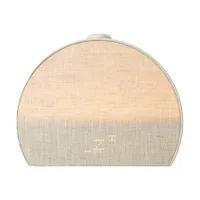
Hatch Sleep Clock review: Design

Sleek and with a natural finish, the Hatch Sleep Clock is a classy piece of bedroom decor. From the design, you would never guess it's stuffed fulk of sleep tech.
The rounded, half-moon build features a fabric covered front and plastic casing with minimal buttons. Opting for simplicity allows the Hatch Sleep Clock to fit most styles of decor.
It's available in three colorways (Putty, Greige and Cocoa) although I'll admit that the options are all similar looking.
Hatch Sleep Clock review: Features
The Hatch Sleep Clock is a contactless sleep tracker integrated into a sunrise alarm clock. It manages to pack a lot of features into a (relatively) small package and I'll detail my experience with each of them in this review.
As a sleep tracker, the Hatch Sleep Clock uses "ultra-low-power radio signals" to detect your breathing patterns. From this, an algorithm determines which sleep stage you're currently in. Hatch claims it's 97% accurate in comparison to traditional polysomnography (the gold standard in sleep tracking).

Alongside sleep tracking, the Sleep Clock operates as a traditional sunrise alarm clock. It brightens in the morning, while gentle sounds and dim light can also soothe you to sleep.
It's also a white noise machine and meditation guide, and even works as just a general bedside clock. So, yeah. It can do a lot.
Hatch Sleep Clock review: Sleep tracking
So, the big question: is the sleep tracking any good? Or is this just a pricier sunrise alarm clock that guesstimates your time in bed?
I've been using the Hatch Sleep Clock alongside the Oura Ring 5, our top-rated sleep tracker. Overall the results have been comparable, with the Hatch Sleep Clock data typically falling close to the range of the Oura Ring.
One thing the Hatch is excellent at, in comparison to wearables, is figuring out when I went to bed. Wearables often overlook the minutes I spend on one last scroll, while Hatch calls out my tendency to climb into bed and then waste time on my phone. It's an issue in my sleep routine that the Hatch keeps me alert to,
Where the Hatch seems to struggle is sleep stages, at least in comparison to the Oura Ring.


I've spotted that the Hatch Sleep Clock often overestimates my deep and REM sleep. This might give the impression that my sleep quality is better than it it (you need around 90 to 120 minutes of deep sleep a night.) I noted a similar problem with the Sleepal AI, which uses a similar tracking mechanism.
The Hatch's tracking is meant to improve as you use it — and as you feedback on the data — and during this testing period I feel the results have become more accurate. But I doubt it will replace my Oura for accuracy.
Another disadvantage of the Hatch is that it collects limited metrics. Devices such as the Oura Ring, FitBit and even the contactless Withings Sleep Mat can provide insight such as heart rate, HRV and temperature. With the Hatch Sleep Clock, it's just the hours in bed and sleep stages.
That will appeal to those looking for simplicity. There's no getting bogged down by numbers and no mornings spent worrying about minor deviations in heart rate. But it's not the all-round health monitor of wearable sleep trackers.

An unusual feature of the Sleep Clock is that it doesn't provide a sleep score. This is by design, as Hatch wants to offer "support" instead of ratings.
I suspect this will be divisive choice. As a sleep tech writer who has tested a variety of trackers, I don't miss it. When I check my data, it's the duration and timing that most catches my eye. However, if you prefer a neat summation of your sleep, a score is a clear data point.
For health and sleep track aficionados, the Hatch Sleep Clock is unlikely to offer the detail and accuracy you need. Particularly as it only tracks one metric (movement from breathing). Although is does record naps accurately, provided you're napping in bed, something even sophisticated wearables often struggle with.
Its timings are more guidelines than pinpointed facts — but some experts suggest that's the best way to view sleep tracking anyway.
Hatch Sleep Clock review: Performance
I've been using the Hatch Sleep Clock for three weeks, assessing it for key areas of performance, set up and function. Here's everything you need to know.
Set-up
As a 2-in-1 tracker and sunrise alarm clock, setting up the Hatch Sleep Clock does take a few minutes. First you have to plug it in, then use Bluetooth to pair it to your Hatch App.
Next is the positioning. With a normal sunrise alarm clock, this is the easiest part. For the Sleep Clock, positioning needs some finagling. It has to sit a few inches above your mattress, within two to four feet of the bed, and directed at your chest. (The app guides you through set up.)

For me, this meant clearing space on the nightstand and employing a stack of books. And as the Hatch Sleep Clock is easy to knock over when you're fumbling with the button first thing, I've found it requires frequent repositioning.
Next is deciding your settings. In the app you can set your sunrise, alarm, sunset and wind-down. There are a lot of options, so this might take a while. And as you struggle to decide just which Icelandic waterfall you want to fall asleep too (Gullfoss, duh) it can get a little overwhelming.
App
The app itself is well laid out with attractive colors and clear labeling. I enjoy navigating it, even if there's a lot to explore.
There are two main parts to the app. The first is data. Here you can find the details of your night, captured in a handy sleep tracking graph. Hatch will also provide hints and tips for better sleep based on your data and you can view weekly overviews.
On a subjective level, the sleep tracking display is among my favorites. The curved graph is super easy to read and helps me easily identify what happened during the night. It also feels less scientific than the charts from trackers like Oura, reinforcing sleep as a natural process, not a set of data.

Of course, the flip side is that if you enjoy the data-led breakdown, the Hatch Sleep Clock might seem like surface level insight.
The second part is setting up your routine. From the app you can choose your wind-down sounds, morning alarms and set your all-important sunrise. This can be complex and I've wasted entire evenings clicking on everything from 'Mojave Desert' to Ambient Rave'. But the alternative would be to remove features, so I'm not sure there's a better choice here.
Sunrise simulation
As someone who often needs to be up before the sun, I find waking to a dark room the worst way to start the day. It always leaves me feeling on the back foot.
The Hatch Sleep Clock has been a real game-changer as the mornings have gotten darker. Through summer, I was used to waking up naturally with the sun. Thanks to the Sleep Clock, I've maintained this healthy habit.

Using the app, you can set the sunrise to start for up to 60 minutes or as little as five minutes before you want to be awake. The Hatch gradually lights up, filling your room with light. This creates a gentle nudge for your circadian rhythm to start the day, replicating the 'awakening' effect of the natural sunrise. (Light suppresses sleepy hormone melatonin and increases production of cortisol, an alertness hormone.)
It's not just timing you can adjust. Pick from a variety of fun colors or stick to a classic golden wake up, to suit your mood and the season.
Alarms
You might find the light alone is enough to pull you out of sleep. However, if you don't want to leave it to chance, add an alarm.
Again, there's a series to choose from on the app (where you can also set the volume level.) Some alarms are more startling than others, while some are ambient noises to rouse you from sleep.
You can also set playlists. These shuffle through different alarm sounds and can be a fun way to shake things up. But prepare for some confusing mornings, lying there wondering just where that jazz music is coming from. (I'm never at my sharpest first thing.)
There's also a snooze option, which you activate by pressing and holding the big button. As a note, to turn the alarm off you also hit the big button, so as you get used to the Hatch, you might want to double check the alarm is properly off before you get out of bed.
Sunset simulation
The Hatch Sleep Clock isn't just there to wake you up; it sends you to sleep as well.
First is the bedtime playlist. Here you can set light and sounds to soothe you into sleep. These can be brief bursts of noise or all-night routines. (The Hatch is plugged in, so there's no battery to worry about.)

Simply hit the big button on the top and the Hatch will take you through your pre-programmed playlist.
Alternatively, you can set up the 'Turndown' service'. Again, this uses light and sound to create a relaxing ambience. The big difference is that it comes on automatically, to draw you away from one last-scroll and towards your bed.
Sleep sounds
Pay for Hatch+ and you unlock a truly vast library of sounds. This includes white noise, ASMR, breathwork, meditations and even audiobooks. It's an ever expanding library, so you can expect frequent updates.
The standard Hatch comes with fewer options, although there are still plenty to choose from. However, you will find yourself limited to more 'basic' sounds.
For easy use, you can save your favorites (Monastery Beach, Carmel-by-the-Sea, CA is mine) to the app. Just make sure to load them to the Sleep Clock before you hit the big button.
Hatch Sleep Clock review: User reviews
There are limited reviews for the Hatch Sleep Clock at the moment but early response suggests users appreciate the easy, "non-judgmental" sleep tracking. Users also note that the Sleep Clock encourages healthier routines and offers feedback on what features are working for them.
Negative reviews suggest that the app is harder to navigate than the Restore 3, while some users have had trouble with the sleep tracking (often related to glitches — hopefully these are kinks that will be ironed out).
Hatch Sleep Clock review: Should you buy?

There are many reasons to invest in a sunrise alarm clock. They support your circadian function, they can make getting up easier, and they help you wind-down before bed.
And there are plenty of benefits to sleep trackers, as they help you understand your sleep to improve it.
So why choose the Hatch Sleep Clock, a sunrise alarm clock and a sleep tracker? After using it for three weeks, I can see a wide appeal to this product. It's ideal for those who want to learn about their rest in an easy, no pressure way. You don't have to wear anything and you don't have to charge anything.
And you get all the advantages of a sunrise alarm clock rolled into the same package. If you've ever started the day lunging for a light switch in a dark room, you're likely to see the benefits of a sunrise clock.
The Hatch Sleep Clock is the next step in making wellness tracking more accessible. It's the kind of product I can see my tech-adverse, 70-year-old mom enjoying. Even as a sleep tech writer, I love waking to the gentle sounds and glow of the Mojave desert, and then assessing my sleep on the attractive app.
But for hardcore wellness enthusiasts who want a sleep tracker that records everything, ditch the Hatch Sleep Clock and try a traditional wearable.
Hatch Sleep Clock review: Alternatives

The Sleepal AI Lamp is the closest rival to the Hatch Sleep Clock right now. This contactless tracker / sunrise alarm clock has more tracking metrics than the Hatch — including noise, light, and temperature readings — but fewer sound and color options. It's also more expensive, at $399 from Sleepal.

If you're not bothered about sleep tracking but you love the sound of a sunrise alarm clock, try the Hatch Restore 3, which features a similar design and is loaded with the same circadian-friendly features. Skipping the tracking also saves you money, with the Restore 3 $169.99 at Hatch.

Conversely, if you want a contactless sleep tracker without the lamp, we recommend the Withings Sleep Mat. It sits under the mattress and collects numerous metrics to deliver excellent sleep tracking. It's $199.95 from Withings and while a subscription expands the features, it's not necessary.