Tom's Guide Verdict
The Samsung Q7F delivers better picture quality than cheaper 4K TVs, but it’s outpaced by similarly priced TVs with better performance and more features. It’s best suited for shoppers who are dead-set on a budget-friendly Samsung TV.
Reasons to buy
- +
Affordable price
- +
Comes with some smart features
- +
Attractive design
Reasons to avoid
- -
Poor contrast
- -
Not bright enough for meaningful HDR
- -
Sluggish software
- -
Missing basic gaming features
Why you can trust Tom's Guide Our writers and editors spend hours analyzing and reviewing products, services, and apps to help find what's best for you. Find out more about how we test, analyze, and rate.
Price: $379.99
Screen size: 43 inches
Model: Samsung UN43Q7FAAFXZA
Resolution: 3,840x2,160
HDR: HDR10, HDR10+, HLG
Refresh Rate: 60Hz
Ports: 3x HDMI 2.0, 1x USB-A
Audio: 20W
Smart TV Software: Tizen OS
Size (without stand): 38.1 x 22.1 x 2.4 inches
Weight (without stand): 15 pounds
Released in 2025, the Samsung Q7F is one of the most affordable Samsung TVs to come with a QLED display. This means that, unlike run-of-the-mill, ultra-affordable sets with a standard LCD display, the Q7F arrives with an air of sophistication.
But while this TV’s price is pleasantly low (especially if you manage to find it on sale), it faces some stiff competition in the form of budget-friendly TVs like the Hisense U65QF that include both quantum dot-color and Mini-LED backlighting — the latter of which goes a long way toward improving brightness and overall contrast.
My testing of the Q7F bears this out. The display offers well-saturated, accurate color, but without a backlight with full-array local dimming, the picture looks flat and HDR content lacks the visual impact it’s known for. There’s also a dearth of features for gamers that makes the Q7F tough (but not impossible) to recommend.
Samsung Q7F QLED TV review: Pricing and availability
Like many affordably priced Samsung TVs, the Q7F is available in a wide range of size options. Right now, many of these sets are seeing discounts, so I’ve included their sale prices at the time of publishing.
- Samsung UN43Q7FAAFXZA (43 inches): $399 | on sale for $329
- Samsung UN50Q7FAAFXZA (50 inches): $449 | on sale for $379
- Samsung UN55Q7FAAFXZA (55 inches): $529 | on sale for $379
- Samsung UN65Q7FAAFXZA (65 inches): $629 | on sale for $499
- Samsung UN75Q7FAAFXZA (75 inches): $999 | on sale for $699
- Samsung UN85Q7FAAFXZA (85 inches): $1,499 | on sale for $1,099
- Samsung UN98Q7FAAFXZA (98 inches): $2,499 | on sale for $1,999

Our review unit is a 43-inch model that we purchased ourselves. I don’t expect there to be any major differences in performance from one model to another since all sizes leverage a similar direct-LED backlight without local dimming.
Samsung Q7F QLED TV review: Design and remote
The Q7F’s rudimentary display hardware frees it up to be slightly more breezier-looking than many TVs in its price range. It won’t earn itself any compliments from friends and family members that come over to check out the new TV, but at the very least, the Q7F plays the part of a premium set quite well.

The panel is kind of a chonkster (that’s an official TV-testing term, by the way), but it’s wrapped in a textured plastic, giving it an air of, if not sophistication, something approaching sophistication. Admittedly, “textured panel” isn’t high on my list of nice-to-have TV features, but considering how cheap-looking lower-end TVs often look, it’s worth taking a moment to appreciate the touch.
I appreciate a no-nonsense stand situation on my affordable TVs, so I was pleased to see a pair of super-slim feet when I unboxed the Q7F, and doubly pleased when I realized that they connect to the panel without screws.

The Q7F comes with one of Samsung’s best innovations in the last decade: the Solar Cell remote control. Do I hate that this clicker comes without a dedicated input button and a backlit face? You bet. Does its solar-powered, rechargeable battery make up for this deficit? Yes — one thousand times over.
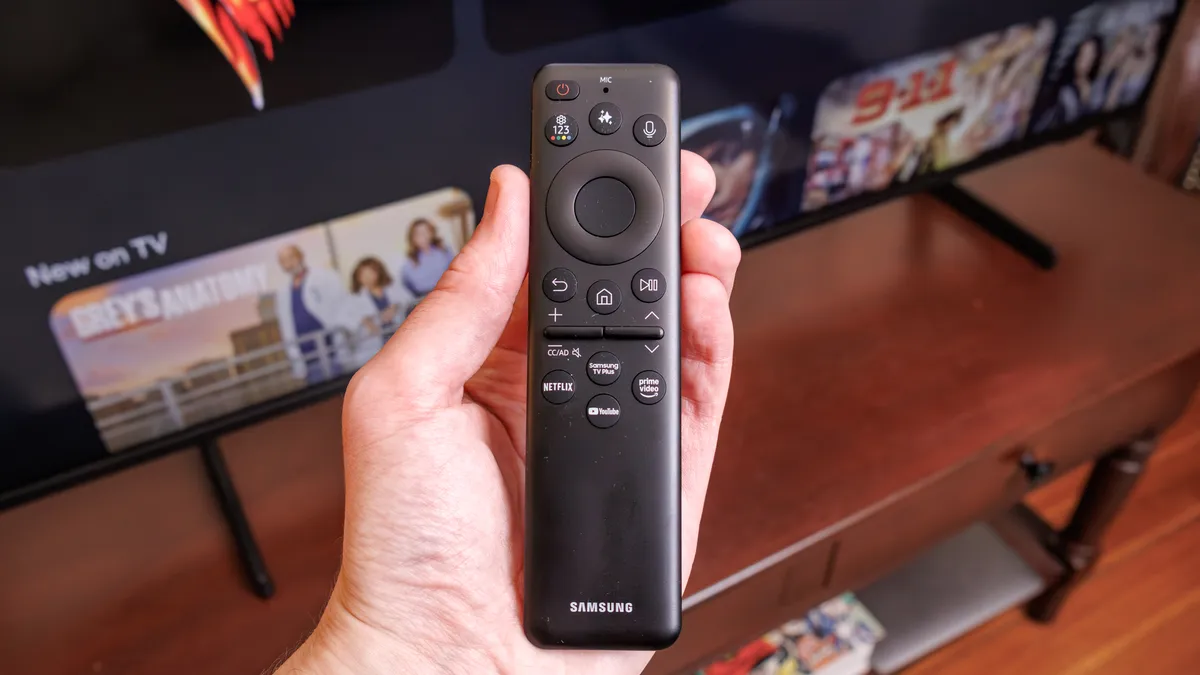
You’ll probably never have to manually charge this remote, and even if you need to in a pinch, its built-in USB-C port will erase the problem. As someone who hates collecting and disposing of dead batteries, I can’t overstate how friendly this feature is.
Overall, the Q7F’s design falls squarely between “basic” and “thoughtful,” which is good enough for budget-conscious shoppers.
Samsung Q7F QLED TV review: Ports
Take a trip behind the Q7F and you’ll find all of its ports located in a rectangular, right-facing cutout. There’s not much to go over: three HDMI inputs (one of which stands in as the eARC-enabled port), a USB-A port, an ATSC tuner and an Ethernet port, should you decide to use a wired internet connection over a wireless one.

There are a few things you should keep in mind about these options. Most importantly, all three of the Q7F’s HDMI inputs are of the 2.0 variety, meaning they are not HDMI 2.1 compatible. I’ll break down why this matters later in the review, but gamers ought to be aware of the Q7F’s lack of HDMI 2.1-related features.

Secondly, the Q7F’s ATSC tuner is 1.0 rather than 3.0, so this TV won’t be able to showcase over-the-air broadcasts in its native 4K resolution. This content remains scarce for the time being, but without the proper tuner, the Q7F is shut out.
Samsung Q7F QLED TV: Performance & Test Results
The Q7F offers decent overall performance compared to many cheaper, entry-level LED TVs, but its decidedly simplistic display renders its picture quality unimpressive unless you’re making the leap to 4K for the first time.
| Row 0 - Cell 0 | Samsung Q7F |
Hisense U65QF |
Samsung Q60D |
TCL QM6K |
SDR Brightness (10%, in nits) |
307 |
526 |
273 |
129 |
Delta-E (lower is better) |
3.5 |
1.8 |
2.6 |
2.4 |
Rec. 709 % Gamut Coverage |
98.6 |
99.45 |
99.12 |
99.67 |
HDR Brightness (10%, in nits) |
309 |
946 |
422 |
560 |
UHDA-P3 % Gamut Coverage |
91.45 |
95.65 |
90.88 |
94.71 |
Rec. 2020 % Gamut Coverage |
70.12 |
71.26 |
69.53 |
71.23 |
So, what do I mean when I call its hardware simplistic? The Q7F leverages a direct LED backlight but lacks local dimming. This setup is affordable to manufacture but comes with a major downside: poor contrast.

Without local dimming, the Q7F can’t brighten or dim independent LED zones. As a result, bright objects don’t look as bright as they might on a TV with local dimming, nor dark areas as dark. It’s why the teeny-tiny lights found in Mini-LED TVs are so desirable. The contrast woes will be present to varying degrees on each size in the series.

The Q7F’s presentation in Samsung’s Movie and Filmmaker modes look fine — not garish in the way affordable TVs sometimes look, but not captivating, either. I only occasionally notice visual artifacts while the TV upscales 1080p and 720p content, but this is mostly dependent on the source. Live TV via Samsung TV Plus, for instance, looks pretty rough, but there are plenty of reasons for that outside of the Q7F’s performance chops.

For everyday, good-ol’-fashioned TV-watching — cable TV, sports and the like — the Q7F will get the job done, but I highly recommend keeping it in dimly lit rooms, and especially out of the sunlight.

The Q7F is brighter than many bottom-of-the-barrel sets you can find for shockingly low prices, but it's not that much brighter than those options. It looked fine in my dimly lit study, but moving it next to a window in my living room created visibility issues.

This limitation is especially disappointing during HDR content. The Q7F isn't appreciably brighter in HDR than it usually is during basic, garden-variety SDR content. When you combine this with the shallow black levels brought about by the Q7F's lack of local dimming, you're left with HDR performance that doesn't really look like HDR at all.

On balance, the Q7F's performance will probably satisfy people who just want an affordable 4K that doesn't look weird while streaming Netflix shows or watching the nightly news. For folks who want more of a cinematic presentation, the Q7F will likely disappoint.
Samsung Q7F QLED TV: Smart Platform & Features
This TV comes with Samsung’s own smart platform, Tizen, pre-installed. The Q7F’s entire experience is built around this software, and even if you plan on pairing the TV with the best streaming device for your viewing habits, you’ll probably still bump up against its interface every now and then when the time comes to swap inputs or juggle settings.

On one hand, Tizen offers access to streamable content, including all of the major streaming services you’re likely to want. This is important, because I suspect that most folks shopping in the Q7F’s price range will want to lean on their smart TV’s streaming features for daily use.
On the other hand, the Tizen experience isn’t perfect. There are huge ads that take up large portions of the home screen and it often takes several extra steps to carry out basic functions due to the software’s meandering layout. This is tough enough to deal with on a top-shelf Samsung TV with a lightning-fast processor — it feels a lot worse on a TV with a less-capable chipset like the Q7F.

Without as much processing power, I find myself pushing buttons more than once, then accidentally needing to undo something because the software finally caught up with the inputs. It can be especially tough to navigate an on-screen keyboard to type in login credentials.
If you’re dead-set on using your next TV’s built-in smart platform for everyday use, the Q7F is good enough for the job, albeit occasionally frustrating. If you want a silky-smooth software experience, adjust your expectations accordingly.

Gamers will have to settle for the Q7F’s severely limited spread of gaming-related enhancements. You’ll get access to Samsung’s cloud-based gaming hub (appropriately named Samsung Gaming Hub), but unless you plan on doing console-free gaming via Xbox, GeForce Now or another supported service, this doesn’t account for much.
Nuts-and-bolts-wise, the Q7F is equipped with a trio of HDMI 2.0 inputs that are capped at 4K/60Hz support. Variable Refresh Rate (VRR) and FreeSync support aren’t included. Casual gamers might find that sufficient, but high-level players looking to get the most out of an Xbox Series X and/or a PlayStation 5 risk disappointment.
Samsung Q7F QLED TV review: Verdict
The Q7F is a relatively affordable TV that doesn't particularly excel at any one thing. Unlike some competitive sets in its price range, the Q7F doesn't sneak in a surprising amount of extra features for gamers or A/V enthusiasts, which is a bummer.
It's a better — but pricier — pick than ultra-cheap TVs that drop to ridiculously low prices during sales events. Unfortunately, it's priced higher than it ought to be given its lackluster performance and minimal features.
Consider the Hisense U65QF. This entry-level Mini-LED TV comes with local dimming, and in our Hisense U65QF review, our reviewer praised its terrific, class-leading brightness. Right now, the 55-inch U65QF is $399 at Best Buy — just $20 more than the Samsung Q7F. The U65QF comes with Dolby Vision support, to boot.
Alternatively, you might want to check out the TCL QM5K, whose 55-inch version is $349 right now. That’s $30 less than the 55-inch Samsung Q7F. Although we’ve yet to formally test it, the QM5K arrives with basic Mini-LED backlighting and local dimming. It also comes with Dolby Vision support.
The Q7F isn’t a bad TV by any means, but it’s just not the best option for most shoppers looking to spend between $350 and $500.