



You can watch this article as a video on The Privacy Lab's YouTube channel.
Five billion dollars. That's how much Google agreed to pay after being caught tracking millions of users who thought they were browsing privately with Incognito mode. During the lawsuit, quotes from Google’s own employees emerged, calling Incognito "effectively a lie" and a "confusing mess."
Even Google's Chief Marketing Officer warned the CEO that they had to use "fuzzy, hedging language" because, in her own words, "it's not truly private."
I think Incognito mode is one of the most successful illusions in tech history. So, I'm going to strip it back to look at what Google Chrome actually does to protect your data, what Incognito mode completely fails to do, and the steps you can take to stay genuinely safe online.
Credit where it's due
It's important to be fair to Google here, even though it might feel a bit wrong: Chrome is actually a fairly secure web browser when it comes to keeping you safe from hackers and malware.
Importantly, it makes sure you use HTTPS, which encrypts the data that passes between your device and the websites you visit. This means that even if you connect to a dodgy Wi-Fi hotspot and someone is monitoring the connection, they can't steal your passwords or read your traffic. Plus, it warns you if you click on unencrypted HTTP links. Because Chrome and most other modern browsers do this, the classic "man in the middle" attack is very rare nowadays.
Chrome also features Secure DNS, as well as tab sandboxing. The latter isolates every browser tab so a malicious site can't jump to another and steal data. But the problem isn't Chrome's security. The problem is what happens when you click on Incognito.
What Incognito mode is good for
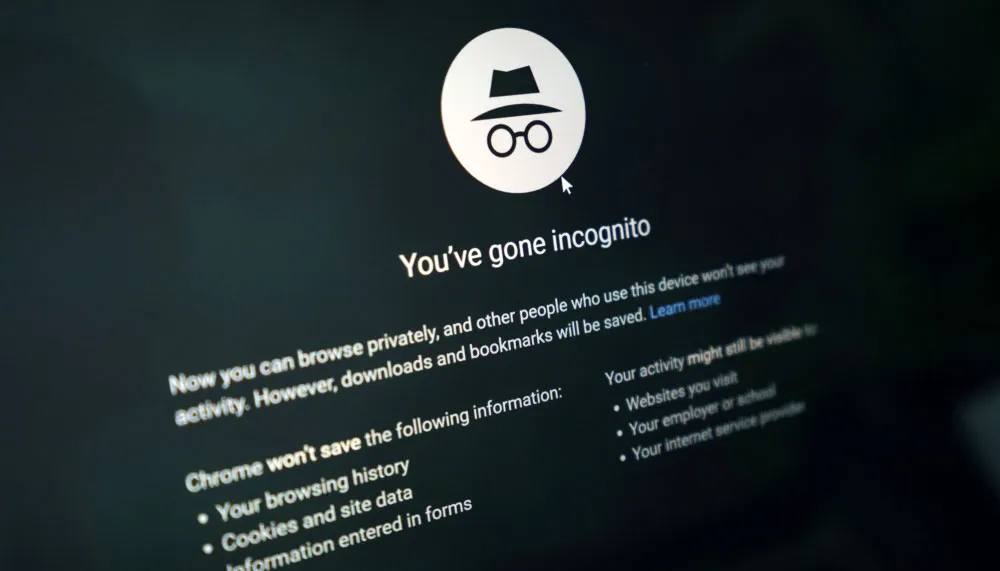
Incognito mode is not built for network stealth – it just keeps your browser tidy. When you open an Incognito tab, your browser stops recording some data. It doesn't save your activity in history, doesn't save auto-fills, and blocks third-party cookies
For example, if you're shopping for a birthday present or visiting… certain sites you'd rather not have saved in your history, Incognito mode works perfectly. It stops someone else who uses the same device from seeing what sites you've visited. However, this is exactly where its power ends.
Where Incognito fails
Everything falls apart the moment your data leaves your device – Incognito mode does nothing to hide your identity from the outside world. Your internet provider can still log the domain names you connect to, and if you're browsing on a work or school network, they can see every single site you visit.
Most worryingly, the websites you visit can still track you. They can record your real IP address, and if they use something like Google Analytics, they can instantly tie your "private" session to your existing digital profile.

In fact, following that massive lawsuit I mentioned earlier, Google had to change the official warning page in Chrome to explicitly admit this. It now reads: "This won't change how data is collected by websites you visit and the services they use, including Google."
Essentially, they had to confess on-screen that the data collection doesn't stop.
Is Incognito mode still worth using?
Whether you should use Incognito boils down to what you expect from it. If you care about what other people using your device can see, it's perfect. It's also great for logging into different email accounts, getting around article limits on news sites, or stopping your YouTube algorithm from being ruined because you wanted to watch one weird video.
However, Incognito does not give you any kind of meaningful digital privacy. For any entity that has control over your connection – notably your ISP, school, or workplace – there's no difference at all between using Incognito and rawdogging it with a logged-in Chrome tab.
It's the same story for the sites you visit. Your IP and any device identifiers are still available to see, so it's very easy to link this activity with anything else you've done online. At the end of the day, Incognito only hides your tracks from the person sitting next to you – not the rest of the world.
For genuine privacy, I recommend using tools that actually secure your connection. Use one of the best VPNs to hide your activity from your ISP and change your IP address, and consider switching to a browser like Brave or Firefox that blocks tracking by default. Ad and tracker blockers are also good – there are plenty available for free – and finally, keep everything updated, including Chrome. New releases address the most recent issues, so it's good to stay on top of this.
In short, it's certainly not in Google's best interest to provide you with a tool that strips away the possibility of data collection. There are still eyes behind the famous fedora and sunglasses – and they're always watching.
We test and review VPN services in the context of legal recreational uses. For example: 1. Accessing a service from another country (subject to the terms and conditions of that service). 2. Protecting your online security and strengthening your online privacy when abroad. We do not support or condone the illegal or malicious use of VPN services. Consuming pirated content that is paid-for is neither endorsed nor approved by Future Publishing.

