
Score this 4K gaming monitor for $200 off
Save $200 on this 4K gaming monitor at Newegg
Here at Tom’s Guide our expert editors are committed to bringing you the best news, reviews and guides to help you stay informed and ahead of the curve!
You are now subscribed
Your newsletter sign-up was successful
Want to add more newsletters?
Daily (Mon-Sun)
Tom's Guide Daily
Sign up to get the latest updates on all of your favorite content! From cutting-edge tech news and the hottest streaming buzz to unbeatable deals on the best products and in-depth reviews, we’ve got you covered.
Weekly on Thursday
Tom's AI Guide
Be AI savvy with your weekly newsletter summing up all the biggest AI news you need to know. Plus, analysis from our AI editor and tips on how to use the latest AI tools!
Weekly on Friday
Tom's iGuide
Unlock the vast world of Apple news straight to your inbox. With coverage on everything from exciting product launches to essential software updates, this is your go-to source for the latest updates on all the best Apple content.
Weekly on Monday
Tom's Streaming Guide
Our weekly newsletter is expertly crafted to immerse you in the world of streaming. Stay updated on the latest releases and our top recommendations across your favorite streaming platforms.
Join the club
Get full access to premium articles, exclusive features and a growing list of member rewards.
If you're building or upgrading a gaming PC, one of the most meaningful investments you can make is a 4K monitor, and I just found a great deal on a good one.
For a limited time, the Gigabyte M28U 4K gaming monitor is on sale for $329 at Newegg. That’s almost half off the usual $599 asking price for this 28-inch monitor, making it a great investment for anyone seeking a 4K gaming screen on a budget.
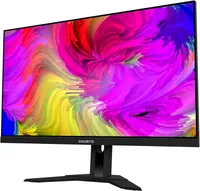
This 28-inch 4K (3,840 x 2,160 pixels) 144Hz gaming monitor offers HDR support, a good port array (including HDMI 2.1 so you can plug in your latest gaming consoles) and a built-in KVM switch feature that lets you use the same mouse, keyboard and monitor across multiple devices.
The Gigabyte M28U is simple to look at and easy to set up, so it's a good starter monitor for the PC gaming novice. At under 20 pounds, it's fairly easy to move around, too, so it's a good choice for students or anyone who's expecting to renovate their desk setup on the regular.
The no-frills design of the M28U might not turn heads, but it helps this display blend into a home office, and the cutout in the back makes it easy to route cables out of sight. And you can adjust it backward and forward, raise or lower the display and swivel it left or right a fair bit, thanks to the adjustable mount, so it's more ergonomic than many monitors.
Plus, the 144Hz refresh rate ensures this 4K display keeps up with high-framerate games running on the PS5, Xbox Series X and some of the best gaming PCs. And with support for AMD's FreeSync tech, you can count on buttery-smooth framerates while PC gaming.
It's not just for gaming, either—this multi-purpose Gigabyte monitor is well-suited to productivity work thanks to its built-in KVM (Keyboard, Video and Mouse) switch. My colleague recently bought an open-box model and was pleasantly surprised at how easy the Gigabyte M28U is to use and set up. It has a number of different display modes to boot, so you can fine-tune the look of the screen to your liking.
This is the lowest price I've ever seen on this gaming monitor, so act fast if you want one!
More from Tom's Guide
- I added this $50 monitor light bar to my desk setup and it’s a game changer
- 5 tips for using a TV as a PC monitor
- My favorite OLED gaming monitor can be ruined by burn-in — here’s how to stop it
Get instant access to breaking news, the hottest reviews, great deals and helpful tips.

Alex Wawro is a lifelong tech and games enthusiast with more than a decade of experience covering both for outlets like Game Developer, Black Hat, and PC World magazine. A lifelong PC builder, he currently serves as a senior editor at Tom's Guide covering all things computing, from laptops and desktops to keyboards and mice.
You must confirm your public display name before commenting
Please logout and then login again, you will then be prompted to enter your display name.

