







Shortly after I began writing for Tom’s Guide, I covered a news story about an Asus gaming monitor boasting a 240Hz refresh rate. At the time, my team and I thought it was over the top. Who but the most hardcore gamer needed such high refresh rates? In the years since, we’ve only seen refresh rates on certain gaming monitors climb even higher.
What’s the point of all this? Simply put, the higher the refresh rate on the best gaming monitors, the smoother everything looks on screen. For competitive gamers, matching a game’s frame rate to a high refresh rate makes your actions feel fast and responsive. But even if you’re just a regular gamer, you can still benefit from a higher refresh rate.
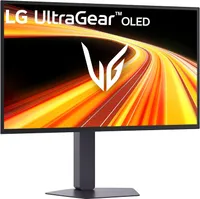
I’m currently testing the LG UltraGear 27GX790B-B ($994 on Amazon), a dual-mode monitor that can switch between 540Hz at 1440p and 720Hz at 720p. This monitor completely blows away the Alienware 500Hz monitor I reviewed a couple of years ago. While testing it, I can’t help but ask the obvious question: Do such high refresh rates truly benefit gamers, or is this all just flexing?
For this article, I’ve reached out to two Future colleagues: Brandon Hill from Tom’s Hardware and Dave James from PC Gamer. As hardware reviewers, they know their stuff and provided me with some great insight on this topic. Here’s what they had to say about high-refresh-rate gaming monitors, along with my own thoughts.
High refresh rates can be beneficial

Not everyone chasing ultra-high refresh rates is doing it purely for bragging rights. I checked in with my colleague Brandon Hill, senior editor at Tom’s Hardware, and he’s a firm believer that high-refresh-rate monitors are a boon for gaming — so long as you have the hardware to push them and the personal drive to take advantage of them.
“I prefer eye candy over insane refresh rates.”
Brandon Hill, senior editor at Tom’s Hardware
He regularly games on a massive 49-inch 240Hz DQHD QD-OLED paired with an RTX 5090. Even with that kind of power, he often hovers around 180 FPS in Battlefield 6 while keeping the graphics settings high. “I prefer eye candy over insane refresh rates,” he told me.
The same thinking carries over to today’s dual-mode monitors. Brandon gets why the most hardcore esports players “would kill to eke out every possible frame to gain the upper hand online,” especially when you’re talking pixel response times in the 2ms range and super-low input lag. But he’s quick to admit he’s not in that camp. “I play for fun, not for competitive aspirations.”
If I had the choice of running a monitor at 540 Hz at QHD versus 720 Hz at 720p, I'd choose the former every single time — and twice on Sundays.
Brandon Hill, Tom's Hardware
Given the choice between 540Hz at crisp 1440p or 720Hz at 720p on something like the Sony Inzone M10S II, his pick is an easy one: “I’d choose the former every single time — and twice on Sundays.”
I agree with Brandon’s take here. While you certainly want games to run as smoothly as possible, it shouldn’t be at the expense of visual fidelity. My eyes scream whenever I switch to the LG UltraGear’s 720Hz mode since it’s locked to 720p resolution. And since I legit cannot tell or feel the difference with 720Hz gaming, sacrificing visuals really makes no sense.
Bragging rights?

Dave James, Editor-in-Chief of Hardware at PC Gamer, has a similar perspective about the benefit of insane refresh rates on gaming monitors. They can surely be beneficial, but they do feel like companies flexing what their hardware can achieve.
Beyond genuinely achievable frame rates, these extra high refresh rates become less about gaming and more about numbers on a spec sheet you can use for marketing.
Dave James, Editor-in-Chief of Hardware at PC Gamer
Dave says it largely depends on who you are and what kind of games you play. For those of us who mostly enjoy single-player or co-op experiences, he argues that 144Hz is still a fantastic refresh rate, with 240Hz now a realistic and worthwhile target. He understands why competitive players want to chase the absolute highest refresh rates they can manage, but stresses that they only become relevant “if you have a system that can drive frame rates to match.” This is something that’s getting easier thanks to upscaling technologies.
When you can actually keep up with the monitor, Dave says playing a competitive shooter on a super-fast screen “almost becomes like looking through a window.”
That said, Dave is much more skeptical about the other end of the spectrum. Once you get to numbers like 720Hz that are extremely difficult to fully utilize, he believes it shifts away from actual benefit. “Beyond genuinely achievable frame rates, these extra high refresh rates become less about gaming and more about numbers on a spec sheet you can use for marketing and one-upping the competition,” Dave told me. “At this level, those numbers aren't for us gamers.”
This is where I fall on this topic. I find it very impressive that LG and others can achieve such lofty refresh rates on their respective gaming monitors. However, it’s hard to see how this benefits anyone but the most hardcore professional gamers.
Bottom line
After hearing Brandon and Dave’s thoughts and spending time with the LG UltraGear 27GX790B-B, my stance hasn’t changed much. These insanely high refresh rates are impressive, but they’re not essential for most gamers.
If you’re an esports competitor, monitors like this can give you a real edge. For everyone else? 144Hz or 240Hz at crisp resolution still delivers smooth gameplay and great picture quality without any sacrifice.

Follow Tom's Guide on Google News and add us as a preferred source to get our up-to-date news, analysis, and reviews in your feeds. Subscribe to Tom's Guide on YouTube and follow us on TikTok.
More from Tom's Guide

