







Now that the majority of web traffic comes from mobile devices, it's unsurprising that demand for the best mobile VPNs is ever-increasing. Thankfully, top VPN companies are investing in their at a steady rate – many have a huge amount of features, rivalling desktop apps.
However, it's also much easier to download a dangerous fake VPN on mobile – so I highly recommend that you don't download the first one you find on the app store. At Tom's Guide, we've tested and reviewed dozens of the best – and worst – mobile VPNs so that you can make an informed decision.
Thanks to its simplicity and "it just works" ethos, I consider ExpressVPN the best VPN for mobile devices. It's ready to go as soon as you install it, and makes privacy easy. However, NordVPN is a great alternative, and offers a lot more flexibility if you're also planning on using your VPN on desktop.
The 3 best mobile VPNs at a glance


How I chose the best mobile VPNs
Why you can trust Tom's Guide Our writers and editors spend hours analyzing and reviewing products, services, and apps to help find what's best for you. Find out more about how we test, analyze, and rate.
For this guide, I tested out all of the VPNs listed on my own personal iPhone 14 Pro, as well as a range of other mobile devices to get a proper feel of what they're like to use day-to-day.
I've also checked data and feedback from our other testers to garner a range of opinions. I've taken a look at the features each platform offers, in order to evaluate any differences there might be between their iOS and Android offerings.
I've focused my analysis on a few key areas that will impact how well these VPNs perform specifically on mobile.
All the VPNs listed have been tested on a 10 Gbps line to determine their maximum speed, as well as on my domestic Wi-Fi to give you a good idea of how fast they'll be for the average user. While a VPN cannot increase your internet connection speed, a lower impact on your base connection will help keep your connection smooth and reliable while using it.
I also checked how well each VPN can unblock various streaming services on mobile. This saw me try to access multiple different streaming services (for example Netflix, Amazon Prime, Disney+, 10 Play and BBC iPlayer) while connected to each VPN in various different regions. This gave me a good idea of what the VPNs were like to use during real-life streaming sessions.
If my streaming sessions were interrupted for whatever reason, I contacted the VPN's support team to see how they approached fixing them. This also allowed me to check out what their support was like.
I've also taken the security offered by the VPNs into consideration too, as this will keep you safe if you connect to unsecured Wi-Fi networks while using your mobile when out and about.
Read more about how we test VPNs for an in-depth look at our testing process.
The best mobile VPN overall
What we like:
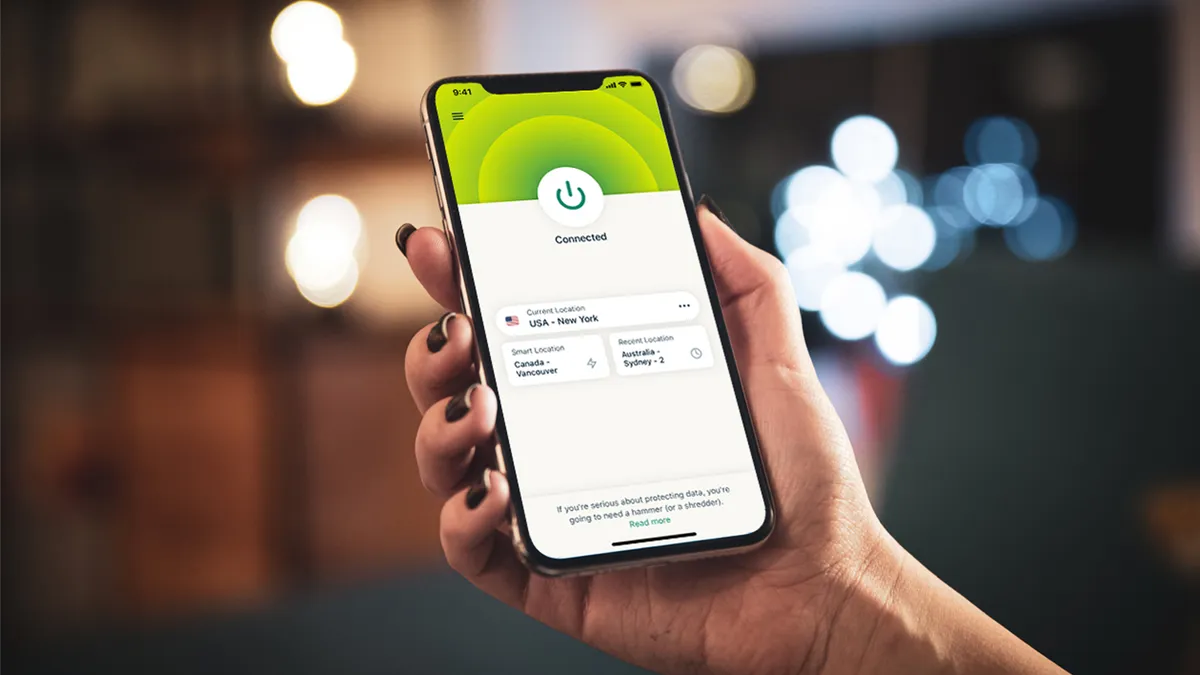
ExpressVPN came out as the best iPhone VPN from our testing, and is one of the best Android VPNs, too. So, it's unsurprising it takes the #1 spot here as well.
ExpressVPN has recently redesigned the UI of its mobile apps. This updated design now includes a map and a speed test tool as well as some new design aesthetics to choose from. This includes Twilight Mode, which switches the app's colours to dark in order to reduce eye strain in low-light environments. You can also pick other appearance themes, including cool blue with "Sky" or green and black with "Midnight".
You can even customize the way the app icon looks on your mobile's homepage, with Classic, Dynamic, Neon, and Grey icons designs to choose from.
It's not all impressive aesthetics, though. ExpressVPN has excellent security under the hood, including industry-standard AES-256 encryption. Both of its mobile apps include a kill switch, although it is referred to as Network Protection on Android. In testing, the kill switch was fully functional, cutting my internet connection when I force-ended the VPN connection.
The Android app comes with a useful auto-connect feature that activates the VPN when you connect to an untrusted network. This is especially useful for a mobile VPN to have, as you're much more likely to be connected to public Wi-Fi in order to save on your data.
Unfortunately, this feature is not available on iOS. Similarly, while its Android apps offer split tunneling, its iOS app does not. However, if you are an Android user, split tunneling feature is useful. Essentially, this allows you to choose which apps use the VPN, and which apps don't. This could be useful if, for example, you always like to route your browser traffic through the VPN, but you also play a mobile game that doesn't work properly when connected.
ExpressVPN also has a handy feature called Parallel Connections. This means the app tries all available connection methods simultaneously when connecting to a server. This makes its connection time the fastest of any mobile VPN I've tested, getting you protected incredibly quickly.
ExpressVPN reliably unblocked a ton of streaming sites in our tests. This included Netflix in the US, UK, Japan, Australia and Canada, as well as Amazon Prime Video, Disney+, BBC iPlayer, and 9Now among many more. So, you should be able to stream just about anything on your mobile while using ExpressVPN.
Finally, with a user rating of 4.7/5 in both the Play Store and Apple App Store, it's clear that real people enjoy using ExpressVPN. In fact, these ratings are higher than any other VPN on this page.
What could improve:
Although ExpressVPN's connections speeds are very fast when using the Lightway Turbo protocol, it's a Windows exclusive. On mobile devices, you're stuck with regular Lightway, WireGuard, and OpenVPN, which didn't test as fast. Lightway topped out at just 489 Mbps, and WireGuard at 694 Mbps.
Connections with OpenVPN impressed at 808 Mbps, but considering NordVPN, Proton VPN and Surfshark all maxed out at over 1,000 Mbps when using a mobile-compatible protocol, it's clear ExpressVPN isn't the fastest handheld choice.
ExpressVPN also ran into a couple of issues while streaming. It was entirely unable to access Amazon Prime Video – and issue shared with Surfshark and Private Internet Access – and we also had some trouble accessing regional content YouTube while not logged into the platform.
However, while this isn't perfect, these results can vary day to day, and very few VPNs did any better in our streaming tests.
🔒 Read our in-depth ExpressVPN review for all the details.
Buy ExpressVPN if:
✅ You're a VPN newbie. ExpressVPN's mobile apps are simple yet powerful, making them ideal for new users.
✅ You want a VPN you can set-and-forget. ExpressVPN's auto-connect feature on Android means once it's set up, you'll always be connected to a secure server.
✅ You want a mobile VPN with added cybersecurity features. Premium ExpressVPN subscriptions include tracker, ad and malware blocking, as well as a password manager.
Don't buy ExpressVPN if:
❌ You want a mobile VPN with flawless streaming performance. ExpressVPN was detected on Amazon Prime Video and YouTube.
❌ You want the absolute fastest VPN. While ExpressVPN's OpenVPN speeds are fast at 808 Mbps, its Lightway speeds are some of the slowest on this list at 489 Mbps.
Best mobile VPN for Netflix

What we like:
Based on our testing, we rate NordVPN as the best overall VPN, so it's no surprise that its mobile apps are powerful.
There is a little variation between what is offered on the Android and iOS apps, although this doesn't mean they don't perform well.
Both apps come with super-secure AES-256 encryption as standard, as well as Threat Protection Lite which blocks ads, trackers and malware. There's also a range of protocols on both platforms. The Android app supports OpenVPN UDP and TCP, NordLynx and the newly announced NordWhisper protocol, while the iOS app currently only supports OpenVPN UDP, TCP and NordLynx.
Similarly, while NordVPN offers a kill switch on Android and iOS, it functions a little differently on each platform.
On Android, NordVPN's kill switch blocks your internet when there is no VPN connection, while the NordVPN iOS app blocks all internet access if the VPN accidentally fails. Additionally, while there is the option to turn the kill switch off on Android, on iOS the kill switch is always-on and cannot be turned off.
I found this a little annoying on Android – if you want to use the kill switch, you have to be connected at all time, or else you can't connect to the internet. I'd prefer to be able to connect and disconnect at will, and still trust that my VPN will protect me if the connection drops out inadvertently..
On Android, you can use NordVPN's split tunneling feature to specify which apps won't use the VPN. Unfortunately, this is not available on iOS.
NordVPN has auto-connect on both iOS and Android. I found both super simple to use, and this means that you can simply set-and-forget your VPN, keeping you protected automatically whether you're in the home or on-the-go.
NordVPN is very fast, clocking in at 1,256 Mbps in our latest speed test. As with ExpressVPN, this was on a 10 Gbps line.
These speeds come in handy if you're using your phone for streaming, especially since NordVPN is one of the best Netflix VPNs. In my testing, I was able to unblock Netflix in the US, UK, Japan, Australia and Canada, all from my phone.
As well as multiple different Netflix libraries, I was also able to unblock Amazon Prime Video – better than ExpressV PN, then – Disney+, BBC iPlayer, and 9Now among many more. So, your on-the-go streaming sessions won't be interrupted if you use NordVPN on your mobile.
What could improve:
While NordVPN's apps are perfectly functional, you will have a different experience using them based on which OS they're on.
When using both apps alongside the desktop version, I found the variation in design and features frustrating. While it's unlikely you'll use both iOS and Android apps, you'll almost certainly install your chosen VPN on your laptop – and if you do, you'll be faced with an entirely different interface.
NordVPN's apps aren't complex by any means, but the difference in app appearance and features is a little jarring. If you want a VPN that keeps it consistent no matter what, you'll prefer ExpressVPN.
Another thing to consider is price. Starting at around $3 per month for a two-year subscription, NordVPN is decidedly mid-range. However, if you want any extras you'll have to upgrade your subscription. Not only this, but you'll be subject to pretty steep price hikes after your first subscription term ends.
Thankfully, you can "stack" subscriptions – this means you can buy extra time whenever you want and add it onto your existing plan – but many people have fallen foul of the super expensive auto-renewal prices.
🔒 Read our in-depth NordVPN review for all the details.
Buy NordVPN if:
✅ You want to use the best VPN overall. NordVPN is the most well-rounded VPN based on our testing.
✅ You want a secure mobile VPN. With AES-256 encryption, auto-connect and Threat Protection Lite, NordVPN will keep the internet traffic on your mobile super secure.
✅ You want a fast mobile VPN. With speeds of over 900 Mbps, NordVPN is one of the speediest VPNs on this list.
Don't buy NordVPN if:
❌ You want consistent apps. NordVPN's apps have quite a lot of variation depending on which operating system you use it on.
❌ You're on a tight budget. At around $3 per month for a two-year subscription, NordVPN is pretty pricey when compared to providers like Surfshark.
Best cheap mobile VPN

What we like:
Surfshark is a great option for mobile VPN users on a budget. It's the best cheap VPN I've ever tested, and packs a lot into a great-value package.
Both of Surfshark’s mobile VPN apps open with an intuitive location list, a Quick Connect button and a Connection Status panel which shows you whether or not your kill switch is on. If it's off, you'll be warned to turn it on, which is a great little reminder to boost your online security.
Similarly, if you connect to an unsecured Wi-Fi network without the VPN active, Surfshark's mobile app will send you a notification asking if you want to protect your connection.
This is a really handy feature for less committed VPN users who may not want to have their VPN active 24/7, but still want to add an extra layer of protection to their internet connection when necessary.
If you want to go one step further, you can always set up Auto-Connect. This handy feature tells the app to automatically connect to the VPN whenever you connect to a Wi-Fi network that you haven’t specifically marked as Trusted.
Essentially, Surfshark has put a lot of work into getting you protected quickly and easily, without too much thought on your end.
Bypasser is Surfshark's name for split tunneling, and it works slightly differently on iOS and Android – on Android you can pick which apps go through the VPN, while iOS also allows you to pick apps, but adds IP addresses and websites, too. It's refreshing to see an iOS app with more features than Android, but neither is underpowered.
Surfshark's privacy and security features don't stop there, however. With Alternative ID and Alternative Number, you can generate a name, email address, physical address and (US-only) phone number for use on sites you don't want to give your real information to. This keeps your real details safe and prevents them from being leaked via data breaches.
When it comes to speeds, Surfshark is known for being one of the fastest VPN services. In our last round of testing, it achieved a peak speed of 1,615 Mbps. However, longer-distance connections weren't quite as quick – which is why Proton VPN top that guide instead.
I was also able to unblock Netflix in the US, UK, Japan, Australia and Canada, as well as Amazon Prime Video and Disney+ in the US, BBC iPlayer, ITVX and Channel 4 in the UK, and 9Now and 10 Play in Australia.
What could improve:
As mentioned above, Surfshark's long-distance connections aren't quite as speedy as shorter hops. When connecting between the UK and the US, peak speeds dropped to 355 Mbps. That's not slow, but if you pay for gigabit Wi-Fi, you'll likely notice a difference.
Another thing to keep in mind is price. While its initial price of less than $2 per month for a two-year subscription makes it the cheapest VPN on this list, this does come with a caveat – this price is exclusive to your first subscription term.
Once the two years are up, your renewal will come with a pretty hefty price hike. If you want to avoid this, as with NordVPN, you'll need purchase extra time before your plan runs out to secure the lower rate.
🔒 Read our in-depth Surfshark review for all the details.
Buy Surfshark if:
✅ You're on a budget. At $1.99 per month for a two-year subscription, Surfshark is the cheapest option on this list.
✅ You use OpenVPN. With speeds of over 431 Mbps when using OpenVPN, only ExpressVPN outdoes Surfshark for speed.
✅ You stream a lot of content on your mobile. Surfshark had absolutely no issues during my streaming tests, making it perfect for on-the-go streaming sessions.
Don't buy Surfshark if:
❌ You want the fastest mobile VPN. Surfshark's speeds are slow by any means, but at 848 Mbps it isn't the fastest VPN on this list.
❌ You want to avoid price hikes. Surfshark's initially low price only lasts for your first two years, with quite steep price hikes after this.
Best mobile VPNs for security

What we like:
Proton VPN is a trusted name in VPN, and a recent redesign of its mobile apps, this rise seems set to continue addressed a lot of critiques I had for it in my previous Proton VPN review. For example, its cluttered server map and confusing layout has been much improved.
Both iOS and Android have sleek new interfaces that are well laid out, with a map simply for aesthetics. This makes them a lot easier to navigate and much more aesthetically pleasing.
This redesign also came with some cool new features, like widgets on both Android and iOS. This allows you to switch Proton VPN on without even opening the app.
One of my favourite iOS features has made it to Android, too: Profiles. By setting up custom connection profiles – selecting the location, city or state, server, protocol, and settings for the VPN connection – you can switch between various specific setups for particular use-cases. This is great if you sometimes prioritise absolute speed and a certain location – perhaps for gaming or streaming – but also like to take extra privacy precautions at other times.
On that note, Proton VPN is well-known for being one of the most secure VPNs on the market, and its mobile apps live up to this reputation. Both Proton VPN's iOS and Android apps have kill switches, but they function slightly differently. On Android, the kill switch a built-in, always-on kill switch, whereas the iOS kill switch can be turned on or off.
ProtonVPN performed incredibly well in our latest VPN speed test, with peak speeds of 1,521 Mbps on a 10 Gbps line with a short-distance connection, and 1,242 Mbps on a long-distance connection. These consistently rapid speeds has earned Proton VPN the top spot in my fastest VPN guide.
On my own domestic Wi-Fi, I was able to achieve speeds of 51 Mbps. This was faster than every other VPN on this list, cementing it firmly as the speediest mobile VPN app.
In my streaming tests, I was able to unblock multiple Netflix libraries from Canada to Japan, as well as Aussie-based streaming services 9Now and 10 Play. As one of the best UK VPNs, it has streaming platforms covered there, too, unblocking BBC iPlayer, ITVX and Channel 4 with ease.
What could improve:
Unlike other VPNs on this list, like NordVPN, ExpressVPN or Surfshark, Proton VPN does not offer auto-connect on Android, iOS.
This means that if you do connect to unsecured public Wi-Fi using your phone, you'll have to remember to turn your VPN on first. If you don't always plan on having your VPN on, this might be an issue.
Often costing more than $3.50 per month for a two-year subscription, Proton VPN is one of the most expensive VPNs on this list. If you wanted to save money you could always go for its free version, Proton VPN Free. However, while this is one of the best free VPNs on the market, it does come with some limitations.
The main restriction is that you can't choose which server you connect to. This is fine if you just need extra privacy, but for streaming, gaming, or any other use that requires a particular server location, it's a no-go.
It's worth noting, though, that Proton does occasionally reduce its pricing – for example, its Black Friday VPN deal dropped its price to less than $2.49 per month.
🔒 Read our in-depth Proton VPN review for all the details.
Buy Proton VPN if:
✅ You need a super-fast mobile VPN. Proton VPN achieved speeds of 1,198 Mbps in our latest streaming tests, making it the fastest mobile VPN on this list.
✅ You want a mobile VPN with streamlined apps. Proton VPN's iPhone and Android apps have a sleek new look which has vastly improved their functionality.
✅ You want a security suite as well a VPN. Proton VPN has a huge range of extra cybersecurity features available in its mobile apps to keep you safe online.
Don't buy Proton VPN if:
❌ You want a free mobile VPN you can use for streaming. While it's great in many other ways, Proton VPN Free's mobile app does not support streaming at all.
❌ You want a cheap iPhone VPN. Proton VPN is one of the most expensive VPNs on this list, with regular pricing starting at over $3.50 per month for a two-year subscription.
The best mobile VPN for experts

What we like:
Private Internet Access (PIA) is a mobile VPN for the more technically-minded, with a huge amount of customizable options. It has a large range of settings to play around with, from encryption protocol to network.
There are some fun extra features to be had too, including allowing you to set up Siri shortcuts for hands-free protection. This isn't available on Android, however.
In terms of security, PIA offers not one, but two kill switches on both its Android and iOS apps, meaning your data will be kept protected even if your VPN connection fails. I found these fairly easy to set up, as well as the ad, malware and tracker-blocking MACE.
Another great feature PIA offers is automation. This allows you to set up automated actions that trigger when you connect to different Wi-Fi networks or when you're on mobile data.
This gives you a huge amount of control over your VPN connection beyond when it is or isn't active. If you set some time aside to get your settings squared away exactly how you like them, you can essentially just leave PIA running in the background, safe in the knowledge that you'll be protected exactly when you need it.
You can get even further control over your VPN connection by using its split tunneling feature to select which apps, IP addresses, or domains don't use the VPN connection. However, this is only available on its Android app.
PIA achieved speeds of 447 Mbps in our latest speed tests, which is slightly down from our last round of testing. While it may be slower than the other VPNs on this list, it should still be fast enough to ensure you're not slowed down during streaming sessions on regular Wi-Fi connections.
Plus, on my own domestic Wi-Fi, I was able to achieve speeds of 41 Mbps, which was surprisingly faster than ExpressVPN, despite ExpressVPN's performance in our speed tests putting it at twice the speed of PIA.
PIA performed pretty well in my mobile streaming tests, unblocking Amazon Prime Video, Disney Plus, BBC iPlayer, ITVX, 9Now, 10 Play as well as Netflix in the US, UK, Australia and Canada. However, this was not without a few hiccups, which I'll get more into below.
What could improve:
While PIA's apps are stuffed to the brim with configuration options, I did find navigating them to be a bit confusing.
The main reason for this is the fact that its mobile apps include quick settings via icons on its homepage. While this may seem handy, in reality it's anything but, due to the fact that it's not initially obvious what these icons actually mean. Clicking on and off them doesn't reveal what they do, either, and to find their true purpose you'll need to dive into PIA's settings.
Even as an experienced VPN user, I found this somewhat confusing – so beginners may well feel frustrated by the lack of clarity. If you are new to VPNs then I wouldn't recommend PIA. Instead, go for ExpressVPN or Surfshark.
Another area where PIA struggles a little is streaming. During testing, I had issues streaming content from Amazon Prime Video – I wasn't able to unblock content regardless of which server I used.
If simplicity of completely reliable streaming is what you're after, I'd recommend Surfshark, or NordVPN.
🔒 Read our in-depth Private Internet Access review for all the details.
Buy Private Internet Access if:
✅ You want a cheap mobile VPN. PIA is one of the cheapest VPNs on this list, with prices starting at $2.19 per month for a two-year subscription.
✅ You want a configurable VPN. You can customize your VPN exactly how you want thanks to PIA's huge range of settings.
✅ You value privacy. PIA has a court-proven no-logs policy, quarterly transparency reports and even allows you to pay in cryptocurrency or third-party gift cards, ensuring your VPN use will stay anonymous.
Don't buy Private Internet Access if:
❌ Streaming is your top VPN priority. PIA had some issues during streaming tests, so you may struggle to access some streaming platforms.
❌ You haven't used a mobile VPN before. PIA's apps can be tricky to navigate and its settings are quite complex, making it less suitable for those new to VPNs.
What's the best VPN to use on my phone?
Based on our testing, the best iPhone VPN is ExpressVPN. This is due to its powerful yet simple apps and the extra added features you get included with your iPhone VPN, like ad and malware blocking and a password manager.
However, all of the VPNs featured on this list are great VPNs in their own right. Check out our mini reviews, take advantage of their 30-day money-back guarantees and see which one is right for you!
Is it worth using a VPN on my phone?
Using a VPN on your mobile will increase your data security by encrypting your online traffic. This is especially important if you frequently connect to unsecured Wi-Fi networks, like public Wi-Fi. If you connect to these networks without a VPN, you risk your data being snooped on by third-parties.
Using a VPN on mobile can also help you access movies or TV shows that aren't available in your region. This is handy in multiple different ways, whether you're travelling abroad and want to catch up with shows from home, or if you're in the mood to watch a movie which is only available in one specific Netflix library.
So, overall, using a VPN on your mobile is worth it.
Can I use a free mobile VPN?
The short answer is yes, of course you can. However, you should keep in mind that even the best free VPNs come with some limits and drawbacks.
For example, some VPNs don't offer the same features on their free VPNs as on their premium VPNs. For example, Proton VPN doesn't offer any streaming support on the free version of its app. So, if you want a free mobile VPN app you can stream content on, you'll have to look elsewhere.
Others that do support streaming, like Privado VPN Free, have strict data limits. If you use Privado VPN Free, you'll only get 10GB of high-speed VPN use, which then switches to unlimited 1 Mbps data after you use this up. If you're planning on doing a lot of streaming or scrolling, you may find yourself butting up against this data limit.
Plus, if you do use a freemium VPN (one that's subsidized by a paid-for service), you might find yourself having to deal with pesky pop-ups and ads urging you to sign up for the paid version.
You may think the solution is to just go for a 100% free VPN, but this may not actually be the case. Some free VPNs actually collect and sell your data to third parties in order to make a profit, and others are actually a front for info-stealing malware.
So, while you can use a free mobile VPN, if you want a reliable and trusted service, you're better off going for a paid-for VPN. However, some of the best cheap VPN services have excellent mobile VPN apps (for example Surfshark), so you don't have to shell out.
Are VPNs safe to use on mobile?
This really depends on which VPN you go for. All the VPNs on this list, for example, have been tested and vetted by both myself and other experts. So, you can use them safe in the knowledge that they won't cause any harm.
Other VPNs, however, are not safe to use on mobile. Whether this is because they collect and sell your data to third parties, or because they are actually malware masquerading as a VPN, we'd absolutely recommend staying away from them.
Ways to spot these VPNs include:
- Unlikely claims, for example a free VPN which claims to be the fastest in the world, as well as being able to unblock all streaming services.
- Artificially high ratings on app stores with many vague 5-star reviews all posted very soon after one another (a sign of bot activity).
- Vague privacy and/or no-logs policies, or no no-logs policy at all.
- Little to no detail about the VPN publisher, for example no contact information, no official webpage and/or very little information about the company itself.
Thankfully, here at Tom's Guide, we've listed all the top mobile VPNs so you can take your pick without having to put yourself or your security at risk.
How does a VPN work for mobiles?
Using a VPN creates a secure, encrypted tunnel between your device and the internet, which all of your internet traffic is routed through. This means that your data is kept safe from anyone who may be trying to intercept it, for instance your internet service provider (ISP) or the government.
This is especially useful for mobile VPNs, as you may connect to unsecured Wi-Fi networks in order to save on mobile data.
Because you connect to the VPN server before connecting to the internet, this assigns you a different IP address to your home address. This means that your online activity cannot be traced back to you.
This also means that, if you connect to a server in a different country, you'll virtually appear within that country. This will give you access to any geo-restricted content on streaming platforms.
Back to the best mobile VPNs ^
How to choose the right mobile VPN
Choosing the right mobile VPN for you can be a difficult process. There are a few factors to consider.
One of the main things to consider is whether or not the VPN you're looking at offers the same features on the operating system your mobile is on.
If you use an Android, you're much less likely to run into these issues. However, if you're an iOS user, you may find that some VPNs don't offer the same features as their desktop or Android counterparts. For example, kill switches are more difficult to code on iOS, so many VPNs just don't offer them on their iOS apps. So, if there are particular features you like on a VPN, make sure it's available on your chosen operating systems.
Since you'll likely use your phone (and by extension your VPN) every day, how it feels to use is also important. If a VPN looks great on paper but you just don't like how it feels to navigate, then it's likely not the right one for you.
Finally, you should keep in mind what you're going to be using it for. For example, if you want a VPN for on-the-go-streaming, you'll need to make sure that your VPN can provide this. This will include being able to unblock the streaming services of your choice, as well as having fast enough speeds to ensure your connection is kept smooth and stable.
Back to the best mobile VPNs ^
The experts that test VPNs at Tom's Guide

Olivia joined Tom's Guide in October 2023, and is currently VPN Commissioning Editor. She regularly uses VPNs to make sure they deliver what they promise, and specializes in testing VPNs with streaming sites. For this guide, they tested all the VPNs listed on an iPhone in order to evaluate their ease of use, streaming support and speed.

Mo has written about VPNs for Tom's Guide, day-in, day-out, for five years. He's an expert when it comes to what makes a VPN truly usable, and loves it when a VPN makes staying safe online as easy as possible. He is also a contributor to TechRadar, T3, and What Hi-Fi?.
We test and review VPN services in the context of legal recreational uses. For example: 1. Accessing a service from another country (subject to the terms and conditions of that service). 2. Protecting your online security and strengthening your online privacy when abroad. We do not support or condone the illegal or malicious use of VPN services. Consuming pirated content that is paid-for is neither endorsed nor approved by Future Publishing.

