




Around this time last year, Samsung was holding its Unpacked event for the Galaxy S25 — but it looks like we’re going to have to wait a bit longer for the Galaxy S26. Even though the latest reports hint at a February 25 reveal, that isn't stopping us from getting intimate details about one of the company's best kept secrets.
I’m referring to the Galaxy S26 Ultra ‘Privacy Display’ feature that protects your screen from wandering eyes. It’s one of the many new features tipped to come with the best phone contender when it’s announced, with rumors about this “Flex Magic” feature going as far back as last August.
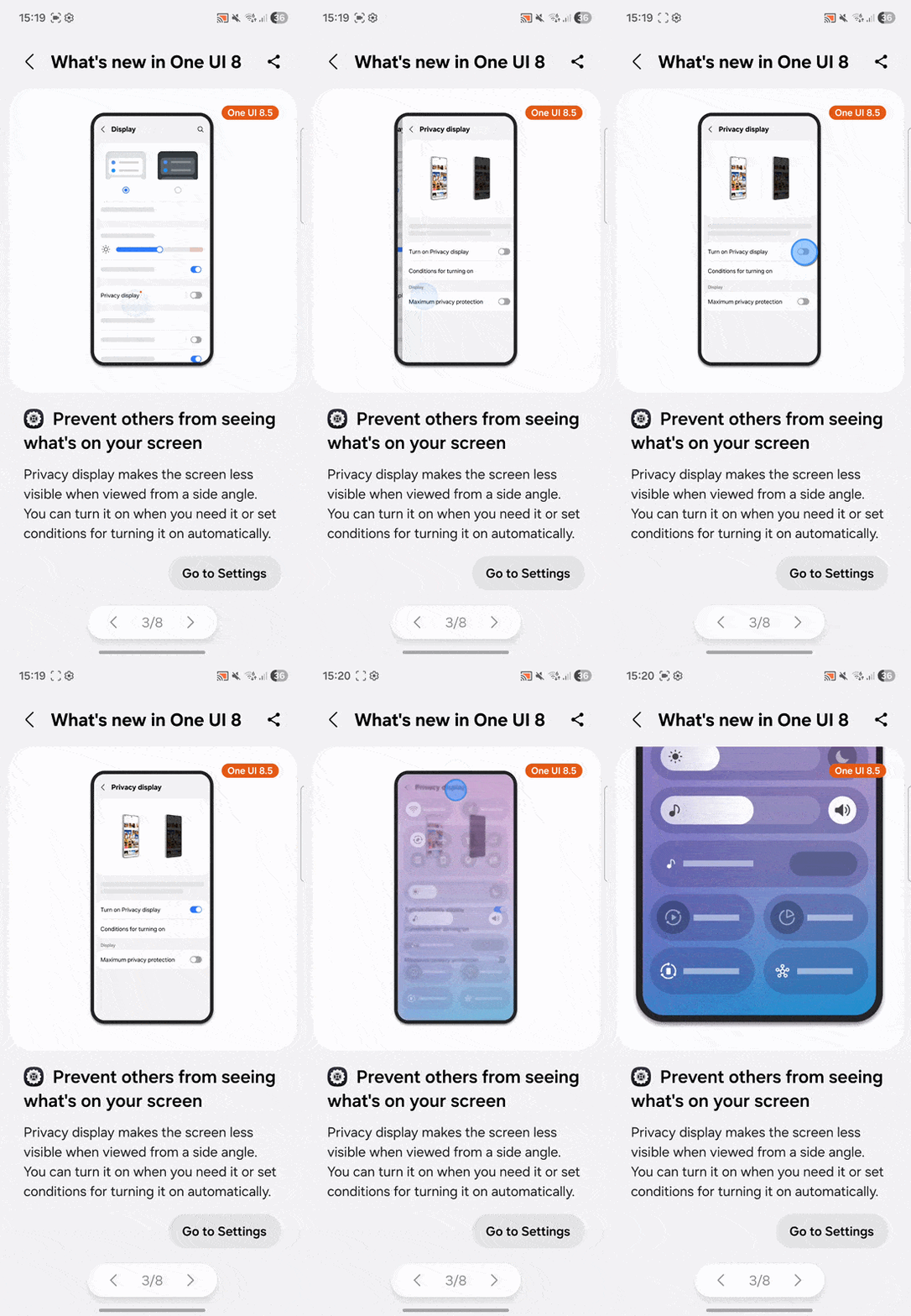
What’s even more surprising is that Samsung inadvertently leaked this feature while prepping new Good Lock features (via 9 to 5 Google)as part of its One UI 8.5 update. If you’ve ever commuted on a New York City subway train during rush hour, I bet a feature such as this would come in handy when you try to use your phone. Here’s everything we know about this new display tech.
Galaxy S26 Ultra Privacy Display: What is it?
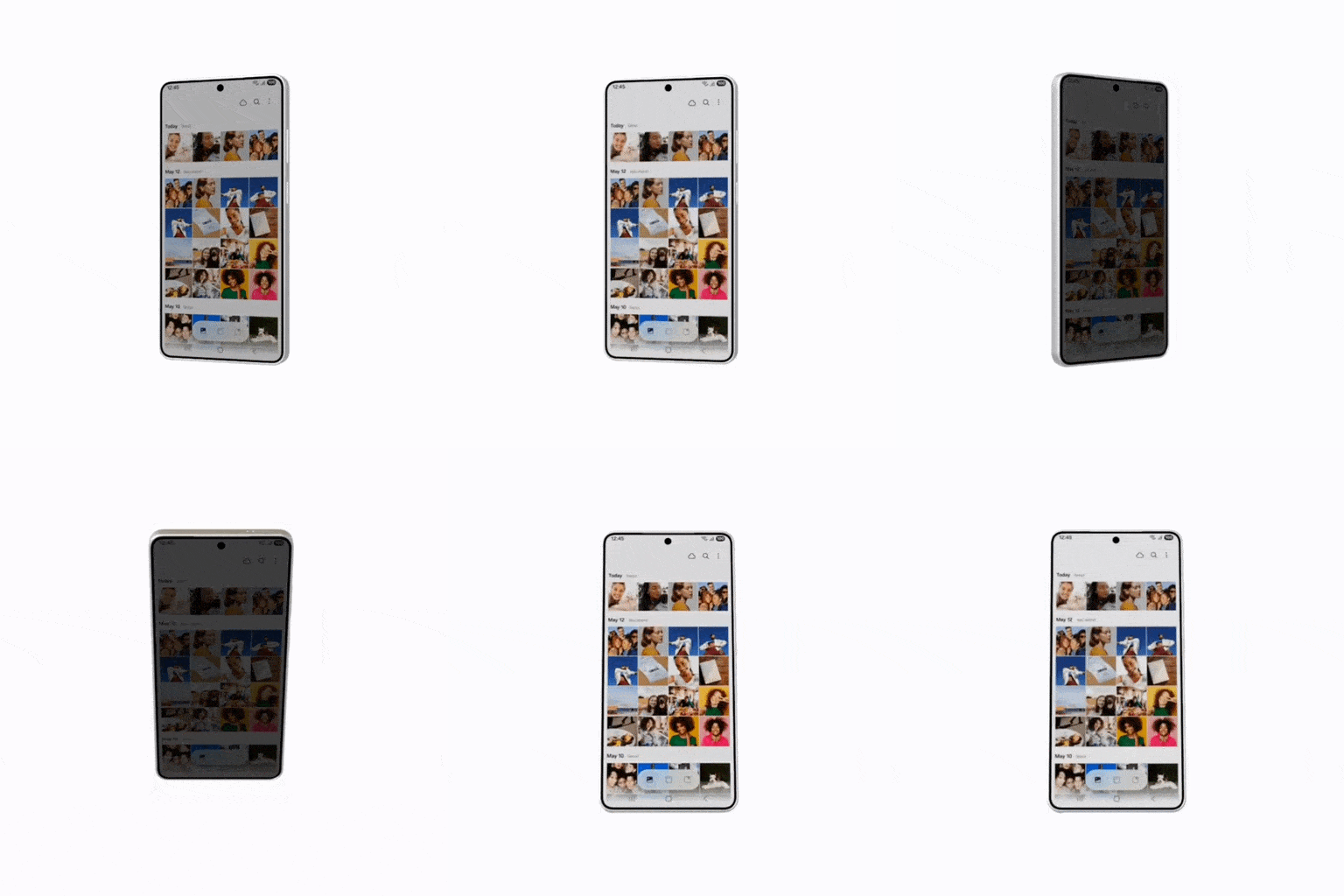
Similar to the privacy screen protectors you can install on most phones, the Galaxy S26 Ultra ‘Privacy Display’ feature functions nearly the same way by blocking the view of the screen from the sides. If you look at the display from an angle, you will have difficulty trying to make out what’s there.
This also appears to block visibility from the top and bottom, so even if someone were behind you looking down, they would have a distorted view. If you look at the animation spotted by SammyGuru above, you can see how this privacy display feature would work.
What’s important to note from this animation is that the screen isn't technically 100% blocked out. Instead, it progressively darkens the screen the wider the angle becomes. Only time will tell if the end result with the Galaxy S26 Ultra will be similar to the pitch-black look shown off by Samsung’s Flex Magic Pixel demo.
Galaxy S26 Ultra Privacy Display: How does it work?

In one of the screenshots of the One UI 8.5 update that Samsung initially shared, it seemingly confirms a “Privacy Display” option packaged into the Quick Settings. With a single tap, it appears you’d be able to instantly activate it.
The Galaxy S26 Ultra is reportedly going to pack a 6.9-inch AMOLED panel — the same as the current Galaxy S25 Ultra — but leaks hint at other hardware changes that could be directly tied to this ‘Privacy Display’ feature. It’s been suggested that this new screen will use CoE depolarizer technology and third-generation anti-reflective glass, which is rumored to improve the screen’s brightness and colors.

I’m curious about the former because that was my biggest concern when I installed a privacy screen protector on my iPhone 17 Pro. I could tell the display’s overall brightness was much weaker with it on. Zagg’s privacy screen protectors rely on micro-louver technology, which is essentially a series of micro-blinds that block out light at specific angles. It’s included in one of the many layers that make up Zagg's Glass Elite Privacy screen protectors
I suspect the screen’s going to be brighter straight on without this ‘Privacy Display’ feature activated. I’ve tested the Galaxy S25 Ultra’s display and it reaches a peak brightness output of 1,860 nits, so I’m confident that the Galaxy S26 Ultra could even break the 2,000-nit mark. This is important because even if the feature is turned on, the screen’s brightness shouldn't be adversely affected.
Galaxy S26 Ultra Privacy Display: What are the benefits?
As I described earlier, the Galaxy S26 Ultra ‘Privacy Display’ feature would offer increased privacy — which is extremely helpful in public spaces. Another scenario where this would be a benefit is when watching a movie on a plane. If you’re deep into something and don’t want your neighbor seeing, activating this feature would help avoid any awkwardness.
In addition, the S26 Ultra privacy display will reportedly be customizable. So you could have it activate in certain locations automatically, such as on your commute. Or you could have it turn on based on the app, such as a banking app. This where the AI smarts will come in.
You can also better protect your information while in public. From passwords to personal data, random strangers would have a tougher time deciphering these details from the Galaxy S26 Ultra. Considering that this feature would be available natively on the phone, as opposed to adding it via a screen protector, it gives Samsung a unique talking point that its rivals lack.

Follow Tom's Guide on Google News and add us as a preferred source to get our up-to-date news, analysis, and reviews in your feeds.
More from Tom's Guide
- Your Google Pixel has two hidden AI notification features that are genuinely useful
- I spent a year with the Samsung Galaxy S25 Ultra — here's what I want to see from the Galaxy S26 Ultra
- Apple reportedly revamping Siri as company's 'first artificial intelligence chatbot' — and it 'will go well beyond the abilities of the current Siri'

