




Samsung certainly made waves at its Galaxy Unpacked 2026 event, where it took the wraps off the Galaxy S26 Ultra. Above all, the biggest new tech that garnered the most attention is without a doubt its Privacy Display.
Phone makers often strive to improve their displays by making them larger, higher resolution, and brighter — but Samsung went after something completely new. And you know what? It’s one of those real world, overlooked things that finally gets addressed.
Now that the phone’s in our possession and being put through the Tom’s Guide labs testing, we’re uncovering some intriguing qualities about the display. What’s most apparent from our testing thus far is that it reveals something I was afraid about with privacy screens in general: it’s that the brightness is dimmer when the Privacy Display is active. More important, the S26 Ultra's screen is not as bright as the previous Galaxy S25 Ultra — even with Privacy Display turned off.
Galaxy S26 display testing results (Privacy Display off)
| Row 0 - Cell 0 | Galaxy S26 Ultra |
Galaxy S25 Ultra |
Overall Peak Brightness |
1,806 nits |
1,860 nits |
Auto Brightness On |
1,209 nits |
1,231 nits |
SDR Adaptive Brightness OFF |
366 nits / 574 nits (extra brightness off / on) |
428 nits / 760 nits (extra brightness off / on) |
SDR Adaptive Brightness ON |
1,209 nits |
1,231 nits |
Before explaining how the Privacy Display impacts the Galaxy S26 Ultra, it’s worth looking at how it compares to its predecessor. Frankly, these results are surprising because Samsung traditionally improves the brightness of its flagship year-over-year.
Samsung rates the 6.9-inch AMOLED screen for up to 2,600 nits. However, our lab testing shows an overall peak brightness of 1,806 nits — just a smidge short of the 1,860 nits we recorded on the Galaxy S25 Ultra.
To be fair, this is a minimal difference that is almost imperceptible to the eye when viewing the displays straight on under normal conditions. But the S26 Ultra's screen looked slightly dimmer head-on when viewing TomsGuide.com and ESPN.com.


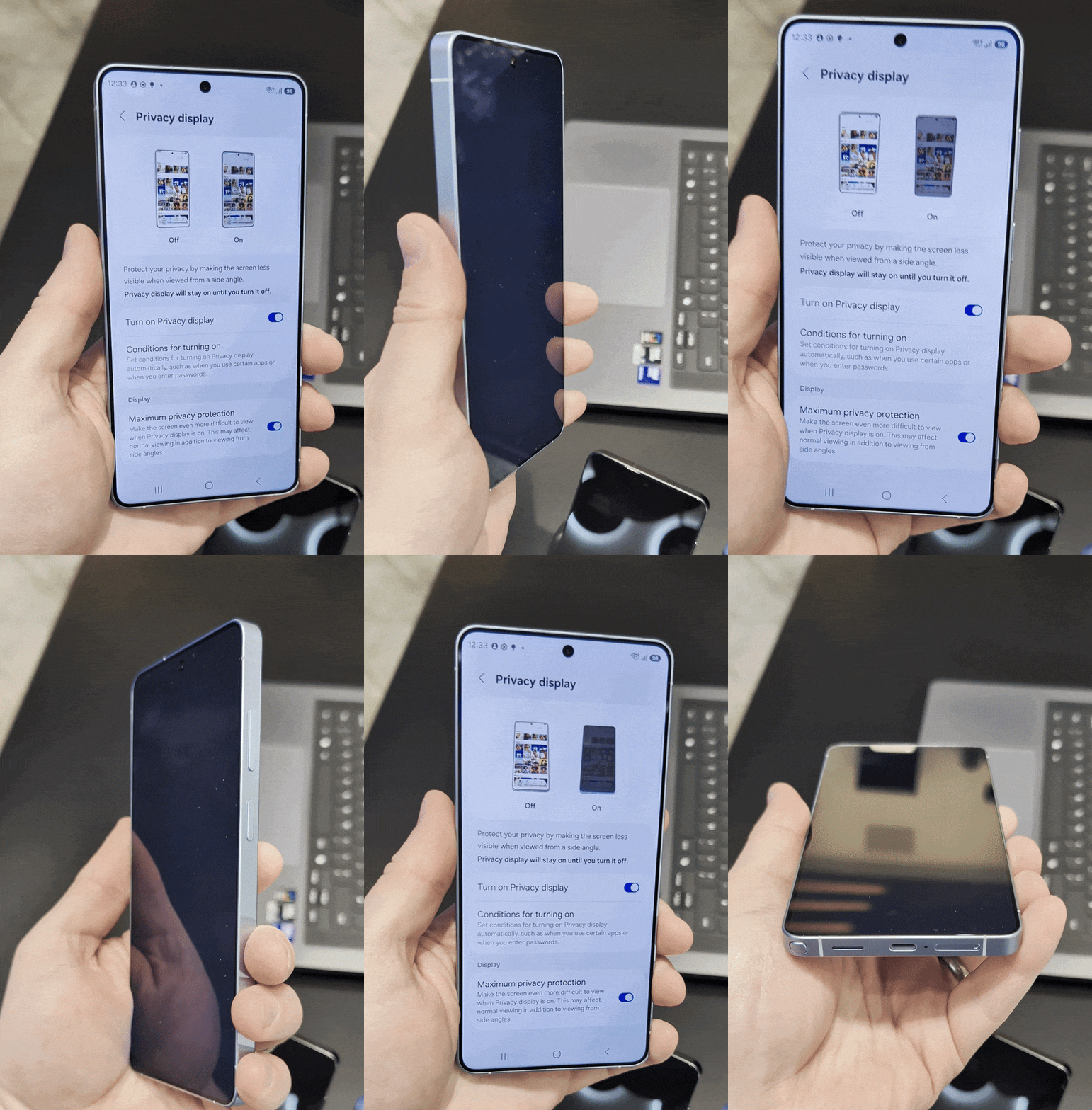
What’s disappointing is that we can visibly see the Galaxy S26 Ultra’s screen appearing dimmer at wider angles. You can see this clearly illustrated in the gallery above. Even with the Privacy Display disabled, there is less visibility when viewing the S26 Ultra from the sides.
Note that we have reached out to Samsung for comment and will update this article once we've heard back.
How brightness is affected by the Privacy Display

I’ve often noted that the biggest downside to using a privacy screen protector is that it ultimately dims the display. However, unlike those aftermarket protectors, Samsung’s version is natively integrated into the panel so it can be toggled on or off. This practically addresses my gripe with third-party protectors: once they're on, you can't exactly remove them.
Not surprisingly, our lab testing reveals a much dimmer display once the Privacy Display is activated. To achieve the highest degree of screen-blocking, you need to enable Maximum Privacy Protection. As a reminder, the peak brightness we recorded from the Galaxy S26 Ultra’s display is 1,806 nits, but with adaptive brightness active while viewing SDR content, that baseline sits at 1,209 nits.
| Row 0 - Cell 0 | Galaxy S26 Ultra |
Adaptive Brightness ON w/Maximum Privacy Protection ON (SDR) |
586 nits |
Adaptive Brightness ON w/Maximum Privacy Protection OFF (SDR) |
588 nits |
Adaptive Brightness OFF w/Maximum Privacy Protection ON (SDR) |
248 nits |
Adaptive Brightness OFF w/Maximum Privacy Protection OFF (SDR) |
250 nits |
When the Privacy Display and Maximum Privacy Protection are both turned on, that figure plummets to 586 nits. This represents a massive 67.6% decrease in light output. At 586 nits, the screen becomes extremely challenging to view, especially outdoors under direct sunlight.
Even indoors, you'll notice the drop in brightness with Privacy Display enabled, whether you're on a train or in a restaurant. But this is the trade-off for warding off shoulder surfers.
Outlook
Considering it’s the first of its kind, Samsung certainly stands to benefit in the long run if this impressive tech is brought to other devices. It's only fitting that the Galaxy S26 Ultra is the first to gain this feature — which adds tremendous value, especially since it maintains the same starting price as its predecessor.
While our testing confirms that the S26 Ultra is objectively dimmer than the S25 Ultra across the board, I’m willing to accept this compromise for the peace of mind that no one can snoop on my screen unless they are looking at it head-on.
At 586 nits, you’re essentially trading a flagship viewing experience for a mid-range one in exchange for privacy in the moment. But unlike phones we’ve tested with obnoxiously dim screens, like the Moto G Power (2025) and its pitiful 521 nits, at least you can toggle this feature off to reclaim a brighter, more vibrant experience when you need it.

Follow Tom's Guide on Google News and add us as a preferred source to get our up-to-date news, analysis, and reviews in your feeds.
More from Tom's Guide

