




The first 24 hours with a new device are the most exciting. Once you've got through the hurdles of signing into your accounts and transferring data, there are all kinds of things to try out. In my case, I even go to bed looking forward to waking up (a rarity for me) so I can try out more of my new gadget's capabilities.
Luckily for me, my job allows me to capture this feeling multiple times a month, but some phones generate this feeling more strongly than others. And the Galaxy S26 Ultra is definitely one of them.
As what we presume will be one of the best Android phones of the year (pending our full review), and coming with a variety of software and hardware upgrades, there's more to try out with the S26 Ultra than most phones I get in. So let me take you through the day I've spent with the Gaalxy S26 Ultra so far, so you can experience the highs and lows of upgrading to this phone for yourself.
Set up
I moved into the Galaxy S26 Ultra from another Android phone late last night, giving me minimal time to check out any new features beyond the design.
I love the Cobalt Violet color that Samsung has chosen as this year's hero color, although the Sky Blue looks great too.

The new rounder corners, making the S26 Ultra less like a Galaxy Note descendant and more like the Galaxy S26 and Galaxy S26 Plus, are pleasing to the eye, except it's meant that the S Pen (yes, that's still here) now has a strange curved top that is a little weird to look at.
A confidential commute
I got my first proper try of a major upgrade to the Galaxy S26 Ultra on my commute the following morning — the Privacy Display. This is the feature I've shown everyone who cares about phones in my vicinity, and they all agree it's fascinating and surprisingly effective. But I've already found some limitations.

While the viewing angles are narrower with the Privacy Display enabled, you can still make out a fair amount of detail at shallower viewing angles. Trying it out while commuting into London sat my partner next to me, who was able to read most of my “hidden” Slack messages unless I held the S26 Ultra quite a bit closer to my face than I normally hold a phone. While it’s still an extraordinary upgrade that currently no other phone can match, the Privacy Display is perhaps not as effective as you may think.

Weirdly, however, I found that I couldn’t get Now Brief to work with the Privacy Display without turning the feature on permanently. Because it’s not a standard app, I couldn’t find a way to add it to the automatic settings during my testing. This means the summary of your day’s activities — which undoubtedly includes information you’d rather passers-by didn’t see — remains fully visible. This is true even if that same information would be hidden if you were to open the Calendar or Gallery apps from which these elements are sourced.
A confusing display

Once I arrived at the office, I put a couple of YouTube videos on as some background entertainment while I sorted through some admin tasks. With the Privacy Display switched off, the brightness and color is just as good as usual, as was the sharpness once I adjusted the screen to its full QHD resolution.
I get wanting to put the phone in a default middle ground between visual fidelity and power consumption by setting it to FHD mode out of the box, but it feels wrong for Samsung to not offer the option to change this during set-up. I can imagine a number of users never finding this setting and therefore never getting the full potential out of their phone.
However, when comparing the Galaxy S26 Ultra to the Galaxy S25 Ultra from last year, I observed that even with the Privacy Display off, the viewing angles are worse on the newer phone, presumably due to the way its redesigned pixels perform even in "normal" mode. You can see how dramatic this can be in the TikTok below. Face-on, it's not a problem at all, but it could be a counterintuitive downgrade from previous Samsung Ultras if you're trying to get a crowd around you to watch a brilliant video or hilarious clip on your socials.
It was also at this point that I finally switched to gesture controls. As I’ve complained about previously, Samsung makes virtual three-button navigation the default for all its touchscreen devices, even though gesture controls are now fully mature. I decided to reassess my assumptions while I tried out the S26 Ultra, but I found having to relearn to use buttons to go home or switch apps too much of a pain to continue after this point.

All the power in the Galaxy

During a coffee break, I played Destiny Rising to see if the new Snapdragon 8 Elite Gen 5 for Galaxy was as good as we've been promised. While this isn't as precise as a benchmark, I can confirm that the S26 Ultra managed to perform beautifully at max graphics, whether at 60fps or 120fps. The phone got a little hot during gameplay, but it was still fine to hold.
Once breaktime was done, the phone needed a charge. Having unboxed the phone at about 50% the night before, I'd managed to get nearly two and a half hours of screen-on time and over 12 hours of standby time by midday, and still had 5% left before plugging it in.
The Galaxy S25 Ultra is a member of our best phone battery life leaderboard, and I'd assume the S26 Ultra will join it once we've done the necessary testing, going by how I managed to make it to almost lunchtime without charging the phone. Setting up a phone takes a major toll on the battery life too, so the S26 Ultra had done extremely well under the circumstances.

Plugged into my desktop charging station, I managed to get a peak of 30 watts of power to refuel the S26 Ultra. Sadly that's nowhere near the 60W peak that Samsung promises, but no doubt you need a specific Samsung charger to hit that rate. Nonetheless, the S26 Ultra took about 25 minutes to get back to 50%, which is more than fast enough unless you're really in a hurry.
Still a sharp shooter
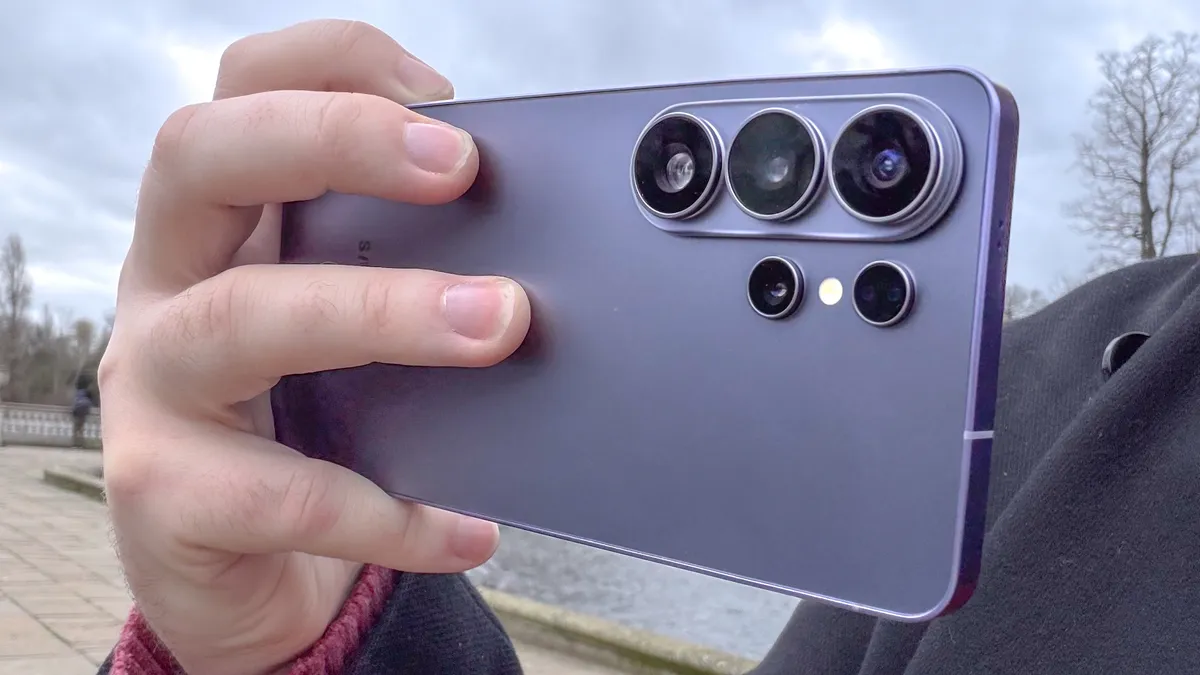
At lunchtime, I went on a walk to a nearby park for some photography. And I am happy to report that Samsung's not forgotten how to produce great photos with its phones.
The 3x telephoto camera remains the weakest camera of the bunch, but the 200MP main sensor with its wider aperture, and the still capable 50MP ultrawide and 5x telephoto cameras all gave me some great results.

Extra respect continues to go to the Galaxy S26 series' selfie camera, which is still the most reliable one for taking portrait mode photos that cut out your glasses correctly.


I had done some video recording earlier in the day too, using the 8K video mode to get the best possible footage for an upcoming unboxing video. Sadly, given my subjects were the other members of the Galaxy S26 series, I didn't have the chance to try the horizontal lock video mode. But next time I'm chasing my family dog around the garden or following traffic down one of London's many busy streets, I'll be enabling it.
The new Galaxy AI needs time to grow

Most of the afternoon was spent preparing for future projects, but I decided to take a little downtime to try out some AI features. We saw Now Brief earlier, but the new additions aren't immediately obvious, with good reason. Now Nudge requires data to work with before it can start surfacing stuff to you when you need it, phone call screening requires people to actually call you, and automated app actions via Gemini are not yet available in the U.K. So, what I elected to do was check out the Creative studio app, and use the S Pen to do some doodling.


The S Pen is not nearly as central to the Galaxy S26 Ultra as it has been on earlier models, but it still justifies its presence here. While I miss the Bluetooth-enabled features, simply having a precise tool with which to draw or take notes is basically all you need. It was certainly enough for me to draw myself a little anthropomorphized coffee cup, which the S26 Ultra was able to turn into a more appealing version, and then put into a series of stickers I can then irritate my friends and coworkers with.
Wow, it's been a day already?

And that brings us basically up to the 24-hour mark. And what a day it's been. Samsung's clearly making the Galaxy S26 Ultra the default option in its S26 line-up, despite it being the most expensive, but at least that's translated to its key features being just as good as before, if not better.
Although some of the sheen has worn off of the Privacy Display, I still think it's a great addition. Photography, performance and power efficiency all remain top notch, and the few AI features I did try worked quickly and without any problems.
I'm hoping to keep the Galaxy S26 Ultra in my pocket for as long as possible, and can't wait to see how it performs in our full review. Even with the limitations I've found in my brief time with it, the S26 Ultra still has every chance of being one of the best Android phones of the year, if not the number one best phone overall.

Follow Tom's Guide on Google News and add us as a preferred source to get our up-to-date news, analysis, and reviews in your feeds.
More from Tom's Guide

