




Looking down at the new Keychron Q1 Ultra 8K, I realize this is as close to an “endgame” keyboard as I’ve gotten yet. Between the "thocky" sound of its keys and the rock-solid stability of its all-metal body, every keystroke feels intentional. With a physical volume knob to top it all off, this board is a tactile dream — and I can’t believe I waited this long to step up from the company’s budget line.
I’ve been using one of the best mechanical keyboards — or rather several across my various desk setups — every day now for over a decade. What was once a niche hobby has become increasingly mainstream, and you no longer have to spend a fortune for a great mechanical keyboard. In fact, I first gave Keychron a try back when I tested out a $30 mechanical keyboard to prove just how far they’ve come over the years.
From there, I bought a few keyboards from Keychron’s K series with my own money as I loved their low-profile design and classic black, gray, and red aesthetic. Up until now, though, I hadn’t even considered stepping up to the company’s more premium Q series. That was until I ran into Keychron at CES 2026 and we got to talking.
They then sent over their new Q1 Ultra 8K 75% keyboard for me to try out. Well, after spending a week with it, I’m completely sold. Whether you write all day like I do or just want a sleek, fully-featured keyboard to match the rest of your desk setup, here’s what it's been like using the Q1 Ultra 8K as my daily driver.
A keyboard heavier than my PC

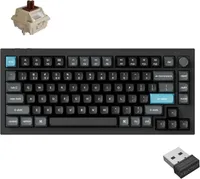
Keychron doesn’t cut corners when it comes to the bundled accessories with its keyboards, and that’s definitely the case with the Keychron Q1 Ultra 8K. Besides the keyboard itself, inside the box you get a braided USB-C charging cable, a keycap and switch puller, a handy USB-C to USB-A adapter, some extra tools, and of course, the necessary keycaps if you want to use it with Windows instead of Mac.
At 3.8 pounds fully assembled, the Keychron Q1 Ultra 8K is a rock-solid fixture on your desk—and 2.5x heavier than the Mac mini M4 I paired it with.
At 3.8 pounds (1,724g) fully assembled, this is the kind of keyboard you won’t be slipping into a bag and bringing with you. Instead, it’s designed to be a rock-solid fixture on your desk for when you get home. During my testing, it didn’t budge an inch while typing and remained firmly planted on the Oakywood Standing Desk Pro I tried it out on.
The Keychron Q1 Ultra 8K’s KSA profile, double-shot PBT keycaps feel great on my fingers, and their legends aren’t going to wear out anytime soon. There’s also customizable RGB backlighting, but for the look — and the extra battery life — I’ve mostly kept it turned off.
Speaking of battery life, unlike other keyboards you need to frequently recharge, this one can last months without needing to be plugged in. This is because with the Q1 Ultra 8K, Keychron has opted for ZMK instead of QMK firmware. Built from the ground up for improved wireless efficiency, the newer firmware powering this keyboard enables it to last up to 660 hours on a single charge.
Based on five hours of daily use, that's enough to keep you working for approximately four months. Granted, you have to keep the backlighting off, but I’m already in the habit of working with it disabled.

On the back of the Keychron Q1 Ultra 8K, Keychron continues to keep things pleasantly simple with physical switches for changing between its Mac and Windows as well as its various connection modes. In addition to Bluetooth, you also get a 2.4 GHz USB receiver in the box which I really appreciate as it makes it a breeze to switch between computers, which I do quite often while testing and reviewing the best mini PCs.
With everything unboxed, it was time to take the Q1 Ultra 8K for a spin but with a bit of twist. While I’ve previously only used Keychron keyboards with Windows-based devices, this time around, I decided to try this new one with the Mac mini M4 as I’ve been using it a lot more lately, especially after I accidentally realized Apple was right about its power button.
From low-profile to premium

If you’re used to typing on one of the best MacBooks, you might naturally lean toward one of Keychron’s low-profile boards. However, as I started my mechanical keyboard journey with high-profile ones before going lower, it was a welcome change to go back to the taller keycaps on the Q1 Ultra 8K.
To get it connected to my Mac mini M4, I plugged the included 2.4 GHz USB receiver into the Satechi Stand & Hub underneath Apple’s mini PC, hit Fn + 4, and I was good to go. I thought I might have to charge it out of the box, but that wasn’t the case; it’s still going strong after a week’s worth of heavy usage. Let’s see how long it lasts without a proper charge.
Right out of the gate, the Q1 Ultra 8K was a massive step up from the low-profile Satechi SM3 I was previously using. While that’s a great option with a very Apple-like aesthetic, the Q1 Ultra is significantly "thockier" thanks to the extra layers of padding and sound-dampening material Keychron packed into its metal body.

With this board, you have the choice between three versions of Keychron’s own Silk POM switches. While I normally prefer Browns, the Banana switches Keychron sent over were a nice change. Instead of the classic mid-stroke bump, these have a sharper, earlier tactile bump that gives the keyboard a punchier, more responsive feel.
If you don’t take to them as quickly as I did though, the board is fully hot-swappable — you can switch them out with practically any 3 or 5-pin mechanical switches with a cross-shaped (+) stem.

It took very little time to get accustomed to the layout. The keycaps have a nice concave shape that naturally guides your fingers to the home row. The redesigned knob on the right made adjusting my Mac’s volume a breeze, and I loved how the F3 and F4 keys triggered Mission Control and Launchpad instantly. Unfortunately, the F1 and F2 keys didn't let me adjust my Studio Display's brightness which is a common limitation with non-Apple keyboards unless you use a third-party app like MonitorControl.
It’s been great using the Keychron Q1 Ultra 8K all week with my Mac mini M4, and I don’t think I’ll be swapping it out anytime soon. While $229 is an investment, it’s only $30 more than Apple’s own Magic Keyboard with Touch ID and Numeric Keypad in black. For that small jump in price, you're getting a significantly superior typing experience and a build that feels like it will last a lifetime.
One keyboard to out-type them all

As a mechanical keyboard enthusiast and someone who tests gadgets for a living, the Keychron Q1 Ultra 8K isn’t quite my “endgame” keyboard, but it could very well be yours. It is on the heavy side at close to 4 pounds — which is 2.5x heavier than the Mac mini M4 I tested it with — but if you only have one mechanical keyboard, I doubt you're the type to bring it with you to the office or while traveling.
I can’t say how well the Keychron Q1 Ultra 8K will hold up in the long run, but remember all of those low-profile Keychron boards I bought after that super budget one? Well, they’re still going strong, as is the $30 one. With a good deep cleaning at least once a year, I reckon this is the kind of keyboard you’ll be able to use for years to come.
Stay tuned for our full Keychron Q1 Ultra 8K review for more, but as for me, I’m off to try and work another keyboard into a brand new, productivity-focused desk setup I’m working on. This time though, it will be Logitech and not Keychron powering the show.

Follow Tom's Guide on Google News and add us as a preferred source to get our up-to-date news, analysis, and reviews in your feeds.
More from Tom's Guide

