







I adore photography. Whenever I go to a new place, or even when I'm out and about with my family or partner, I love photographing the landscapes, wildlife, and taking portraits. For almost a year, I've been using the Fujifilm X-T50, and I've taken some beautiful photos with it — in the U.K., in Iceland, and everywhere else I've been since owning it.
One of the greatest things about the best mirrorless cameras is that they can simplify your workflow and make it easier to take photos. The X-T50, like many of Fuji's latest cameras, boasts time-saving features which you may or may not already know of. When you're photographing a crucial moment, say, a bird in flight, you might not want to bother with diving into the in-depth menu settings.
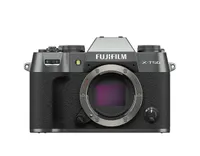
Luckily, many modern Fuji cameras — and other brands — offer quick and easy solutions. From creating your own custom film recipes to adjusting shooting settings on the fly, here are my time-saving tips and tricks as someone who reviews cameras for a living. Hopefully you'll find some of these helpful, and if there are any that you use and I haven't included, do share them in the comments below!

I review the best cameras and best drones here at Tom's Guide. I've adored photography for as long as I can remember, and when I'm not working, I love taking my Fujifilm X-T50 on a walk and capturing the sights. My favorite subjects to photograph are animals, birds, and my partner. You can follow my work on Instagram.
1. Creating custom film recipes

Film simulation dials are a staple on Fuji's latest cameras, but it was first introduced on the Fujifilm X-T50. While some people may disagree, I absolutely love the film sim dial and think it's a big time-saver. The film sim dial gives you access to eight of Fuji's most popular recipes, as well as three customizable slots and a 'C' position for menu-based selection — so 20 in total.
The film sim dial basically lets you apply filters so that images are ready to go for either printing or sharing on social media without you having to edit them in post-production. Customizing your own recipes is super easy too, by diving into the image quality settings menu and editing custom settings. You can then adjust values like Grain Effect, Color Chrome Effect, White Balance, ISO, Sharpness, Exposure Compensation, and more.
It's worth taking your time and playing with the settings to get to the look you like most — or you can copy settings from recipes available on Google and online forums, like Reddit. After that, it's a matter of assigning them to either the three custom slots or menu-based selection.
2. Assigning personal shortcuts

We've all been there. You want to change one setting in a camera's menu settings but you have to navigate through several sub-menus that aren't relevant to you in that moment. The Fujifilm X-T50, for one, offers a simple solution: My Menu. The last tab in the main menu settings is empty by default, but you can add up to 10 items you use most (but aren't assigned to physical buttons).
Once you've assigned your desired items to My Menu and it's all set up, the camera will default to this tab every time you press the Menu button. This saves you a lot of time as you negate having to scroll through sections like Image Quality.
3. Quickly resetting the focus point

The Fujifilm X-T50, like many other Fuji cameras, features a focus joystick, located on the back panel and next to the monitor. While you can use the joystick to change focus points, did you know that pressing it resets and recenters the focus point? This is something most photographers will be familiar with, but I don't think you should overlook its importance.
I find myself pressing the focus joystick to recenter the focus point nearly every time I pick up my camera. It's quick and easy and saves you the time you'd otherwise spend on manually bringing the focus point back to the center of the screen.
4. Zooming into the focus point

One of my favorite dials on the Fujifilm X-T50 is the rear command dial, or the thumb wheel, located right above the focus joystick and navigation buttons. If you use it as a scroll wheel, you can adjust the ISO — or the shutter speed and other settings, depending on what you've programmed it to. Clicking it, however, makes the electronic viewfinder (EVF) and the LDC screen show a 10x zoom on your focus point.
It's a quick way of checking if your subject is in focus, especially if you're using manual focus or single AF. To zoom out, simply press it again. If you're shooting through the viewfinder, as I usually do, you can verify sharpness without taking your eye off the EVF.
5. Remapping gestures/buttons on the fly

The rear panel of the Fujifilm X-T50 houses a few different buttons which help you navigate the camera's settings and gallery. But did you know that the Disp/Back button isn't just for, well, exiting menus? If you hold the Disp/Back button for two seconds, it instantly opens the Function (Fn) Setting menu, which allows you to remap any physical buttons and touch gestures on the fly.
Using the Disp/Back button saves you a lot of time you'd otherwise spend diving into detailed menus. It's important to note that touchscreen gestures are disabled by default, so remember to enable them via the menu if you want to use swipes on the screen to access settings like internal mic adjustment, histogram, and so on.

Follow Tom's Guide on Google News and add us as a preferred source to get our up-to-date news, analysis, and reviews in your feeds.
More from Tom's Guide
- I didn’t realize how much I loved the Fujifilm X-T50 until I photographed my trip to Iceland — and it blew me away
- Fujifilm X-T50 review: Fuji's mid-range stunner
- I think the new Fujifilm X-E5 is overrated — and I’m so glad I bought this camera instead

