







The best smart home hubs are an essential part of any smart home set up. Whether you're adding lights, locks, video doorbells or garage openers, you need a way to check in with all your new devices and control them from a single place.
We’ve tested the leading options for Alexa, Google Home, Apple Home and SmartThings, including flexible hubs for mixed-brand setups and affordable ways to get started. We recommend the Amazon Echo Show 8 (4th Gen) as our top pick, especially if you're looking for an easy, seamless setup with Alexa+ and want a smart display. But there's also the Apple HomePod (2nd Gen) for HomeKit users, along with the still-excellent Google Nest Hub Max for Google Home users.
For more in-depth reviews, expert advice and our hands-on testing, this guide will help you find the best smart home hubs to buy now.
The best smart home hubs you can buy right now
Why you can trust Tom's Guide Our writers and editors spend hours analyzing and reviewing products, services, and apps to help find what's best for you. Find out more about how we test, analyze, and rate.
Best smart home hub overall


Amazon’s Echo Show 8 4th Gen is the smart home hub upgrade we've been waiting for (especially Amazon users), making it our top recommendation as one of the best smart home hubs to get. A sleek, compact display, seamless setup and control over devices with Alexa+, powerful speakers for great audio — there's a lot to like here.
Combining an 8.7-inch display with upgraded internals for smoother, faster navigation, the larger screen made daily controls and video calls feel easier and more natural, while the new processor eliminated any lag we would have noticed in earlier models, like the Echo Show 8 Gen 3.
You get stereo speakers that match the Echo Studio for power, producing much richer sound than you’d expect at this price. The addition of a temperature sensor and Wi-Fi radar for presence detection means you can automate routines based on who’s home and environmental conditions, something we found especially useful for hands-free comfort. Alexa+ (which, at the time, we tested in early access) impressed us with its natural responses and more advanced routine-building, helping us link lights, sensors and smart plugs from several brands into complex automations from the same hub.
Compared to Amazon’s own Echo Dot Max or the budget Echo Dot (5th Gen), the Show 8 4th Gen justifies its higher price with a bigger screen and far stronger speakers, making it a better core hub if you want visual controls and richer audio. Both Dots integrate well with Alexa, but only the Show 8 pairs full-featured automation and display with the breadth of compatibility that more power-hungry smart home buyers demand.
There are a few trade-offs. The magnetic stand that makes adjusting the viewing angle easy is an add-on, not included by default. Plus, there’s no physical privacy shutter on the camera anymore, which will bother buyers who want the most visible privacy controls (you'll have to press the mute button to disable the mic and camera). And unlike some previous Echo Show models, you can’t take or store photos directly on the device.
If you want a do-it-all smart home hub that can grow with your system and automate nearly anything, the Echo Show 8 4th Gen is our go-to recommendation. Note that it supports Zigbee, Matter and acts as a Thread Border Router.
- Read our full Amazon Echo Show 8 (4th Gen)
Best budget smart home hub
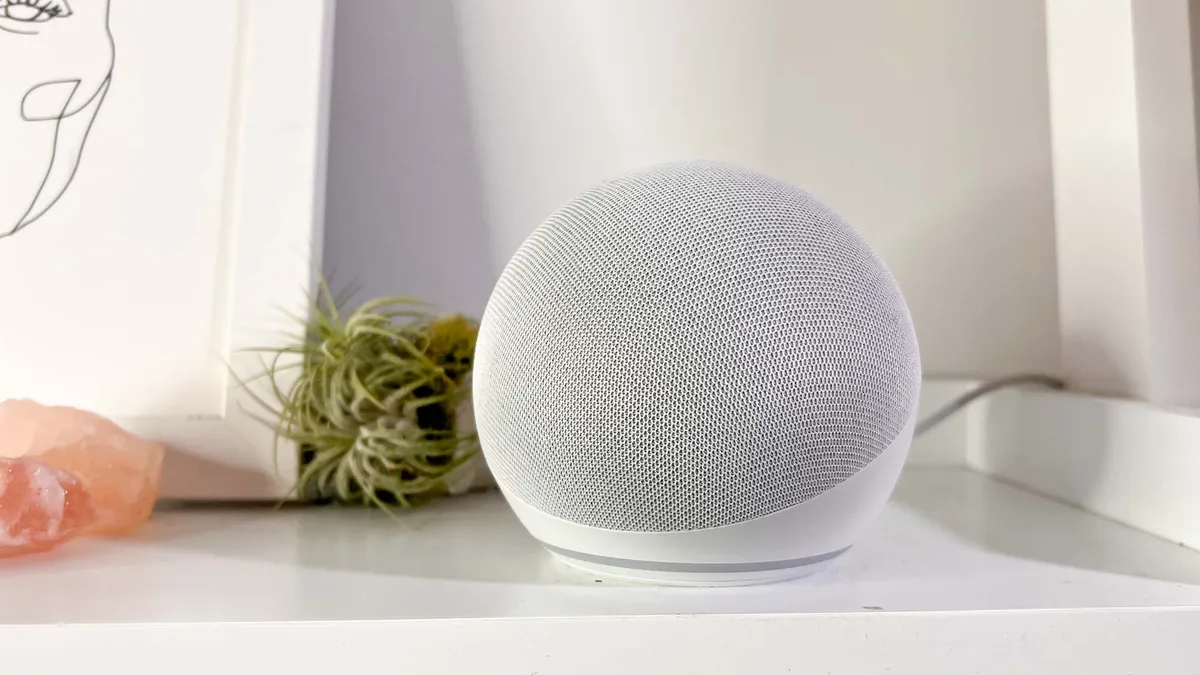
Building your smart home on a budget? The Amazon Echo Dot (5th Gen) is one of the cheapest smart home hubs you can get, but it's still compatible and powerful enough to control your devices with your voice via Alexa.
There are compromises, of course; it doesn't support Zigbee or Z-Wave. But it works with Matter devices, can pull dual-use as a Wi-Fi extender if you have an eero mesh Wi-FI router and includes Bluetooth and Wi-Fi connections.
Although smart home hubs are incredibly useful, there's always the worry that the microphone picks up things you'd rather it didn't. You can disable the mic on the Echo Dot (5th Gen) and a red LED will light up around the base so you can tell at a glance when your conversations are private.
The design feels like it was 'inspired' by the Apple HomePod, which is good as the fifth generation of the Echo Dot now blends into your home more seamlessly than the older models. And the price means you can add a few around your home for less than the cost of Apple's smart speaker.
So while it's not as feature packed as the Amazon Echo Dot Max or as compatible as the Aeotec Smart Home Hub, it's easily the most affordable way to get started with smart home devices, and Alexa is a mature and easy to use platform, too.
- Read our full Amazon Echo Dot review
Best Alexa smart home hub


Amazon popularized smart home hubs with its Echo devices, so it shouldn't be a surprise that one of the best smart home hubs is the AI-powered Echo Dot Max, a compact smart speaker with a lot of tech packed inside.
It's the spiritual successor to the now-discontinued Amazon Echo (4th Gen) but with hardware upgrades and support for Alexa+, the subscription-based AI version of Alexa. The Dot Max is smaller and the speakers are better, but it's quite a familiar unit.
The underlying smart home features are mostly the same as you'd find on other Amazon Alexa devices. It can act as a satellite for eero Wi-Fi routers, hitting up to 100 Mbps, so it can help deal with wireless dead zones in your home.
But the main reason to get the Echo Dot Max is its integration with Alexa, and more specifically the $20/month Alexa+ AI upgrade. Alexa remains the same voice-controlled smart home hub as it is on other hardware, allowing you control devices, especially Amazon ones, with specific commands.
Alexa+ adds natural language processing so you can get more succinct answers to questions, but most importantly, create more detailed routines with simple language, and it's more contextually aware, so you can say things like 'turn off lights in this room' and it'll know which area of the house you mean.
The main hardware upgrade on the Dot Max is the speakers. These sound better than most Echo speakers have in the past, though they're not up to the same standard as the HomePod. If audio quality is an important feature, you should go for the larger (and more expensive) Amazon Echo Studio, which has improved speakers.
The Echo Dot Max is the multi-functional smart home hub in Amazon's range. It's affordable, can handle most smart home devices and tasks, and has pretty good speakers, with natural language processing if you opt for Alexa+. It's good, but it's not wildly different from the Echo (4th Gen) before it. Since you can't buy that anymore, the Echo Dot Max is the best smart home hub for all Alexa users right now.
- Read our full Amazon Echo Dot Max review
Best Apple smart home hub
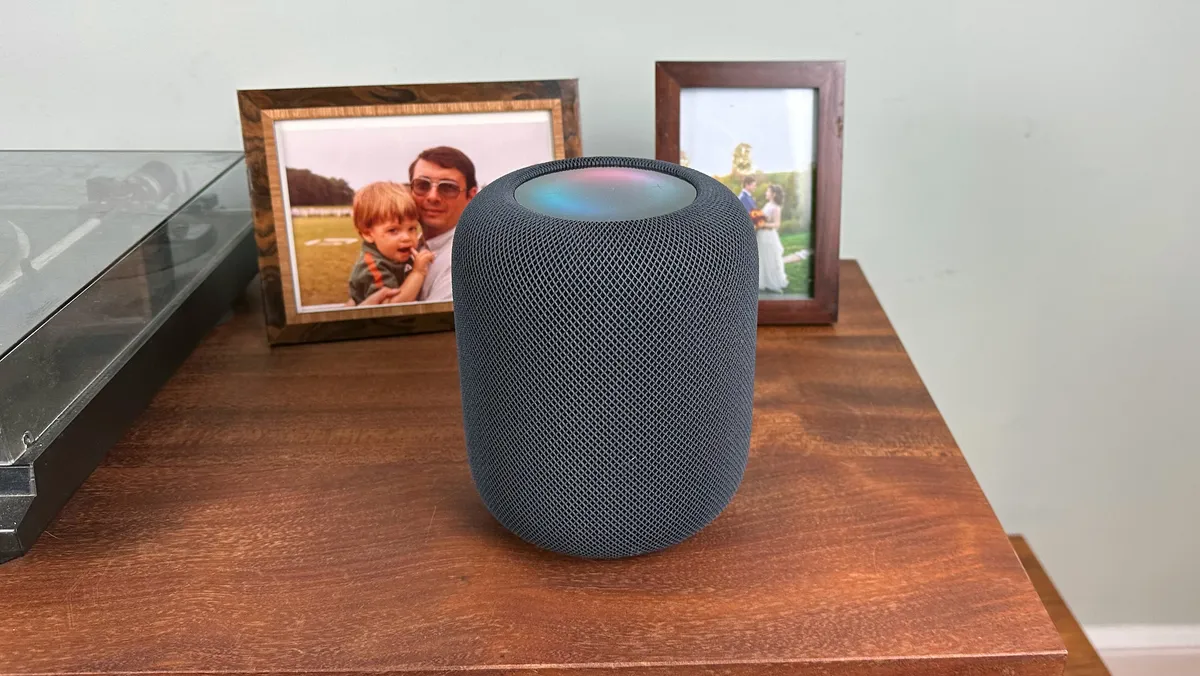
The Apple HomePod (2nd Generation) is the only smart home hub the company offers. This is, in part, because you can use many iPhones/iPads/Apple TVs to control some smart home devices, but the HomePod is a more comprehensive option.
It supports Matter, which is quickly becoming one of the most popular smart home protocols, and means that you can connect devices that are outside of Apple's walled garden and control them just as well from the HomePod.
The HomePod (2nd Generation) has, as you'd expect from Apple, a pleasing aesthetic and certainly blends into your home far easier than the obviously-tech-design of the Amazon Echo Dot Max, but it's also more capable than that Alexa-powered speaker.
It has temperature and humidity sensors that mean you can incorporate environmental data into your smart home routines via Apple's HomeKit. Post-release, Apple gave the HomePod a software upgrade, which added the ability to listen for smoke and carbon monoxide alarms and send you an alert if one is triggered.
We found that the HomePod (2nd Generation) sounded every bit as good as the original — it's one of the best smart speakers — but its high price of $299 may turn off those who aren't invested in Apple's ecosystem.
- Read our full Apple HomePod (2nd Generation) review
Best Google Home smart home hub

The Google Nest Hub Max was released in 2019, which feels like a long time ago in consumer tech. But it's actually still the most current large-format Google smart hub display. There's also the smaller Google Nest Hub, released in 2021.
Both devices have Gemini support (something which has been added in the last couple of years following the AI boom) and are generally still as compatible as they were more than half a decade ago.
When we reviewed the Nest Hub Max, we found that the spacious 10-inch screen was easy to read and interact with, and the quality of the image is actually good enough that you can watch YouTube and Netflix without issue, too.
And although it's not designed solely for audio like the Apple HomePod (2nd Generation) or Amazon Echo Dot Max, everything we listened to on the Nest Hub Max actually sounded pretty good. There's also a built-in 6.5 MP camera that is acceptable for video calls, even years later.
Several years ago, the company released the Google Pixel Tablet, which although officially a tablet, had a dock that turned it into a smart home hub. It's very similar to the Nest Hub Max, but doesn't support Thread, which the Nest Hub Max does.
There's also Wi-Fi and Bluetooth connectivity, though you may get slower speeds than you'd like with those connections, given the tech is more than seven years old now. The biggest advantage of the Nest Hub Max is its integration with Google Assistant and Gemini, which is perfect if you're already using Nest doorbell cams or other Google devices.
- Read our full Google Nest Hub Max review
Also tested
These are a lot of smart home hubs out there, and not every single one can be The Best. But some are still really good, so these are the hubs that didn't quite make the main list, but are still worth considering, including all the various latest Amazon devices.



How to choose the best smart home hub

The most important factor when choosing a smart home hub is what you want to do with it. Which sounds obvious, but it's crucial to think about before you start buying smart home devices.
There are different connection protocols, and not every smart home hub supports each one. So, importantly, you need to look at whether your smart home hub supports Wi-Fi (almost all do), Bluetooth (most), Zigbee, Z-Wave, Thread or Matter.
Then there's which ecosystem the smart home hub exists in. Amazon devices integrate with Alexa, Google ones with Gemini and Nest, and Apple with HomeKit. The Aeotec Smart Home Hub is also compatible with Samsung's SmartThings platform.
Once you have compatibility sorted, consider if you need a screen or if you want to only control devices with voice commands. Adding a display increases the cost, but also makes the hub more versatile. But screen-less varieties often have better speakers.
And before you part with your money, think about whether the hub is future-proof. Is it locked into a particular vendor's ecosystem or can you connect open protocols. My personal take is also to be wary of any exclusively AI-powered options, as there's no telling whether these will still be supported once the hype dies down.
Best Smart Home Hub: Frequently Asked Questions

Do I need a smart home hub?
Actually, you may not need a smart home hub if you only have a few devices, such as a couple of smart bulbs, that work well in their own apps. A hub becomes more useful as you add lights, locks, cameras, thermostats or other connected products and want to control them from one place.
It can also run routines that make devices work together, rather than requiring separate commands in separate apps. If you expect to expand your setup, choosing a hub and checking its compatibility before buying more devices can help avoid a fragmented system.
What is the difference between Matter, Thread, Zigbee and Z-Wave?
Matter is a cross-platform smart-home standard intended to make compatible devices easier to use across ecosystems, while Thread, Zigbee and Z-Wave are technologies devices can use to communicate. They are not interchangeable, so a Matter device alone does not mean a hub can directly connect every Zigbee or Z-Wave product.
Thread is a low-power mesh network used by some Matter devices; Zigbee and Z-Wave are established smart-home mesh protocols that need compatibility in a smart hub. That's why it's worth checking the protocols supported by both the hub and every device you plan to add.
Can a smart home hub control devices from different brands?
Yes, a compatible smart home hub can bring devices from different brands into one app and let you use them in shared routines. The important limitation is that brand name alone is not a compatibility guarantee: the hub, platform and device must support a common ecosystem or connection standard. For example, an Apple HomePod will connect with all Apple-related products (HomeKit) and Matter products, but not Z-Wave or Zigbee.
What does a smart hub do in a smart home?
A smart home hub provides a central place to manage compatible devices and create automations between them. Instead of opening separate apps for your lights, lock and thermostat, you can use one interface or voice assistant to control them and set routines.
As an example, a routine could turn on lights when a smart lock is opened, or schedule a thermostat, blinds and charging equipment around a morning commute. A hub’s usefulness depends on how many of your devices it supports and how easily its app lets you create and manage those automations.
What smart hub works with Nest?
The Google Nest Hub Max is the most natural choice for a home built around Nest products, as it integrates with Google Assistant, Gemini and the wider Google Home ecosystem. It is particularly suited to buyers who also want a large display for viewing cameras, video calls and media.
What's coming up?
Amazon refreshed it's Alexa-powered Echo lineup in late 2025, so it's unlikely we'll see much from it again this year. It's not impossible though, as Amazon does tend to surprise release devices and has a sizeable range of smart home models. But whether we'd see a dedicated smart home hub is unknown.
Google generally leaves older generations of hardware out for several years before launching an upgrade. The current roster could be the lineup for another couple of years too, as the company has rolled out Gemini AI-powered updates to its various devices in 2026, which significantly changed the experience of using them.
The unknown in the mix is Apple. Last year's iOS 26 had code that suggested a new HomePod would be on the way in September 2025, but it didn't materialize. Instead, the older HomePod 2 got a software update. There's speculation that Apple held off until the AI-powered Siri revamp went live.
However, in June 2026, Apple announced that Siri AI would be live in iOS 27, which has now launched. So could a new HomePod be on the cards this year? We'll have to wait to find out, so stay tuned for the latest.
How we test smart home hubs

The way we test the best smart home hubs is to use them just like you would. We take them home, plug them in, connect to our network and attach devices. One of the most crucial parts of any smart home hub is how easy it is to set up, so we spend time thinking about how each device handles this critical period.
Since we test many standalone smart home devices, we always have many we can add to the hub straight away. The more it can handle without issue, the better the hub will be for either enthusiasts or those dipping their toes in for the first time who may upgrade or add more smart gadgets in the future.
Of course, if you only plan to use a few smart devices at home, a hub could be overkill, but it's a good option if you want to future-proof your smart home or need a central controller to make everything worth together. And it's that working together that we pay close attention to during our testing.
The main point of a hub is to manage several devices at once, and combine them into routines when certain conditions are met. Like in the morning, you may want your smart thermostat to come on, smart blinds draw, and your car start charging based on the time of day or on a specific day you need to commute.

