I enjoy eating pasta and would eat a whole pile at every mealtime if I had the chance. But I’ve always been reluctant to make fresh pasta myself. And despite watching numerous YouTube videos on how to get it right, it wasn’t until I got the chance to try KitchenAid’s pasta maker that I gave it a go.
Now, I’m wondering what I was worrying about. Apart from being a fun activity, homemade pasta is super easy to make, and I want to keep making more.
But, there is a downside: you will need a KitchenAid stand mixer to use the pasta maker, as it attaches to the front of the appliance. However, if you don’t already own one, they're among the best stand mixers you can buy, and I know from first-hand experience that it will be money well spent.
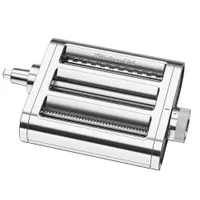
The KitchenAid pasta attachment is a breeze to use

I tried KitchenAid’s 3-in-1 Metal Pasta Attachment, $249 from KitchenAid, and the results surprised me. In fact, it was far easier to use than I thought, and I ended up with perfectly cut pasta in no time.
So how does it work? Your mixer does the hard work for you, and rather than having to turn a handle to work the machine, as you would with a traditional pasta maker, the attachment is set in motion once your stand mixer is turned on.
While it’s not hard work to turn the handle on a traditional pasta maker, using this version frees up a hand. And having both hands to feed through and guide the pasta is a big help.
Making fresh dough
Before you use the KitchenAid pasta attachment, you will need to make some fresh pasta dough. If you haven’t done this before, don’t fret, it's super easy, and there are plenty of online tutorials you can follow.
I used Jamie Oliver's fresh pasta recipe, but halved the ingredients to use three large eggs and 300 grams / 10 ounces of pasta flour, which I found was plenty to feed a family of four.
It's pretty quick to make pasta dough by hand, but it will need to be kneaded for about 10 minutes. If you prefer, you can make the dough in your KitchenAid stand mixer using the dough hook.
How to use KitchenAid’s pasta maker
You’ll notice at the front of your KitchenAid stand mixer, there’s a central hub. All you have to do is remove the cap and secure the pasta attachment in place with the screw. Apart from this pasta attachment, there are plenty of other gadgets that can be attached, including a vegetable spiralizer, meat grinder plus much more besides.
If you haven’t used a pasta machine before, you’ll benefit by scanning the QR code on the Quick Start Guide, which will take you through how to use the attachment, from setting it up to preparing your dough and using the rollers.

Having already made my pasta dough, I divided it into 3.5 oz (100g) pieces, then shaped them into rough rectangles and lightly floured them to prevent sticking. I was then ready to start feeding my dough through the roller.

This 3-in-1 attachment has three feeds. The middle roller is for thinning dough and making lasagne sheets, while the other feeds are for cutting the dough into anything from hearty noodles to delicate strands. The thickness of the pasta can be set by turning the dial on the attachment.
I started by feeding my pasta dough through the central feed on the first setting. I found it was best to feed it through twice before upping to the next level and repeating the process.


It’s not a design fault, but you will notice that you can’t turn the dial backwards. For instance, if you want to return the setting to ‘1’ after positioning it on ‘8’. I instinctively wanted to turn the dial back, but found that you have to turn it all the way around to get it back to your desired setting.
I wanted to make tagliatelle, so continued the process up to and including level 6. Do remember to give your dough a light coating of flour if it starts to stick. This will help it ease through the machine and make clear up quicker.
I enjoyed passing the dough through the machine and watching it change shape — it’s so much easier than rolling it out by hand. What’s more, it was fun to do.

I soon got the knack of the process, and was able to judge the thickness of pasta I required. Although, if in doubt, you can refer to the instructions via the QR code on how thick the sheet should be before cutting or shaping it into your desired pasta type.
Once the dough was as thin as required, I started to feed it through the wider cutter to make tagliatelle. At this stage, I found I had to carefully guide the pasta out as it wasn’t a solid sheet, and placing a bowl below helped.
Then, using another rectangle of dough, I began the process again, but this time passed it through the thinner cutter to make spaghetti.
Cleaning up

I found cleaning the pasta attachment easy, but I had kept my pasta well-floured, so it didn’t get messy and stick to the machine. But you won’t get stuck, even if the dough does clog the roller and cutters, as it’s supplied with a double-ended cleaning tool, with a brush on one end and a pick on the other.
KitchenAid advises leaving the pasta attachment for one hour before cleaning, to allow the dough to dry, making it easier to remove. To access the cutters, remove the top housing by lifting the notch just below the KitchenAid logo. It can be reattached by aligning two joints on the underside at the front of the housing, then it will snap back into place.
What I learnt


I found the KitchenAid Pasta Attachment intuitive, and after a few uses, I felt confident. While I was happy to use it on my own, without any distraction, I can see that it would be good fun to get friends and family involved. What's more, it's not a fiddly accessory to use; it was quick to attach and it's easy to store.
It’s certainly made me think again about cooking with dried pasta. Next time I go grocery shopping, I'll add more eggs and pasta flour to my basket and make it myself.
You might also be interested in discovering how I got on when I tried KitchenAid's pastry beater and flex-edge beater.

Follow Tom's Guide on Google News and add us as a preferred source to get our up-to-date news, analysis, and reviews in your feeds.
More from Tom's Guide