Making the switch from console to PC gaming doesn’t mean you need to be tethered to your desk with a big, bulky gaming PC anymore. Case in point, the Minisforum G1 Pro is smaller than a PS5 Slim but outperforms both it and the Xbox Series X in both raw CPU processing power and ray-tracing performance.
I’ve tested a ton of the best mini PCs this year but the Minisforum G1 Pro earned a special place among them and on my desk. In fact, we awarded it the best mini PC of the year in the Tom’s Guide Awards for 2026 and rightfully so.
Right now though, you can pick up the Minisforum G1 Pro for $1,699 at Newegg. While still more expensive than your average console, this deal shaves $450 off its current price of $2,149.
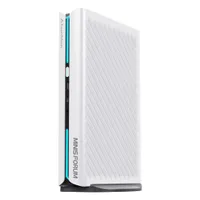
With an AMD Ryzen 9 8945HX processor and 32GB of DDR5 memory, the G1 Pro is a powerful though larger mini PC. Still, that extra space is put to good use as it comes with a desktop-style, dedicated Nvidia RTX 5060 GPU. You also get a 1TB SSD to store all of the best Steam games and it comes with Windows 11 pre-installed.
Despite its small size, the G1 Pro comes packed with handy ports. Up front, you get USB-A, USB-C and a headphone jack while around back, there are two more USB-A ports, an additional USB-C port, dual DisplayPort 2.1 connections and a DisplayPort 1.4a one, dual HDMI 2.1 ports and a surprisingly fast 5 gigabit Ethernet port. The G1 Pro doesn’t skimp on connectivity either with both Wi-Fi 7 and Bluetooth 5.4 on board.
I’ve been using the G1 Pro as my daily driver for both work and gaming for the past six months and I’m just as impressed with this console-style mini PC as when I first laid eyes on it back at Computex. Here’s everything you need to know about the Minisforum G1 Pro and why it cleaned up at the Tom’s Guide Awards 2026.
Smaller than a PS5, but built like a PC

At 12.4 x 8.5 x 2.25 inches, the G1 Pro is certainly a lot larger than your typical square mini PC. However, it’s still a lot smaller than the PS5 Pro and even the PS5 Slim. Another thing that makes it feel smaller — and take up less space in your desk’s cable management tray — is that it has an internal power supply. This also makes it quite easy to bring the G1 Pro out to the living room for some big screen gaming.
While the left side features a wave-like pattern, you get two large vents on the right side as well as on the top to exhaust hot air from its RTX GPU. Just like on the PS5, there’s a light bar on the front (split into two segments), but you can customize its color and lighting effects using the pre-installed Minisforum app.

Although the G1 Pro comes with a stand and is meant to be used vertically, you can lay it down flat on its side too. Around back, it uses a standard PC power plug for its internal PSU. You have all the ports from its motherboard above that along with some extra exhaust fans, and on top, you have easy access to the video-out ports on its GPU. In between its trio of DisplayPort connections, there’s a lone HDMI 2.1 port.
In terms of performance, we saw over 90 fps in older titles like Red Dead Redemption 2 and around 45 fps in Cyberpunk 2077 at 1080p. However, since it has an Nvidia GPU, you can always enable the latest version of DLSS for extra frames and a bump in resolution, like if you want to play on your TV. The G1 Pro is a very capable 1440p gaming machine on its own though.

One of my favorite things about the G1 Pro is that it’s almost entirely upgradeable. Once you remove the vertical stand and two screws on its base, its vented side panel slides right off, giving you full access to its internals. After removing its main fan, you can add an extra SSD and more RAM as well.
Out of the box, the G1 Pro comes with a 1TB SSD and a free M.2 slot. In total, you can add up to 8TB of storage with a 4TB SSD in each slot. As for memory, there’s a single stick of 32GB DDR5 RAM underneath the CPU cooler with, once again, a free slot next to it. You can use both RAM slots to configure the G1 Pro with up to a whopping 96GB of memory.
It’s not as easy to work on a smaller PC like this as it is with a big, bulky tower, but at least you can upgrade it to your liking once RAMaggedon is finally behind us. Likewise, while you will need to make sure the video-out ports align, you can also upgrade the G1 Pro’s GPU with a low-profile model once Nvidia’s next-gen graphics cards arrive.
Made for more than your desk

The Minisforum G1 Pro earned a 4.5-star rating in my review, but this gaming-focused mini PC has continued to impress me. While I’ve used it at my desk and from my couch on the TV, I also ended up bringing it on a family trip over the summer as I just couldn’t get enough of Death Stranding 2 on PC.
With a slightly larger backpack, I was able to easily slip the G1 Pro inside alongside all of the necessary cables, a portable monitor, a mechanical keyboard, and a mouse. It was great spending my days on the beach and my evenings playing PC games hundreds of miles away from home.
Now you can certainly get more bang for your buck by going with one of the best gaming PCs in a large, tower-style case or by building your own. However, if you want to ditch console gaming in favor of PC and want a machine that’s as portable as it is powerful, the G1 Pro is easy to recommend, especially since you can always upgrade it down the line to play even more demanding PC games.

Follow Tom's Guide on Google News and add us as a preferred source to get our up-to-date news, analysis, and reviews in your feeds.
More from Tom's Guide