As someone who reviews the best mini PCs for a living, I keep coming back to Apple’s Mac mini M4. With its all-aluminum chassis, perfectly rounded corners, and — for the first time on a Mac mini — handy front ports, it’s the redesign and power boost we’d been waiting for. It’s certainly not the only game in town, but it’s easily the prettiest.
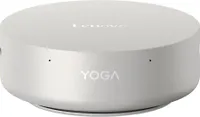
At least, I thought so until Lenovo unveiled its Yoga Mini at CES earlier this year. While other mini PCs stick to the same tried-and-true square or rectangular box, this one is completely round — so much so that you could easily mistake it for a smart speaker or a screenless smart thermostat.
Even though there aren’t any front ports next to the Yoga logo — just two small pinholes for the built-in microphone array — this is the kind of mini PC designed to sit front and center on your desk. Just like the MSI Cubi NUC AI+ 2MG, I wouldn’t dream of mounting the Yoga Mini behind a monitor. Lenovo clearly agrees, as you won't find any VESA mounting holes on its underside. Instead, you get 360-degree ventilation, a built-in speaker, and the cherry on top: customizable RGB underglow.
I was immediately impressed during my initial hands-on with the Yoga Mini. Now, after spending two weeks using it as my daily driver, I’m even more taken with how Lenovo has managed to turn traditional mini PC expectations on their head. Or rather, on their side.
Here’s what it’s been like living with this Panther Lake-powered, puck-shaped mini PC on my desk — and why, given the choice, it wouldn't be going anywhere anytime soon.
360 degrees of usability

Even with its compact 5.12 x 5.12 x 1.91-inch footprint, I was a bit surprised by how few extras Lenovo included in the box with my Yoga Mini review unit. Alongside the device itself, there was only a 100W power brick — which, as it turns out, you don’t strictly need to use, but more on that shortly.
If you pick one up at retail, Lenovo's site notes that you’ll get a bundled wireless mouse and keyboard. Still, with no video cable listed, this mini PC will pair quite well with one of the best monitors equipped with a USB-C port capable of power delivery.

Around back, you get a nice selection of ports given the Yoga Mini’s very compact size. There’s a Thunderbolt 4 port, two USB-C ports which both come equipped with DisplayPort functionality (one even features power delivery), an HDMI 2.1 port, a high-speed USB-A port and a 2.5 Gigabit Ethernet port.
Though there aren’t any proper front ports, Lenovo didn’t let the sides of the Yoga Mini go to waste. On the left, there’s another Thunderbolt 4 port also equipped with power delivery with a 3.5mm headphone jack next to it. Then on the right side, there’s a power button with a built-in fingerprint scanner for secure logins.

At 1.32 pounds, Lenovo’s Yoga Mini is just slightly lighter than the Mac mini M4 at 1.5 pounds. While I doubt you’ll be holding it like this as often as I have, its aluminum finish feels great on your fingers and the whole mini PC fits neatly in the palm of your hand. Thanks to a few extras Lenovo worked into its design, the Yoga Mini is the kind of mini PC you can travel with too if you prefer using an external mouse and keyboard over your laptop’s keyboard and trackpad.
Hiding this mini PC isn’t an option

Back when I first laid eyes on the Yoga Mini at CES, I imagined it sitting front and center on my desk. After using it for two weeks that way, I can easily see it becoming a permanent fixture. Sure, it is small enough to tuck under a monitor stand, but that would defeat the point. This is a mini PC that’s meant to be seen — and it sees you, too.
The Yoga Mini comes equipped with Intel’s Wi-Fi sensing tech, allowing you to use Windows’ settings menu to wake up your monitor when you enter the room or put it to sleep when you leave. As someone who often leaves several desktop computers running simultaneously, walking into my office to see a blank display for once was a welcome change. But that’s not the only trick up the Yoga Mini’s rounded sleeves.

Within the Lenovo AI Turbo Engine app, you can customize the default lighting and change how the RGB underglow responds to different scenarios. Although I set the default lighting to teal to match the accent keys on my Keychron Q11 Ultra keyboard, I really liked the soft violet hue it was set to out of the box. I decided to keep that shade to greet me when I sit down at my desk, paired with a bouncy ball lighting effect to boot.
There’s more you can do with the underglow, too. While testing the built-in speaker, I forgot I had Sound Lighting enabled. As a 21:9 music video played on the Innocn 401CU ultrawide monitor above it, Lenovo’s mini PC treated me to a miniature light show that I enjoyed more than I’d like to admit. You can also enable lighting effects for notifications, though I typically keep those off in Windows since my phone buzzes enough as it is.

One detail I particularly like in mini PCs designed for the center of a desk is a built-in fingerprint scanner, like the ones on MSI’s Cubi NUC AI+ 2MG or the Mind Graphics 2 eGPU dock I use with the Khadas Mind 2S. The one on the Yoga Mini’s right side works quite well and makes logging into Windows a breeze — especially when paired with presence detection to re-authenticate after stepping away.
If the fingerprint scanner, RGB underglow, and built-in microphone array aren’t enough to convince you to make the Yoga Mini your desk's centerpiece, Lenovo included one more trick.

Just like a smartphone, this mini PC features a built-in accelerometer under the hood, allowing you to use the top of its case like a large touch-sensitive button. In the Lenovo AI Turbo Engine app, you can enable tap interactions: by default, a single tap toggles the adaptive lighting on or off, while a double tap activates voice chat mode. You can also remap either gesture to launch any program installed on your PC.
Since my review unit arrived early, Lenovo is still ironing out the software kinks for gesture remapping. While tapping to toggle the RGB underglow worked fine, I couldn’t get it to launch Chrome with a single tap or Steam with a double tap (more on that in a bit). This will be addressed in an upcoming software update though.
Since there’s only one USB-A port on the back of the Yoga Mini, I initially relied on my monitor’s built-in KVM switch for the 2.4GHz dongles for my keyboard and trackball mouse. That worked well until I needed to offload photos from my camera’s SD card, leading me to an unexpected discovery.

Although you get one USB-A port with the Yoga Mini, you don’t get any with the Mac mini M4. That’s why the first accessory I tried out with Apple’s redesigned mini PC was Satechi’s Mac Mini M4 Stand & Hub. Alongside three USB-A ports, it also has an SD card reader on the front. I had tried using it with a few other Windows-based mini PCs in the past and while everything worked, it was far from a perfect fit. Since the circular base at the bottom of the Yoga Mini has more or less the same dimensions as the one on the Mac mini M4, the two look like they were made for each other — especially with that same anodized aluminum finish.
While I’ve spent most of my time using the Yoga Mini for work in my office, I decided to give another setup a try to put the graphical power of its Panther Lake chip to the test.
Power-brick optional

If there’s one thing I hate seeing on the back of a mini PC, it’s a barrel connector for power. That usually means you're stuck using the bulky included adapter to power the device. Fortunately, with the Yoga Mini, that’s not the case.
The included adapter uses a USB-C connector, which means as long as you match the wattage, you can swap it for a compact GaN charger instead. I did just that in my office for a cleaner look with braided cables. However, I also wanted to see if a monitor with USB-C power delivery could do the same thing
I brought the Yoga Mini to my game room and plugged it into the MSI Pro Max 271UPXW12G monitor I recently reviewed. At first, the mini PC refused to turn on. Then I remembered this MSI display has two USB-C ports: one capped at 15W and another that provides 98W of power delivery. After a quick cable swap, I hit the power button again and we were in business.
I’d previously tried this with that Innocn ultrawide monitor and while it worked, I kept the Yoga Mini plugged into a power outlet there just to be safe. The main reason I moved it to the game room setup was to see how well I could game on its integrated Intel Graphics. On the 5K2K ultrawide, I could manage windowed gaming, but full screen was asking too much.

While a native 1080p display would have been better suited for testing than a 4K monitor, playing my go-to game — the fast-paced skateboarding sim Session — was a pleasant surprise. The visuals were a tad soft rendered at 1080p on a 4K panel, but the framerate stayed solid and the game was completely playable.
Intel’s integrated graphics performance has come a long way over the years — something I first noticed when I built a triple-monitor setup with the original Khadas Mind. Panther Lake takes those built-in graphical capabilities even further. While you won't be running demanding AAA titles on the Yoga Mini, it has plenty of power for older or lighter titles when you need a gaming fix.
I’m definitely going to try out a few more games ahead of my full review, but for a productivity-focused device, I’m thoroughly impressed with what this round mini PC is capable of.
Circle gets the square

Now don’t get me wrong, the Mac mini M4 is one of the best Macs Apple has ever made — both in terms of design and performance — and I can’t wait to see what Cupertino does with the next generation. Still, while it’s one of the most recognizable mini PCs, it’s far from your only option. And let’s face it, not everyone can or wants to daily drive macOS.
I’ve tried out plenty of mini PCs with a similar footprint and performance to the Mac mini M4, like the Geekom A9 Max. However, while Geekom has continued to improve upon its designs with each new mini PC it releases, the Yoga Mini is an entirely new form factor for Lenovo and one that works surprisingly well.
After testing this mini PC for two weeks, I hope the puck-shaped Yoga Mini becomes a mainstay of Lenovo’s lineup going forward. Given the company has "Intel" in parentheses next to its name, who knows? Maybe we’ll see an AMD version or even one equipped with Nvidia’s upcoming RTX Spark chip sooner rather than later, too.

Follow Tom's Guide on Google News and add us as a preferred source to get our up-to-date news, analysis, and reviews in your feeds. Subscribe to Tom's Guide on YouTube and follow us on TikTok. Finally, you can visit our dedicated Tom's Guide Savings Squad hub for expert help on getting the best products for less.
More from Tom's Guide