Tom's Guide Verdict
The Mac mini M6 isn’t a radical redesign over its predecessor, but it doesn’t need to be. The added processing power and graphics performance of the M6 chip make everything feel noticeably faster, whether you're editing photos, tackling daily tasks, or playing modern games. You also get future-proofed connectivity thanks to Apple’s custom N1 chip. It’s a shame that Apple bumped the starting price up to $899 without adding more storage or memory, but the Mac mini M6 remains the absolute best compact Mac desktop you can buy.
Reasons to buy
- +
Same sleek and compact design
- +
Surprisingly capable gaming at 1080p
- +
Upgraded Wi-Fi 7 and 2.5 GbE connectivity
- +
Significant performance boost thanks to 2nm M6 chip
Reasons to avoid
- -
Higher starting price
Why you can trust Tom's Guide Our writers and editors spend hours analyzing and reviewing products, services, and apps to help find what's best for you. Find out more about how we test, analyze, and rate.
Apple’s Mac mini with M6 is one of the company's most impressive desktops, packing desktop-class power into a tiny footprint thanks to the cutting-edge 2nm chip inside. While it retains the same design and port layout as its predecessor, this upgraded Mac mini is a true workhorse that can handle far more demanding tasks.
Apple completely redesigned the Mac mini from the ground up with the M4 generation, which meant it didn’t need to change the exterior this time around. You still get convenient front ports and three Thunderbolt ports for video out around back. With the power of Cupertino’s new M6 chip — featuring a 12-core CPU and GPU alongside a dual 16-core Neural Engine — the Mac mini M6 handles everything from local AI workloads to video editing and even gaming with ease.
My Mac mini M6 review will help you decide if this is the best mini PC for your workload, and whether it’s the desktop equivalent of the MacBook Neo for those finally looking to ditch their Windows PC for good.
Mac mini M6: Cheat Sheet
- What is it? An upgraded version of Apple’s smallest desktop computer featuring new M6 or M5 Pro chips.
- Who is it for? People looking to switch to Mac, or MacBook users who want a small form-factor desktop for their desk.
- What does it cost? The Mac mini with M6 starts at $899, while the Mac mini with M5 Pro starts at $1,699. Both systems can be configured with additional memory, storage, and 10Gb Ethernet.
- What do we like? It keeps the same compact design and front/rear port layout as its predecessor, adds Apple’s N1 chip for Wi-Fi 7, Bluetooth 6, and Thread, and makes 2.5 GbE the standard Ethernet port.
- What don’t we like? The higher starting price, the awkwardly placed power button on the bottom of the device, that it ships with a 256GB SSD, and how quickly the price increases when you add extra memory or storage at checkout.
Mac mini M6: Specs
| Header Cell - Column 0 | Mac mini M6 (as tested) |
Mac mini M5 Pro |
|---|---|---|
Price |
$899, £899, AU$1,449 |
$1,699, £1,699, AU$2,699 |
CPU |
M6 (12-core CPU, 12-core GPU) |
M5 Pro (15-core CPU, 16-core GPU) |
RAM |
16GB (16-32GB) |
24GB (24-64GB) |
Storage |
256GB-2TB |
512GB-8TB |
Ports |
2 x USB-C, 3.5mm headphone jack (front), 3 x Thunderbolt 4/USB 4, 1 x HDMI, 1 x 2.5 gigabit Ethernet (back) |
2 x USB-C, 3.5mm headphone jack (front), 3 x Thunderbolt 5/ USB 4, 1 x HDMI, 1 x 2.5 gigabit Ethernet (back) |
Connectivity |
2.5 Gigabit Ethernet (upgradeable to 10 gigabit), Wi-Fi 7, Bluetooth 6, Thread |
2.5 Gigabit Ethernet (upgradeable to 10 gigabit), Wi-Fi 7, Bluetooth 6, Thread |
Size |
5 x 5 x 2 inches |
5 x 5 x 2 inches |
Weight |
1.5 pounds |
1.6 pounds |
Mac mini M6: The ups
The Mac mini M6 takes everything that worked so well with its predecessor while turbocharging its internals with Apple’s new M6 chip. However, the smaller, connectivity-focused upgrades and its gaming performance impressed me most.
Refined not redesigned
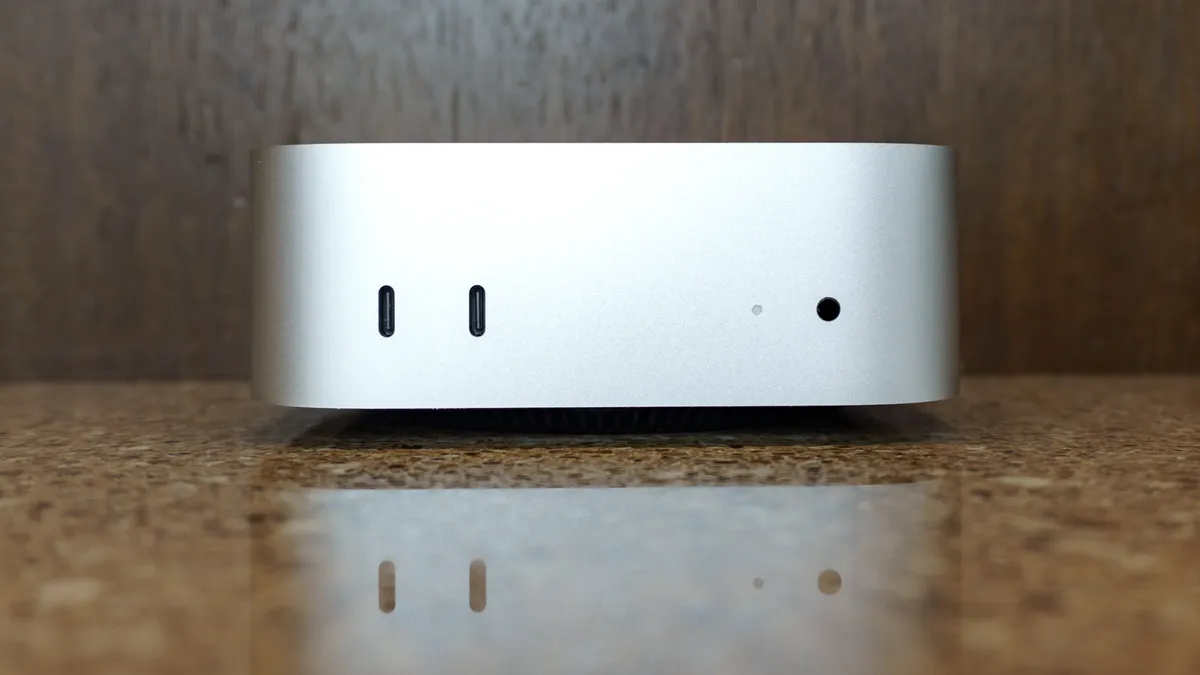
At 5 x 5 x 2 inches, the Mac mini M6 takes up the exact same footprint on your desk as its predecessor. Unlike many of the other mini PCs I’ve tested, it features an internal power supply, making cable management and traveling with it a breeze.
On the front, you still get two USB-C ports, a 3.5mm headphone jack, and a subtle white LED power indicator. Keep in mind, though, these front ports are strictly for connecting accessories and transferring data, as they don’t support video out.

Around back, there are three Thunderbolt 4 ports on the Mac mini M6 (or three Thunderbolt 5 ports on the M5 Pro model). On both versions, you also get an HDMI port, an Ethernet port and the power connection.
While the layout is virtually identical to the previous generation, the Ethernet port got a stealthy upgrade: instead of standard Gigabit Ethernet, Apple now includes a multi-gig 2.5 GbE port as the new standard for faster wired downloads and uploads, which is a fantastic addition in my book.
M6 upgrades all around

If you’re upgrading from the previous generation to the Mac mini M6, you might feel a bit of déjà vu when unboxing your new desktop — I know I did. In terms of looks and accessories, everything is virtually identical. However, it’s the added power under the hood (and one key connectivity upgrade) that truly sets this new Mac mini apart.

During my time testing the Mac mini M6, I threw my typical daily workload at it: dozens of Chrome tabs spread across side-by-side windows alongside photo editing in GIMP. Unlike the Mac mini M4, which could occasionally stutter under heavy multitasking, the M6 didn’t miss a beat.
It’s worth noting that Apple provided our review unit with 24GB of unified memory rather than the base 16GB. Still, with the M6 silicon running the show, even the base model will feel like a massive step up for most users.
It was in our lab testing that the Mac mini M6 really shone. On the Geekbench 6 CPU benchmark, its single-core score of 4,708 easily beat the Mac mini M4 Pro by nearly a thousand points. The M6’s multi-core result landed at 21,405 — just shy of the M4 Pro’s 22,661 — and a staggering 44% jump over the base M4.
| Header Cell - Column 0 | Mac mini M6 |
Mac mini M4 |
Lenovo Yoga Mini |
|---|---|---|---|
Geekbench 6.7 single-core |
4708 |
3838 |
2667 |
Geekbench 6.7 multi-core |
21405 |
14838 |
10850 |
25GB file copy test (MBps) |
6371.5 |
3017.3 |
1457.1 |
Handbrake (Mins:Secs) |
2:45 |
4:42 |
6:12 |
If you plan on using the Mac mini M6 for video editing, you’re in for a welcome surprise. In our Handbrake test — which transcodes a 25GB 4K video file down to 1080p — the M6 finished in just 2 minutes and 45 seconds, shaving nearly two full minutes off the M4's time.
The Mac mini M6 also crushed our 25GB file copy benchmark at 6,371.5 MBps, more than doubling the M4’s 3,017.3 MBps and outpacing PC competitors like the Lenovo Yoga Mini (1,457.1 MBps).
Much like the gains seen in Blackmagic SSD tests, this speed boost is largely tied to our review unit’s 512GB SSD, which unlocks full multi-channel PCIe Gen 4 storage bandwidth on Apple Silicon. For anyone handling heavy video workflows or large media transfers, that extra file speed alone makes upgrading to at least 512GB worth the additional $200 at checkout.
More than faster performance

The new M6 silicon may be the star of the show, but it’s not the only piece of custom Apple hardware inside the Mac mini M6. The company also outfitted its upgraded desktop with its proprietary N1 networking chip, improving short-range wireless connectivity across the board.
In addition to Wi-Fi 7, you get Bluetooth 6.0 and native Thread support out of the box. For me, the jump to Wi-Fi 7 is the major upgrade — alongside access to the faster 6 GHz band, you get key protocol features like Multi-Link Operation (MLO), which aggregates multiple bands simultaneously for lower latency and higher throughput.
Meanwhile, Bluetooth 6 brings Channel Sounding for far more accurate distance tracking, better power efficiency and lower-latency wireless audio. With native Thread support built in, the Mac mini M6 can also double as a smart home hub without needing an external bridge.
After Apple debuted the N1 chip on the iPhone 17, I knew it was only a matter of time before it migrated to the Mac mini. I’m glad to see Apple make the switch from off-the-shelf Broadcom modules to its own custom networking silicon sooner rather than later.
Mini Mac gaming realized

Now don’t get me wrong — I was certainly able to play games on the Mac mini M4, but I was largely limited to older titles and rarely saw anything close to 60 fps. With the Mac mini M6, however, you can now comfortably run modern titles on a desktop even smaller than Valve’s Steam Machine.
While testing the Mac mini M6 with Apple’s Studio Display XDR at the office, I decided to jump into Control, especially with its sequel, Control Resonant, hitting shelves. I did have to drop the resolution down to 1440p, but the game looked crisp and ran smoothly. If you’re willing to scale down to 1080p, performance gets a massive boost — particularly compared to the previous generation.
| Header Cell - Column 0 | Mac mini M6 |
Mac mini M4 |
Mac mini M4 Pro |
|---|---|---|---|
Cyberpunk 2077 |
56.99 |
N/A |
N/A |
Borderlands 3 |
18.95 (48.35 at 4K) |
25.10 |
44.62 |
Shadow of the Tomb Raider |
71.3 |
40 |
83 |
Sid Meier's Civilization VI: Gathering Storm |
86.86 |
52.48 |
89.310 |
Total War: Warhammer III |
46.94 |
24.6 |
46.1 |
In our lab testing, the title that surprised me most was Cyberpunk 2077. Thanks to its dedicated "For this Mac" graphical preset, it maintained a steady 56 fps at 1080p. In older titles like Shadow of the Tomb Raider and Sid Meier’s Civilization VI: Gathering Storm, the M6 easily cleared 60 fps at that same resolution.
I still wouldn’t rush out to buy a Mac mini M6 purely as a dedicated gaming rig, but it’s refreshing to know you can play demanding titles comfortably if you’re open to tweaking your resolution and graphics settings.
Mac mini M6: The downs
The Mac mini M6 is a big step up over its predecessor, but it’s not without its downsides. Namely, its higher starting price and the fact that Apple played it safe with this mini PC’s design.
Not quite a mini price tag

At $599 (or $499 with an education discount), the Mac mini M4 was a surprisingly affordable mini PC. Now, with a starting price of $899, the Mac mini M6 costs $300 more. While you’re getting a much faster chip, you aren’t getting extra storage or a memory bump like we saw when Apple moved from 8GB to 16GB of unified memory as the baseline standard on the M4.
Because of RAMageddon, much of this is out of Apple’s control. Still, looking at the MacBook Neo — where Apple kept the price hike down to $100 despite rising memory costs — a $300 bump here stings.
While the base Mac mini M6 is plenty fast for everyday tasks like writing documents or checking email, anyone planning on heavier workloads will likely need to configure more headroom. At $200 a pop to upgrade storage or memory, those costs add up fast.
You can offset storage limits with external accessories like Satechi’s Mac mini M4 Hub & Stand (which works with the M6, too), but memory is locked in for life — so plan accordingly before ordering.
Lacking that "One more thing"

When the Mac mini M6 was first revealed, I was definitely excited, but also slightly let down. Once Apple introduces a major redesign, the company usually waits a few generations before making any big physical changes — but I really wish it had tweaked the Mac mini M6 just a bit.
For example, putting the power button on the bottom of the computer still feels like a strange design choice. (Even if I accidentally ended up proving Apple right when I left my Mac mini M4 powered on for several months straight without noticing last year.)
One upgrade I would have loved to see on the Mac mini M6 is built-in Touch ID. As we’ve seen on the iPad mini and now with the iPhone Duo, Apple does a great job of integrating fingerprint readers directly into power buttons. Why couldn’t the Mac mini get the same treatment? A small tweak like that wouldn't have required redesigning the whole computer, either.
A faster chip and improved connectivity are great upgrades, but just a little something extra on the hardware side really would have been a nice touch — and perhaps even reason enough to convince Mac mini M4 users to upgrade.
Mac mini M6: Verdict
The Mac mini M6 doesn’t reinvent the wheel, but thanks to the major redesign of its predecessor, it really doesn’t need to. You still get a beautifully designed and compact mini PC with plenty of ports and 16GB of unified memory standard. However, it’s the extra processing and graphical horsepower of the M6 silicon that truly shines here.
Whether you’re browsing the web, managing local files, or putting Apple Intelligence and Siri AI through their paces, everything just feels noticeably faster. Equally impressive, this tiny Mac stays completely cool to the touch and dead silent while doing so.
At $899, the higher price tag does sting a bit — especially if you plan to add extra memory or storage. But even at a higher price, the Mac mini M6 remains an excellent mini PC and the perfect MacBook alternative for desktop users. It’s also a fantastic entry point for anyone looking to dive headfirst into the Apple ecosystem with the full power of Apple Silicon.

Follow Tom's Guide on Google News and add us as a preferred source to get our up-to-date news, analysis, and reviews in your feeds.