If you’ve been waiting for Apple’s smallest desktop to get a true performance jump, you’re in luck: the new Mac mini M6 is finally here. While it keeps a nearly identical design to its predecessor, this latest model packs major under-the-hood upgrades that make it an even better productivity machine.
For starters, you get faster single-core and multi-core performance thanks to Apple’s M6 chip. Built on a more efficient 2nm process, it features a Dual 16-Core Neural Engine for local AI tasks, along with an upgraded 12-core GPU for a dramatically better gaming experience.
That speed comes with a trade-off, though. At $899, the Mac mini M6 carries a higher starting price, and anyone hoping for a visual redesign or new colorways will find the exterior virtually unchanged.
Whether you’re upgrading from an older Mac mini or picking up your very first Mac, here is everything you need to know about the Mac mini M6 — along with five reasons to buy and two reasons you might want to skip Apple’s latest mini desktop.
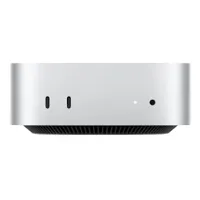
Mac mini M6: Reasons to buy
Same tiny footprint
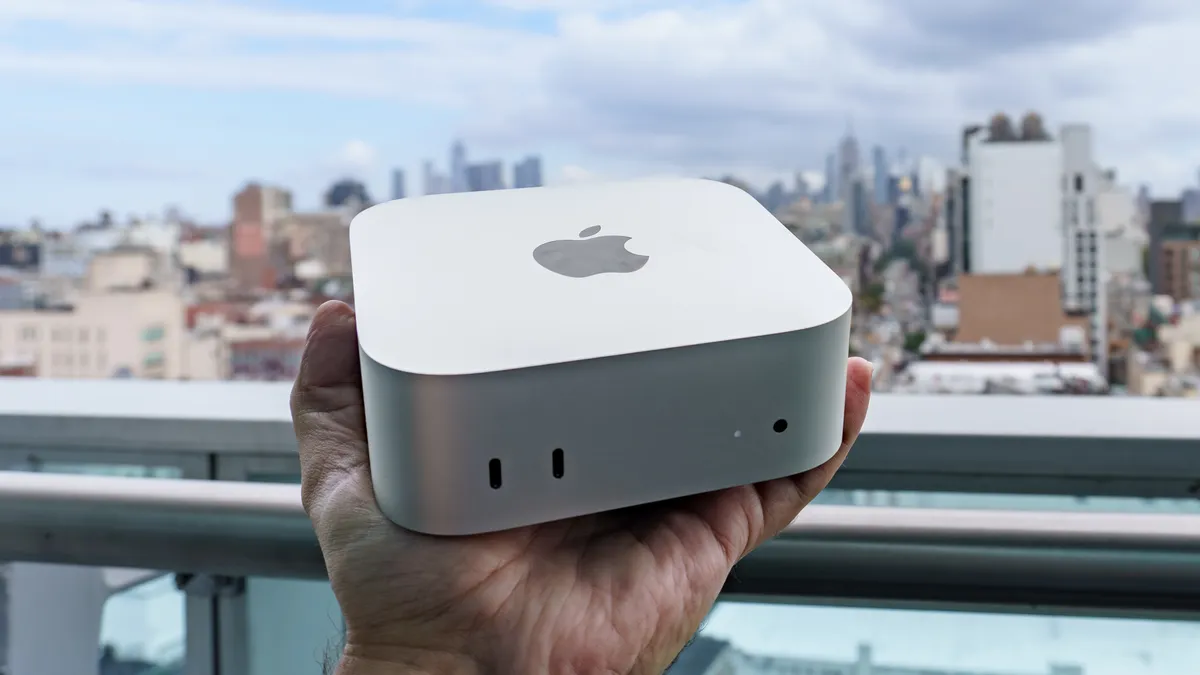
The Mac mini M6 isn’t just one of the best mini PCs; it’s also one of the smallest. At 5 x 5 x 2 inches, it’s tiny and won’t take up much space on your desk. Also, since it has an internal power supply, you don’t have to worry about a bulky power brick. This makes cable management a breeze, and it's easy to move your Mac mini from room to room or even travel with it.
For an even cleaner desk setup, I’d recommend Bluetooth accessories like Apple’s Magic Keyboard, Magic Mouse, or Magic Trackpad. If you want more customization, though, Logitech’s MX Master Series is also a great fit for Apple’s smallest Mac.
Massive M6 speed boost

Don’t get me wrong, the Mac mini M4 was a big step up over the Mac mini M2. However, with the M6 chip in this new model, our benchmark tests showed results that were closer to the Mac mini M4 Pro. For instance, on the Geekbench 6 CPU benchmark, its single-core score of 4,708 easily beat the Mac mini M4 Pro by nearly a thousand points. The multi-core results were slightly under the M4 Pro’s at 21,405 (versus 22,661) but were 44% faster than the base M4.
The Mac mini M6 will be a big upgrade for most workflows. However, if you plan to edit video or do more intensive tasks on your Mac mini, budget an extra $200-$400 for extra storage and RAM when configuring your system. Though 16GB of RAM is more than enough for most tasks, choosing a 512GB SSD over the standard 256GB one unlocks full multi-channel PCIe Gen 4 storage bandwidth on Apple Silicon, resulting in faster exports and file transfers.
Faster wireless and wired downloads

Raw processing power may be the biggest upgrade with the Mac mini M6, but you also get a connectivity boost as well thanks to Apple’s custom N1 networking chip. Unlike the previous generation, this new Mac mini supports Wi-Fi 7, Bluetooth 6.0, and Thread networking thanks to the N1 chip housed inside it.
With Wi-Fi 7, you’ll see faster downloads and uploads, while Bluetooth 6.0 brings Channel Sounding for far more accurate distance tracking, better power efficiency, and lower-latency wireless audio. With native Thread support built in, you can also use the Mac mini M6 as a smart home hub instead of an external bridge.
Finally, if you prefer a wired internet connection over wireless, you’re in luck. While the previous Mac mini came with a gigabit Ethernet port, this one has a multi-gig 2.5 GbE port. Wi-Fi is convenient, but for large downloads or uploads, you might want to use an Ethernet cable instead to speed things up even further.
Mini Mac gaming realized

Apple’s M-series chips have made great strides in gaming on your Mac. While older titles ran well on the M4, the M6 finally lets you play modern titles right on your Mac mini. This isn’t one of the best gaming PCs, but if you’re willing to drop the resolution and lower some settings, you can play quite a lot of native Mac games surprisingly well.
I tested Control on the Mac mini M6, and after lowering the resolution to 1440p, it ran quite well even on Apple’s high-resolution Studio Display XDR. In our test lab, though, we dropped the resolution down to 1080p and saw framerates well above 60 fps in a number of titles. Using its dedicated “For this Mac” preset, we even managed to play Cyberpunk 2077 at a stable 56 fps at 1080p. I wouldn’t recommend buying a Mac mini M6 solely for gaming, but it’s nice to know you can play even more demanding games with a few compromises.
Easy (and cheaper) to accessorize

Now you might see the Mac mini M6 sharing an identical design with its predecessor as a bad thing. However, since both mini PCs share the same ports (minus the upgraded Ethernet port) and dimensions, you can use any existing third-party accessories for the Mac mini M4 with this new model.
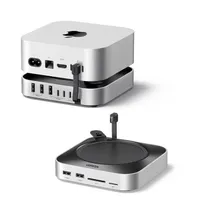
I’m particularly fond of the Satechi Mac mini M4 Hub & Stand as well as this one from Ugreen for several reasons. They add a ton of extra ports to your Mac mini, including USB-A, plus SD and microSD card readers. The best part, though, is that when you flip either one over, there’s a compartment on the bottom where you can add an SSD to significantly expand your Mac mini’s storage without paying a fortune.
Mac mini M6: Reasons to skip
Higher starting price

At $599 (or $499 with an education discount), the Mac mini M4 was an absolute steal. Thanks to RAMaggedon and the ongoing storage and memory crisis, the Mac mini M6 now starts at $899 (or $799 with an education discount). That $300 price hike isn’t insignificant, especially when you factor in the cost of adding extra memory or storage to your new Mac mini directly from Apple.
The Mac mini M4 is still an excellent choice, and if you can find one used in good condition, that might be a better option depending on your budget. Still, the Mac mini M6 is a much more powerful machine and could be worth the premium, depending on your workflow.
A nearly identical design

When Apple introduces a major redesign as it did with the Mac mini M4, the company usually waits a few generations before making any big changes. Since the Mac mini M6 is its direct successor, you won’t find much difference in design. It uses the same case and port layout, and the power button is still on the underside of the device.
If you already have a Mac mini M4, Apple’s faster M6 chip and the Wi-Fi 7 upgrade, along with the included N1 chip, are the main reasons to upgrade. If you have a perfectly fine Mac mini M4 but want something a bit different, it might be worth holding out for the next generation instead. Even then though, this smaller, squarer Mac mini redesign might be here to stay for a while.

Follow Tom's Guide on Google News and add us as a preferred source to get our up-to-date news, analysis, and reviews in your feeds.
More from Tom's Guide