Apple just announced a new Mac mini that’s available with either the all-new M6 chip or the more powerful M5 Pro chip. You’re still getting what looks to be one of best mini PCs and the most affordable Apple desktop, but with this new generation of Mac mini, overall speed and the ability to run AI models locally seem to be the main focus.
Given how popular the Mac mini M4 became with AI enthusiasts, the company has given the base model a major boost in that department. According to Apple, the Mac mini with M6 delivers up to 4x faster AI performance, 2x faster storage and graphics as well as 40% faster CPU performance. When it comes to the Mac mini with M5 Pro, the company says it provides 4x faster LLM prompt processing performance in LM Studio and compared to the M2 Pro, it’s 8.5x faster.
Even if you’re not interested in AI, the Mac mini with M6 and the Mac mini with M5 Pro will make for great desk companions and a great alternative to one of the best MacBooks for those who prefer a more stationary setup.
Regardless of which new Mac mini you pick up, you’re getting Wi-Fi 7 and Bluetooth 6 support as well as an upgraded 2.5 Gigabit Ethernet port around back. Both mini PCs will also ship with macOS 27 Golden Gate, which includes the next version of Apple Intelligence and a first for the Mac mini, Siri AI.
Pre-orders start today, with units scheduled to start arriving on September 22. Here’s everything you need to know about Apple’s new Mac mini.
Mac mini: Price & Availability
The Mac mini with M6 starts at $899 (or $799 for education), while the Mac mini with M5 Pro starts at $1,699 (or $1,599 for education). Apple will also offer configure-to-order options on its site where you can bump up the unified memory in the Mac mini with M6 from 16GB to 32GB and the Mac mini with M5 Pro all the way up to 64GB.
Pre-orders begin today on Apple’s website and in the Apple Store app in 30 countries and regions, including the U.S. Units begin shipping on September 22.
Mac mini: Design

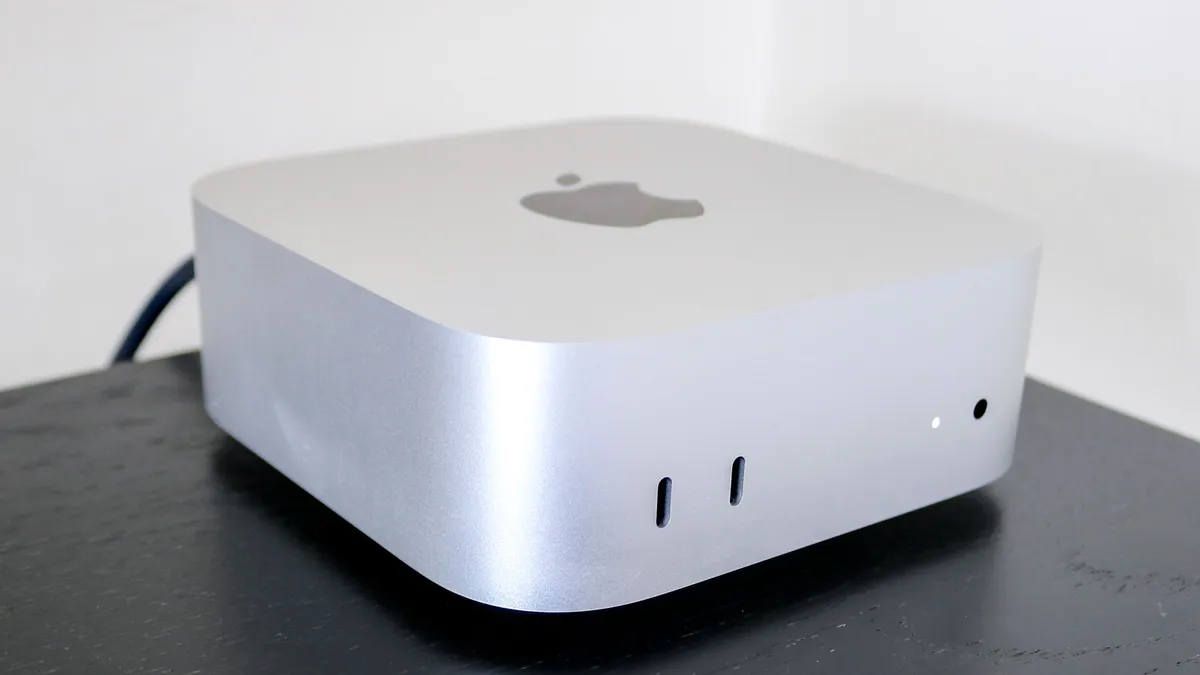
The new Mac mini with M6 and Mac mini with M5 Pro are both compact mini PCs that are small enough to find a place on any desk. Apple hasn’t announced any major exterior changes, so it’s likely that both will feature the redesigned form factor first introduced with the Mac mini M4.
This means there will be two USB-C ports and a headphone jack on the front of both Mac mini models. Around back is where things differ. While the Mac mini with M6 will retain the three rear Thunderbolt 4 ports of its predecessor, the Mac mini with M5 Pro will have three rear Thunderbolt 5 ports instead. Likewise, both models will have HDMI around back along with upgraded 2.5Gb Ethernet out of the box, though you can upgrade either to a 10 Gigabit Ethernet port, albeit in a custom configuration.
On the Mac mini with M5 Pro, its Thunderbolt 5 ports deliver up to 120Gb/s which is useful for connecting fast external storage and monitors like the Apple Studio Display and Apple Studio Display XDR. However, there’s another benefit to having these faster ports. With Thunderbolt 5, you’ll also be able to cluster multiple Mac mini systems together which allows you to run large AI models locally instead of over the cloud.
Wireless connectivity is getting a big upgrade on both new Mac mini models too. Instead of Wi-Fi 6E and Bluetooth 5.3 on the Mac mini M4, the Mac mini with M6 and the Mac mini with M5 Pro now support Wi-Fi 7 and Bluetooth 6. When paired with one of the best Wi-Fi 7 routers, you’ll likely see faster downloads and uploads while the addition of Bluetooth 6 brings precise device tracking, lower latency and better power efficiency for your wireless peripherals like Apple’s Magic Mouse, Magic Keyboard and Magic Trackpad as well as your AirPods.

Although Apple didn’t reveal how many displays these new Mac mini models can drive, you’ll likely be able to use three of the best monitors simultaneously, though their resolutions and connection configurations will likely differ depending on whether you’re running the all-new M6 chip or the more powerful M5 Pro.
On the video front, we’re also getting a brand new feature delivered through USB-C called genlock support. Available on both the Mac mini with M6 and Mac mini with M5 Pro, it enables precise synchronization between a display and camera, including the iPhone 17 Pro.
Finally, storage speeds on both Mac minis are getting an upgrade. Apple switched to a next-generation SSD architecture based on PCIe Gen 6 for its upgraded Mac Studio and it looks like the new Mac mini will be following suit. The company claims up to 2x the performance compared to prior generations, which should make loading projects, transferring files and working with large language models even faster.
Mac mini: Specs & performance
| Header Cell - Column 0 | Mac mini M6 |
Mac mini M5 Pro |
|---|---|---|
CPU |
12-core |
Up to 18-core |
GPU |
12-core |
Up to 20-core |
Unified memory |
Up to 32GB (16GB standard) |
Up to 64GB |
Memory bandwidth |
Up to 170 GB/s |
307 GB/s |
Just like with the last generation, there will be two distinct versions of the Mac mini: one designed for consumers and one for pros. While both previously used different versions of the same chip, this time around, Apple is mixing things up.

The base model will be powered by Cupertino’s all-new M6 chip which features a 12-core CPU alongside a 12-core GPU. Single-threaded performance is the big upgrade here and Apple claims that the M6 offers the “world’s fastest,” so expect everything to feel extra snappy and responsive. Likewise, we’re also getting Neural Accelerators inside each core of its 12-core GPU which is a first for Mac mini. As a result, Apple claims this new chip will deliver up to 4x faster AI performance and 2x faster graphics. Multitasking is getting a boost too thanks to higher memory bandwidth up to 170GB/s.

The Mac mini with M5 Pro takes things even further performance-wise for professionals who aren’t ready to step up to a Mac Studio. With up to an 18-core CPU and up to a 20-core GPU, this upgraded model redefines what’s possible on a small desktop to handle tasks like app development, video rendering, scientific simulations and more. You’re also getting third-generation ray tracing for even more complex 3D design, VFX and game development.
With up to 64GB of unified memory with 307GB/s of memory bandwidth, the Mac mini with M5 Pro looks to be a tiny AI powerhouse capable of running even larger local AI models. However, even with this extra power under the hood, it remains a quiet and efficient always-on desktop that’s ideal for creative workflows or running AI agents.
Mac mini: Outlook
The new Mac mini is following in the footsteps of its predecessor, both in terms of design and use case. While the Mac mini with M6 will be a great desk companion with upgraded performance and improved local AI capabilities, the Mac mini with M5 Pro is more of a workstation for professionals who want even more performance in the same small form factor.
Both Mac mini models are getting a bit of a price hike compared to the previous generation but with higher memory and storage prices, this is to be expected. We’ll see what the Mac mini with M6 and the Mac mini with M5 Pro are truly capable of when we get them into our testing lab in September, so stay tuned for more.

Follow Tom's Guide on Google News and add us as a preferred source to get our up-to-date news, analysis, and reviews in your feeds.