







The iPhone 16e was unlike any of the cheap iPhones we've seen before, mainly because it wasn't actually that cheap, thanks to Apple adding a lot of high-end hardware to the device. This enabled the 16e to run Apple Intelligence AI, for better or for worse.
Still, Apple needed to make some trade-offs versus its flagship phone, including one very important feature that Apple shouldn't have sacrificed: MagSafe wireless charging. Thankfully, rumors suggest that the iPhone 17e won't be falling into the same trap. Not only is the iPhone 17e expected to feature MagSafe, it's supposedly coming with the faster 25W MagSafe charging that debuted on iPhone 16 as well. That's exactly the kind of high-end feature cheap phones should be offering.
What we know about MagSafe on iPhone 17e

There haven't been a lot of rumors about the iPhone 17e so far, but those that have shown up suggest that the phone will be a lot like its predecessor. There should be some key differences under the hood, like a faster A19 chipset, C1X modem and N1 wireless chip.
MagSafe is the defining physical change, since the iPhone 16e lacked the magnetic ring that gives MagSafe its name. All we got last year was regular-old wireless charging, with the same 7.5W speeds you'd expect from the iPhone SE series. For a phone that cost $599, it was rather disappointing to have some of the same pitfalls as one that cost $429.
While you could forgive Apple for offering a lesser version of MagSafe, offering slower charging speeds as a way to keep costs down, that's apparently not the case. The phone will reportedly offer 25W speeds when using a MagSafe charger, which puts it on par with the rest of the iPhone 17 lineup and phones like Google Pixel 10 Pro XL — which support the Qi2 25W standard.
It's nowhere near as fast as some phones, which utilize fancy chargers and proprietary wireless charging protocols, but it is still pretty darn fast — and means you should be able to use any MagSafe or Qi 25W wireless charging pad to reach top speed. Not just the ones made by Apple and its accessory partners.
Why is MagSafe so important?

Wireless charging isn't for everyone, and I certainly have a rather love/hate relationship with the whole concept — for a variety of reasons. But there's no denying the fact that MagSafe wireless charging (or Qi2, if you use Android) offers a better experience than the older Qi standard.
The most important part is that MagSafe is significantly faster, with the newest iPhones offering up to 25W wireless charging speeds. But even if the iPhone 17e came with the original version of MagSafe that debuted on iPhone 12, it would still offer 15W speeds — noticeably faster than the 7.5W speeds available on the iPhone SE 2022.
You also have to consider the magnets, which ensure the wireless charging coils in the phone and MagSafe charger are almost perfectly aligned. This means better power transfer, which makes for a more efficient charging session — both in terms of better charging times, and the fact that less energy is lost as heat. Heat and phones don't mix very well, so the cooler the charging, the happier your phone will be in the long term.
All of that is very technical, and while useful, it probably isn't the thing people think of when they think of magnetic iPhones. That's where the MagSafe accessories come into play.
Magnets mean better accessorizing
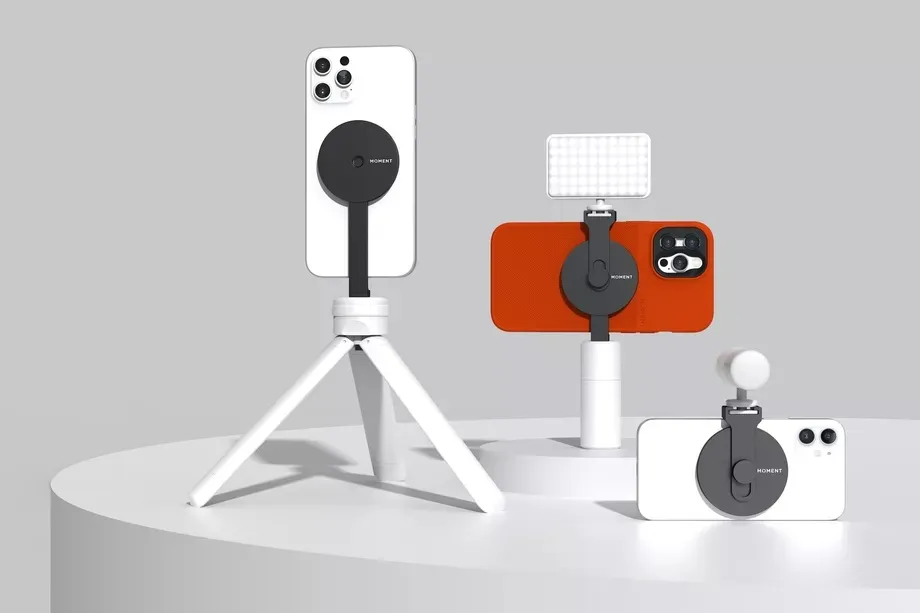
If there's one thing Apple has truly excelled at, it's making its devices fashion accessories. The iPhone is no exception, and while iPhone cases and accessories were always popular, throwing MagSafe into the mix means swapping things out on a whim is easier than ever.
Those magnets are rather strong, but they're not so strong that you can't remove stuff from them. And unlike adhesives, magnets can be reused almost indefinitely.
So one day you could go out with a grip attached to your iPhone 17e, and the next swap it out for a wallet or magnetic battery pack. It all gives you significantly more choice than ever before. Just like swapping a case, but with extra utility.
Personally, I like phone magnets to keep my pop socket attached. But the fact that I can pull it off at a moment's notice means I can still prop my phone up on a stand without issue whenever I feel like it. It's particularly useful in my car, because I can snap it onto a stylish-looking MagSafe stand in half a second — and will know full well it'll stay there for the duration of the drive.
Apple gave us MagSafe, and it makes sense to have it everywhere

Apple is the company that gave us MagSafe, which paved the way for Qi2 wireless charging to follow it. The company rarely does anything for the sake of it, and definitely believes that MagSafe charging is the way to go — or else it would have been removed from the likes of iPhone 17.
It's just a shock that it's taken so long to see the technology hit every iPhone. While I suspect the iPhone SE's lower price tag meant that adding MagSafe wasn't possible, that shouldn't have been the case with the iPhone 16e. It was even shaped like an iPhone 14, which was loaded with MagSafe magnets, so there wasn't really an excuse to skip the technology.
Thankfully, Apple seems to be getting putting things right, which means MagSafe will be available on the new cheap iPhone. Even if the iPhone 17e doesn't actually seem that cheap.

Follow Tom's Guide on Google News and add us as a preferred source to get our up-to-date news, analysis, and reviews in your feeds.
More from Tom's Guide

