I'm not a big fan of the Pixel 11 Pro. As I mentioned in my Pixel 11 Pro and Pixel 11 Pro XL review, these are not bad phones but it feels as though Google hasn't done enough to help justify their existence. One of the few hardware changes the phones do include is the HiLight LED, which lives on the camera bar.
HiLight is part of the camera flash on the back of the Pixel 11 Pro, utilizing a range of colored LED lights. It's essentially a modern day take on the notification light smartphone companies mostly ditched years ago.
Unfortunately, the way HiLight works right now feels like a missed opportunity, but there is potential if Google is willing to put some effort into it.
What HiLight can do
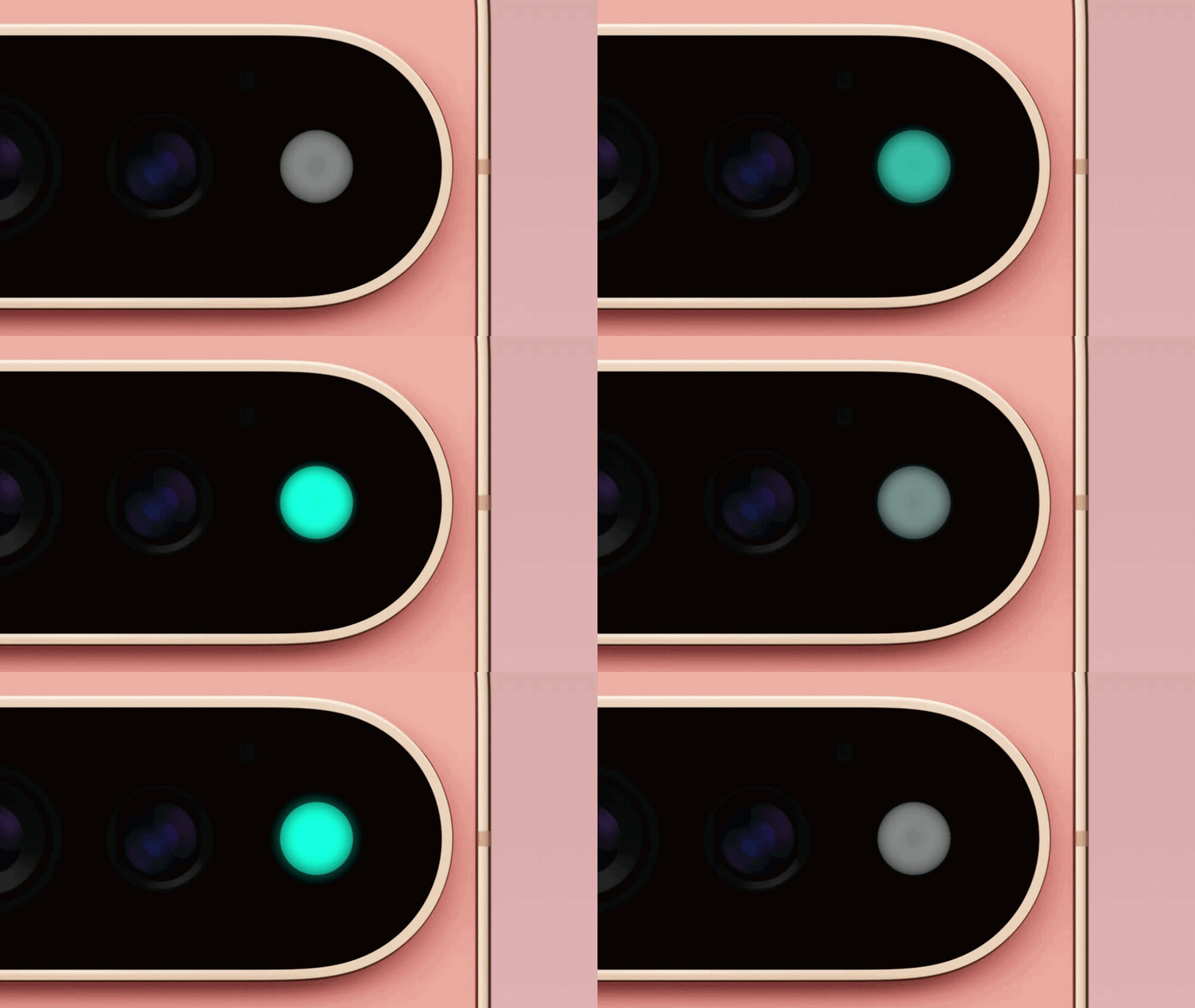
Looking at the back of the Pixel 11 Pro, you'd never know that HiLight was actually there. Though if you are familiar with Pixel phones you may recognize that the flash is totally different, with a smooth solid-colored surface rather than the fresnel-looking lens utilized on the likes of Pixel 10 Pro.
Here's how it works. When you place your phone face down, and whenever the right trigger occurs HiLight will flash one of six colors. Blue is reserved for Google Gemini, but at the moment the HiLight icon can also flash teal, yellow, magenta, purple and white. Unfortunately, the feature is limited in what it can actually do.
The way Google described HiLight, you might have assumed that it would support a bunch of different notification types. I know I did, but that isn't the case. As it stands, HiLight will only flash for two reasons. The light will flash blue whenever you're talking to Google Gemini, but it can also be set up to flash one of the five other colors when your starred contacts are calling you.
At the moment, that is all HiLight can do. Any other kind of notification is completely off limits, and there's no way to set up HiLight to flash up when you get an email, text message or something else entirely.
It's also worth noting that HiLight won't engage if your phone screen is not facing directly down. It doesn't have to be a flat surface, only that your phone screen is pointing towards the ground. In fact, you can test this yourself, because HiLight will actually turn off if you tilt your phone too far in any other direction.
The limitations are disappointing — but it didn't have to be this way

It feels like Google has only done half a job with the way it's rolled out HiLight to the Pixel 11 Pro. The limited functionality means that the one thing that could have become the Pixel 11 Pro's standout feature is nearly pointless for me.
I can't tell you how many times my starred contacts actually bother to call me. Usually they send me a text message, or call me via WhatsApp — which is not compatible with HiLight.
Honestly, it feels like Google hasn't put a lot of effort into making HiLight a feature that people will actually get much benefit from. Everything about it is limited, from the compatibility to the color options.
Google did state that HiLight will be updated with more features at some point in the future, but the only specific detail we've been given is that HiLight will flash when you get messages from favored contacts. We just don't know when that might happen, or what further plans Google has in store for the feature.
App developers have been hard at work trying to crack the system behind HiLight and give users the freedom to utilize the LED however they want. One of them claims to have succeeded, which is crazy considering we're just a few short days out from the phones' official release.
Developers step in

HiLight Studio has garnered attention for its bold claims, promising that users can control the rear-lights colors, and program the lights to activate with an even larger range of apps. I haven't been able to test it for myself, because the setup process is a lot more complicated than simply installing an APK file. This is a system level feature, after all, and it's not one that Google will want you messing with.
In other words, this is for people with patience and technical ability to get everything going. The fact that you need to relaunch the service every time your phone reboots is enough to put me off.
Still, it shows that HiLight is not necessarily limited to the few features Google has graced the Pixel 11 Pro with so far. It's a lot more versatile and potentially a lot more useful than I initially gave it credit for — or it could be.
Bottom line: HiLight could be a lot better than it is

I can see potential in HiLight, and the ability to keep tabs on your notifications without constantly checking your phone screen. In an ideal world you could map different notifications to a veritable rainbow of different colors and use that to determine whether you should actually open up your phone or not.
But in its current state, HiLight is basically a non-starter. It's only compatible with two features, and while I understand why Gemini was chosen I have no idea why Google decided adding support for phone calls was a priority. Actually receiving a phone call is unusual enough that it grabs my attention, I don't need a colorful light to go with it.
HiLight could be something, but it's going to rely on Google actually rolling out a bunch of updates to improve the usefulness of the entire mechanism. But if things stay the way they are, it's just one more phone feature destined for the scrap heap.

Follow Tom's Guide on Google News and add us as a preferred source to get our up-to-date news, analysis, and reviews in your feeds. Subscribe to Tom's Guide on YouTube and follow us on TikTok. Finally, you can visit our dedicated Tom's Guide Savings Squad hub for expert help on getting the best products for less.
More from Tom's Guide