Tom's Guide Verdict
The Google Pixel 11 Pro Fold brings neat AI features and a durable design that makes it more resilient, but its trailing Tensor G6 performance, negligible battery gains, and persistent app scaling quirks make it an underwhelming upgrade. For a top-tier foldable carrying a flagship price tag, it feels like an overly safe refresh that struggles to move the needle against stronger rivals.
Reasons to buy
- +
Brightest screen in a foldable
- +
Genuinely helpful AI features
- +
Rambler makes dictation a breeze
- +
Expanded Gemini task automation support
- +
Creator Mode adds a teleprompter
- +
Bubbles multitasking is genius
Reasons to avoid
- -
Lackluster Tensor G6 performance
- -
App scaling issues
- -
Minor battery life improvements
- -
Camera performance could be better
Why you can trust Tom's Guide Our writers and editors spend hours analyzing and reviewing products, services, and apps to help find what's best for you. Find out more about how we test, analyze, and rate.
Four generations in, Google's foldable phone experiment should be hitting its stride — right? When the original Pixel Fold arrived, it was the company’s opportunity to move outside its usual stable of slab phones into something much more exciting. We’re now at the Pixel 11 Pro Fold, which, more than ever, can’t afford to come up short.
Google no longer has the luxury of being graded on a curve. Having tested the best foldable phones over the last six months alone, I know this space is a fiercely contested battleground, with rival devices like the Motorola Razr Fold, Samsung Galaxy Z Fold 8, and Z Fold 8 Ultra vying for consumer attention.
While class-leading hardware has never been the line’s biggest strength, Google has taken a different approach by doubling down on its outstanding AI features. In my Google Pixel 11 Pro Fold review, you’ll see if it has the hardware, software, and performance to come out on top. But make no mistake: it needs to be firing on all cylinders, because even the smartest software can't stop the Pixel 11 Pro Fold from slipping behind the pace.
Google Pixel 11 Pro Fold review: Specifications
Cover display |
6.5-inch OLED (1,080 x 2,342) |
Main display |
8-inch OLED (2,076 x 2,152) |
Chip |
Google Tensor G6 |
RAM |
16GB |
Storage |
256GB, 512GB, 1TB |
Rear cameras |
48MP wide, 10.5MP ultrawide with Macro Focus, 10.8MP 5x telephoto (up to 30x Super Zoom) |
Selfie cameras |
10MP (inner), 10MP (cover) |
Battery |
4,806 mAh |
Wired/Wireless Charging |
30W, 25W |
Size open |
155.2 × 150.4 × 5.0 mm (6.1 × 5.9 × 0.2 inches) |
Size closed |
155.2 × 76.0 × 10.1 mm (6.1 × 3.0 × 0.4 inches) |
Weight |
239 grams (8.4 ounces) |
Colors |
Obsidian, Olive |
Google Pixel 11 Pro Fold review: Price and release

The Google Pixel 11 Pro Fold officially arrives on August 20, but it costs $100 more than last year’s model — pushing the starting price to a steep $1,899 for the base 256GB version.
While no one likes seeing a price hike, it still manages to undercut key rivals like the Motorola Razr Fold and Galaxy Z Fold 8 Ultra. Considering this is the first time Google's foldable line has seen a price bump, and that it still rings in cheaper than other book-style flagships, the markup isn't an outright dealbreaker.
Just like previous generations, color choices remain minimalist: Obsidian and Olive.
Google Pixel 11 Pro Fold review: Design

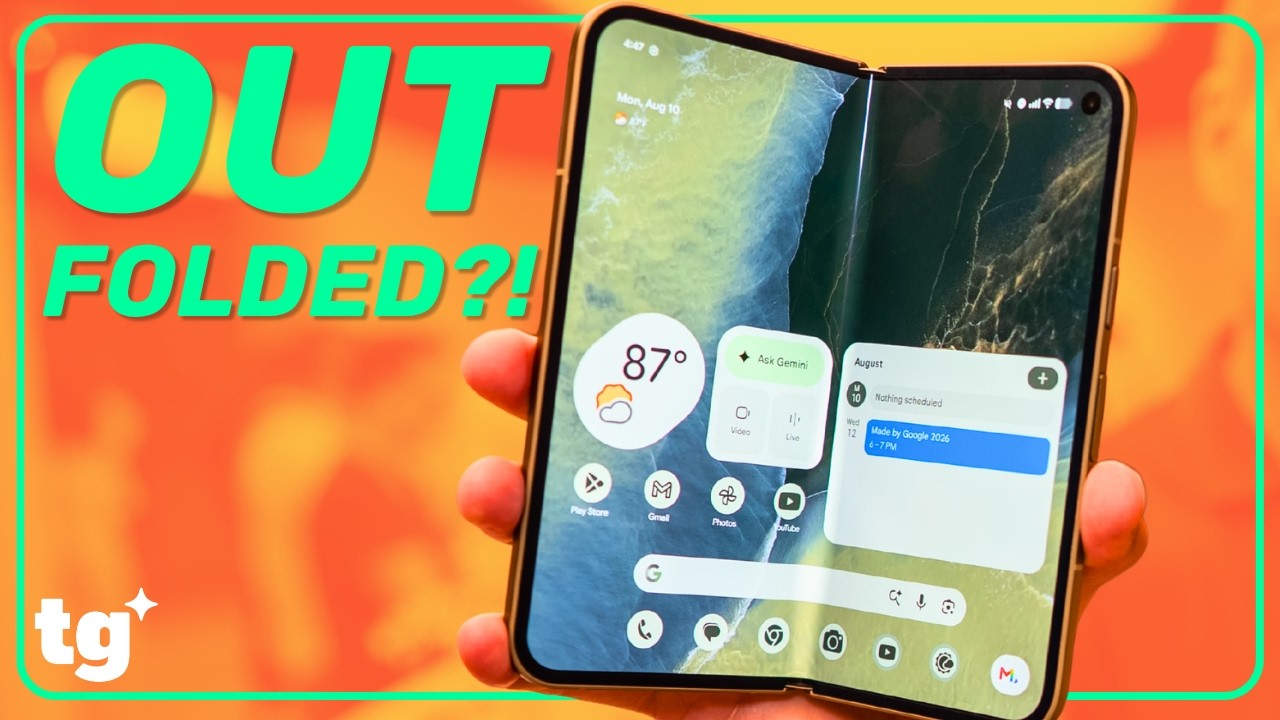
At first glance, the Pixel 11 Pro Fold doesn't look all that different, sticking closely to the design language Google established over the past couple of generations. But where it truly pulls ahead is durability. By retaining its rare IP68 rating, it offers superior dust-tight protection alongside submersion resistance — so yeah, it’s ready for beach outings, unlike the IP48-rated Galaxy Z Fold 8 Ultra.

Yet despite that durability win, the design still lacks the high-end refinement found on its closest rivals. It remains noticeably thicker in hand than Samsung's ultra-sleek powerhouse, the bezels framing both displays are wider, and the inner screen still exhibits a deeper crease.
Google nails the ruggedness, but on pure ergonomics and fit-and-finish, it still feels a step behind the curve.
Google Pixel 11 Pro Fold review: Display

Setting a new record, the Pixel 11 Pro Fold features the brightest screen of any foldable phone that has passed through the Tom’s Guide labs — reaching a blinding peak brightness of 2,982 nits on its main 8-inch Super Actua Flex display.
| Row 0 - Cell 0 | Peak Brightness |
Color |
Accuracy |
Google Pixel 11 Pro Fold |
2,982 |
82.1% / 72.2% (Adaptive / Natural) |
0.31 / 0.26 |
Samsung Galaxy Z Fold 8 Ultra |
2,687 |
95.3% / 82.6% (Vivid / Natural) |
0.27 / 0.2 (Vivid / Natural) |
Motorola Razr Fold |
2,192 |
88.5% / 159.6% (Natural / Vivid) |
0.20 / 0.35 (Natural / Vivid) |
Google Pixel 10 Pro Fold |
2,566 |
74% / 86.5% (Natural / Adaptive) |
0.25 / 0.34 (Natural / Adaptive) |
Whether I’m scrolling through reels or working across two apps simultaneously, the main screen doesn’t disappoint, delivering crisp detail, vibrant colors, and outstanding outdoor visibility. Its 6.5-inch outer cover screen is equally impressive.


The only thing that continues to irk me is how underutilized that outer display remains when the phone is propped up in tabletop or tent mode. While rivals have embraced dedicated desk-clock and smart display standby experiences — like what I get on the Motorola Razr Fold — the Pixel 11 Pro Fold fails to offer a proper StandBy mode on its cover screen. The closest it gets is the basic ambient screen that kicks in when placed on a wireless charging dock.
Google Pixel 11 Pro Fold review: Cameras

On paper, the camera setup on the Pixel 11 Pro Fold looks almost identical to last year's model. You get a triple rear system consisting of a 48MP main camera, 10.5MP ultrawide, and 10.8MP telephoto with 5x optical zoom. That telephoto lens continues to be a major standout, offering the longest native optical reach on any book-style foldable. Both the cover display and the inner screen house identical 10MP selfie cameras.
Despite the familiar spec sheet, Google has swapped in a new primary sensor that reportedly captures more light for improved low-light and Night Sight performance, while the revamped telephoto setup now extends digital reach up to 30x Super Res Zoom.
Over on the software side, I’m ecstatic about the updates that make the camera app far more robust. For instance, new Camera Looks apply professional-grade film styles for a distinct aesthetic, while handy quick controls give instant access to manual parameters like exposure, focus, and ISO.


Unfortunately, my low-light snapshots contradict Google’s claims. Just browse through the gallery above to see what I mean — quite frankly, the differences between the Pixel 11 Pro Fold and Pixel 10 Pro Fold are minimal. Across exposure, fine detail, and clarity, the Pixel 11 Pro Fold simply doesn't offer any dramatic gains.


Despite boasting the longest native optical reach, the Pixel 11 Pro Fold proves that hardware specs alone can’t guarantee the sharpest telephoto results. Even though the Pixel's 30x snapshot manages to edge out the Galaxy Z Fold 8 Ultra, the Razr Fold’s superior computational photography and AI enhancements deliver class-leading clarity, rendering the roof shingles and foreground brush with noticeably finer definition.


Here’s another example of how the Pixel 11 Pro Fold stacks up against its rivals at 30x zoom. This time, I pointed them at a distant sign to see how effectively each phone cleans up the shot.
Once again, the Razr Fold surprised me by leveraging superior AI upscaling to carve out sharp text edges and rich wood-grain definition. Still, Google's 30x Super Res Zoom easily outperforms the Galaxy Z Fold 8 Ultra, which falters with aggressive digital noise and muddier textures across the fence.


For pure color accuracy and balanced exposure, the Pixel 11 Pro Fold comfortably captures the most authentic snapshot of the floral arrangement above. It delivers remarkably true-to-life color temperature and natural saturation, allowing the yellow sunflowers and deep pink carnations to pop without blowing out subtle highlight details on the petals.


When it comes to framing quick portraits, I recommend sticking to the cover screen camera, as it produces noticeably better results than the inner shooter. Under tricky indoor restaurant lighting, the Pixel 11 Pro Fold's 10MP outer selfie camera captures the most lifelike skin tones, authentic facial texture, and natural contrast of the bunch. While the Razr Fold tends to overexpose and soften fine facial features, and the Galaxy Z Fold 8 Ultra leans noticeably warm, Google's color tuning and computational processing make for clean, well-balanced shots every time.


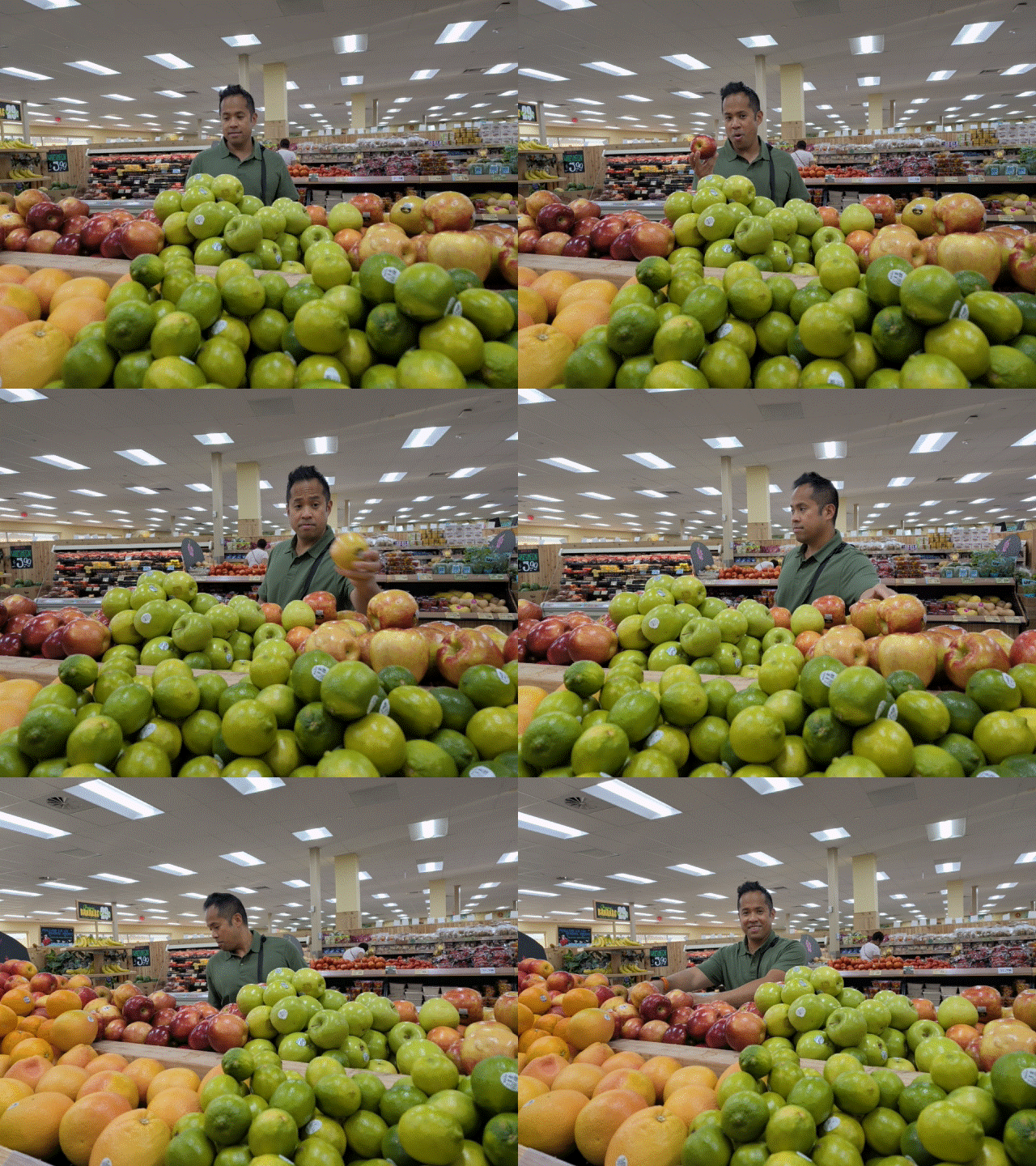
Another standout addition to the camera experience is Magic Capture, which takes the stress out of trying to nail the perfect action shot in real time. Instead of forcing you to choose between shooting a video or firing off a burst of photos, Magic Capture continuously records short clips while the phone analyzes every frame behind the scenes.


It automatically detects peak moments — spotting genuine smiles, sharp motion freeze, and open eyes — to extract high-resolution stills straight from the footage. Even when I had someone else record my shameless inspection of the apple section at Trader Joe’s, Magic Capture worked exactly as intended, consistently plucking sharp, print-worthy stills from the video without any extra effort on my part.

Content creators and solo vloggers will adore the new Creator Mode, which transforms the foldable into a self-contained production studio. The standout perk is the built-in teleprompter tool, which scrolls through my script smoothly across the display at customizable speeds and text sizes, keeping my eye line locked directly onto the lens.
Best of all, Google took full advantage of the dual-screen form factor because Creator Mode seamlessly supports the cover screen paired with the flagship rear cameras. It completely eliminates the need for a dedicated camera operator or a secondary monitor, making solo video production faster, sharper, and far more intuitive.
Google Pixel 11 Pro Fold review: Performance

Benchmark tests reveal that Google’s latest chipset, the Tensor G6, continues to trail behind key rivals powered by Apple’s A19 Pro and Qualcomm’s Snapdragon 8 Elite Gen 5. While I don’t place a lot of emphasis on synthetic benchmarks — since they don’t always translate directly to real-world performance — they remain ideal for comparing objective processing performance.
In Geekbench 6, the Pixel 11 Pro Fold delivers a single-core score of 2,687 and a multicore result of 7,381. While those marks represent a modest bump over the Pixel 10 Pro Fold, they're far from the chart-topping numbers posted by competing flagships. Thankfully, real-world operation tells a smoother story: day-to-day use exhibits snappy app launches, fluid split-screen multitasking, and effortless navigation across the UI.
| Row 0 - Cell 0 | Chipset |
Geekbench 6 (single / multi-core) |
3DMark Wild Life Unlimited (fps) |
Google Pixel 11 Pro Fold |
Tensor G6 |
2,687 / 7,381 |
87.56 |
Motorola Razr Fold |
Snapdragon 8 Gen 5 |
2,711 / 9,134 |
129.23 |
Samsung Galaxy Z Fold 8 Ultra |
Snapdragon 8 Elite Gen 5 for Galaxy |
3,733 / 11,457 |
123.83 |
Google Pixel 10 Pro Fold |
Tensor G5 |
2,334 / 6,332 |
79.68 |
Graphics processing sees a marginal boost as well, with 3DMark’s Wild Life Unlimited benchmark yielding an overall score of 14,623 and an average frame rate of 87.56 fps. I loaded up my go-to test titles, including Age of Origins and Diablo Immortal, and both ran smoothly on the massive 8-inch canvas without any major hiccups or stutter.
While Tensor silicon has historically prioritized on-device AI efficiency and computational smarts over raw benchmark supremacy, I still would have liked to see Google close the gap with its direct competitors at this price point.
Google Pixel 11 Pro Fold review: Battery and charging

In our custom battery drain test, the Pixel 11 Pro Fold clocks an average time of 12 hours and 31 minutes — a modest 15-minute bump over the Pixel 10 Pro Fold. That’s one of the slimmest year-over-year gains I’ve seen in a while, doing little to bolster its overall value proposition. Still, while it doesn't dethrone the longest-lasting foldables on the market, 12.5 hours is more than enough to get me through a full day of typical use.
| Row 0 - Cell 0 | Battery size (mAh) |
Battery life (hrs:mins) |
Charging % in 15 minutes |
Charging % in 30 minutes |
Google Pixel 11 Pro Fold |
4,806 mAh |
12:31 |
29% |
56% |
Motorola Razr Fold |
6,000 mAh |
14:44 |
42% |
75% |
Samsung Galaxy Z Fold 8 Ultra |
5,000 mAh |
14:33 |
49% |
76% |
Google Pixel 10 Pro Fold |
5,015 mAh |
12:16 |
28% |
58% |
Similarly, there are no major improvements with charging, as it retains the same 30W wired and 25W wireless ratings. Plugged into a compatible wired adapter, it reachess 29% in 15 minutes and climbs to 56% after 30 minutes.
On the upside, I’m glad to see PixelSnap support return: it doesn't just enable seamless magnetic charging with Qi2 and MagSafe chargers, but also lets me snap on magnetic accessories like my Nomad MagSafe Wallet.
Google Pixel 11 Pro Fold review: Software and AI

Software is where Google typically pulls away from the pack, and the Pixel 11 Pro Fold delivers some genuinely brilliant AI-powered productivity perks.
One of the most impressive additions is the new Rambler feature in Gboard, which uses Gemini Intelligence to automatically strip out filler words, format messy thoughts into clean sentences, and accept natural voice edits without missing a beat. It has quickly become one of the phone's most underrated features, working so reliably in my daily testing that it has noticeably loosened my reliance on traditional on-screen typing.
I also appreciate the proactive suggestions that surface contextual shortcuts based on on-screen content. For example, when a text message arrives about setting up a dentist appointment, the system automatically offers a quick action to log it directly into Google Calendar.

At the same time, expanded third-party app support for Gemini task automation allows the assistant to handle multi-step actions across more apps than ever. When I asked it to book a dinner reservation at a local restaurant, Gemini researched table availability based on my preferences and prompted me to confirm the final booking. The way it executes complex tasks behind the scenes is not only slick, but a genuine time-saver.
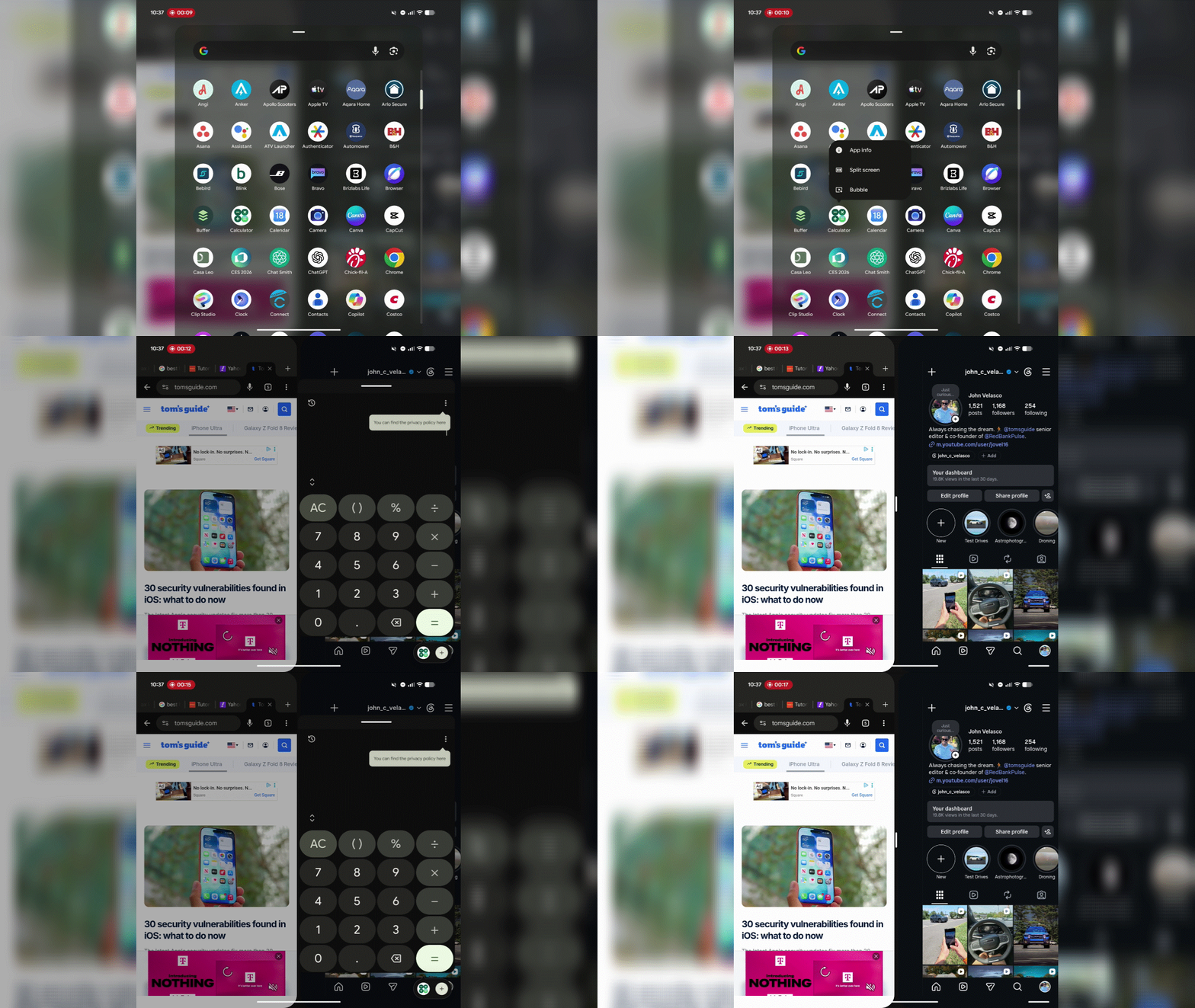
Multitasking also gains a major boost from the new app bubbles system, letting me dock floating mini-windows in the bottom corner of the unfolded display or overlay a third app on top of an active split-screen view.
Yet, despite these clever software highlights, the foldable experience still stumbles over familiar quirks. Google still hasn't fully solved app scaling and layout consistency: certain third-party apps remain awkward when switching between portrait and landscape orientations, occasionally refusing to scale smoothly or leaving letterboxed dead space.
Making matters worse, transitioning from the cover screen to the main 8-inch inner display — and vice versa — can still force apps to refresh their states rather than providing an uninterrupted handoff. It’s a frustrating foundational issue that continues to hold back large-screen Android devices.
On the longevity front, you still get class-leading support with seven full years of major Android OS and security updates. However, when it comes to Google's top-tier AI features, you only get six months of complimentary Google AI Pro access before a monthly subscription kicks in.
Google Pixel 11 Pro Fold review: Verdict

Honestly, I want to like the Pixel 11 Pro Fold — but not like this. It simply feels too underwhelming, especially after testing standout rivals like the Motorola Razr Fold and Galaxy Z Fold 8 Ultra. While new AI additions like Rambler, expanded Gemini task automation, and Magic Capture are undeniably neat, the hardware fails to deliver the generational leap I expected.
The Tensor G6 continues to trail rival silicon in raw processing muscle, battery endurance sees only a negligible 15-minute bump, and real-world camera performance does little to move the needle.
Compounding these modest hardware gains are persistent large-screen software annoyances that still hold the device back. Moving apps between the cover display and the 8-inch main canvas frequently triggers frustrating state refreshes rather than seamless transitions, while orientation switches still suffer from awkward scaling and wasted dead space.
For a premium foldable commanding a top-tier price tag, the Pixel 11 Pro Fold feels like an iterative update that struggles to truly impress.