Update: macOS Ventura coming October 24 — everything you need to know.
Raise your hand if you hate entering passwords. Okay, now keep your hand raised if you happen to use the same password for multiple accounts or services. Yes, lots of people do this, and it’s a leading cause for users getting hacked.
Think about it. If someone can gain your password for a single service — either through a data breach, social engineering, or phishing attack — your identity and personal information could be compromised. This can lead to anything from people spying on baby cameras to hackers stealing money from your bank account.
Yes, there are alternatives to manually entering passwords, such as the best password managers, but they can still leave users vulnerable. Now Apple, Google, Microsoft and others have banded together via the FIDO Alliance to try to replace the password for good. And Apple’s implementation is called Passkeys, which is coming this fall in iOS 16, macOS Ventura and iPadOS 16.
In an exclusive Tom's Guide interview, I had a chance to speak with Kurt Knight, senior director of platform product marketing at Apple, and Darin Adler, VP of internet technologies at Apple, about how Passkeys work and how they could truly make passwords a thing of the past.
What the heck are Passkeys and how do they work?
Passkeys are unique digital keys that are easy to use, more secure, never stored on a web server and stay on your device. The best part? Hackers can’t steal Passkeys in a data breach or trick users into sharing them.
Face ID and Touch ID verification give you the convenience and biometrics we can achieve with an iPhone. You don't have to buy another device, but also you don't even have to learn a new habit.
— Darin Adler, Apple
“Passwords are key to protecting everything we do online today, from everything we communicate to all of our finances,” said Knight “But they’re also one of the biggest attack vectors and security vulnerabilities users face today.”
That’s why Apple has been pushing so hard for an alternative. Passkeys use Touch ID or Face ID for biometric verification, and iCloud Keychain to sync across iPhone, iPad, Mac, and Apple TV with end-to-end encryption.
Other companies have tried to replace passwords with dedicated hardware, like a physical security key, but that was mostly focused on enterprise users; it also added another layer of complexity. Passkeys have a real shot to take off because they leverage a device you already have.

Passkeys are based on what’s called public key cryptography. There’s a private key, which is a secret and stored on your device, and there’s a public key that goes on a web server. Passkeys make phishing impossible because you never present the private key; you merely authenticate using your device.
“People almost always have phones with them,” said Adler. “Face ID and Touch ID verification give you the convenience and biometrics we can achieve with an iPhone. You don't have to buy another device, but also you don't even have to learn a new habit.”
Wait, what happens if you’re not using an Apple device?
Let's say you sign up for a streaming service on your iPhone but need to log in on your Roku. What do you do when your Roku doesn’t have Touch ID or Face ID?
The other device generates a QR Code that can be read by your iPhone or iPad. iOS uses Face ID or Touch ID to confirm that it’s you who’s trying to sign in before confirming or denying the request to the app or website running on the other device.
In addition, if someone is trying to log in to a service using an iOS device or Mac that is not yours, passkeys can be shared via AirDrop.
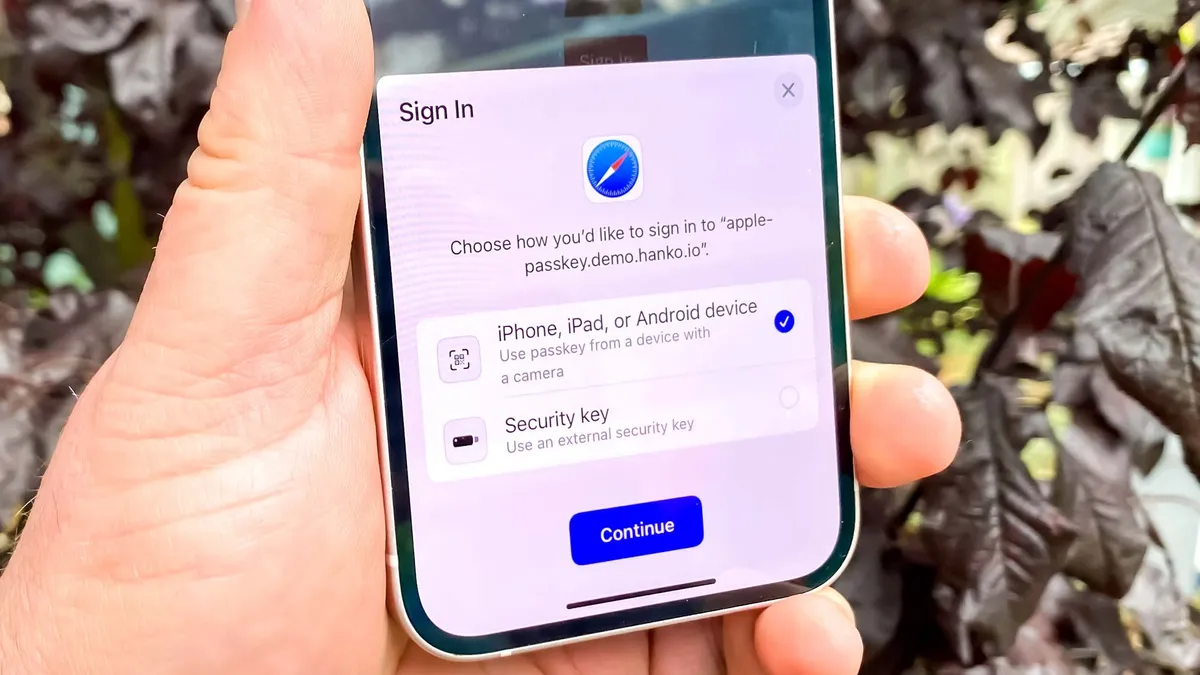
The cross-platform experience is super easy,” said Knight. “So say you're someone who has an iPhone, but you want to go and log in on a windows machine. You'll be able to get to a QR code that you will then just scan with your iPhone and then be able to use Face ID or Touch ID on your phone.”

In other words, computers are going to communicate with each other to make sure that you are in proximity for security sake and they'll confirm that you're signed in.
An unbreakable Keychain
In order for Passkeys to work across multiple Apple devices — including iPhone, iPad, Mac and Apple TV — it needs something to sync the information with end-to-end encryption. And that’s where iCloud Keychain comes in.
“This isn't a future dream to replace passwords. This is something that's going to be a road to completely replace passwords, and it's starting now."
Kurt Knight, Apple
iCloud Keychain is already used to keep your passwords and other secure info (like credit cards) in sync across your devices. But the arrival of Passkeys takes things to the next level.
So what happens if you don’t have access to your iPhone? iCloud Keychain also makes it possible to recover your past keys through iCloud if your Apple device gets lost or stolen.

This is why it’s so critical that Apple built Passkeys on top of iCloud Keychain.
“iCloud Keychain made it possible, and security that before was limited to people who would be willing to carry extra hardware can be made available to everyone with the phone,” said Adler. “So I think those two things come together in a really special way.”
What’s next for Passkeys
Passkeys will be built into the operating systems for iOS 16, iPadOS 16 and macOS Ventura, but Apple is also working with developers to integrate Passkey support into their apps.
Apple couldn’t yet share which Passkey-compatible apps will be available at launch, but it sounds like there’s already momentum in the background. And it’s not just about ease of use.
“These public keys don’t really have any value. There’s nothing worth stealing,” said Adler. "So that’s going to decrease liability for developers running services…and developers will want to take advantage of this because of the decreased responsibility.”
According to Adler, developers have everything they need to start implemented Passkeys now and consumers are going to have support when they update their Apple devices to the newly released software this fall.
So despite all the previous hype around killing the password for good, this time it could be happening for real.
“This isn't a future dream to replace passwords,” said Knight. "This is something that's going to be a road to completely replace passwords, and it's starting now."