




The holidays are nearly here and if you're getting ready to travel you may have quite a lot left on your to-do list. In addition to gifts, wrapping and food, you also have packing, planning and home preparations to get sorted.
If you already have any of the best smart home devices set up, they can help you get prepared. Likewise, if you're ready to add a few extra gadgets to the line up, they can help round out those few scenarios or blind spots you probably haven't even considered.
Here are seven ways smart home devices can easily assist you in keeping your home safe and secure when you're traveling for the holidays.
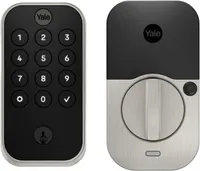
1. Update your smart lock code

There are a lot of great reasons to have one of the best smart locks as part of your home security setup – unlike a standard lock, a smart lock can let visitors or service people temporarily access your home, give you access to your front door from your smartphone and help you keep track of who has entered and exited your household.
During the holidays, you may have a neighbor, friend or family member you ask to check in on your house. You may even have hired someone to come feed your pets. In this case, it's a great time to update your smart lock codes and add new temporaries for people you expect to drop by.
I always like to give temporary access to a nearby neighbor as well, in case something catastrophic happens (fire or flood). That way, they can ensure first responders are able to get in without having to break down my door.
2. Motion detectors for windows and doors

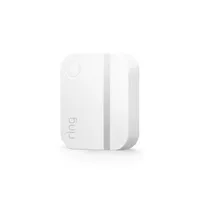
If you already have a home security system that features a hub, now is the perfect time to add a few smart motion detectors on those windows or doors that could provide easy to access if no one is home. Think windows hidden from view, garage doors, doors in alleyways, or storm doors.
Motion detectors are often inexpensive and they're also easy to install using their included adhesive strips on the back. When the two parts are separated, you get an alert sent right to your phone. It's easy enough to add them right before you leave town to make sure that access points that could become break-in points aren't being taken advantage of.
3. Set smart thermostats to away

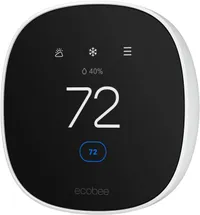
If you're heading out for a period of time, don't forget to update the settings on your smart thermostat – after all, there's no reason to heat a house when no one is home. Smart thermostats can be controlled with smart assistants or an app, so many of them can be spoken to, or adjusted, from miles away.
However, many smart thermostats also offer settings like "Vacation" that tell the device you won't be at home, which will not only save energy but start reheating your home a few hours before you arrive back.
4. Get smart lights or smart plugs

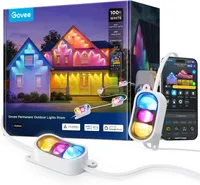
There's no better way to tell when someone is home than if the lights are on – which is exactly why the best smart lights are so popular. There's a wide variety of options for smart indoor light bulbs that can be used in lamps and overhead lights to ones that will work in wreaths and Christmas trees to exterior lighting that works all year round.
We recently reviewed Govee's Permanent Outdoor Prism Lights which can be securely installed thanks to their new design that features screw holes. The lights themselves don't look strictly seasonal but can be changed to match whatever the theme may be, and can work with over 100 preset scenes. They also work with smart assistants.
At the same time, smart bulbs can be programmed to turn on and off at a scheduled time through their respective apps or turned on with a digital assistant, So no matter where you are, it looks like you've just gotten home. Bonus if you get a smart plug for the Christmas tree or a few of the best outdoor smart plugs for your exterior decorations as well.
5. Automate your curtains

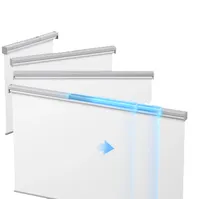
Admittedly, this one might be a little more advanced but if you've already automated the rest of your home it might be time to tackle the curtains. After all, how cool is the idea of being able to open and close your curtains from an app? If your lights come on, and your blinds open and close, your home really gives off the appearance of having people inside.
Smart blinds aren't as widely available as some other options, but one of the more popular companies is SwitchBot because their devices allow you to swap in whatever fabric you want. They also integrate with smart assistants and operate quietly.
6. Set up smart pet feeders

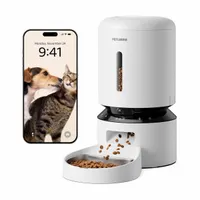
Smart pet feeders have come a long way from just automatically feeding your pet. Sure, they'll still do that but now you can also watch your cats using a 1080p video feed and speak to them over a microphone. If you already regularly use a smart pet feeder there may not be much more to do then just to make sure that it's filled up and connected to your phone. And if you don't, it's fairly easy to plug one in and pair it to the app on your smartphone so that you can make sure your pets are appropriately fed while you're away from home.
Our editor who tested the Petlibro found it not only useful for keeping each of their cats fed the appropriate food, but also really enjoyed keeping an eye on them throughout the day. Likewise, he appreciated the data in the app that helped keep track of successful feedings and low food dishes. Because it can sense motion and record activity it also acts as a secondary home security device.
7. Add a leak detector

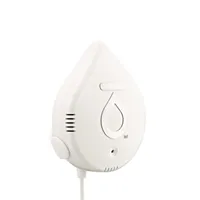
Whenever the temperatures drop, homeowners look sideways at their pipes. And when you travel, you never want to come home to a problem – particularly one that involves water leakage. A smart water detector can alert you to issues faster by sensing moisture and sending you an alert over your smartphone so you know there's a problem even if you're thousands of miles away.
There are a lot of options available among the best smart water detectors, but what you're looking for is something that will fit into your space and is loud enough to alert you when you're home. You also want to consider whether you need something that runs on batteries or can be plugged in and if you need additional features like a device that also can shut off the water leak or monitor your water usage.

Follow Tom's Guide on Google News and add us as a preferred source to get our up-to-date news, analysis, and reviews in your feeds.
More from Tom's Guide
- Stop porch pirates before they strike with these essential tips and devices
- 5 common mistakes when buying a security camera
- Your security cameras are in the wrong spots — here's how to fix it

