Tom's Guide Verdict
If you’re already in the Ring ecosystem, the Indoor Cam Plus pumps out sharp video, even in low light. But we experienced some consistency issues, and you’ll need a Ring subscription if you want to save video. Check out Nest, Wyze, and Eufy all offer just as capable security cameras for less.
Pros
- +
Super fast and easy to set up
- +
Versatile placement options
- +
Excellent 2k video, especially in low light
Cons
- -
Video occasionally breaks up and has big artifacts blocking field of view
- -
Short power cable
- -
Works with Alexa, but not other third party smart home connections
- -
Subscription required to save video
Why you can trust Tom's Guide Our writers and editors spend hours analyzing and reviewing products, services, and apps to help find what's best for you. Find out more about how we test, analyze, and rate.
Price: $59.99
Dimensions: 1.97 x 1.97 x 3.8 inches
Connectivity: Single band wifi, 2.4GHz; WiFi 4; requires min upload speed of 5Mbps
Camera resolution: 2K video
Field of view: 115 degrees horizontal; 60 degrees vertical
Motion detection: Advanced Motion Detection with Customizable Motion Zones
Audio: Two-way talk with noise cancellatio
Siren: remote activated
Having installed the Ring Wired Doorbell Plus for a review, it only made sense to expand the Ring ecosystem in and around my home. In that vein, I installed Ring’s Indoor Cam Plus in my garage so I can keep an eye on comings and goings where I store some of my favorite toys, like my motorcycle and bikes.
It’s an awesome versatility option for the Ring ecosystem and opens up viewing in other areas besides my front yard, which is scoped out by the Ring doorbell. The Indoor Cam Plus offers the same exceptional 2K video as the doorbell — when it works. I had issues with artifacts and cut-outs while using the Indoor Cam Plus, which put a damper on an otherwise convenient device — and lessened its appeal among the best home security cameras.
Ring Indoor Cam Plus review: Price and availability
The Ring Indoor Cam Plus costs $59.99 and is available for purchase now on Ring’s website. You can choose a single camera, or up to a 4-pack of cameras at check-out, and you can also finance the purchase using Affirm. The camera comes with a 1-year warranty.
Ring also offers various packages, like the Indoor Cam Plus and a Battery Doorbell for $159.98, or a Spotlight Cam Pro and Indoor Cam Plus combo for $309.98.
The Indoor Cam Plus is also available at major retailers like Amazon. Combo options will vary depending on which retailer you choose.
Design
There’s a lot of cool stuff packed into this very small package. The biggest advantage is Ring’s Retinal Vision 2K video, which boasts lots of clarity and bright color in almost all conditions except full dark.

When the lights get dim, Ring’s Low Light Sight maintains color and clarity. Then, when the lights are out, you still get a super-clear picture in black and white, somewhat akin to night-vision goggles (minus the green tinge). Regardless of lighting conditions, you can also zoom in up to 4X to pinpoint your view on specific parts of the scene.
You can set up privacy zones within the scene to prevent the camera from recording specific locations. The swivel mount also helps with this, allowing you to move the camera to a location that works best for you. If all else fails, you can use the included removable lens cover to completely block the lens when you need to.
Automatic motion detection triggers the camera to record when it senses people or moving objects. This gets saved in your video history (which can vary based on whether you’re using the free app features or the paid subscription). The longest the videos get saved is 180 days.

Within the app, you can set up real-time notifications, motion-activated notifications, person and vehicle alerts, video preview alerts, and safety alerts. It’s easy to respond to events as they happen with Live View and Two-Way Talk, the latter of which allows you to speak to anyone in view of the camera right from your phone. If you’re not available, you can even pre-record responses for quick-replies.

The Indoor Cam Plus has 2.4GHz connectivity, and it works with iOS and Android. It also works with Alexa, though it is not compatible with other smart home ecosystems like Google.
Ring Indoor Cam Plus review: Using the Ring Indoor Cam Plus
Setting up the Indoor Cam Plus is super easy. I set my camera up in my garage, since this is a highly-trafficked area in my home and I wanted to be able to see the comings and goings. (Usually that’s just video of me puttering around.) I wanted to wall-mount my camera, but the included power cable is very short, which made it impossible to mount the camera high enough for my preferences. Instead, I put it up on a shelf.

I often do photo shoots in my garage as well. In this case, I prefer to use the included lens cover to ensure visitor privacy. It’s a nice feature that’s easy to use, though if you mount the camera high up on a wall or shelf, you’ll have to get up there frequently to manually turn the lens cover.

Once I had my camera installed, I opened the Live Video feed to check out colors and clarity. Like the Ring doorbell camera, the 2K Retinal video is excellent. It’s clear, the colors come through vibrantly, and even in low light conditions the image quality is excellent. Zooming in all the way (4x) produces some grain and pixelation, which is to be expected, but it’s still remarkably clear for what essentially amounts to security footage.

My garage lights are off when I’m not in there. So being able to view the space clearly in no light is especially important to me. In the dark, the video image quality is still excellent, though you don’t get a color image. It’s like night vision. That said, it’s still very easy to see even smaller objects in the field of view.

Speaking of the field of view, it’s very generous. I can see just about my entire garage, though there are blind spots just below the camera and in extreme angles. I’ve positioned it in such a way that those particular blind spots aren’t relevant.
I also love being able to set up privacy areas. In a dream world, my garage would be my photography studio, which means I’d have a changing area for clients. This would be an ideal use for the privacy settings, and they’re easy to use and set up in the app. On your video image, the privacy zone presents as a blacked-out shape over the area you wish to hide.

You can also set up motion detection zones. These zones will trigger recordings when someone or something enters a specific part of the video’s frame. It’s as easy as setting up a virtual shape on your screen with your finger.
It integrates nicely into the app and it’s easy to pick and choose which clips are relevant to you. But, like all Ring products, you’ll have to subscribe to get the most out of the camera. You get a free trial, but it’s a pretty big bummer that you have to pay for an app after buying the product.
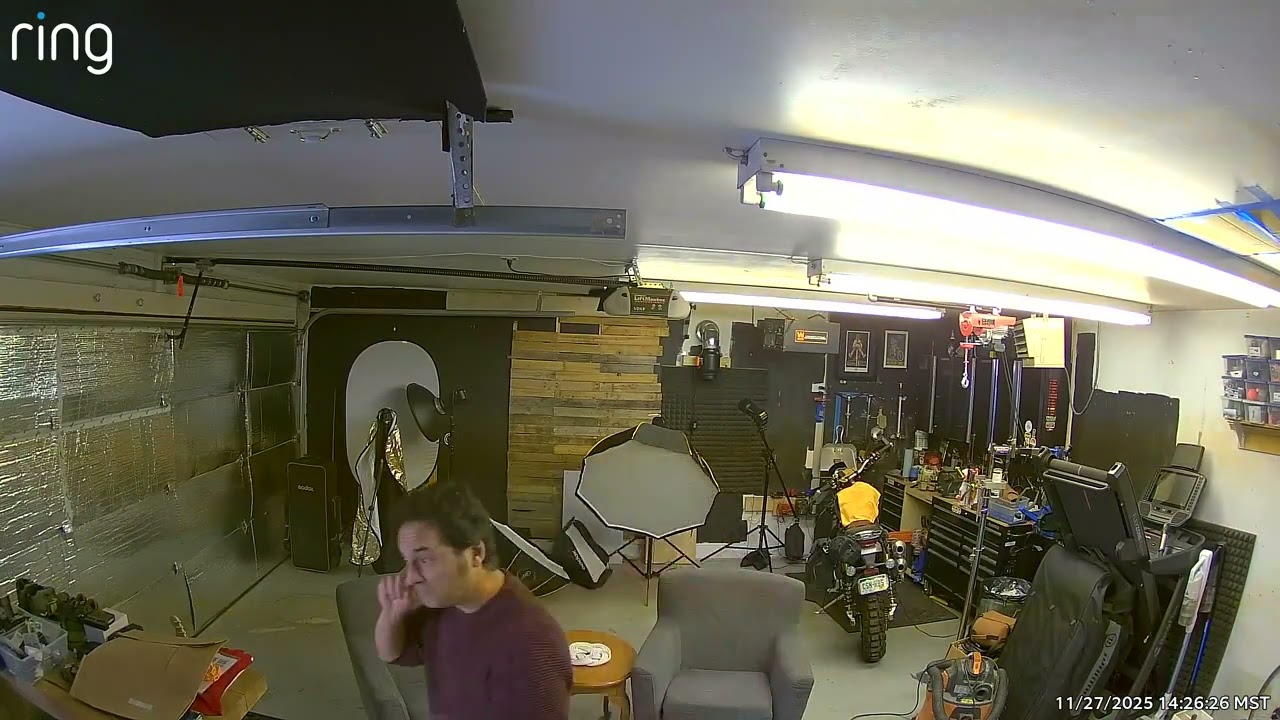
My only big complaint with the Indoor Cam Plus is the reliability of the video footage. While the video quality has been excellent, occasionally I’ll get artifacts, or complete cut-outs. This might be due to the quality of my Wi-Fi, so be sure you set up your camera where your Wi-Fi signal is strong. That said, I’ve never had Wi-Fi difficulties with any other smart devices, or my computer, in my garage space. So the artifacts and cut-outs were particularly frustrating.
Ring Indoor Cam Plus review: Accessories
You can increase the usability of your Indoor Cam Plus with a few key accessories. The one I intend to purchase is the 10ft USB-A to USB-C power cable ($14.99) so I can run my camera in a higher position on the wall. It seems odd that the included power cable is so short to begin with, so it’s a bit of an annoyance that I have to buy an additional accessory for this.

Other accessories are less directly relevant to the Indoor Cam Plus and more relevant if you have other Ring accessories. You can get the Pet Tag ($9.99) and Reflective Security Stickers ($5.99), for example, or a Chime. The latter usually comes with the Ring Doorbell, but you can always add another for a different part of the house.
Ring Indoor Cam Plus review: Subscription fees
Like all of Ring’s other products, you need to pay for a subscription if you want to use most of the Ring Indoor Cam Plus’ features — most notably, saving video. Among the best home security cameras, it’s one of the only companies that doesn’t offer any sort of video history for free.

Ring’s plans start at $5/month, which gets you 180 days of video history, as well as person, Package, and Vehicle Alerts. However, this plan only covers one device. If you want to cover an unlimited number of devices, you’ll need the $10/month plan. And, if you want to access Ring’s AI features — which include such things as more descriptive alerts, and the ability to use natural-language searches — it’ll cost $20/month.
Ring Indoor Cam Plus review: Competition
The indoor camera market is increasingly large. Ring has perhaps the best name recognition in the market, and the video quality really is exceptional. But if you want integration with other smart home ecosystems beyond Alexa, you’ll have to look elsewhere. Eufy, Arlo, Simlisafe, and Wyze all offer camera alternatives.

One of the strongest alternatives is the TP-Link Tapo, which works with Alexa and Google Assistant. It’s also less expensive than the Ring; you can get a single camera for around $30 or a two-pack for around $60. It offers 2K video, and the option for both local and cloud storage. (You have to pay extra for Ring’s cloud storage.)
Ring Indoor Cam Plus review: Verdict
The Ring Indoor Cam Plus is a good complement to the Ring ecosystem if you’ve already invested in a Ring doorbell or are willing to shell out the cash for the features behind the app’s paywall. The camera itself pumps out beautiful, sharp video and it’s super easy to zoom in to see what you want to see, even in low light.
But, I was a bit frustrated with its inconsistent performance, which means you might miss certain important events or visitors in your video history. And like other Ring products, the experience would be much improved without having to shell out extra cash for an app. If you’re in the Ring ecosystem already, the Indoor Cam Plus is worth a look, but otherwise, there are better options among the best home security cameras.