The Meta Ray-Ban Display smart glasses first went on sale in late September, but owing to their popularity and production, have only recently become available in large numbers. I had a chance to go hands-on with them at Meta’s launch event, but only for a few brief minutes.
I was finally able to schedule a fitting for the glasses — a required first step for anyone looking to purchase a pair — and, after waiting over a month, I finally got my hands on a pair and have been testing them out for the past day.
I’m still working on my full review, but having worn the Ray-Ban Display for a fair chunk of time, I have a few initial impressions of these $800 specs, and how they might stack up against the best smart glasses.
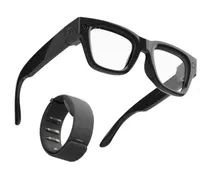
They’re chunky

Compared to Meta’s other wearables, which don’t scream “smart glasses,” the Displays have a much thicker frame (think Buddy Holly), which makes them stand out a lot more. My wife commented that they didn’t look as nice on me as the Ray-Bans or Oakleys, so be prepared to get a few more stares if you pick these up.
I do like that the Meta Displays come with transition lenses by default, as it would be a shame to have to stop wearing them each time I went indoors or outside.
Gestures took a while to master

Both at the store and on the glasses themselves, Meta offers some pretty good instructions on how to use the gestures, but it still takes some practice. By the second day, I had gotten them down fairly well, but there have been more than a few occasions where I had to rub my thumb over my forefinger more than once to get things to move on the display.
My favorite gesture is the pinch to adjust volume or zoom. If you’re listening to music, you can touch your index finger and thumb and then rotate your wrist to increase or decrease volume. Similarly, if you’re using the camera app, the same gesture lets you zoom in and out.
One pleasant surprise (especially if you’re in the middle of a freezing winter) is that the control gestures work just as well even if you’re wearing gloves. That’s because all hand gestures are interpreted by a Neural Band, which you wear on your wrist, that detects muscle movement.
Handwriting is cool, but a work in progress
With some apps (such as WhatsApp), you can use your finger to write, and the glasses will interpret your gestures as letters and numbers. It’s pretty neat, and when it works, it responds quickly. I scrawled out a few words, and while the glasses were a second or two behind, it got things mostly right. However, there was more than one occasion where I had to keep tapping for it to recognize my inputs.
You can use your finger to write out some punctuation — I could do periods, exclamation points, and question marks — but you need to access a special menu for other symbols. What’s cool, though, is that you don’t even need a hard surface for your finger; you can literally write in mid-air. It’s definitely a feature I’m going to dig deeper into.
Maps are made for walking

One of the key differentiators between the Meta Display and the company’s other smart glasses is that it can provide turn-by-turn directions, which can be especially helpful if you’re in an unfamiliar place.
However, it’s very limited at the moment. For starters, while you can look up directions wherever you are, you can only navigate using the glasses in a few select locations, such as New York City.
I was able to quickly get directions from the Tom’s Guide office to Penn Station, and the glasses gave me guidance along the route. But when I got to suburban New Jersey and tried to use it to get home, the glasses would only show me the route overview, saying that turn-by-turn directions were not available for my location. In those instances, you can have the glasses open up the route on your phone’s navigation app (in my case, Apple Maps).
Also, you can only get walking directions on the Meta Display, and even then, doesn’t take into account things such as mass transportation. So, if you can’t get somewhere on your own two feet (and you don’t live in a major metropolitan area), the Meta Display won’t do you much good.
The display is bright but not intrusive

Having used other heads-up displays in smart glasses and goggles, I have to say that Meta seems to have gotten things right with the Display. The screen is crisp and colorful, and I don’t have to strain my eyes to see things (and there’s even a setting for those who have color blindness).
It’s easy to see the screen, even when I’m in direct sunlight — and it even auto-adjusts its brightness to compensate for ambient conditions.
Meta AI can only do so much
The key to any smart glasses is the power of its underlying AI. I’ve used the Ray-Ban Metas in the past, and it’s been pretty good at identifying things I look at, but it does have its limitations. While passing a parking lot, I looked at a Toyota SUV, and asked Meta to identify the vehicle, which it confidently told me was a Range Rover.
At another point, I noticed we were running out of carrots, so I asked Meta to add carrots to my shopping list. Unfortunately, it said it couldn’t do that, but said it would create a reminder for me.
I'm going to dive deeper to see how it compares to Gemini and Alexa+, at least as a wearable AI.
Battery life goes fast

I put the glasses on a little before 9 am, and by 1 pm, they were down to 56%. That’s actually better than Meta’s claims of about 6 hours with mixed use, like if you’re playing music. I do like the Display’s charging case, though, which folds down into a very compact shape when the glasses aren’t inside.
Initial thoughts

Meta has jumped ahead of the likes of Google, Amazon, and Apple with several pairs of smart glasses that are not just innovative but practical. The Meta Display glasses make it easier to do things that would normally require you to take your phone out of your pocket, be it listening to music, taking photos, or getting somewhere new.
However, even in my early testing, I see some limitations with Meta’s AI that it needs to work out before competitors like Google release their own smart glasses. For starters, navigation needs to be nailed down so you can use it for more than walking — and in more places. And, Meta AI needs to be able to work with more apps, so that if you do want to create something as simple as a shopping list, you can do so.
I’m still checking out all of the other features of the Meta Display, so stay tuned for my full review. Let me know in the comments if there’s anything in particular you’d like me to check out.

Follow Tom's Guide on Google News and add us as a preferred source to get our up-to-date news, analysis, and reviews in your feeds.
More from Tom's Guide