
I've been chasing the best gaming laptops for decades, playing the latest PC games on over 100 beastly machines to push them to their limits. That's all to find out if they truly are worth their weight in gaming gold, as if there's one thing I've come to understand after years of testing, it's that these rigs are a major investment.
Whether it's a light yet powerful gaming laptop (check out the Asus ROG Zephyrus G14) or a full-blown desktop replacement rocking a heap of horsepower (the HP Omen Max 16 is what you're after), there are a lot of factors that go into choosing your gaming laptop of choice.
My top picks

The 2025 Asus ROG Zephyrus G14 continues its reign as the gaming laptop we recommend for most because it delivers a potent blend of performance (thanks to RTX 50-series), portability and power efficiency in a svelte 14-inch chassis.

You'd be hard-pressed to find a better gaming laptop for under $1k than this cyberpunk-inspired gaming machine, which comes with a capable Nvidia RTX 4050 GPU, a fast 13th Gen Intel CPU and a solid 144Hz 15.6-inch display that won't let you down.

The HP Omen Max 16 is an RTX 5090 monster that is juiced to the max with the highest possible wattage going through its parts. What that means is not only silky smooth gameplay on its display, but buttery 4K gameplay, too!
That's just the starting lineup, as there are a wealth of gaming laptops that suit different budgets, performance needs, portability requirements and, of course, styles. That's why it's worth asking yourself the following:
FAQs
Read more ▼

What is the best gaming laptop for me?
Everyone has different needs, so think about the requirements that are essential to you.
Performance: Since recent gaming laptops hold a lot of power, you can expect them to manage any game you throw at them. But it's a matter of how much power you're getting. Generally, the higher the price, the more performance a laptop offers, meaning being able to turn settings in games to max without the system melting. With Nvidia's latest GeForce RTX 50-series and AMD's recent GPUs now here, though, you can also get a lot more out of a machine thanks to DLSS 4 and Multi Frame Generation. Essentially, more frame rates at higher resolutions, and a good middle-ground example is the Asus ROG Zephyrus G14. However, RTX 40-series aren't out of the game yet, as these can pull off some major performance gains in the latest PC titles, as we've found in the Asus TUF Gaming A16.
Portability & Battery: Plan on gaming on the go or sticking to your desk for gaming sessions with the ability to transport it? Gaming laptops are well known to lack strong battery life, but that doesn't mean there aren't any that can last a while. Take the Asus ROG Flow Z13 as an example, which is ultraportable and can last over 2 hours while gaming (and much longer while not). If you're more inclined to have a beast for your PC setup, laptops like the 18-inch Asus ROG Strix Scar 18 are it, just don't expect it to run long when it's not plugged in. Otherwise, if you're not planning on gaming just anywhere, you'll want to look at the best gaming PCs.
Productivity: The good thing about gaming laptops is that they have plenty of power for professional tasks as well, such as video rendering or CAD work. As they can be an expensive purchase, it might be worth looking at getting a machine that can pull double duty as a gaming and work laptop. Machines like the Lenovo Legion Pro 7i are good examples of this, offering a design that’s slim enough to easily take them to work, yet also have a powerful enough specification for AAA gaming.
How much should I spend on a gaming laptop?
Gaming laptops don't come cheap, but you don't have to empty your wallet to pick one up either. However, it's important to keep value in mind, as there's no point getting a barebones budget system if you plan on cranking up settings to max in PC games like Cyberpunk 2077 or Black Myth: Wukong.
Think about the types of titles you play most and how demanding they are, but also know that the latest and greatest — no matter the price — can hold their own in many AAA titles.
That said, if you're looking for more competitive multiplayer games or indie titles, the MSI Cyborg 15 will do the trick for under $1,000. Many laptops sporting an RTX 4060 and (especially) an RTX 5060 can blaze through these titles, offering super-smooth frame rates at high settings. But for monstrous power that can handle anything, including path tracing and the highest settings in games with high 240Hz frame rates even at 4K resolution, expect to pay at least $3,000 and over, like the Razer Blade 18.
A good middle ground is something like the Asus ROG Zephyrus G14, which can manage high settings and higher frame rates (with DLSS 4 turned on) at around $1,500-$3,000.
The best gaming laptops you can buy today
Why you can trust Tom's Guide Our writers and editors spend hours analyzing and reviewing products, services, and apps to help find what's best for you. Find out more about how we test, analyze, and rate.
The best gaming laptop overall


As the headline of my review suggests, I took the new Asus ROG Zephyrus G14 on a 5,000-mile journey with me. And from firing up Cyberpunk the first time and seeing that silky smooth OLED gameplay, I already knew this was going to be the gaming laptop I'd recommend to everyone who asked me.
A lot of it remains the same — an identical gorgeous CNC-milled aluminum finish that gives serious MacBook Pro vibes, a stellar typing and clicking experience with a tactile keyboard and glass touchpad, and that delicious 14-inch 2880 x 1800 OLED display.
But inside, Asus has vastly increased the horsepower pairing to an AMD Ryzen AI 9 HX 370 and up to an Nvidia RTX 5080. These together unlock a true beast in both prosumer productivity and (most importantly) monstrous gaming performance.
Turn on DLSS 4 with multi-frame gen, and I was playing Cyberpunk at over 140 frames per second with max settings. When I remembered just the size and weight of this machine, it felt a little mind-bending to see just what it can do.
That being said, Asus hasn't managed to overcome the poor battery life of the G14's predecessor. Don't get me wrong, it did get an additional 45 minutes of playtime in my testing. But just like any gaming laptop, make sure you run games near a power outlet.
But with all that being said, this is a gaming laptop that doesn't forget about the "laptop" part of the equation, and that's why it keeps its position on top of this list.
Read our full Asus ROG Zephyrus G14 (2025) review.
The best gaming laptop under $1,000
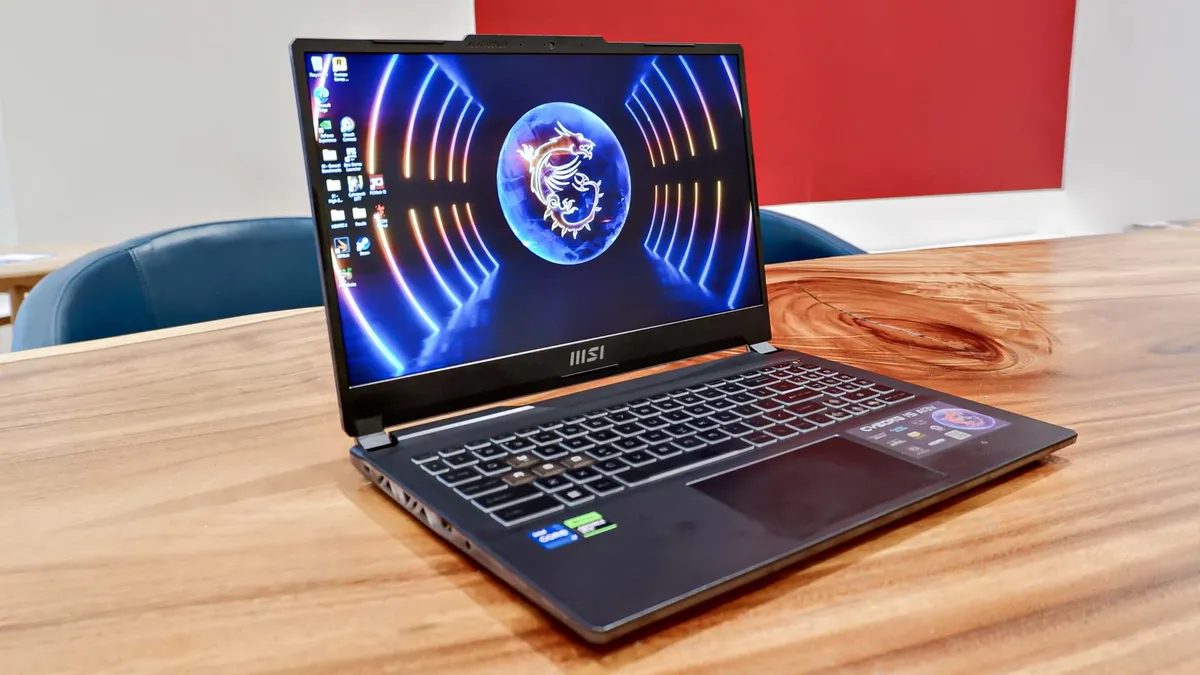
The MSI Cyborg 15 is almost always available for under $1,000, proving you don’t have to break the bank just to own a good gaming laptop. It’s also an example that budget gaming laptops don’t have to look cheap. In fact, this notebook’s cyberpunk-inspired aesthetic gives it more flair than many higher-end options. If you want rock-solid gaming performance in a fun chassis, this machine satisfies both needs.
Component-wise, the MSI Cyborg 15 packs an Nvidia RTX 4050 GPU and 16GB of RAM. Those aren’t exactly high-end, but they’re more than enough to let you play games at 1080p and around 60 frames per second. Basically, you’re getting a console-like (or better) experience on this laptop. Of course, the MSI Cyborg 15 can play many more games than a PS5 or Xbox Series X, since you can access game launchers like Steam.
The 15.6-inch 1920x1080p display doesn’t get as bright or colorful as its competitors’, but it still lets you clearly see everything happening on the screen. The 144Hz refresh rate also ensures that things run smoothly on the display. We should at that the 18ms response time isn’t the greatest, but you probably won’t notice any latency in most single-player games. However, you might feel some lag when going up against others online.
Since this is a budget gaming laptop, the MSI Cyborg 15 makes some concessions — such as screen vividness, battery life and a plastic chassis. However, given the decent performance it delivers for under $1,000, we consider this machine an excellent way to get into the world of PC gaming.
Read our full MSI Cyborg 15 review.
The best 16-inch gaming laptop

A great gaming laptop is all about offering that blistering performance while not forgetting about the essentials of a good notebook. That's exactly what the Lenovo Legion Pro 7i Gen 10 offers, and makes it one of my personal favorite 16-inch models.
There's a lot to talk about here, and while I could start with the power (don't worry, I'll get to that), it's worth noting that of the entire list, this is one of the best all-rounders in terms of general laptop experience. The build quality is impressively premium with a sleek design (which hides its heaviness well), that 240Hz OLED panel is jaw dropping, and Lenovo continues to offer one of the best laptop keyboards in the business.
Performance-wise, the RTX 5080 inside is capable of some incredible things without any DLSS trickery, such as Cyberpunk 2077 running at 50.2 FPS. Turn on DLSS 4, however, and you can easily get that over 100 FPS (or over 60 if you wanted to plug it into a 4K TV for some couch gaming too).
Plus, it's a gaming laptop, so I had no problem with port array at all — thanks to a wealthy selection of them including gigabit Ethernet and HDMI 2.1. All of this is helpful too for an intense workload on the side as well, as I aimed that Nvidia GPU at 4K video edits in Premiere Pro and it didn't break a sweat.
With a high wattage pumped to all those components inside, don't expect this to last long when away from the charger (96 minutes in our testing). But if you're shopping for a gaming laptop, that's to be expected. What this is, at the end of the day, is the bonafide best 16-inch gaming laptop for everything you want to play.
Read our full Lenovo Legion Pro 7i review.
The best 18-inch gaming laptop

There's plenty of big screen gaming laptops to choose from, but its rare to find one that can also fit in a normal backpack too. That's where the Razer Blade 18 comes in — packing mightily powerful specs into a big yet slim chassis that can be carried around.
Yes, of course it's going to be heavy at 6.9 pounds, and it comes with the standard hefty Razer price tag too. But for what you get, this is a seriously good option for serious gamers. With a sustained 280W of power delivered to the CPU and GPU, this is capable of some beasty frame rates with all the ray tracing goodness turned on.
Compared to the astronomically expensive MSI Titan 18 HX, the Blade wins out easily — Metro: Exodus being 9.5% faster on Extreme detail, Marvel Rivals 20.8% faster on Ultra, and Assassin's Creed: Shadows at Ultra detail a whopping 24% faster.
Plus a plethora of ports (including Thunderblot 5) and a phenomenal 4K 240Hz display means you can embrace DLSS 4 and multi-frame gen and not lose any of that buttery smoothness. And since it's Razer, the laptop parts also get plenty of TLC too — the keyboard feels amazing to use with an ocean of a touchpad, the speakers are clear with nice bass, and thermal management is kept optimal with a massive vapor chamber.
Yes, that $5,000 price tag for the RTX 5090 version will sting, but for the ultimate large display experience on the go, this is the one to pick.
Read our full Razer Blade 18 (2025) review.
The best ultraportable gaming laptop


Put simply, this is the power of roughly an RTX 4070 gaming laptop in something the size of a tablet. The Asus ROG Flow Z13 is a Microsoft Surface Pro that ingested a whole lot of caffeine, and it's one of my favorite gaming systems of the year.
At just 11.8 x 8 x 0.6 inches, it's easily the smallest system on this list, and I know when I say the words "integrated graphics," a lot of you reading this guide will recoil in horror. But stick with me. AMD's Strix Halo chips are a true marvel in gaming performance.
I'm talking Cyberpunk 2077 at a solid 30 FPS, Red Dead Redemption 2 at 60 FPS, and if you turn on FidelityFX Super Resolution (FSR) tech for frame generation and resolution scaling, you can easily get these games running at over 100 FPS.
And they look really rather pretty on that 500-nit display with a vibrant 82% DCI-P3 color gamut. But going the integrated route reveals two key superpowers here: battery life and versatility of play.
Most of the laptops on this list will struggle to make it much further past the one-hour mark when disconnected from the charger. At over two hours in our lab testing, that integrated GPU knows how to slow sip that battery juice and keep you playing for longer (of course, mileage varies based on what kind of games your playing).
Then there's the versatility. This is a 2-in-1 after all, and while the keyboard attachment feels shockingly good to play on with good key depth and tactility, you could just ditch it altogether, pull out a bluetooth controller and play on your own dedicated superpowered tablet too!
So long as you're prepared for a couple of other tablet-esque frustrations too like the limited number of ports and the price tag attached to this, there's nothing better for ultraportable gaming right now.
Read our Asus ROG Flow Z13 (2025) review.
The best desktop replacement

Desktop replacements need to do three things well: be powerful (duh), have a great screen and nail the ergonomics. Not only does the HP Omen Max 16 tick the boxes on all three, it also does so at a slightly cheaper price than the rest of the pack.
Yes, at a starting price of $3,000, that cost is still going to sting. But given you're looking at $4k upwards for systems of a similar spec, this is actually value for money for those who want as much of a desktop as possible without the space for a giant tower.
Performance-wise, you're looking at well over 60 FPS in all your favorite AAA titles at the highest settings, which can be multiplied with DLSS 4 and multi-frame gen (thanks to that RTX 5090), and the high wattage pumping through all the components (and strong heat dissipation) meant I got blistering fast sustained performance too.
Then let's talk about the screen up top — a drop dead gorgeous QHD+ OLED panel with a silky smooth 240Hz refresh rate. Normally, you're looking at Mini LED screens that can run this fast, and to see the flash flood of color of OLED this smooth is a treat for the eyes.
Of course, you're not here for the battery (it's a desktop replacement), so it should come as no real surprise that you're getting under 90 minutes of gameplay on one charge.
But there's no mistake about it, if you want the most performance possible to give a gaming desktop-esque experience without taking up too much space with a tower, the Omen Max 16 would be my choice.
Oh, and the wealth of ports and that sleeker chassis gives it pride of place on any desk (as well as unlocking great cooling).
Read our full HP Omen Max 16 (2025) review.
The best upgradeable gaming laptop

Gaming laptops are great and all, but I feel like you do miss out on one of the best bits of the best gaming desktops — the modularity and upgradeability of it. Seeing the ever-increasing spec demands of AAA titles in the next few years can be worrying, but none of that matters with the Framework Laptop 16.
Put simply, this is a gaming laptop that you can customize, repair and upgrade on your own time. And it's super simple too thanks to the expansion slots and a comprehensive guide to do so! This means while you get some top notch options included (the RTX 5070 Ti in here is an impressive dedicated GPU for 1080p and 1440p gaming in our testing), you're not limited to it when new GPUs come out in the future.
And even if you go for the "DIY version" that you build yourself, it only takes 15 minutes to put together, and with the vast array of port options you can add to it, I managed to find the perfect arrangement of sockets and performance for me with the greatest of ease.
On the face of it, this is quite a chunky option, and to get the downsides out the way, the screen up top is a little dim and those keyboard deck panels can slide around a little.
But for the chance to be able to upgrade, repair or even switch the ways you use it through the super easy modularity of the Laptop 16 makes these gripes fade into the background in my experience.
Read our full Framework Laptop 16 (2025) review.
Also tested
We test and review dozens of gaming laptops every year, and just because they don't all make this list doesn't mean they aren't good machines.
Only the best of the best can lead the pack and make our list, but there are lots of other great gaming laptops that are worth buying if you can't find your first choice in stock or at a price you like.
That's why we've gathered all the great gaming laptops we've tested which don't quite make this list in one easy-to-skim section, and you can click through to check out our testing results and read our full review!
How we test gaming laptops
To find the best gaming laptop, we run every machine through a rigorous suite of benchmarks and real-world tests to gauge how it will perform during everyday use. We measure the average brightness and color quality of each laptop's display using our in-house light meter and colorimeter.
For general performance, we run our machines through tests that include Geekbench 5 (CPU performance), as well as various 3DMark tests to measure graphics capabilities. We also run a file transfer test to measure how fast a machine's hard drive is, and a custom battery test that has the machine browse the internet over Wi-Fi until it runs out of juice.
We also run benchmarks for popular games such as Assassin's Creed Valhalla, Far Cry 6 and Red Dead Redemption 2 on every gaming laptop we test. For more information on our testing process, check out our guide to how we test.
Performance test results compared
| Row 0 - Cell 0 | Cyberpunk 1080p Ray Tracing: Ultra benchmark results (frames per second) |
Asus ROG Strix Scar 18 | 68.2 |
Asus ROG Zephyrus G14 | 49.6 |
Razer Blade 14 (2025) | 39.6 |
Asus TUF Gaming A14 | 29.6 |
MSI Cybog 15 | 19.7 |
Samsung Galaxy Book4 Ultra | 18.7 |
When you're buying a gaming laptop, you want to know how well it can run the best PC games.
That's why we run every gaming laptop we review through a series of performance tests in 3DMark and a number of games, including Assassin's Creed, Doom: The Dark Ages and Grand Theft Auto V.
To help you better understand how the laptops on this list compare, I've listed all their performance scores in the one gaming performance test we can run on all of them: Cyberpunk 2077.
Not only does it offer a range of customizable settings, but it's also a popular AAA game that gives us a good judgment on how these laptops can handle its demands.
Battery benchmarks: comparison
| Row 0 - Cell 0 | PC Mark 10 gaming benchmark (hh:mm) |
Samsung Galaxy Book4 Ultra | 02:27 |
Razer Blade 14 (2025) | 02:14 |
Asus TUF Gaming A14 | 01:47 |
Asus ROG Zephyrus G14 | 01:45 |
Asus ROG Strix Scar 18 | 01:32 |
MSI Cyborg 15 | 01:05 |
Battery life is a key concern for folks using laptops on the go, and gaming laptops are notoriously weak in this area because of their high-powered components.
That's why we run every laptop we review through battery tests, which measure how long it can last on a full charge, both while gaming and while doing less demanding work like browsing the web.
Below you'll find a chart of how long these laptops last while gaming, which is typically far less time than they would while just browsing the web. So while these battery times are the most conservative, when doing less demanding work, you can generally expect between 8-12 hours of battery life from these laptops on a full charge.
Ultimately, what you do on your laptop, how bright you set the screen, and what power settings you use will all affect how long your laptop lasts before running out of juice—but this chart will help you compare to find the best gaming laptop for your needs.
FAQs
How do I find the best gaming laptop deals?
For gaming laptops, there is an ocean of deals. We've already scoured the internet for the best savings on all our top recommendations up above, but if you want to shop for yourself, here are our top tips.
Set a budget — figure out what you're looking for: "What are you looking to do?" This is always the vague question customer service reps ask when you walk in the store. But let's get to the bottom of it. Are you a newcomer to PC gaming on the go? Then something cheap and cheerful is for you. If you have more enthusiast-pro level goals, then it's worth investing more into the configuration of your system.
Double-check if that deal is actually good: Download the Camelizer and thank us later. This is a Chrome extension that runs an extensive historical price check on any Amazon product, which stops any sneaky retailer tricks to raise prices just before big sales events to make that smaller discount sound better on paper.
What are your most important key features? Is it a good keyboard for working by day and playing by night? Maybe it's a super crisp display or a sleek design to throw in your backpack? Make a note of what the key priorities are for you in a gaming laptop outside of how much horsepower is under the hood.

Alex Wawro is a lifelong journalist who's spent over a decade covering tech, games and entertainment. He oversees the computing department at Tom's Guide, which includes managing laptop coverage and reviewing many himself every year.

