I’ve set an ambitious goal for 2026: I’m finally going to build a permanent HiFi system in my house. I routinely test components of a HiFi system — that’s a big part of my role as Managing Editor of TV and Audio — but after I test them, I make sure they get returned to their respective manufacturers.
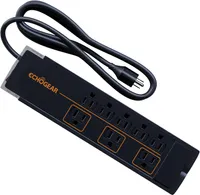
This year, I’m making the effort to build a system I can call my own, and I’m starting with this $29 ECHOGEAR surge protector from Amazon. Here’s why this key component is my first purchase.
All the protection my gear deserves
Knowing that I’ll probably have thousands of dollars of gear connected to this thing, I wanted to make sure that it’s rated to withstand an electrical event and that I’ll be able to tell if or when that protection has been used up. (Fun fact: You’re actually supposed to replace your surge protector every few years for this reason.)
The ECHOGEAR ShockBlocker 8 has both. Not only is it good for a relatively sizable electrical event, but the green indicator lights on its edge will stop glowing once it burns through that protection. Very handy.
Should something happen to my equipment in the interim, ECHOGEAR provides a 5-year, $25,000 connected equipment warranty. (If my wife is reading this, I am NOT going to spend $25,000 on my audio gear...at least this year.)
Plus EMI/RFI noise filtering
Arguably just as important to me as the protection is the fact that it comes with 58 dB of EMI/RFI noise filtering. This was something I knew about from my days working at Best Buy, but it wasn’t something I’ve given much thought to in the last decade.
EMI/RFI noise filtration essentially reduces the amount of electromagnetic noise in your power supply. Electromagnetic interference can sound like a hum through ungrounded equipment — so it’s not ideal to have it in a system that’s focused on pristine audio.
Would I say it’s absolutely essential? Probably not.
But if I’m paying several thousand dollars for the best audio gear, it makes sense to do everything I can to keep unwanted noise out away from the components.
My favorite surge protector ever?
Look, surge protectors aren't anything special. They're the hammers or screwdrivers of an AV arsenal. And yet, I really do like it. I bought it a few weeks ago, and so far I have nothing but nice things to say about it.
Currently, I’ve got it connected to a Sony PS-LX310BT turntable that connects to a Bluesound Powernode (2025) and a pair of Polk Audio Legend L100 bookshelf speakers, and it fits right at home. There’s no audible hum when everything’s up and running — though, admittedly, it’s not something I heard before I had this surge protector — and I feel confident that no matter what happens, the gear’s going to be protected.
For $28, I’m pretty smitten with it.

Follow Tom's Guide on Google News and add us as a preferred source to get our up-to-date news, analysis, and reviews in your feeds.
More from Tom's Guide